March 2026
These release notes describe all user-facing changes that will be included in the next Axon Records and Standards releases, along with advance notice of major upcoming features, updates, and applications.
There are two releases scheduled for March:
- March 10, 2026
- March 25, 2026
Releases begin rolling out at 11 AM Pacific time and may continue through the following day. We do not expect any downtime during these updates. Please note that availability is subject to change. Depending on the complexity and amount of items included in a release, some items in these notes may not be available until two days after the release.
Additional help documentation for Axon Records and Standards is located at axon.com/help. Do you have feedback about Axon's release notes? Submit it here.
Download this month's release notesRecords preview release
This section includes information about upcoming features and updates that are available for testing in training environments. These are beta features, and all functionality may not be fully present or completely reliable.
Case Management
The following feature will be available for all organizations to use in their training environments on March 10, 2026. Contact your Axon representative or Axon Support to activate it for your organization.
- You can use a new privilege, Edit due dates for auto-created tasks, to control which users can update the due dates of templated case tasks.
Templated case tasks are tasks that are automatically created when an incident is created.)
- This new privilege helps you maintain the integrity of investigative workflows by preventing unauthorized or untracked schedule changes. By limiting who can adjust case task due dates, you can improve accountability, support internal policies and compliance requirements, and gain greater confidence that case timelines accurately reflect approved operational decisions.
Form Builder
The following feature will be available for all organizations to use in their training environments on March 10, 2026. Contact your Axon representative or Axon Support to activate it for your organization.
- You can now use a new Restore previous version as a draft action in Form Builder. This feature lets you undo the most recently published changes for a form by restoring the form to the previously published version.This feature introduces a safeguard to allow you to roll back form changes in case incorrect or undesired changes were published.
- To initiate this action, open a form and select More Actions […] > Restore previous version as a draft. When triggered, the revert action discards the current unpublished draft and creates a new draft using the most recently published version—the one that was live before the latest publish. You can then review, adjust, and re-publish this restored version as needed. This action is logged in the Form Builder activity log, recording who performed the revert and when.
- Key details:
- You can only revert to the version most recently published (before the current published version).
- The feature is available for forms with at least one prior published version.
- A warning message appears before confirming the revert, explaining that any changes in the current draft will be lost.
- If you revert a form and a new draft is generated, you must discard this new draft to return to the latest published version instead.
Records general release
This section includes information about upcoming features and updates that are available in all production environments.
Report Writer
The following update will be applied to the production environments of all organizations on March 10, 2026.
- Now, when searching to add an organization to a a report, you will see each organization’s address on the search result.
- This enhancement helps report writers distinguish between multiple locations of the same organization (e.g., Target, McDonalds, etc.).
Search
The following feature will be available for all organizations to use in their production environments on March 25, 2026. Contact your Axon representative or Axon Support to activate it for your organization.
- Now, when you search for incident reports, search results show the descriptions and roles of vehicles involved in that incident.
The following updates will be applied to the production environments of all organizations on March 25, 2026.
- Now, organizations can configure how search result exports display the options in dropdown fields, checkboxes, etc.
- Currently, the Short code is displayed, but exports can be configured to display the longer description instead. For example, when exporting search results, the Role field can display “VICTIM” instead of “VIC.”
- Now, when on a search page, you can select Actions > Show search tips to reveal instructions for using wildcards and advanced search formatting.
- Previously, this option was labeled “Show Advanced Search.” This update only applies for organizations using the new search experience.
- Now, if you click on a search result to open a profile and then select the Back button to return to the search results list, the page will auto-scroll down to the location of the search result you clicked on.
- Previously, when you went back to the list, you were taken to the top of the search results list.
- If after selecting Back, you begin to interact with the search results list (e.g., type something in the search bar), a message will appear at the top of the page, allowing you to click a link and scroll back down to the location of the search result you had clicked on.
- You can now search for partial Incident IDs when searching on the Calls for Service search category page.
- Previously, you had to enter the full Incident ID in order to find Calls for Service associated with an incident.
- You can now search for text in PDF and Word documents that have been uploaded to Axon Evidence.
- You can perform this search, both from Evidence search in Axon Evidence or from Search in Axon Records. Existing documents are not automatically included in this search; only new documents uploaded going forward will be searchable.
- You may request a one-time backfill to index these existing documents, priced based on document volume by contacting your Axon representative.
- An Evidence.com Pro license is required to search, and all searches are logged in the audit trail.
- You can perform this search, both from Evidence search in Axon Evidence or from Search in Axon Records. Existing documents are not automatically included in this search; only new documents uploaded going forward will be searchable.
Profiles
The following updates will be applied to the production environments of all organizations on March 25, 2026.
- The options n the More actions menu on incident and case profile pages have been re-ordered and are now grouped into sections to make it easier to scan and find actions. The groupings are as follows:
- Incident/case management
- Create activity
- Edit case name
- Reassign case
- Transfer unit
- Update disposition
- Update due date
- Delete incident
- Evidence management
- Add file
- Create community request
- Related documentation
- Link other reports
- Link related incidents and Standards events
- Manage teletype notes
- Sharing and print
- Manage shares in Axon Evidence
- Prepare documents for sharing
- Print incident/case
- Access management
- Manage restrictions
- Manage seals
- Privileges and features are still respected; if a user does not have the appropriate privileges to view an option, the option remains hidden. Similarly, if a feature listed above has not been activated for your organization, the option will not appear.
- Incident/case management
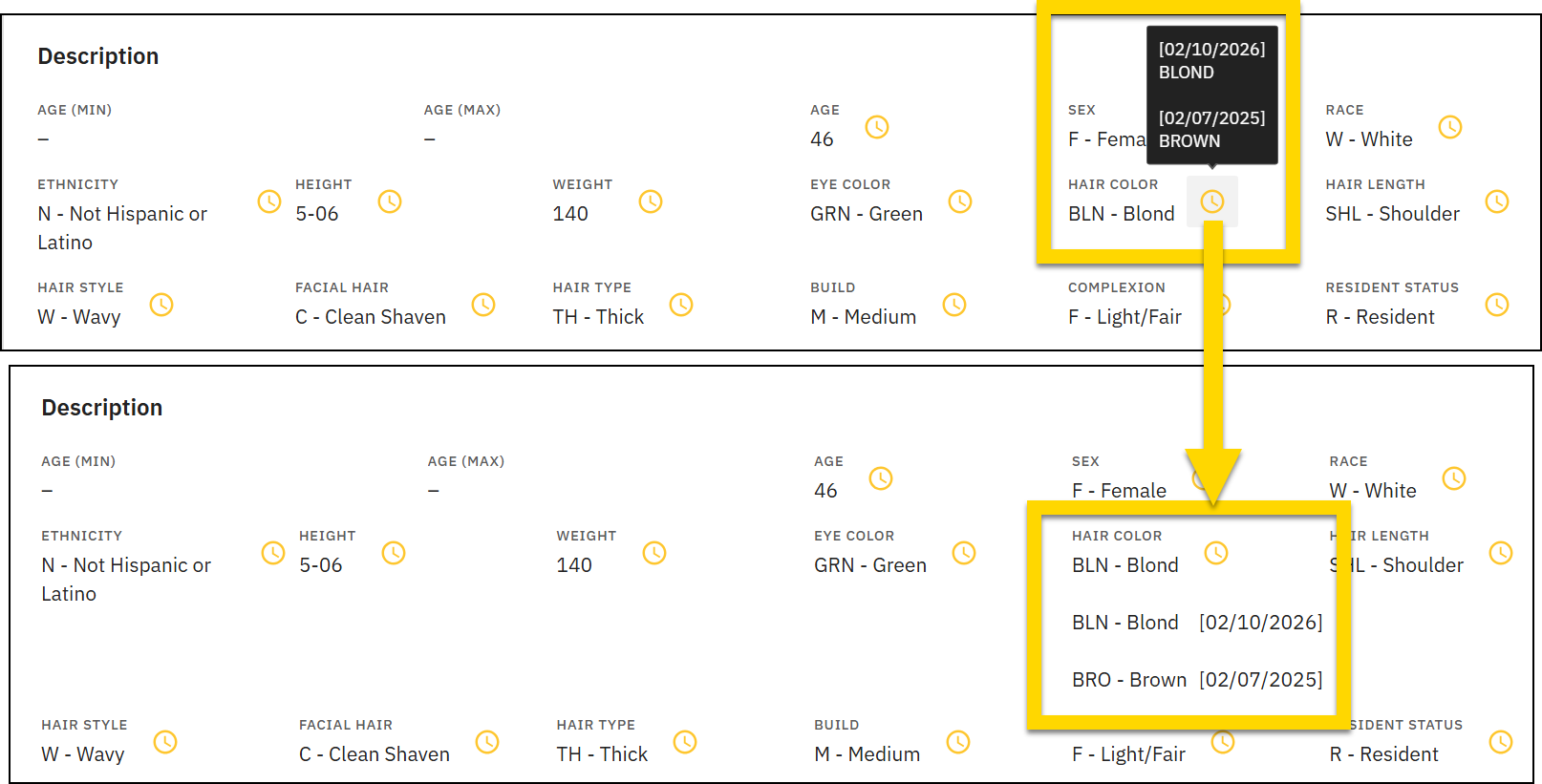
- You can now hover over the clock icon on citizen profiles to view historical date and values for that field. Clicking this icon shows the historical data on the profile page.
Printing
The following feature will be available for all organizations to use in their production environments on March 10, 2026. Contact your Axon representative or Axon Support to activate it for your organization.
- You can now control who can print reports and who can adjust print settings through new team-level privileges.
This feature allows administrators to assign specific print privileges per team, giving more flexibility in how printing is managed across roles.
- The print access levels are now:
- No print access: Users within this team cannot print reports.
- Print, but cannot configure print settings: Specific print settings, such as include header/footer, Auditing Details, include approval log, and other settings can be configured in Form Builder and cannot be changed by end users when they are printing reports.
- Print and configure: This is the default option for all users today. These team members can print reports and adjust print settings when they are printing reports.
- To manage these privileges, open a team and go to the new Print section in the Reports - Records and Standards category. Here, you’ll find two privileges:
- Print reports: Lets users print reports
- Configure print options and settings: Lets users configure a form’s print settings from Form Builder.
- The print access levels are now:
The following feature will be available for all organizations to use in their production environments on March 25, 2026. Contact your Axon representative or Axon Support to activate it for your organization.
- A new label now appears on Axon printouts.
- Previously, either a Draft label would appear on printouts if the report was in draft (i.e., not finalized) or no label would appear when the report was finalized. This behavior was confusing when a report was approved by a supervisor and printed for court purposes, but the Draft label was displayed on the printout.
- Organizations could be configured to hide the Draft label altogether during printing, but this prevented printouts from displaying when a report was actually in draft (and not yet approved by a supervisor).
- Now, the label displays the granular status of the report: Draft → Submitted → Supervisor Approved → Finalized. If one of these statuses is not applicable (i.e., supervisor approval is not required for that report), the label reflects the last known status of the report.
- Previously, either a Draft label would appear on printouts if the report was in draft (i.e., not finalized) or no label would appear when the report was finalized. This behavior was confusing when a report was approved by a supervisor and printed for court purposes, but the Draft label was displayed on the printout.
Case Management
The following features will be available for all organizations to use in their production environments on March 10, 2026. Contact your Axon representative or Axon Support to activate them for your organization.
- Previously, you could only redact and export incidents for sharing only after a case had been created for them in Axon Records.
Now, you can redact, export, and share incidents, even when they are not yet associated with a case.
- This ability is now controlled by the “Cases - More actions - Prepare Documents for Sharing” privilege.If a user belongs to a team or Command Hierarchy Group with this privilege, they will now see the Prepare documents for sharing option in the More actions menu on both incident and case profiles.
- The Update Case Disposition experienced is being updated to ensure NIBRS compliance and avoid downstream state rejections in relation to Exceptional Clearance changes.
- Previously, NIBRS validation errors only appeared when viewing the incident report in Report Writer. As a result, detectives and supervisors could miss important NIBRS data issues when updating case dispositions. Now, NIBRS validation errors related to Exceptional Clearance conflicts appear in the Update Case Disposition window.
- Now, if a user updates an Exceptional Clearance that conflicts with NIBRS requirements, they will now see a clear validation error in the Update Case Disposition window, along with a link to view the incident report. For example, if a user sets an Exceptional Clearance when an offender is still marked as Unknown, a validation error appears.
- If your organization is configured to prevent the submission of reports that contain validation errors, and a case disposition update would result in an error, the disposition update will be blocked.
- If your organization does not prevent the submission of reports that contain validation errors, a warning appears, but the disposition update will NOT be blocked.
- This update applies to organizations that are configured to automatically create a case in Axon Evidence whenever an incident is created in Axon Records.
- Previously, when this Axon Evidence case was created, it did was not assigned to a case owner. As a result, case access was blocked or limited for organizations that restrict case access to case owners.
- This integration between Axon Records or Standards and Axon Evidence has been updated so now:
- When an incident is created in Axon Records an Axon Evidence case is automatically created and linked, the Axon Evidence case owner is now automatically set to the primary author of the incident report.
- When an Axon Records case is created from the incident and a lead detective is assigned, the Axon Evidence case owner is updated to the lead detective of the case in Axon Records.
- If the lead detective is later updated, the Axon Evidence case owner is updated as well.
- If an incident that is linked to an Axon Evidence case is deleted from Axon Records or Standards, the Axon Evidence case owner is NOT updated.
- For assistance with setup or questions about this feature, please contact your account representative.
- Organizationscan now use a streamlined three-step case task workflow (Open → Detective Review → Closed) to better surface case-critical information for investigators.
- This option makes it easier for teams such as labs to complete tasks and route results directly to detectives for review.
Analytics
The following update will be applied to the production environments of all organizations on March 25, 2026.
- The Analytics tool in the Administrator Console now displays the server name where each PowerBI dashboard is hosted.
Property Management
The following feature will be available for all organizations to use in their production environments on March 10, 2026. Contact your Axon representative or Axon Support to activate it for your organization.
- Moving forward, organizations who manage property using containers can update the authorized disposition of properties in bulk from the Property search page.
- Additionally, you can use the Retention end date filter to display only those properties whose retention dates have expired.
Administrator Console
The following feature will be available for all organizations to use in their production environments on March 10, 2026. Contact your Axon representative or Axon Support to activate it for your organization.
- Previously, updating charges (e.g., NIBRS UCR codes) required exporting a CSV with 10k+ rows, making a single edit, and re-importing.
Now, you can search for and edit charges in the Master Charge Tool directly in-line, rather than using CSV export/import.
- Key features of this update include:
- Search and Edit: Enter a for a Charge ID, Description or Short Code in the new search bar at the top of the Master Charge Tool.
- Inline Editing: Select any cell to modify its value then Save to apply your changes.
- Validation: Edits are validated to ensure they do not result in errors.
- Auto-refresh: After a successful save, your changes are automatically searchable and applied to the Master Charge Table.
- Key features of this update include:
The following update will be applied to the production environments of all organizations on March 10, 2026.
- You can use a new set of privileges to provide granular control over which users can access which tools in the Administrator Console.
- Previously, a single Administrator Console privilege controlled whether or not users could access all Administrator Console tools. Now, you can use the following privileges listed in the table below to control which users can access which tools.
- If you do not want to manage granular access, you can continue to use the existing Access the Administrator Console privilege to grant access to all Administrator Console tools.
- Not that in order to grant granular access, you must disable the existing Access the Administrator Console privilege and instead enable the various tool-specific privileges.
Depending on your organization's configuration and which product your organization uses (Axon Records, Axon Standards, or both), some of the tools listed below may not appear in the Administrator Console.
|
Tool |
Privilege |
Notes |
|---|---|---|
| Administrator Console | Access the Administrator Console | If an administrator has this privilege, they can access ALL tools in the Administrator Console. |
|
Analytics |
Archive User Dashboards Create user dashboards Delete user dashboards |
If an administrator has one of these three existing privileges, they will also have access to the Analytics tool. |
|
User Management |
View the User management tool |
New privilege |
|
Teams |
View the Team management tool |
New privilege (for organizations that do NOT use the Command Hierarchy feature) |
|
Command Hierarchy & Teams |
View the Command Hierarchy & Teams tool |
New privilege |
|
Audit Log Tool |
View the Audit Log tool |
Existed privilege being renamed (previously was called Access audit log) |
|
Form Builder |
View the Form Builder tool |
New privilege |
|
Master Charge Tool |
Access the Master Charge Tool |
Existing privilege |
|
Master Location Tool |
Access the Master Location Tool |
Existing privilege |
|
Site/District |
View the User Districts tool |
New privilege |
|
Announcement Banner Update |
Update Agency Announcement Banner |
New privilege |
|
Restrictions or Classifications Tool |
View the restrictions tool |
New privilege |
|
MNI Merge Tool |
Access the Master Name Index (MNI) Merge Tool |
Existing privilege |
|
Personnel Data Tool |
View the Personnel data tool |
New privilege |
|
Training Data Tool |
View the Training data tool in the Administrator Console |
New privilege |
|
Feedback Note |
View the Feedback Notes tool |
New privilege |
|
Property Management |
Configure Property Locations, Release Notices, and Status |
New privilege |
|
Flags Configuration |
Manage flag categories in the Administrator Console |
Existing privilege |
|
Workflow Manager or Workflow Settings |
View the Workflow Manager |
New privilege |
|
Rule Manager |
View the Rule Manager |
New privilege |
|
Expungements |
View the Expungement Log in the Administrator Console |
Existing privilege |
|
EIS Management |
View the EIS Management tool in the Administrator Console |
New privilege |
|
Report Submission Settings |
Manage Report Submission Settings in the Administrator Console |
New privilege |
|
Scoped Search |
Edit scoped search attribute mappings |
Existing privilege |
|
DataStore Settings |
Manage the Records/Standards DataStore using the DataStore Settings tool |
Existing privilege |
|
DataStore Secret Generation |
Use the Records/Standards DataStore Secret Generation tool to create DataStore secrets |
Existing privilege |
|
Inbox Manager |
View the Inbox Manager |
New privilege |
Records resolved issues
This section includes information about upcoming bug fixes and resolved issues that will be released to all production environments.
Report Writer
The following issues will be resolved on March 10, 2026.
- An issue has been resolved where a single-author report's narrative incorrectly appeared under "Other Contributors" when a supervisor used the "Review and Edit Report" flow.
- Single-author narratives now display under the main Narratives section during supervisor review.
- Previously, when users used Copy Information to new report and unchecked specific entities, the system could silently re‑select all entities a few seconds later, causing unintended data to be copied incorrectly into the new report.
- This issue has been fixed, and the Copy feature works as expected.
The following issue will be resolved on March 25, 2026.
- Previously, when users typed shorthand 2-digit years in date fields (e.g. "010128" for January 1, 2028), the fields auto-filled the year to 1928 instead of 2028.
- This issue has been resolved and dates now auto-fill to the correct century.
Search
The following issue will be resolved on March 10, 2026.
- Previously, in exported search results the Report Type field was listed as “Custom.”
- This issue has been resolved, and the name of the form is now displayed.
Printing
The following issue will be resolved on March 10, 2026.
- An issue has been resolved where the report number did not display when printing a file list for incidents.
Property Management
The following issue will be resolved on March 25, 2026.
- An issue has been resolved duplicate roles appeared on Property task and profile pages.
- Now, a property item’s role will not be duplicated in these locations.
NIBRS
This section includes information about upcoming updates and bug fixes for NIBRS validation rules, errors, and submissions.
Arkansas organizations
The following update will be applied to the production environments of all Arkansas organizations on March 10, 2026.
- Previously, Arkansas NIBRS flat file submissions included blank lines between incidents, which did not meet state formatting requirements. During certification testing, the state requested that submissions be sent without empty lines separating incidents.
- This issue has been resolved, and Arkansas NIBRS submission files are now generated without line breaks between incidents, ensuring the file format aligns with state requirements and prevents submission issues.
- No action is required. This update ensures Arkansas NIBRS files are formatted correctly for state submission.
California organizations
The following updates will be applied to the production environments of all California organizations on March 10, 2026.
- California NIBRS submissions have been updated to align with the CIBRS NIBRS IEPD 2023.0 schema, as required by the state. This update includes changes to the submission file structure to meet the new state specifications.
- No changes to the incident report or data entry workflow are required. Submissions will automatically use the updated format once this release is applied.
- An issue has been resolved for a small number of California agencies that were migrated to the new rule validation framework, where the Senior Citizen Indicator was incorrectly set to "N" for victims aged 60 or older.
- Previously, the indicator did not evaluate the victim's age correctly, causing it to always transmit "N" regardless of age. The system now correctly sets the Senior Citizen Indicator to "Y" when a victim's age is 60 or older, ensuring California NIBRS submissions accurately reflect senior citizen status.
- Impacted reports must be resubmitted. Contact Axon Support or your NIBRS Customer Support Specialist for assistance.
Illinois organizations
The following update will be applied to the production environments of all Illinois organizations on March 10, 2026.
- An issue has been resolved where victim injury data was not being included in NIBRS submission files, even though the injury was correctly selected on the incident report.
This caused state error 401, indicating that required victim injury information was missing from the submission.
- The issue was first identified in reports submitted on or after November 7, 2025.
- Victim injury selections are now accurately included in the submission file, and affected submissions will no longer receive error 401 for missing injury data.
- Impacted reports will need to be resubmitted. Contact Axon Support or your NIBRS Customer Support Specialist for assistance.
Louisiana organizations
The following update has been applied to the production environments of all Louisiana organizations.
- An issue has been resolved where Louisiana IBR submission files failed to generate due to formatting errors in the Officer Assignment Type and Property Value fields.
These fields were not in the expected format, preventing the submission file from being created.
- The Officer Assignment Type and Property Value fields are now correctly formatted, and submission files generate successfully.
- If your organization experienced submission delays related to this issue, please contact Axon Support or your NIBRS Customer Support Specialist to confirm your affected incidents have been resubmitted.
The following update will be applied to the production environments of all Louisiana organizations on March 25, 2026.
- An issue has been resolved where Louisiana IBR submission files failed to generate, preventing all incidents from being submitted.
A field formatting error in the weapon/force data caused the submission process to stop before the file could be created.
- Data element types have been corrected, and submission files now generate successfully.
- If your organization experienced submission delays related to this issue, please contact Axon Support or your NIBRS Customer Support Specialist to confirm your affected incidents have been resubmitted.
Maryland organizations
The following update will be applied to the production environments of all Maryland organizations on March 25, 2026.
- A validation rule (Edit 560) has been reinstated for Maryland NIBRS submissions that prevents same-sex victim and offender combinations for 11A (Rape) offenses.
- This rule was previously removed in July 2025; however, Maryland State Police has advised that the updated rape definition will not be reflected in the state schema until 2027. Until that time, incidents where both the victim and offender are the same sex must continue to be reported as 11B (Sodomy) per current Maryland reporting requirements.
- No action is required. The validation rule will be automatically applied, and users will see a validation error if a same-sex victim and offender combination is entered for an 11A offense.
Michigan organizations
The following update has been applied to the production environments of all Michigan organizations.
- An issue has been resolved where Michigan NIBRS submissions were rejected with MICR error 607 (Domestic Violence Indicator cannot be Entered). The submission file was including the Domestic Violence Indicator even when the Victim-Offender Relationship did not meet domestic violence reporting criteria.
- The Domestic Violence Indicator is now only included in the submission when applicable, preventing the rejection.
The following update will be applied to the production environments of all Michigan organizations on March 10, 2026.
- An issue has been resolved where Michigan NIBRS submissions were rejected with MICR error 986 (Stolen Motor Vehicle cannot be Entered).
The submission file was including stolen motor vehicle data in cases that did not meet the required reporting criteria.
- Stolen motor vehicle information is now only included in the submission when applicable, preventing the rejection.
- If your organization has received rejections for this error code, please contact Axon Support or your NIBRS Customer Support Specialist to have the affected incidents requeued for submission.
The following updates will be applied to the production environments of all Michigan organizations on March 25, 2026.
- An issue was resolved where Data Element 59 (Estimated Drug Quantity) was not being formatted correctly in Michigan NIBRS submission files. Drug quantity values were being sent with decimal notation instead of the MICR-required implied decimal format, causing state rejection errors.
- Drug quantities are now formatted according to MICR requirements, ensuring submissions are accepted by the state.
- If your organization has received rejections related to Data Element 59, contact Axon Support or your NIBRS Customer Support Specialist to have the affected incidents requeued for submission.
Minnesota organizations
The following update has been applied to the production environments of all Minnesota organizations.
- An issue was resolved where Minnesota NIBRS submissions failed CRS schema validation due to XML element ordering.
The ArresteeStatuteAssociation element was being placed in an incorrect position within the submission file, causing the state to reject incidents that included arrest and statute data.
- The submission file now places all association elements in the order required by the Minnesota CRS schema, preventing the validation error.
- If your organization has received schema validation rejections related to this error, please contact Axon Support or your NIBRS Customer Support Specialist to have the affected incidents requeued for submission.
Pennsylvania organizations
The following update has been applied to the production environments of all Pennsylvania organizations.
- An issue was resolved where NIBRS submissions were rejected with error 652 (Disposition of Arrestee Under 18 not entered) when an arrestee was under 18 at the time of the incident but turned 18 before the date of arrest.
- The system now correctly calculates the arrestee's age for NIBRS reporting purposes, ensuring the Disposition of Arrestee Under 18 is included when applicable.
Virginia organizations
The following update will be applied to the production environments of all Virginia organizations on March 10, 2026.
- Virginia has updated its NIBRS reporting standards to include new and revised drug type values in the 2025.1 Virginia IBR User Manual.
Previously, some of these updated drug types were not available or were labeled incorrectly in the system.
- This issue has been resolved, and Virginia agencies will now see new drug type options available for reporting, including Oxycodone & Other Licit Opioids, Over 3 Drug Types, and Khat and other Cathinones, along with corrected descriptions for existing drug categories. These updates apply to both Suspected Drug Type and Arrest Type Drug fields and align system values with current Virginia reporting requirements.
- To have these updates applied in your environment, contact Axon Customer Support or your NIBRS Customer Support Specialist.
The following update will be applied to the production environments of all Virginia organizations on March 25, 2026.
- An issue has been resolved where Virginia drug type codes were incorrectly mapped for Data Element 20 (Suspected Drug Type) and VA Data Element 63 (Arrest Type Drug). Drug type codes H and M were displaying incorrect labels, and codes W, X, and Z were missing. These codes have been corrected and added to align with the 2025.1 Virginia IBR User Manual:
- Code H now correctly displays as "Other Narcotics"
- Code M now correctly displays as "Other Stimulants"
- Code W (Oxycodone & Other Licit Opioids), Code X (Over 3 Drug Types), and Code Z (Khat and other Cathinones) are now available
Standards preview release
This section includes information about upcoming features and updates that are available for testing in training environments. These are beta features, and all functionality may not be fully present or completely reliable.
Case Management
The following feature will be available for all organizations to use in their training environments on March 10, 2026. Contact your Axon representative or Axon Support to activate it for your organization.
- You can use a new privilege, Edit due dates for auto-created tasks, to control which users can update the due dates of templated case tasks.
(Templated case tasks are tasks that are automatically created when an incident is created.)
- This new privilege helps you maintain the integrity of investigative workflows by preventing unauthorized or untracked schedule changes. By limiting who can adjust case task due dates, you can improve accountability, support internal policies and compliance requirements, and gain greater confidence that case timelines accurately reflect approved operational decisions.
Form Builder
The following feature will be available for all organizations to use in their training environments on March 10, 2026. Contact your Axon representative or Axon Support to activate it for your organization.
- You can now use a new Restore previous version as a draft action in Form Builder.
This feature lets you undo the most recently published changes for a form by restoring the form to the previously published version.This feature introduces a safeguard to allow you to roll back form changes in case incorrect or undesired changes were published.
- To initiate this action, open a form and select More Actions […] > Restore previous version as a draft. When triggered, the revert action discards the current unpublished draft and creates a new draft using the most recently published version—the one that was live before the latest publish. You can then review, adjust, and re-publish this restored version as needed. This action is logged in the Form Builder activity log, recording who performed the revert and when.
- Key details:
- You can only revert to the version most recently published (before the current published version).
- The feature is available for forms with at least one prior published version.
- A warning message appears before confirming the revert, explaining that any changes in the current draft will be lost.
- If you revert a form and a new draft is generated, you must discard this new draft to return to the latest published version instead.
Standards general release
This section includes information about upcoming features and updates that are available in all production environments.
Search
The following updates will be applied to the production environments of all organizations on March 25, 2026.
- Now, organizations can configure how search result exports display the options in dropdown fields, checkboxes, etc.
- Currently, the Short code is displayed, but exports can be configured to display the longer description instead. For example, when exporting search results, the Role field can display “VICTIM” instead of “VIC.”
- Now, when on a search page, you can select Actions > Show search tips to reveal instructions for using wildcards and advanced search formatting.
- Previously, this option was labeled “Show Advanced Search.” This update only applies for organizations using the new search experience.
- Now, if you click on a search result to open a profile and then select the Back button to return to the search results list, the page will auto-scroll down to the location of the search result you clicked on.
- Previously, when you went back to the list, you were taken to the top of the search results list.
- If after selecting Back, you begin to interact with the search results list (e.g., type something in the search bar), a message will appear at the top of the page, allowing you to click a link and scroll back down to the location of the search result you had clicked on.
Profiles
The following update will be applied to the production environments of all organizations on March 25, 2026.
- You can now hover over the clock icon on citizen profiles to view historical date and values for that field. Clicking this icon shows the historical data on the profile page.
Printing
The following feature will be available for all organizations to use in their production environments on March 10, 2026. Contact your Axon representative or Axon Support to activate it for your organization.
- You can now control who can print reports and who can adjust print settings through new team-level privileges.
This feature allows administrators to assign specific print privileges per team, giving more flexibility in how printing is managed across roles.
- The print access levels are now:
- No print access: Users within this team cannot print reports.
- Print, but cannot configure print settings: Specific print settings, such as include header/footer, Auditing Details, include approval log, and other settings can be configured in Form Builder and cannot be changed by end users when they are printing reports.
- Print and configure: This is the default option for all users today. These team members can print reports and adjust print settings when they are printing reports.
- To manage these privileges, open a team and go to the new Print section in the Reports - Records and Standards category. Here, you’ll find two privileges:
- Print reports: Lets users print reports
- Configure print options and settings: Lets users configure a form’s print settings from Form Builder.
- The print access levels are now:
The following feature will be available for all organizations to use in their production environments on March 25, 2026. Contact your Axon representative or Axon Support to activate it for your organization.
- A new label now appears on Axon printouts.
- Previously, either a Draft label would appear on printouts if the report was in draft (i.e., not finalized) or no label would appear when the report was finalized. This behavior was confusing when a report was approved by a supervisor and printed for court purposes, but the Draft label was displayed on the printout.
- Organizations could be configured to hide the Draft label altogether during printing, but this prevented printouts from displaying when a report was actually in draft (and not yet approved by a supervisor).
- Now, the label displays the granular status of the report: Draft → Submitted → Supervisor Approved → Finalized. If one of these statuses is not applicable (i.e., supervisor approval is not required for that report), the label reflects the last known status of the report.
- Previously, either a Draft label would appear on printouts if the report was in draft (i.e., not finalized) or no label would appear when the report was finalized. This behavior was confusing when a report was approved by a supervisor and printed for court purposes, but the Draft label was displayed on the printout.
Case Management
The following feature will be available for all organizations to use in their production environments on March 10, 2026. Contact your Axon representative or Axon Support to activate it for your organization.
- This update applies to organizations that are configured to automatically create a case in Axon Evidence whenever an event is created in Axon Standards.
- Previously, when this Axon Evidence case was created, it did was not assigned to a case owner. As a result, case access was blocked or limited for organizations that restrict case access to case owners.
- This integration between Axon Records or Standards and Axon Evidence has been updated so now:
- When an event is created in Axon Standards an Axon Evidence case is automatically created and linked, the Axon Evidence case owner is now automatically set to the primary author of the event report.
- When an Axon Standards case is created from the event and a lead detective is assigned, the Axon Evidence case owner is updated to the lead detective of the case in Axon Standards.
- If the lead detective is later updated, the Axon Evidence case owner is updated as well.
- If an event that is linked to an Axon Evidence case is deleted from Axon Records or Standards, the Axon Evidence case owner is NOT updated.
- For assistance with setup or questions about this feature, please contact your account representative.
Analytics
The following update will be applied to the production environments of all organizations on March 25, 2026.
- The Analytics tool in the Administrator Console now displays the server name where each PowerBI dashboard is hosted.
Administrator Console
The following feature will be available for all organizations to use in their production environments on March 10, 2026. Contact your Axon representative or Axon Support to activate it for your organization.
- Previously, updating charges (e.g., NIBRS UCR codes) required exporting a CSV with 10k+ rows, making a single edit, and re-importing.
Now, you can search for and edit charges in the Master Charge Tool directly in-line, rather than using CSV export/import.
- Key features of this update include:
- Search and Edit: Enter a for a Charge ID, Description or Short Code in the new search bar at the top of the Master Charge Tool.
- Inline Editing: Select any cell to modify its value then Save to apply your changes.
- Validation: Edits are validated to ensure they do not result in errors.
- Auto-refresh: After a successful save, your changes are automatically searchable and applied to the Master Charge Table.
- Key features of this update include:
The following update will be applied to the production environments of all organizations on March 10, 2026.
- You can use a new set of privileges to provide granular control over which users can access which tools in the Administrator Console.
- Previously, a single Administrator Console privilege controlled whether or not users could access all Administrator Console tools. Now, you can use the following privileges listed in the table below to control which users can access which tools.
- If you do not want to manage granular access, you can continue to use the existing Access the Administrator Console privilege to grant access to all Administrator Console tools.
- Not that in order to grant granular access, you must disable the existing Access the Administrator Console privilege and instead enable the various tool-specific privileges.
Depending on your organization's configuration and which product your organization uses (Axon Records, Axon Standards, or both), some of the tools listed below may not appear in the Administrator Console.
|
Tool |
Privilege |
Notes |
|---|---|---|
| Administrator Console | Access the Administrator Console | If an administrator has this privilege, they can access ALL tools in the Administrator Console. |
|
Analytics |
Archive User Dashboards Create user dashboards Delete user dashboards |
If an administrator has one of these three existing privileges, they will also have access to the Analytics tool. |
|
User Management |
View the User management tool |
New privilege |
|
Teams |
View the Team management tool |
New privilege (for organizations that do NOT use the Command Hierarchy feature) |
|
Command Hierarchy & Teams |
View the Command Hierarchy & Teams tool |
New privilege |
|
Audit Log Tool |
View the Audit Log tool |
Existed privilege being renamed (previously was called Access audit log) |
|
Form Builder |
View the Form Builder tool |
New privilege |
|
Master Charge Tool |
Access the Master Charge Tool |
Existing privilege |
|
Master Location Tool |
Access the Master Location Tool |
Existing privilege |
|
Site/District |
View the User Districts tool |
New privilege |
|
Announcement Banner Update |
Update Agency Announcement Banner |
New privilege |
|
Restrictions or Classifications Tool |
View the restrictions tool |
New privilege |
|
MNI Merge Tool |
Access the Master Name Index (MNI) Merge Tool |
Existing privilege |
|
Personnel Data Tool |
View the Personnel data tool |
New privilege |
|
Training Data Tool |
View the Training data tool in the Administrator Console |
New privilege |
|
Feedback Note |
View the Feedback Notes tool |
New privilege |
|
Property Management |
Configure Property Locations, Release Notices, and Status |
New privilege |
|
Flags Configuration |
Manage flag categories in the Administrator Console |
Existing privilege |
|
Workflow Manager or Workflow Settings |
View the Workflow Manager |
New privilege |
|
Rule Manager |
View the Rule Manager |
New privilege |
|
Expungements |
View the Expungement Log in the Administrator Console |
Existing privilege |
|
EIS Management |
View the EIS Management tool in the Administrator Console |
New privilege |
|
Report Submission Settings |
Manage Report Submission Settings in the Administrator Console |
New privilege |
|
Scoped Search |
Edit scoped search attribute mappings |
Existing privilege |
|
DataStore Settings |
Manage the Records/Standards DataStore using the DataStore Settings tool |
Existing privilege |
|
DataStore Secret Generation |
Use the Records/Standards DataStore Secret Generation tool to create DataStore secrets |
Existing privilege |
|
Inbox Manager |
View the Inbox Manager |
New privilege |
Standards resolved issues
This section includes information about upcoming bug fixes and resolved issues that will be released to all production environments.
Report Writer
The following issue will be resolved on March 10, 2026.
- An issue has been resolved in which users who do not have the “finalize” privilege were able to finalize reports from the mobile Axon app.
- With this change, users who do not have Finalize privileges will not be able to finalize a report on desktop nor mobile.
The following issue will be resolved on March 25, 2026.
- Previously, when users used Copy Information to new report and unchecked specific entities, the system could silently re‑select all entities a few seconds later, causing unintended data to be copied incorrectly into the new report.
- This issue has been fixed, and the Copy feature works as expected.
- Previously, when users typed shorthand 2-digit years in date fields (e.g. "010128" for January 1, 2028), the fields auto-filled the year to 1928 instead of 2028.
- This issue has been resolved and dates now auto-fill to the correct century.
Search
The following issue will be resolved on March 10, 2026.
- Previously, in exported search results the Report Type field was listed as “Custom.”
- This issue has been resolved, and the name of the form is now displayed.
Printing
The following issues will be resolved on March 10, 2026.
- An issue has been resolved where the report number did not display when printing a file list for events.
- An issue has been resolved where the "Show restricted information" checkbox ha dno effect when printing Standards events using a print template.
- Restricted fields are now correctly shown or hidden based on the checkbox selection.
Axon DataStore
This section includes information about upcoming changes to the Axon Records and Standards DataStore.
Updates
The following features are now generally available:
- The DataStore Access Control module has a new feature that allows DataStore administrators to create DataStore access for external users—such as third-party vendors, Axon representatives, and users who do not have an Axon Evidence account. The DataStore administrator is responsible for generating, transferring, and managing the access credentials for these external accounts, ensuring that proper security and data governance practices are followed.
- See Axon Help for more information.
- DataStore is introducing a new feature that allows administrators to set detailed access permissions for users. Before this update, any user with access to DataStore could view all available views and schemas without restriction. With the new Fine-Grained Access Control feature, administrators can now manage and limit access to specific views or schemas for individual users. This provides agencies with greater flexibility and security, ensuring that users only have access to the data relevant to their roles.
- See Axon Help for more information.
Axon Notes Module general release
This section includes information about upcoming features and updates that are available in all production environments.
The Axon Notes Module is currently only available for use by Canadian organizations. Contact your Axon representative or Axon Support if you are a non-Canadian organization interested in using this feature.
The following updates will be applied to the production environments of all organizations on March 10, 2026.
- An audit log entry will now be triggered whenever a user views the Note page. The audit log will track who viewed the page and date/time of the action.
- When completing shift details, you can now select Tomorrow to auto-enter tomorrow’s date. (This update is in addition to the pre-existing Today and Yesterday buttons.)
Axon Notes Module resolved issues
This section includes information about upcoming bug fixes and resolved issues that will be released to all production environments.
The following issues will be resolved on March 10, 2026.
- An issue has been resolved where narrative hotkeys were not functioning properly for Notes.


