Resource Center
Best practices for video evidence review with Axon Investigate and Axon Evidence
:format(webp))
In today’s investigative and legal environments, video evidence plays a pivotal role in uncovering facts and building cases. Ensuring that this evidence is handled in a forensically sound way is essential to preserving its integrity and admissibility in court. This article explores best practices for acquiring and reviewing video evidence, including how to use Axon Investigate and Third-Party Video Support—hosted in Axon Evidence—to ensure evidence authenticity and accuracy.
Acquisition challenges
Investigators encounter digital video evidence in both standard and proprietary formats. Standard formats—such as .mp4, .avi and .mov—are widely supported by most media players and forensic tools.
Proprietary formats, on the other hand, are unique file types produced by specific video system manufacturers, such as CCTV companies. When investigators come across video evidence in unfamiliar proprietary formats like .dav, .dat and .dga, they often opt to extract these files in a standard format rather than the original proprietary format—leading to unintended consequences.
When video files are reencoded into a different format, critical metadata, such as timing information, is often lost. The altered file may no longer accurately reflect the recorded events upon playback, and once a file has been reencoded, any lost metadata cannot be recovered. It is critical that investigators obtain video evidence in its original format to ensure the integrity of the evidence.
Playback challenges
Following file acquisition, investigators must review video evidence, and improper video playback can lead to unintended consequences for an investigation.
Many investigators use proprietary players to verify footage. However, these tools are rarely designed with forensic integrity and may distort video evidence without investigators even realizing it. Common playback issues when using proprietary media players include improper aspect ratios, incorrect frame rates, and dropped frames, all of which can distort the accuracy of recorded events and jeopardize investigations.
Additionally, proprietary players can pose IT risks. Many require cumbersome installations, are blocked by internal firewalls, or even introduce malware—especially when footage comes from public sources.
Best practices for forensically sound playback and storage
Investigators need reliable, secure solutions for managing video evidence. Axon Investigate and Third-Party Video Support—both hosted in Axon Evidence—help agencies view hundreds of proprietary file types without transcoding or relying on vendor-specific players—ensuring agencies can trust the forensic integrity of their video evidence.
Review with Axon Evidence
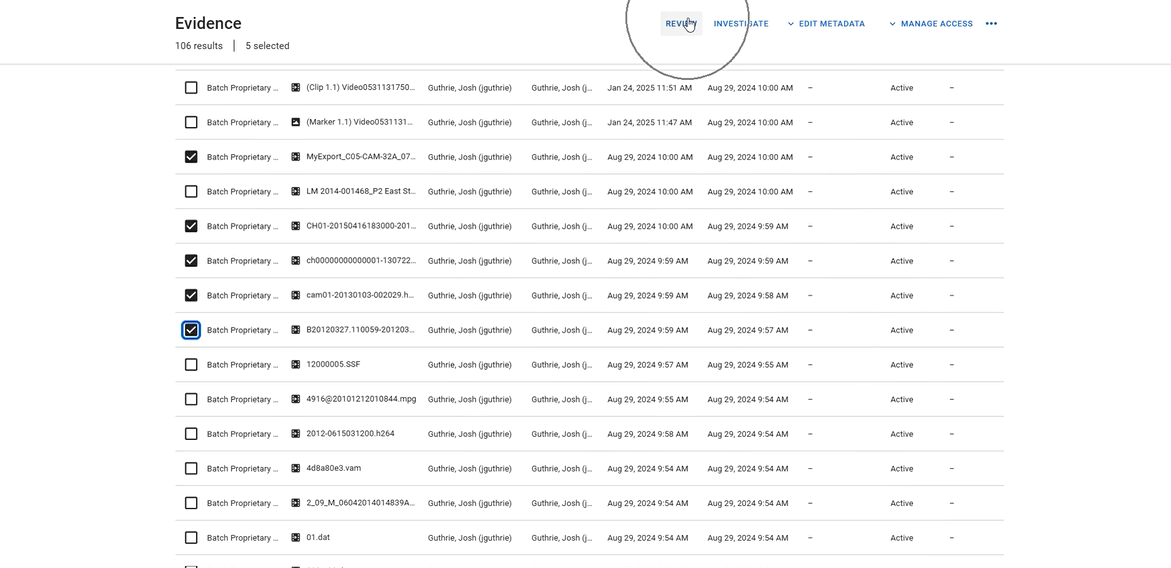
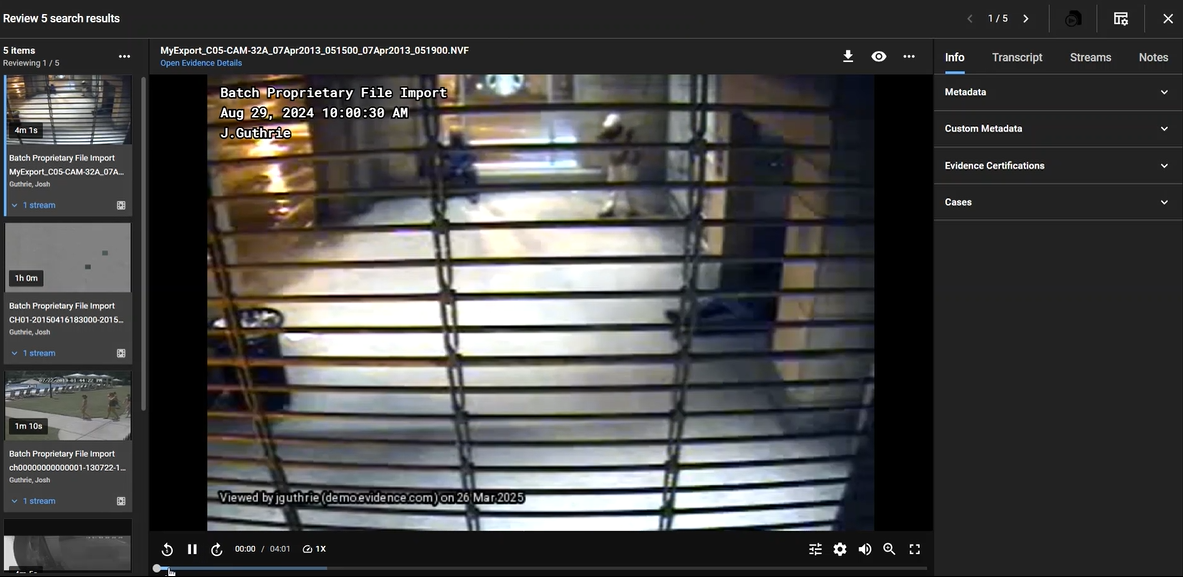
Investigators can directly upload their third-party multimedia files into Axon Evidence from their computer or external media, such as a USB storage device. Upon upload, these video files are automatically scanned for malware to support safe file review via Third Party Video Support. These files then appear in Axon Evidence, allowing investigators to select the files they want to review for forensically sound playback by placing a checkmark in the box next to the evidence, and then selecting Review above the evidence list. This action opens a new environment, allowing officers to systematically review their newly acquired evidence.
Review with Axon Investigate
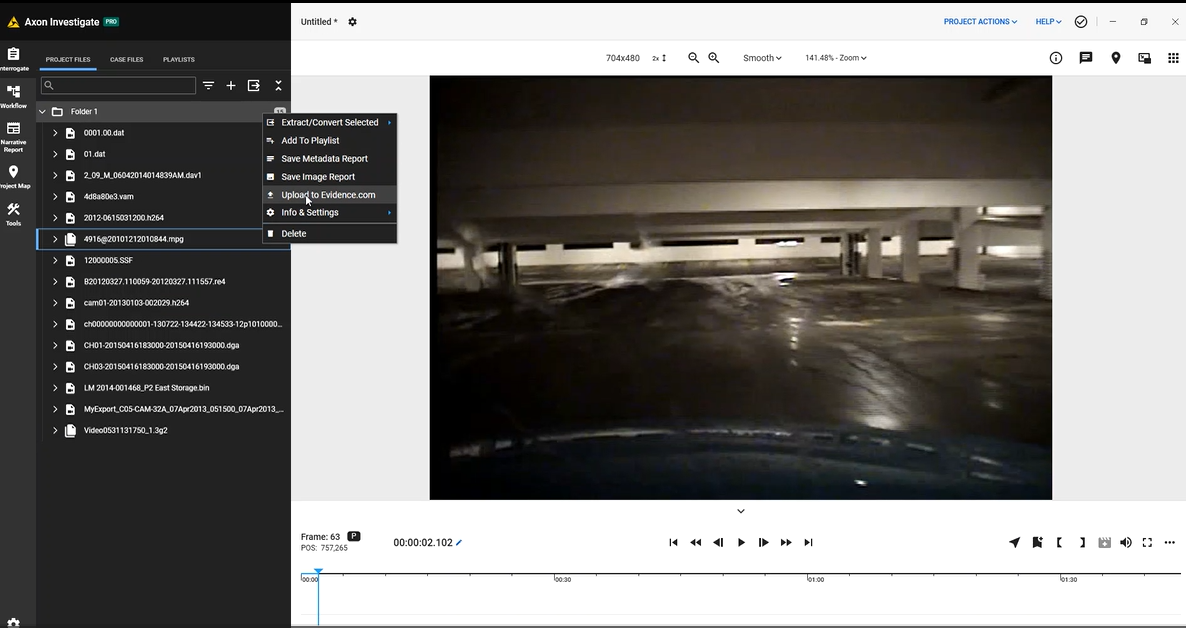
For investigators who prefer to review their evidence prior to uploading it to Axon Evidence, Axon Investigate is the best option to perform an initial review. If the investigator is satisfied that the video contains the needed information, the file(s) can be uploaded directly into Axon Evidence from Axon Investigate via the API bridge linking the two products. Users can simply click on the three dots next to the file in the file list and select Upload to Evidence.com. If a case has already been created in Axon Evidence, the file can be placed directly into the case file, in addition to the overall evidence library. If no case has been created, the file will simply be uploaded to the main evidence library.
Protecting the chain of custody
By following best practices for acquisition and playback, investigators can ensure their video evidence remains intact, reliable and admissible. Axon Investigate and Third-Party Video Support eliminate the reliance on proprietary media players or risky file conversions—enabling secure, forensically sound workflows that uphold the chain of custody from the field to the courtroom.