Resource Center
Lessons from the field: Draft One power users share their tips and tricks
:format(webp))
Draft One is helping officers spend less time behind a desk and more time in the field. But the real difference lies in how it’s used. We spoke with power users across agencies to understand the features and habits that deliver the biggest impact. These aren’t just theoretical tips. They’re officer-tested methods directly from those who are saving time and writing better reports every day.
Tip 1: Start with simple calls
Draft One works best when it's used on routine, lower-complexity incidents — general information reports, non-criminal events, and follow-ups that still require documentation. These calls make up a large share of report volume at most agencies and are the fastest path to time savings with minimal editing.
“The first time I used Draft One was during a busy summer shift. I knocked out four general information reports for non-critical events that still required a report in under 30 minutes. Most simple reports would take about 20 minutes to write and Draft One was helping me do it in as little as three minutes with very little editing. For my longer cases, like in custody charge files, I would spend upwards of 180 minutes writing those full reports in detail and Draft One has helped cut that down to like 25 minutes.”
— Constable Skoretz, Fredericton Police Force
Power users lean on Draft One to move through everyday calls quickly. It helps them save time, stay focused, and keep up with the pace of the shift. Starting with routine reports builds confidence and efficiency. From there, many officers begin using Draft One on longer, more detailed cases where the time savings can be even greater.
Tip 2: Narrate in the moment — don’t wait to recall later
Draft One works best when it has more to work with — and the best way to generate a more detailed draft is to narrate while you are on scene or immediately after. Since Draft One creates a first draft entirely based on audio transcripts, it can only use what is spoken. Power users speak naturally into their body-worn camera to capture what they observe, think, and decide in real time. That added context gives Draft One even more information to generate a stronger, more detailed first draft.
“For more complex calls you have to narrate to yourself. While I’m driving, I start a new recording and dictate the call to my body-worn camera. Then, when I use Draft One, the report comes out even stronger than if I had just used the body-worn camera transcript. That’s my biggest takeaway. I can recap what had just happened, narrate addresses, locations, dates and times, spell a person’s name, so I don’t even have to write those details out anymore. That has provided the most effective reports with the least amount of manual corrections afterwards.“
— Constable Hatoum, Peel Regional Police Service
Power users turn this into muscle memory. Narrating during the incident and while it’s still fresh in your mind sharpens recall, improves draft quality, and reduces manual editing later which can be especially useful for complex or fast-moving scenes with lots of details.
Tip 3: Use post-incident narration to complete the story
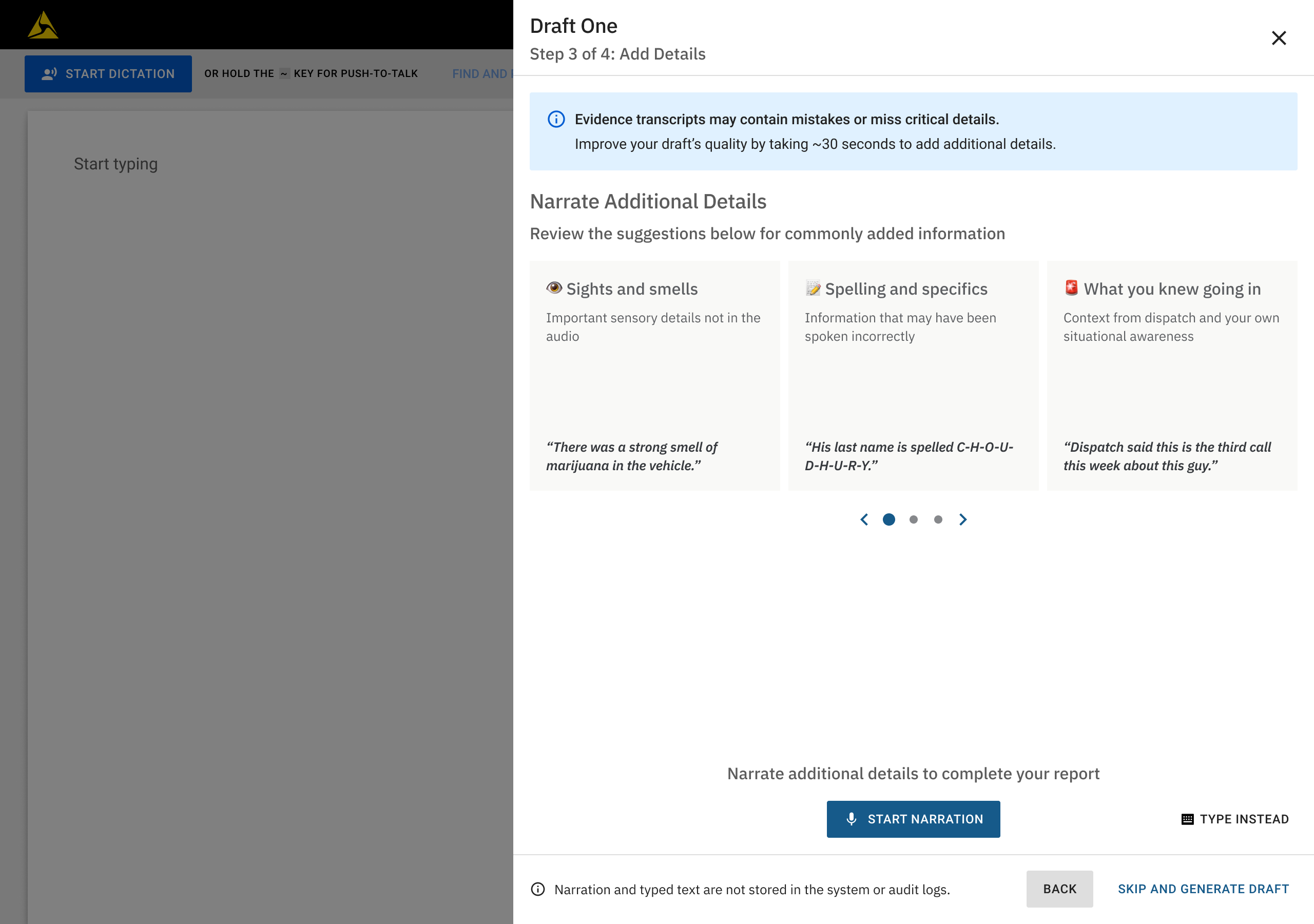
Body-worn camera audio captures what happened and what was said while recording. But important details can surface after the call ends. That is where post-incident narration comes in. While reviewing or working on a report, officers can record a new narration in Draft One to add details that were not captured in the original audio. This might include information relayed by another officer, clarifying descriptions, or reasoning behind a decision.
“After you finish the call, there’s a button you can press to explain more about what happened and what other officers may have seen. If I say, ‘he was wearing a red shirt’ it will find where the description is in the draft and add it where it should be based off the interaction. Or I’ll use narration if another officer was on scene and I later ask them for details about anything they saw, heard, or did. I’ll say, ‘this is from officer so-and-so and here’s what was disclosed to them.’ It’s very good at finding where it needs to plug in that information afterwards. It’ll build the draft from what I’m telling it as opposed to me just explaining what’s happening and it including that information word for word like dictation does.“
— Constable Goodyear, Fredericton Police Force
Post-incident narrations are not just add-ons. They are transcribed into structured inputs for the Draft One process that help make the first draft stronger from the start. For power users, this is a reliable way to capture details that otherwise might require manual edits or be left out entirely.
Learn from the best, then join them
Every officer’s workflow is different, but the most consistent and effective results come from small habits that add up. Draft One power users share a common theme: they’ve found smart ways to make the tool work better for them. Starting with simple reports, narrating in the moment, and using post-incident reflections can turn a good first draft into a great one and save time along the way.
These tips come directly from the officers using Draft One day in and day out. Try them out, see what works for you, and optimize your own routine. If your agency doesn’t have Draft One yet and you want to explore how it could support your report-writing workflows, contact your Axon representative or visit axon.com/draftone.