Automatic evidence tagging
Overview
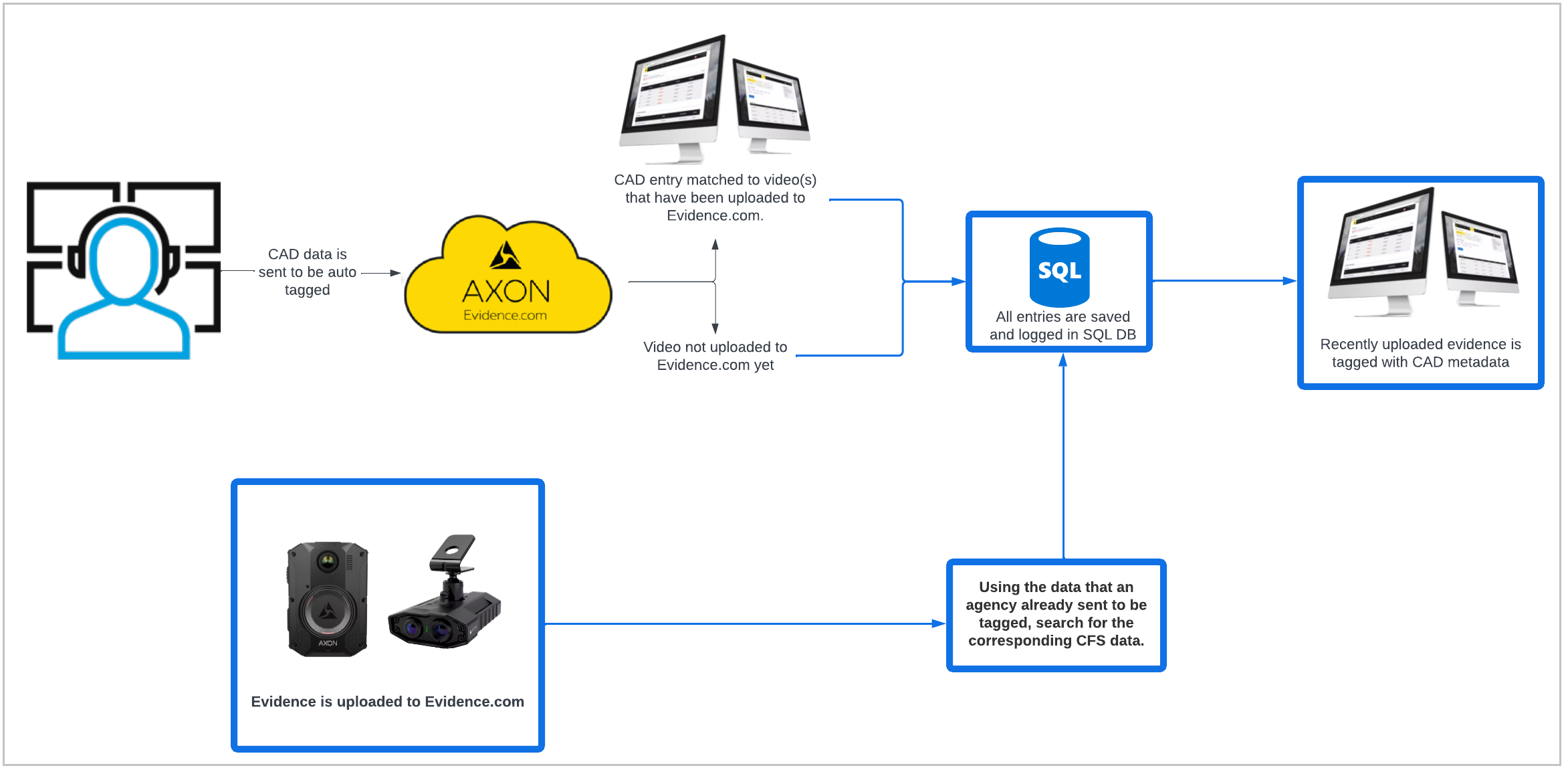
The automatic tagging of CAD/RMS metadata to evidence starts when your organization sends an export of your CAD/RMS data to Axon. The average scheduled delivery timeframe of 1–5 times a day is defined by your organization.
You can also choose whether the Title from the CAD/RMS export will overwrite user-altered titles. If your organization chooses not to overwrite user-altered titles, other CAD/RMS metadata will still be added to their respective evidence fields via the Auto-Tagging service.
Auto-Tagging upon Evidence Upload is an Axon capability that introduces a new workflow and trigger for the Auto-Tagging service.
- When your CAD export is sent to Axon, Axon processes this data normally and tags CAD metadata to the evidence present in Axon Evidence.
- All valid CAD entries (entries that didn't contain any errors when processing), whether matched or unmatched to evidence, are saved and referenceable for evidence uploaded to Axon Evidence in the future.
- When evidence is uploaded to Axon Evidence, it triggers the Auto-Tagging service to search for its corresponding CAD entry in the CAD entries that were already processed for your organization.
- If a match is found, Auto-Tagging tags the CAD/RMS metadata to the evidence upon upload.
The matching logic between a CAD entry and evidence remains the same. This capability doesn't introduce new matches.
This update eliminates the need for an organization to send an export of their CAD/RMS data to start the Auto-Tagging process. There is no longer a one-to-two-day delay between the time that evidence is uploaded to when metadata is tagged, and organizations no longer need to send the same CAD/RMS data multiple times to Axon.
Your organization doesn't need to update anything to receive this capability. However, we provide the recommended actions in this article which you can take to make the most of Auto-Tagging upon Evidence Upload.
Recommended actions
Alter the scheduled interval for Auto-Tagging
Send data either at or right before shift end times so that the CAD data is processed by the time evidence is uploaded.
For organizations that have wireless offload or LTE offload capability, send CAD/RMS data in-between shifts so that evidence is tagged during a shift at time of upload.
- If your organization has the Windows Self Hosted Integration Runtime installed, reach out to [email protected] to change your scheduled Auto-Tagging interval.
- If your organization has installed the Axon local client (typically if your organization used the Auto-Tagging service before early 2020), reschedule the CAD/RMS data export job interval.
If the agency I.T. or county I.T. is generating a CSV file, coordinate your schedule change with them.
Cad/RMS data to send
The CAD/RMS data exports no longer need to contain multiple days' worth of data to tag all evidence. CAD/RMS entries from previous exports are saved, so the CAD/RMS export query is reduced to only contain the CAD entries that took place from the last export to the current export.
Frequently asked questions
My CAD exports send days' worth of data. Which entry will be matched with my evidence?
When Axon Evidence searches for a piece of evidence's respective CAD entry and there are multiple matches with the same unique CFS ID, it uses the metadata from the most recent CAD entry from the most recent export.
How long will the CAD data be saved for?
Currently, the data is kept for 1 year. If evidence is uploaded a year from December of 2022 and matches a legacy CFS that was processed by Auto-Tagging, that entry's CAD metadata will be tagged to that piece of evidence. Any matched or unmatched CAD entries beyond a year are deleted.
How can I tell which pieces of evidence were automatically matched versus the normal Auto-Tagging workflow?
The matches from evidence upload are appended to the matched report CSV, which details the matches from evidence upload between the last CAD export datetime to the most recent CAD export.
The following image shows an example of an agency that sends CAD data to Axon Evidence three times a day at 00:00, 08:00, and 16:00.
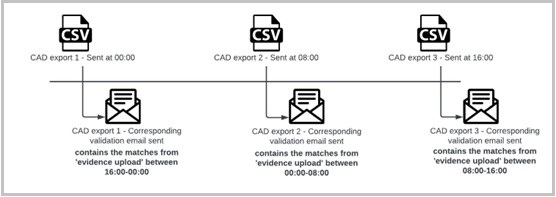
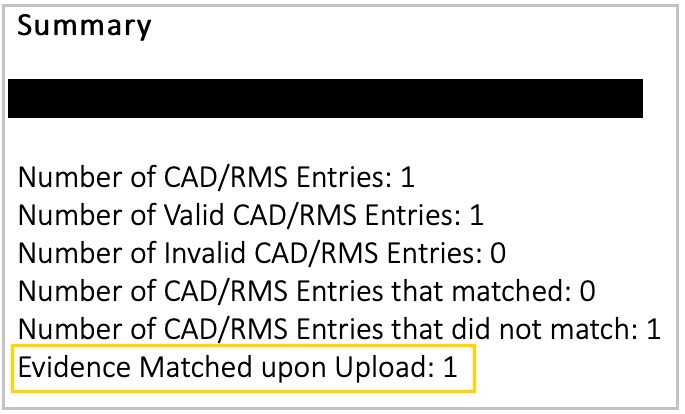
Validation emails are sent to a specific group of individuals at your organization after a CAD/RMS data export is sent to Axon to be tagged. This group was configured when Auto-Tagging was deployed at your agency. To make changes to the group, contact [email protected].
A new metric in the validation email, Evidence Matched upon Upload, details the number of matches due to evidence upload that took place since the last CAD/RMS export was sent to be auto-tagged.
How can I tell which matches in the matched report CSV are from "evidence upload"?
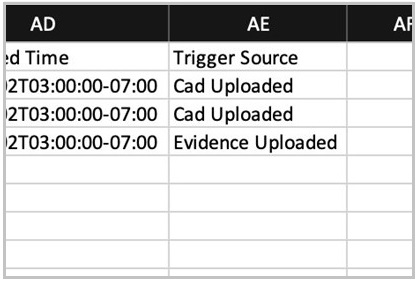
Column AE in the matched report CSV contains data about the Trigger Source. There are two available values: CAD Uploaded and Evidence Uploaded. A trigger source of "Evidence Uploaded" for an entry means that it was matched due to evidence being uploaded to Axon Evidence.
Is there an additional charge for this service?
No. It is included for any organization with active licenses for Auto-Tagging.
Does this include Community Request evidence?
Yes. This includes Community Request evidence submitted from individual links. If the date and time of the portal link that's created and sent to the individual is within the timeframe of someone being assigned to a CAD call, then that evidence can be auto-tagged. The assigned call must then be closed and included in a CAD export before the evidence the community member uploaded can be tagged.


