Installation, single-bay
For multi-bay dock wall installation, skip to Wall-mounting, multi-bay.
Watch this video for an overview of dock mounting.
Axon Docks should be installed in a cool, well-ventilated space. The ideal ambient temperature when all equipment is powered on and cameras are docked or charging is 41–80 ⁰F (5–27 ⁰C). Temperatures outside this recommended range may lead to battery performance degradation over time while charging.
For desktop/shelf use (images shown are for Body 3; later docks are similar):
- Plug the ethernet cable into the WAN port on the dock.
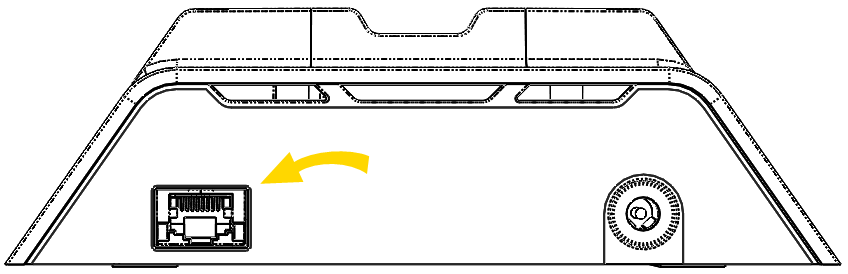
- Plug the other end of this ethernet cable into an active network port.
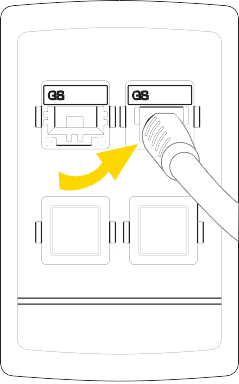
- Connect the power cord to the power supply block.
- Plug the power supply cord into the power connection port on the dock.
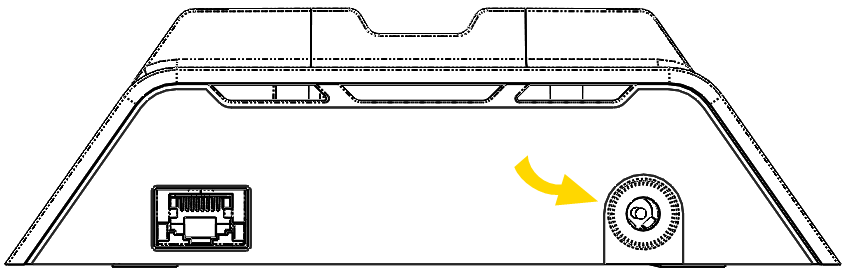
- Plug the power cord to a standard power outlet.
Place an Axon body camera in the dock and look for the charging icon on the camera display. Once a dock is installed, it can be used to register and charge cameras.


