Fentanyl decontamination
Fentanyl is a powerful synthetic drug similar to morphine and heroin but up to 100 times more potent. Fentanyl can come in several forms including powder, liquid, or pills. It can be absorbed through the skin and contact can result in unintended overdose. This article describes how to clean a
The method of decontamination depends on the severity of the exposure. If fentanyl entered the camera due to heavy exposure, the inside of the camera must also be decontaminated. This will effectively destroy the camera, but is necessary to prevent the risk of exposure later to others. For this reason, this procedure is split into two methods: light/surface exposure and heavy/internal exposure.
This procedure applies to all Axon body cameras.
DO NOT return contaminated cameras to Axon without first conducting the appropriate decontamination procedure.
Suggested materials
- First Line Technology Dahlgren Decon PDK (Personnel Decon Kit)
- 91% isopropyl alcohol
- Chemtronics CS25 ChemSwab
- Chemtronics CF4050 swabs
- Paper towels or soft clean cloth
- Latex gloves
- Clean water
Any contact with the camera is very dangerous until it is decontaminated. WEAR PERSONAL PROTECTIVE EQUIPMENT. DO NOT allow the camera to touch bare skin and DO NOT allow it to cross-contaminate other surfaces.
Light/surface exposure
Use this method when the exposure is limited to the external surface of the camera.
Perform this procedure in a well-ventilated area. Read this process completely before beginning.
- Put on the latex gloves.
- Isolate the camera in a safe area that can be cleaned after the decontamination procedure is completed.
- Lay out the contents of the PDK kit:
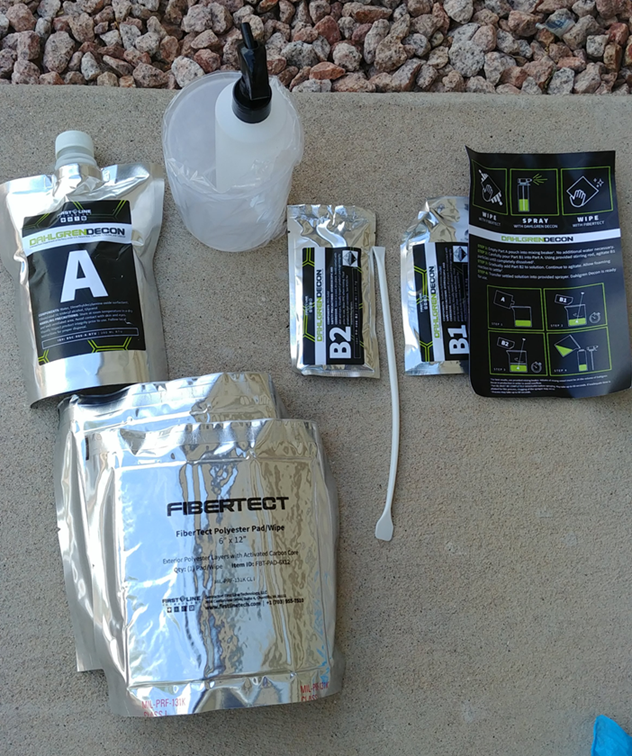
- Mix the Dahlgren Decon solution in the provided beaker per the instructions on the kit.
- Pour the solution into the spray bottle when foaming reaction settles. Contact First Line Technology with any questions on mixing the solution.
- For a Flex POV camera, keep the camera cable connected to both the body camera and POV camera.
- Keep the camera cable connected to both the controller and POV camera.
- Spray the solution on the FIBERTECT wipe until damp, then use it to wipe the entire surface
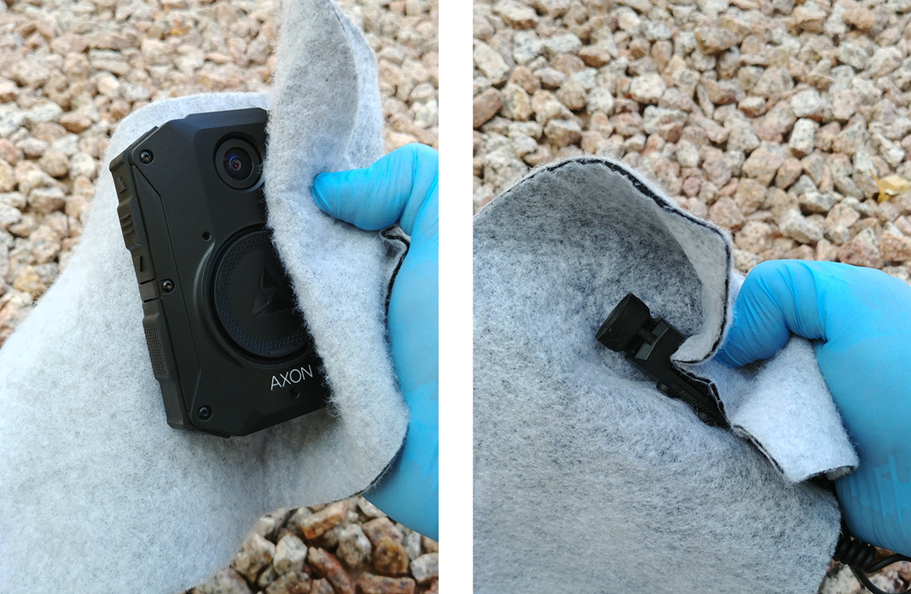
- Spray the camera
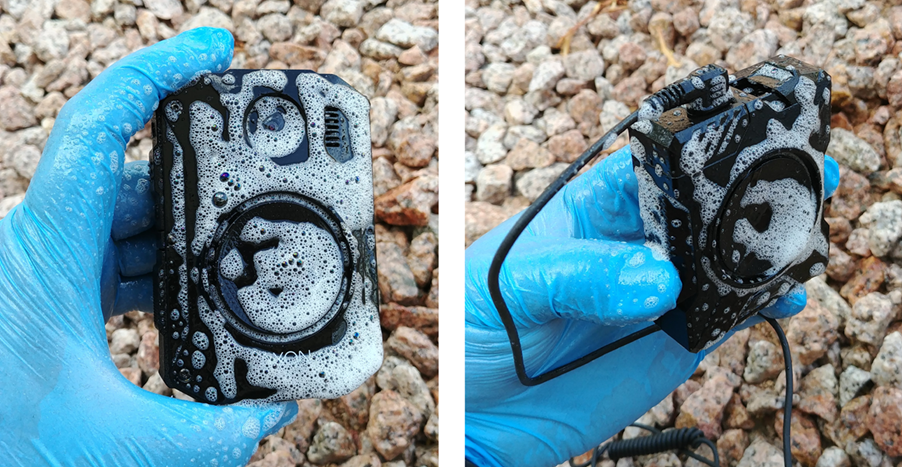
- Let the solution sit on the camera for five minutes.
- Use the other FIBERTECT wipe to clean the solution from the components
- For the
-
- Use the swabs to clean any hard-to-reach areas such as the Event button, microphone/speaker wells, and buttons.
- Do not let alcohol drip into any ports.
- Clean off all residue to prevent attracting dirt or contaminants.
- Allow the components to dry for one hour.
- Turn on the camera and test functionality.
- Ensure the camera powers on successfully.
- Ensure you can pair with Axon View and view the video feed.
- Ensure a recording begins when you double-press Event.
- Ensure LEDs
- Ensure each button functions correctly.
- Ensure the recording ends when you press Event for three seconds.
- Ensure the camera powers off properly.
- Dock the camera and ensure proper communication and transfer of files.
- View the recording and ensure the video and audio quality are not less than they were prior to the exposure.
Heavy/internal exposure
This method will likely damage the internal circuits and hardware within the camera and render it unusable, but reduces the risk of exposure to anyone who might handle the camera in the final disposal process.
Clean the body camera exterior as described in Light/surface exposure and then dispose of these contaminated components per laws and regulations as hazardous material.
The following steps are only for a
Perform this procedure in a well-ventilated area. Read this process completely before beginning.
- Put on the latex gloves.
- Isolate the camera in a safe area that can be cleaned after the decontamination procedure is completed.
- Lay out the contents of the PDK kit (see photo in step 3 above).
- Mix the Dahlgren Decon solution in the provided beaker per the instructions on the kit. Contact First Line Technology with any questions on mixing the solution.
- Remove the cable from the body camera and set the camera aside.
- Remove the cable from the controller and set the controller aside.
- Using an appropriately sized container, submerge the following in the Dahlgren Decon solution for five minutes (do NOT submerge a
- Flex camera (NOT controller)
- Flex POV camera
- cable
- Remove from the solution and wipe with the FIBERTECT wipe.
- Dispose of components (as decontaminated as you could get them) in a safe and environmentally conscious manner.


