Incremental pulling
You can perform incremental pulling in the Axon DataStore to retrieve only newly added or updated data from DataStore instead of replacing all data. This data sync method improves efficiency and reduces system strain while enabling users to manage data expungement without full deletions.
Generally you will use this in two scenarios: incremental pull and cold start.
Glossary
When using this feature, it's helpful to understand the following terms:
- Expungement data: Data completely deleted from DataStore, considered redundant or obsolete
- CDC: Change Data Capture, tracks database record changes (
INSERT,UPDATE,DELETE) - DML: Data Manipulation Language (
SELECT,INSERT,UPDATE,DELETE) - Sproc: Stored procedure in SQL
- UserTableName: Name of the table in the your Azure SQL database
- TableName: Name of the table in the Axon DataStore
- TablePrimaryKey: Primary key of a table (e.g.,
Idin IncidentReport or EntIncident)
Recommendations
Following these guidelines ensures your organization's incremental pulling works as expected:
- Use the same schema, table name, and column name as DataStore in your Azure SQL database. If these items do not match, you must map the tables between your database and the DataStore.
- You can find all supported tables and columns by retrieving the information schema.
- When new tables are added to the DataStore in their corresponding label group, CDC is automatically enabled. When made aware of these changes, you should wait to consume new tables until your schema is ready.
- If a record fails, you can pull it again using its primary key.
- Perform an incremental pull after a cold start to handle expungement data.
- Do not place foreign keys on tables. This complicates deletion, requiring child entities to be deleted before the parent is deleted.
Incremental pulling
The Axon DataStore team provides a stored procedure you can execute to retrieve data changes, including primary keys and associated operations. The diagram below illustrates this process: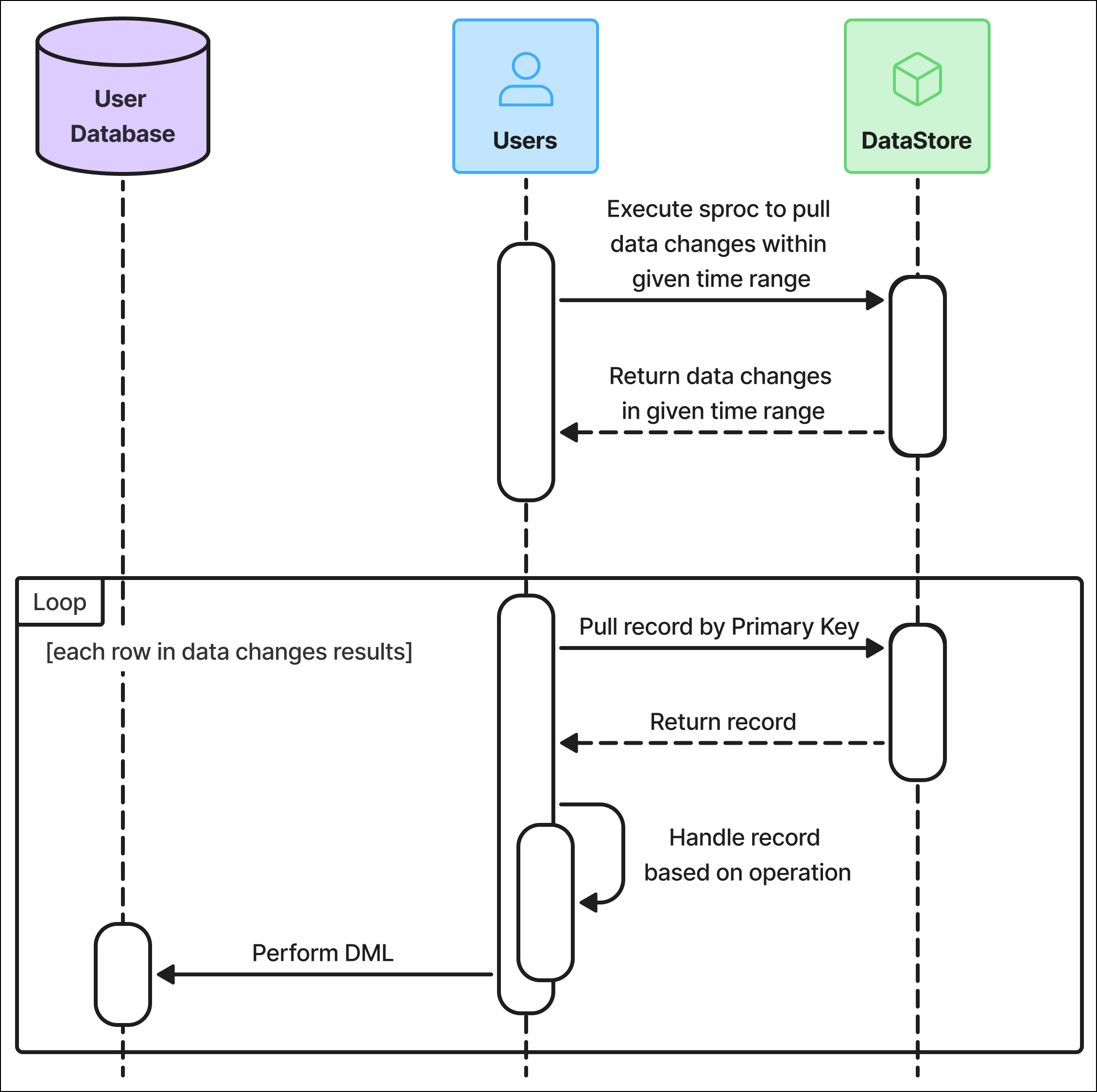
Retrieve data changes
The first step in performing an incremental pull is to execute the axon.usp_PullDataByRange stored procedure. This procedure returns a list of data changes for a specific table within a given time range, based on the timestamp when each change was captured in the CDC tables.
EXEC axon.usp_PullDataByRange @BeginTime @EndTime @SchemaName @TableNameUse the following inputs for this query:
BeginTime:The beginning time to start the pull; input in SQL datetime2 format and UTC timezoneEndTime:The end time to finish the pull; input in SQL datetime2 format and UTC timezoneSchemaName:RecordsorStandardsTableName:Specific table name within the given time range
After each pull, save the value used for EndTime. On the next pull, use that EndTime value as the new BeginTime. This ensures you only retrieve new changes with each pull.
For example:
-- Execute sproc to retrieve one specific table
EXEC axon.usp_PullDataByRange N'2024-01-01 00:00:00', N'2024-01-02 00:00:00', N'Records', N'IncidentReport';
The result of this query is a table that contains the following columns:
SchemaName:RecordsorStandardsTableName: The table name in DataStore (Reports,Cases, etc.)Operation:DELETEorUPSERTPrimary Key: Contains one or more pairs of columns (composite keys):PK_Column1Name: The name of the primary key columnPK_Column1Value: The value in the primary key column
See below for an example result you would see after querying IncidentReport:
| SchemaName | TableName | PK_Column1Name | PK_Column1Value | Operation |
|---|---|---|---|---|
| RECORDS | IncidentReport | Id | 63575741-cf6f-4a73-adaa-11451f4798a5 | UPSERT |
| RECORDS | IncidentReport | Id | 72b3563b-141b-4e7e-af99-1d053063eaba | DELETE |
| RECORDS | IncidentReport | Id | e4d7e926-26a9-4af2-8604-3447b66338f0 | UPSERT |
| RECORDS | IncidentReport | Id | 8805387e-5413-47f7-aaaa-7a056eb44aaa | DELETE |
The example result below shows that IncidentReport_EntPerson has primary key columns of ID and ReportId, indicating that you must query both columns.
| SchemaName | TableName | PK_Column1Name | PK_Column1Value | PK_Column2Name | PK_Column2Value | Operation |
|---|---|---|---|---|---|---|
| RECORDS | IncidentReport | Id | 63575741-cf6f-4a73-adaa-11451f4798a5 | ReportId | 0ae2e41a-239d-45c6-b9e6-797ef909739f | UPSERT |
| RECORDS | IncidentReport | Id | 72b3563b-141b-4e7e-af99-1d053063eaba | ReportId | ca6eca55-464b-4926-bc0d-3a913fe2174c | DELETE |
| RECORDS | IncidentReport | Id | e4d7e926-26a9-4af2-8604-3447b66338f0 | ReportId | 057160fe-3ec3-48f4-a2d1-9ccafca9ef4b | UPSERT |
| RECORDS | IncidentReport | Id | 8805387e-5413-47f7-aaaa-7a056eb44aaa | ReportId | b0161993-0087-4347-9595-c68e3a6c33d5 | DELETE |
Perform an operation on each change
After running the procedure above, iterate through each row of the result table and perform either an UPSERT or DELETE operation:
- For
DELETEoperations, use the primary key column to locate and remove the corresponding record from your database. - For
UPSERToperations, retrieve the record from the DataStore using the primary key and then perform theUPSERTin your database.
Include all primary key columns in the condition to ensure you retrieve the correct record.
Example DELETE operation
-- Sample query in your Azure SQL database
DELETE FROM <UserTableName>
WHERE <PK_Column1Name>=<PK_Column1Val>
    AND <PK_Column2Name>=<PK_Column2Val> ...
In this example, primary key is a placeholder. Each table has a different name for its primary key. For example:
DELETE FROM IncidentReport WHERE Id=XXXXYYYY
DELETE FROM IncidentReport_EntPerson WHERE ID=XXX AND ReportId=YYY
Example UPSERT operation
>-- Sample query in your Azure SQL database
-- Retrieve record from the DataStore
SELECT * FROM <SchemaName>.<TableName>
WHERE <PK_ColumnName>=<PK_Column1Value>
    AND <PK_Column2Name>=<PK_Column2Value> ...

-- Perform Upsert
IF EXISTS(SELECT 1 FROM <UserTableName>
    WHERE <PK_Column1Name>=<PK_Column1Value>
        AND <PK_Column2Name>=<PK_Column2Value>))
BEGIN
    UPDATE <UserTableName>
    SET ColumnA='', ColumnB='',...
    WHERE <PK_Column1Name>=<PK_Column1Value>
        AND <PK_Column2Name>=<PK_Column2Value>;
END
ELSE
    INSERT INTO <UserTableName> (ColumnA, ColumnB, ...)
    VALUES (ValueColumnA, ValueColumnB, ...)
Use the following inputs for this query:
SchemaName:RecordsorStandardsTableName:The table name in DataStore (Reports,Cases, etc.)TablePrimaryKey:Primary key of the table (e.g.,ReportIdin Report,IncidentIdin Incident)UserTableName:Name of the table in the your databasePK_Column{i}Name:Name of theithcolumn in composite primary keyPK_Column{i}Value:Calue of theithcolumn in composite primary key
You can find all supported tables and their primary keys by retrieving the information schema.
Cold start
Change data in each table is retained for up to three months. If you need older data, you must perform a cold start and pull data into empty tables.
Use Cases
You may need to perform a cold start when first syncing with the DataStore or if the data in your database has been out-of-sync with the DataStore for more than three months.It’s recommended that you truncate the tables before initiating a cold start to avoid stale or duplicated data.
In this case, you would run the cold start to pull in data for a specific time period, such as 2010-01-01 00:00:00 to 2024-01-01 00:00:00. After performing the cold start, you would begin an incremental pull starting at 2024-01-01 00:00:00.
The timestamp in CDC tables will always be greater than or equal to the delta time timestamp in the tables (i.e., CreatedAt and UpdatedAt). As a result, duplicate imports may occur. However, this is acceptable because the UPSERT operation during incremental pulling ensures synchronization by updating new or modified records since the cold start point.
Expunged Data
When you perform a cold start, you must also perform an incremental pull to properly handle expunged data. If you do not, expunged data may remain in your tables. As a result, if you choose to perform a cold start, your database should be empty before pulling data. This ensures you retrieve only the most up-to-date records. If the table is not cleared before a cold start, there is a risk of retaining stale data or expunged records that should no longer exist.
Cold Start Query
Use the following query to perform a cold start. It is recommended that you pull data in one-month segments to avoid excessive CPU and RAM usage.
EXEC axon.usp_PullTableByRange @BeginTime @EndTime @SchemaName @TableNameUse the following inputs for this query:
BeginTime:The beginning time to start the pull; input in SQL datetime2 format and UTC timezoneEndTime:The end time to finish the pull; input in SQL datetime2 format and UTC timezoneSchemaName:RecordsorStandardsTableName:Specific table name within the given time range
The sproc returns data equal to and greater than BeginTime and smaller than EndTime. For example:
-- Sample query in your Azure SQL Database
-- Cold Start from 2020 to 2024
-- Batch in 1 month
EXEC axon.usp_PullTableByRange N'2020-01-01 00:00:00' N'2020-02-01 00:00:00' N'Records' N'IncidentReport'
This query returns data from the specified table (e.g., Reports), including all columns similar to a SELECT query.
-
Data is retrieved within a specified time range (e.g.,
2020-01-01 00:00:00to2020-01-31 23:59:59). - The ending boundary (23:59:59) is excluded, and the date continues to increment for subsequent batches.
The query internally pulls data using a delta time strategy:
UpdatedAtis used if available.- If
UpdatedAtis not available,CreatedAtis used. - If neither is available,
LastUpdated(the time the a row was last updated in the DataStore) is used, as it serves the same purpose.
See below for an example result you would see after running a cold start query:
| Report Id | IncidentNumber | ReportNumber | ReportType | ReportCategory | UpdatedAt |
|---|---|---|---|---|---|
| 3c868b65-7a61-4ee0-944e-1144d92236a7 | 56565656 | 56565656-80 | GENERAL_OFFENSE | RecordsReport | 2020-08-11 00:49:56.2800000 |
| d35aef50-b795-4b31-8aca-3d47beb4b6d0 | 48645418 | 48645418-1 | GENERAL_OFFENSE | RecordsReport | 2022-03-17 22:48:43.6130000 |
Retrieve Information Schema
The DataStore has a view you can access to get all table names that support historical tables for incremental pulling. You can:
- Get tables with incremental pulling enabled
- Get column names of a table
- Get primary key of a table
Get tables with incremental pulling enabled
To get all tables with incremental pulling enabled, use the following procedure:
SELECT * FROM [axon].[HistoricalTables]See below for an example result you would see after running this query:
| SchemaName | TableName |
|---|---|
| RECORDS | InciddntReport |
| RECORDS | EntIncident |
You can also query to get only tables that have changed within specified time range. Use the following procedure:
EXEC axon.usp_GetTablesHaveChanges @BeginTime, @EndTime, @SchemaNameUse the following inputs for this query:
BeginTime:The beginning time to start the pull; input in SQL datetime2 format and UTC timezoneEndTime:The end time to finish the pull; input in SQL datetime2 format and UTC timezoneSchemaName:RecordsorStandards
Example query:
EXEC axon.usp_GetTablesHaveChanges N'2024-01-01 00:00:00', N'2024-01-02 00:00:00', N'RECORDS'Get column names of a table
Use the query below to get the column names for a table:
SELECT TABLE_NAME,
    COLUMN_NAME,
    DATA_TYPE,
    CHARACTER_MAXIMUM_LENGTH,
    IS_NULLABLE,
    is_primary_key,
    is_fk
FROM axon.uf_GetTableColumns(@Schema, @TableName);
Example query:
select TABLE_NAME,
    COLUMN_NAME,
    DATA_TYPE,
    CHARACTER_MAXIMUM_LENGTH,
    IS_NULLABLE,
    is_primary_key,
    is_fk
from axon.uf_GetTableColumns('RECORDS', 'IncidentReport_EntPerson');
See below for an example result you would see after running this query:
| TABLE_NAME | COLUMN_NAME | DATA_TYPE | CHARACTER_ MAXIMUM_LENGTH |
IS_NULLABLE | is_primary_key | is_fk |
|---|---|---|---|---|---|---|
| IncidentReport_EntPerson | Id | nvarchar | 100 | NO | true | false |
| IncidentReport_EntPerson | ExternalId | nvarchar | 100 | YES | false | false |
| IncidentReport_EntPerson | ReportId | nvarchar | 100 | NO | true | true |
| IncidentReport_EntPerson | ReportFriendlyId | nvarchar | 100 | YES | false | false |
| IncidentReport_EntPerson | PersonFriendlyId | nvarchar | 100 | YES | false | false |
| IncidentReport_EntPerson | CreatedAt | datetime2 | null | YES | false | false |
| IncidentReport_EntPerson | UpdatedAt | datetime2 | null | YES | false | false |
| IncidentReport_EntPerson | AxonAge | decimal | null | YES | false | false |
| IncidentReport_EntPerson | AxonSex | nvarchar | -1 | YES | false | false |
| IncidentReport_EntPerson | AxonRace | nvarchar | -1 | YES | false | false |
Get primary key of a table
Use the query below to get all columns in the composite primary key of a table:
SELECT * FROM axon.uf_GetPrimaryKeyColumns(@SchemaName, @TableName)Use the following inputs for this query:
TableName:The name of the table you want to retrieveSchemaName:RecordsorStandards
See below for an example result you would see after querying the IncidentReport_EntPerson table with the Records schema:
| TableName | ColumnName |
|---|---|
| IncidentReport_EntPerson | Id |
| IncidentReport_EntPerson | ReportId |
Demo python script
You can use the following Python script to pull data with full flow. Copy the code below or download this file, which contains the full code shown below.
- Determine
begin_timeandend_time, assuming data pull every 24 hours:Copybegin_time_utc = datetime.now(timezone.utc) - timedelta(hours=24)
begin_time = begin_time_utc.strftime('%Y-%m-%d %H:%M:%S')
end_time_utc = datetime.now(timezone.utc)
end_time = end_time_utc.strftime('%Y-%m-%d %H:%M:%S') - Retrieve a list of table names that have changed within a specified time range for a given schema:Copy
def get_changes_tables(SCHEMA: STR, begin_time: STR, end_time: STR,
        CURSOR: pyodbc.Cursor) -> list[STR]: query = f"""
    EXEC axon.usp_GetTablesHaveChanges N'{begin_time}', N'{end_time}', N'{schema}'
    """ TABLES = [] try: cursor.execute(query) TABLES = [row.TableName for row in cursor.fetchall()]
EXCEPT
EXCEPTION AS e: print(f"Error fetching tables have changes: {e}") RETURN TABLES - Get all columns for each table:Copy
def fetch_columns_in_a_table(SCHEMA: STR, TABLE: STR,
        CURSOR: pyodbc.Cursor): query = """
    SELECT COLUMN_NAME
    FROM axon.uf_GetTableColumns(?, ?)
    """ columns = [] try: cursor.execute(query, (SCHEMA, TABLE)) columns =
    [row.COLUMN_NAME for row in cursor.fetchall()]
EXCEPT
EXCEPTION AS e: print(f"Error fetching columns: {e}") RETURN columns - Get primary keys for each table:Copy
def fetch_primary_keys(SCHEMA: STR, TABLE: STR,
            CURSOR: pyodbc.Cursor): query = """
        select PRIMARY_KEY_COLUMN as COLUMN_NAME from axon.uf_GetPrimaryKeyColumns
        (?, ?)
    """ primary_keys = [] try: cursor.execute(query, (SCHEMA, TABLE)) primary_keys = [row.COLUMN_NAME for row in cursor.fetchall()]
EXCEPT
EXCEPTION AS e: print(f"Error fetching primary keys: {e}") RETURN primary_keys - Other useful utilities:Copy
def concatenate_table_name_and_schema_name(SCHEMA: STR, TABLE: STR) -> STR:
    RETURN f"[{schema}].[{table}]"
def format_sql_value(row_data):
    value = row_data
    IF value IS NONE:
        RETURN 'null'
RETURN f"'{value}'" - Get updated IDs in CDC:Copy
statement = f"EXECUTE axon.usp_PullDataByRange N'{begin_time}', N'{end_time}', {schema_name}, {table_name}"
cursor.execute(statement)
data = cursor.fetchall() - Iterate every row and perform an
UPSERTorDELETEprocedure:Copyfor row in data:
try:
key_values = {}
for i in range(num_primary_keys):
name_pattern = f"PK_Column{i + 1}Name"
value_pattern = f"PK_Column{i + 1}Value"
key_values[getattr(row, name_pattern, None)] = getattr(row, value_pattern,
None)
prepare_where_statement = " AND ".join([
f"{name}='{key_values[name]}'" for name in key_values
])
prepare_statement = f"""
SELECT {', '.join(columns)}
FROM [{schema_name}].[{table_name}]
WHERE ({prepare_where_statement})
"""
datastore_cursor.execute(prepare_statement)
row_data = datastore_cursor.fetchone()
operation = getattr(row, 'OperationType', None)
# Execute in User Database
if operation == 'UPSERT':
column_names_without_primary_keys =
datastore_cursor.description[len(primary_keys):]
upsert_prepare_statement = f"""
IF EXISTS (
SELECT 1
FROM {concatenate_table_name_and_schema_name(user_schema_name,
user_table_name)}
WHERE ({prepare_where_statement})
)
BEGIN
UPDATE {concatenate_table_name_and_schema_name
(user_schema_name, user_table_name)}
SET {", ".join([
f"{column_name[0]}={format_sql_value(getattr(row_data,
column_name[0]))}"
for column_name in column_names_without_primary_keys
])}
WHERE ({prepare_where_statement})
END
ELSE
BEGIN
INSERT INTO {concatenate_table_name_and_schema_name
(user_schema_name, user_table_name)}
({', '.join([column[0] for column in
datastore_cursor.description])})
VALUES ({", ".join([f"{format_sql_value(i)}" for i in
row_data])})
END
"""
user_cursor.execute(upsert_prepare_statement)
user_cursor.commit()
elif operation == "DELETE":
delete_prepare_statement = f"""
DELETE FROM {concatenate_table_name_and_schema_name(user_schema_name,
user_table_name)}
WHERE ({prepare_where_statement})
"""
user_cursor.execute(delete_prepare_statement)
user_cursor.commit()
except Exception as e:
print(f"SKIPPING - Error while running row data with {prepare_where_statement}
- "
f"table {table_name} - primary keys value {key_values} - err:
{str(e)}")- Example
UPSERTin a row:CopyIF EXISTS(SELECT 1 FROM [dboRECORDS].[EntPerson_AxonIdentityDocuments]
WHERE (Id='5090'))
BEGIN
UPDATE [dboRECORDS].[EntPerson_AxonIdentityDocuments]
SET Id='5090', ParentId='6a19ae77-4467-48b6-ae00-8c4f4e94ffdb', PersonFriendlyId='PER2500001289', PersonId='6a19ae77-4467-48b6-ae00-8c4f4e94ffdb', CreatedAt=null, UpdatedAt=null, Type='DRIVERS_LICENSE', MoreInfo=null, SsnNumber=null, OtherNumber=null, PassportNumber=null, PassportCountry=null, OtherDescription=null, DriverLicenseClass=null, DriverLicenseNumber=null, OtherExpirationDate=null, BirthCertificateNumber=null, PassportExpirationDate=null, CommonAccessCardIssuer=null, CommonAccessCardNumber=null, DriverLicenseRestrictions=null, DriverLicenseIssuingState=null, DriverLicenseExpirationDate=null, BirthCertificateIssuingState=null, CommonAccessCardExpirationDate=null, FederalBureauOfInvestigationNumberNumber=null, OriginatingAgencyPoliceOrIdNumberNumber=null, LastUpdated='2025-02-20 13:26:07.058000'
WHERE (Id='5090')
END
ELSE
INSERT INTO [dboRECORDS].[EntPerson_AxonIdentityDocuments] (Id, ParentId, PersonFriendlyId, PersonId, CreatedAt, UpdatedAt, Type, MoreInfo, SsnNumber, OtherNumber, PassportNumber, PassportCountry, OtherDescription, DriverLicenseClass, DriverLicenseNumber, OtherExpirationDate, BirthCertificateNumber, PassportExpirationDate, CommonAccessCardIssuer, CommonAccessCardNumber, DriverLicenseRestrictions, DriverLicenseIssuingState, DriverLicenseExpirationDate, BirthCertificateIssuingState, CommonAccessCardExpirationDate, FederalBureauOfInvestigationNumberNumber, OriginatingAgencyPoliceOrIdNumberNumber, LastUpdated)
VALUES ('5090', '6a19ae77-4467-48b6-ae00-8c4f4e94ffdb', 'PER2500001289',
'6a19ae77-4467-48b6-ae00-8c4f4e94ffdb', null, null, 'DRIVERS_LICENSE', null, null, null, null, null, null, null, null, null, null, null, null, null, null, null, null, null, null, null, null, '2025-02-20 13:26:07.058000') - Example
DELETEin a row:CopyDELETE FROM [dboRECORDS].[EntPerson_AxonIdentityDocuments]
WHERE (Id='5090')
- Example


