Timestamp watermark for Axon camera videos
Axon cameras of 4th-generation (Axon Body 2, Axon Flex 2, and Fleet system) and later can embed a visual watermark containing the date, time, model and serial number of the camera in the upper-right corner of captured videos.
The watermark date and time uses the ISO 8601 international standard to indicate time in a 24-hour format and adds a Z zone designator directly after the time to denote zero offset from Coordinated Universal Time (UTC) time. This is also known as Zulu time, since Zulu is the NATO phonetic alphabet word for Z.
Body 3, Body Workforce, Body 4, and later
While we believe it is critical to maintain UTC for all videos to ensure accuracy of when recorded events occurred, we understand this can be unclear when viewing videos. To help alleviate this, we have added the following:
When a video is uploaded, Axon Evidence converts the time for each video to local time zone and shows that time in the metadata section adjacent to the video player. However, the watermark date and time in the video remain in UTC time, as shown here: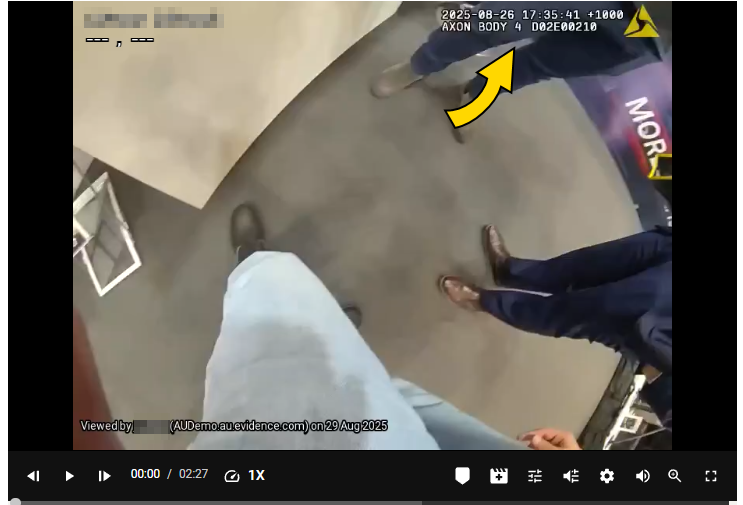
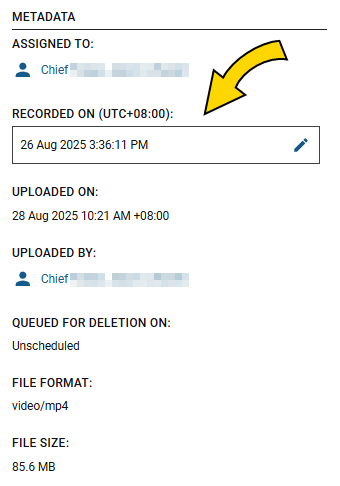
These later generation cameras have the option of using UTC or local (agency) time zone (FAQs below).
Axon Body 2 and Flex 2
While we believe it is critical to maintain UTC for all videos to ensure accuracy of when recorded events occurred, we understand this can be unclear when viewing videos. To help alleviate this, we have added the following:
When a video is uploaded, Axon Evidence converts the time for each video to local time zone and shows that time in the metadata section adjacent to the video player. However, the watermark date and time in the video remain in UTC time, as shown here: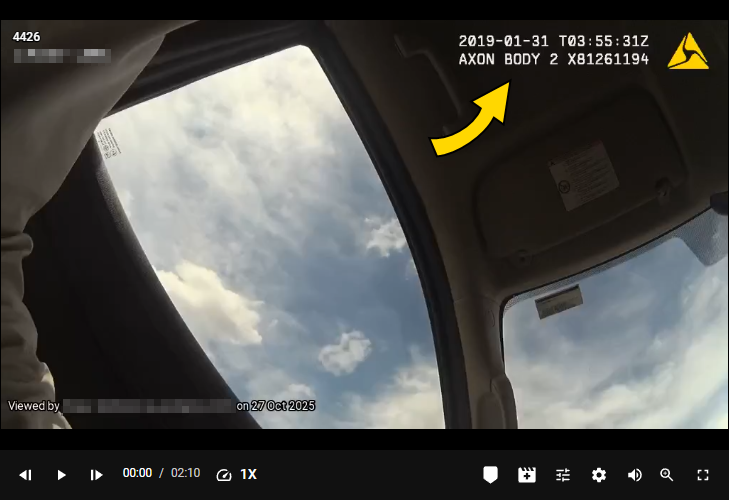
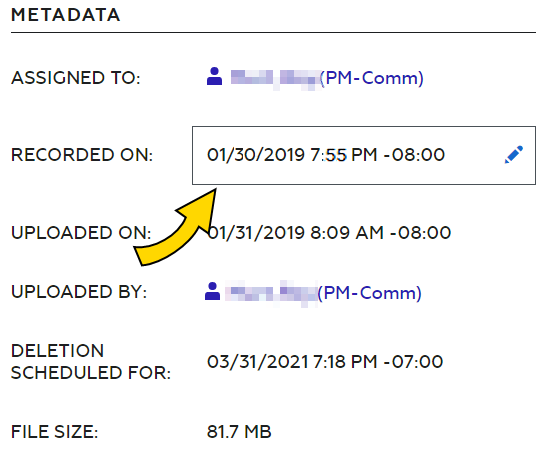
Notes
- If the camera's internal clock was not set, the watermark shows that the time was not set when the video was recorded.
- While you can disable the watermark separately for body-worn cameras and Fleet cameras through Device settings in Axon Evidence, the change affects all cameras of that type at your organization.
FAQs
What is the difference between GMT, UTC, and Local?
- GMT is a time zone officially used in some European and African countries. The time can be displayed using both the 24-hour format (0–24) or the 12-hour format (1–12 am/pm).
- UTC is a time standard that's the basis for civil time and time zones worldwide. No country or territory officially uses UTC as a local time. The UTC part of the watermark on camera videos adjusts where Daylight Saving Time (DST) is recognized.
-
Watermark Local Time Zone sets the time shown in the watermark as local time (based on agency configuration). When disabled, it uses UTC.
How does Daylight Saving Time affect UTC and GMT?
UTC and GMT do not change for Daylight Saving Time (DST). However, some countries that use GMT switch to different time zones during their DST period. For example, during the summer months the United Kingdom uses British Summer Time (BST), which is one hour ahead of GMT.
How do I disable or change the watermark for my Body 3 and later camera?
In Axon Evidence, with Edit Device Settings permissions:
- Select Admin.
- Select your body or Fleet camera.
- For body cameras, select the appropriate Profile.
- Use Ctrl+F to find the Watermark setting and toggle on/off as needed.
- If needed, toggle agency Watermark Local Time Zone on/off in the next setting (this is not user time zone).
- Scroll to the bottom and select Save Settings.
How do I disable or change the watermark for my Body 2, Flex 2, or Fleet 2 camera?
In Axon Evidence, with Edit Device Settings permissions:
- Select Admin.
- Select your body or Fleet camera.
- Use Ctrl+F to find the Watermark setting and toggle on/off as needed.
- Scroll to the bottom and select Save Settings.


