Introduction
Axon Signal Vehicle is part of a communications platform that, when certain hardware is activated, transmits a message recognizable by Axon Signal compatible equipment. For example, when the vehicle light bar is activated, Axon Signal Vehicle can signal all properly equipped Axon systems within range to begin recording.
Axon systems that work with Axon Signal Vehicle include the Axon Body 2 Camera, Axon Flex 2 system, Axon Fleet 2 system, and all later versions.
Additional reading
If Axon Signal Vehicle is part of an Axon Fleet installation, refer to the Axon Fleet Installation Manual for addition information and guidance.
See the Evidence.com User and Administrator Guide for information on Signal configuration and Axon Body Camera Settings for use with Axon Signal products.
Specifications
| Secure Bluetooth transmission | 30 seconds |
| Range of alerted cameras | 30+ ft. (9.1+) |
| Operation input voltage | 5.0 VDC – 14.4 VDC |
| Ignition enable voltage | 3.6 VDC – 14.4 VDC |
| Trigger input voltage | 3.6 VDC – 14.4 VDC |
| Stand-by current | |
| - Ignition on | 25 mA (typ) |
| - Ignition off | 25 µA (typ) |
| Trigger input timing (positions J2-5 thru J2-10) | |
| - Low to high transition | 200 ms |
| - High to low transition | 200 ms |
| Trigger input timing (positions J2-11 thru J2-12) | |
| - Low to high transition | 200 ms |
| - High to low transition | 2.5 s* |
* This feature is intended to reduce the likelihood of nuisance videos from extraneous triggers caused by some progressive slide switch control modules. These controllers can cause the input voltage of Axon Signal Vehicle to drop below 3.6 VDC when transitioning between switch positions.
Pinout table
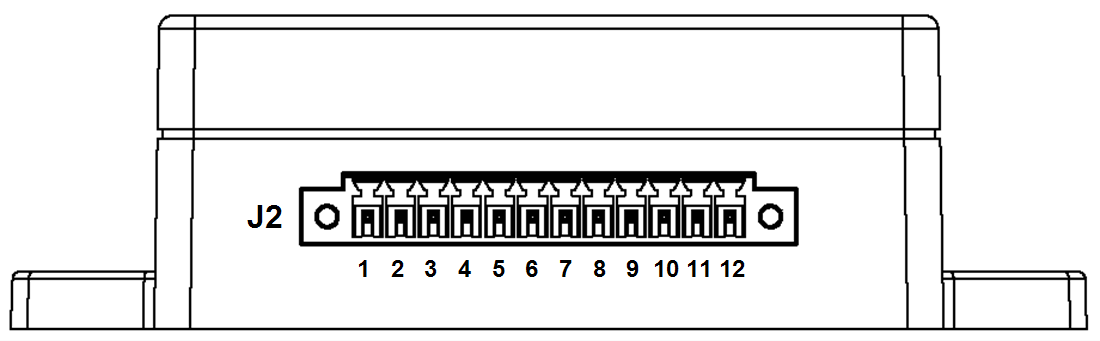
| J2 Position | Description |
|---|---|
| 1 | Power +12VDC (fuse @ 1A) |
| 2 | Ground |
| 3 | Ignition enable |
| 4 | Auxiliary enable |
| 5–10 | Trigger Input |
| 11–12 | Trigger input, delayed turn-off |
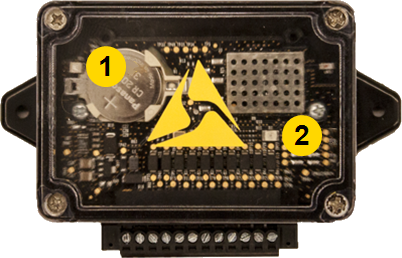
LED indicators
|
|
Power LED
| Color | Information |
|---|---|
| Solid green (on) | Axon Signal Vehicle is powered and enabled |
| Off | Axon Signal Vehicle is either not powered or not enabled |
Status LED
| Color | Information |
|---|---|
| Solid green (on) | Operational state (successful boot-up) |
| Off |
Check the Power LED
|
| Blinking green* | Axon Signal Vehicle is transmitting a detected input signal |
* Axon Signal Vehicle must have firmware version 4.2.1 or later for this function.
Last modified - 27 July 2026


