Update firmware
Axon periodically releases updates for the firmware of all Axon devices. Maintain the latest firmware on your Axon Signal Vehicle devices to achieve optimal performance and device stability.
Update Axon Signal Vehicle firmware Axon Device Manager (ADM) for Android. ADM for iOS does not yet support Axon Signal Vehicle firmware updates.
- Open the ADM app.
- Sign in to your agency’s Axon Evidence account.
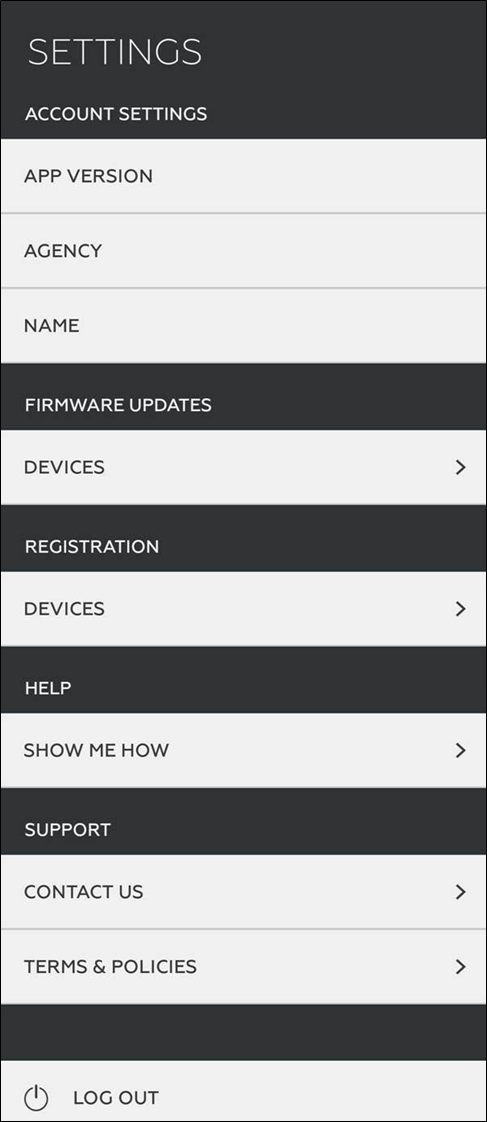
- In ADM, tap the Settings menu in the upper left.
- Under Firmware Updates, tap Device.
- Tap Axon Signal Unit in the device list.
- Place the phone near an enabled Axon Signal Vehicle device and tap Start Scan. Select the device from the list of available devices and tap Connect to initiate Bluetooth pairing.
- If the Axon Signal Vehicle device's firmware is outdated, an update will automatically begin after pairing. A status bar shows the progress of the update.
- When the firmware update is complete, tap Clear Completed. ADM disconnects from the Axon Signal Vehicle device.
- Optionally, connect again to send the Axon Signal Vehicle device logs to Axon Evidence:
- Tap Send Logs. A status bar shows the progress of the upload.
- Tap Disconnect to disconnect from the Axon Signal Vehicle device.
Last modified - 27 February 2026


