Community Engagement Training
Community Engagement Training is designed to help officers de-escalate encounters with various people in the community. The scenarios range from responding to crisis calls involving the mentally ill to intervening on a fellow officer who may be unnecessarily escalating a situation to the brink of misconduct.
These VR scenarios are filmed in 360° video with live actors and follow a scripted narrative that trainees have the ability to progress through in a Choose-Your-Own-Adventure format. These passive VR experiences are great foundational learning experiences for these difficult types of calls and topics because they allow officers to experience and better understand what an individual may be going through during a law enforcement encounter, while also exposing them to different tactics that may or may not successfully resolve the situation.
In all Axon VR apps, make selections by looking at an item ("gaze") until the circular crosshair fills in. When reading a page, ensure your gaze is on an inactive part of the screen.
Scenario descriptions
All Facilitator's Guides, Sample Course Rosters, and Certificates of Completion (for IADLEST certified scenarios) are available for download on the Training Materials page on Axon Help.
* = also available in French (Canada)
IADLEST certified
The following scenarios are certified through International Association of Directors of Law Enforcement Standards and Training (IADLEST) National Certification Program.
Bipolar Disorder
Through a curriculum that emphasizes holistic learning, trainees will gain a comprehensive understanding of bipolar disorder by identifying indicators of both manic and depressive episodes, while focusing on effective communication and de-escalation techniques to assist with the safety and well-being of community members and law enforcement officers. Trainees will also learn to apply crisis intervention strategies and connect individuals to appropriate rehabilitation resources, enhancing their preparedness to handle mental health crises with empathy and professionalism.
Crisis De-Escalation
Respond to a mental health crisis using de-escalation strategies grounded in Crisis Intervention Training (CIT). Trainees engage with an unarmed individual in distress and apply verbal and non-verbal techniques to reduce tension, slow the pace, and make safe, informed decisions. The scenario reinforces agency-aligned approaches to empathy, trauma-informed communication, and tactical patience to help officers navigate complex, high-stakes situations.
Critical Incident Stress Management
In this scenario, trainees will explore Critical Incident Stress Management (CISM) techniques following a traumatic event. Through realistic scenarios, trainees learn to identify both the emotional and physical effects of critical incidents and practice peer-based defusing and debriefing methods. Emphasizing agency policy, this scenario highlights peer support as a vital tool in managing trauma and reinforces agency resources that support long-term resilience and well-being.
Interactive Case Law I
In this scenario, trainees will receive education on the outcomes of the landmark 2016 case, Estate of Armstrong v. Village of Pinehurst et al., and how it has influenced TASER training standards. Trainees will then be dispatched to a similar call involving a "danger to self" individual in need of public safety intervention. Decisions regarding the use of force and de-escalation techniques must align with agency policy to enhance the chances of achieving a mutually beneficial resolution for all parties involved.
Interactive Case Law II
In this scenario, trainees will learn about the landmark Ninth Circuit case, Hyde v. City of Willcox et al., and its impact on TASER energy weapon training standards. Trainees will be placed in a simulated incident where they must respond to a detainee attempting to evade officers within a county jail. Trainees will practice use-of-force decisions aligned with agency policy to support safe and controlled outcomes for all parties involved.
Substance Use Disorder II
Trainees respond to a call involving a parolee who has run away from court-mandated rehabilitation for opioid use. Trainees begin the in-headset experience with the parolee displaying signs of an opioid overdose and must make decisions on how to render aid while minimizing exposure risks using best practices.
Community Engagement
Alzheimer’s*
Learn proven strategies for responding to individuals exhibiting symptoms of Alzheimer's disease and related dementia cases. Explore techniques that overcome communication barriers and aim to achieve a successful outcome for both the subject and the officer during an encounter.
Autism I*
Police interactions can often overwhelm individuals on the autism spectrum. In an environment filled with lights, sirens and other potential triggers, learn the tools officers can use to identify and respond to someone in crisis to achieve positive outcomes.
Autism II*
Police interactions can often overwhelm individuals on the autism spectrum. In an environment filled with lights, sirens, and potential triggers, learn the tools officers can use to identify and respond to someone in crisis to achieve positive outcomes.
Combative Subject Call I
Trainees arrive on scene to a distressed male subject threatening employees of an office building with a hammer. Armed with a TASER energy weapon and firearm, trainees learn how to identify a subject experiencing emotional distress and create safety on a scene involving an emotionally distressed subject, all while under timed stress.
Combative Subject Call II
In this scenario, trainees will arrive on scene to find a distressed male subject in search of his former employer, threatening harm with a hammer. Armed with a TASER energy weapon and firearm, trainees will learn how to respond to an emotionally distressed subject on scene and employ tactics to create safety when a subject is experiencing emotional distress, all while under timed stress.
Conflict Management
In this scenario, trainees will arrive on scene to an escalating workplace dispute between two co-workers. Armed with a TASER energy weapon and a firearm, trainees will learn how to de-escalate aggressive behavior and respond to physical altercations, all while under timed stress.
Corrections I
Learn proven strategies for locating hidden contraband in a correctional facility setting. Take a first-person perspective through unoccupied areas within the facility to conduct contraband sweeps for weapons, electronics, and drugs.
Corrections II
As trainees attempt to identify infractions like hiding, consuming, and passing contraband, various activities and conversations can serve as distractions. Discover how to effectively monitor populated locations, including the yard, common room, and laundry facilities, to identify prohibited behaviors.
Corrections III
In this scenario, trainees conduct a cell search after an inmate fails to exit when instructed. Learn to identify potential opioid-related crises in a correctional setting, focusing on opioid abuse indicators and overdose symptoms. Implement on-scene safety protocols, minimize exposure risks, and make critical decisions at key points during the search.
Corrections IV
In this scenario, trainees assume the role of a correctional officer engaging with an inmate employing manipulative tactics. Trainees will learn to identify signs of manipulation, understand behaviors that escalate conflict, and implement effective strategies to maintain control and prevent issues. Through decision-making, trainees will see how seemingly minor interactions can lead to significant consequences when dealing with manipulative inmates.
Destruction of Property I
As the first responding officer on-scene, trainees are equipped with a TASER 7 and a firearm and encounter a male subject actively damaging a vehicle with a crowbar. Trainees must apply de-escalation tactics and, if deemed necessary, utilize use-of-force protocols in accordance with their agency's policies and procedures.
Domestic Violence I*
Empathy lies at the heart of this scenario—experience firsthand the inner dialogue, anxiety, and despair involved in a domestic violence incident. Learn strategies to effectively communicate with victims of trauma and employ questioning techniques to keep all parties safe.
Domestic Violence II
Upon arrival at the scene, trainees encounter a married couple engaged in a verbal and potentially physical dispute. Armed with a TASER energy weapon and a firearm, they learn to identify instances of domestic violence and utilize tactics to ensure the safety of all parties involved while operating under time constraints. A countdown timer simulates real-world demands for swift and decisive action.
Domestic Violence III
Trainees arrive on scene to a female subject destroying her wife’s car with a baseball bat. Armed with a TASER energy weapon and firearm, trainees learn how to identify a case of domestic violence and employ tactics to create safety on scene for all parties, all while under timed stress.
English as a Second Language
When faced with various communication methods, acquire the skills to navigate complex language barriers when dealing with non-English speakers during emergencies.
Hard of Hearing*
Discover methods to identify individuals who may have varying levels of hearing loss. Gain access to tools and techniques that facilitate effective communication with deaf or hard of hearing individuals, ultimately reducing fear or confusion during encounters with law enforcement officers.
Human Trafficking
During a domestic violence response, trainees may encounter signs that a victim is being trafficked. Trainees learn to spot subtle indicators, communicate safely and supportively, and coordinate with investigators to connect victims with appropriate services. Emphasizing trauma-informed approaches, this scenario helps officers navigate complex calls with empathy, build trust, and take action that supports victim safety and agency policy.
Interactive Case Law III
Interactive Case Law III will be available soon.
In this scenario, trainees will learn about the landmark U.S. Supreme Court case, Graham v. Connor, and its impact on how use-of-force decisions are evaluated under the Fourth Amendment’s objective reasonableness standard. Trainees will then respond to a simulated investigatory stop involving a subject whose behavior may be misinterpreted. As circumstances evolve, trainees will practice reassessing their response options and articulating their use-of-force decisions based on the facts known at the time and in alignment with agency policy.
Officer Assist
Armed with a TASER energy weapon and a firearm, and responding to a call for backup where another officer is involved in a physical altercation with a male subject. Learn to employ tactics for engaging with a combative subject to achieve a mutually beneficial outcome while operating under time constraints. A countdown timer simulates the real-world requirement for quick and decisive action.
Officer in Crisis*
More law enforcement professionals die by suicide than from any other cause. To protect the lives of fellow officers, learn how to recognize the signs of a first responder in crisis and take immediate action to help a colleague find the necessary resources.
Peer Intervention I: Noise Complaint*
How should an officer react when their partner is quick to argue with a defiant subject? Learn to deduce why the partner may become upset during an incident and how to employ effective de-escalation techniques to defuse the situation and prevent unjustified use of force.
Peer Intervention II: Homelessness*
Discover techniques for effectively and respectfully intervening when a fellow officer becomes impatient with a subject.
Peer Intervention III: Traffic Control*
Learn how to recognize symptoms of Post-Traumatic Stress Injury (PTSI) and apply this knowledge to de-escalate a conflict between a fellow officer and a confrontational driver.
Schizophrenia I*
Behaviors exhibited by individuals living with schizophrenia can frequently be mistaken for resistance or aggression. Discover effective strategies for identifying these behaviors and resolving situations without resorting to the use of force when interacting with individuals experiencing an acute behavioral health episode.
Schizophrenia II
When encountering a young man at a train station, officers must navigate a heavily populated area to approach and empathize with an individual living with schizophrenia. Learn how to maintain a secure environment for officers and the community in a busy urban area when dealing with someone experiencing a mental health crisis.
Substance Use Disorder I
Learn effective strategies for interacting with individuals dependent on substances and connecting them with available community resources.
Suicidal Ideation*
Communication strategies lie at the core of this scenario. By employing deliberate and compassionate care, discover how to de-escalate an incident in which a subject is expressing suicidal ideation. Officers also learn how to connect the individual to the appropriate support channels.
Traffic Stop I
Trainees are tasked with conducting a traffic stop involving an irate and intoxicated individual carrying a wrench. Equipped with a TASER energy weapon and a firearm, trainees learn how to effectively establish a secure environment while dealing with an uncooperative subject under time constraints.
Traffic Stop II
Trainees conduct a traffic stop with backup involving an erratic driver armed with a machete. Armed with a TASER energy weapon and a firearm, trainees learn how to effectively interact with an uncooperative subject and determine the best tactics for de-escalating an encounter, all while working within time constraints.
Veteran PTSI*
Veteran safety lies at the core of this scenario. Learn verbal and non-verbal techniques to identify underlying issues when encountering a veteran experiencing Post-Traumatic Stress Injury (PTSI).
Scenario management
By default, Community Engagement Training does not include any pre-installed scenarios. You can download, update, and delete scenarios as needed.
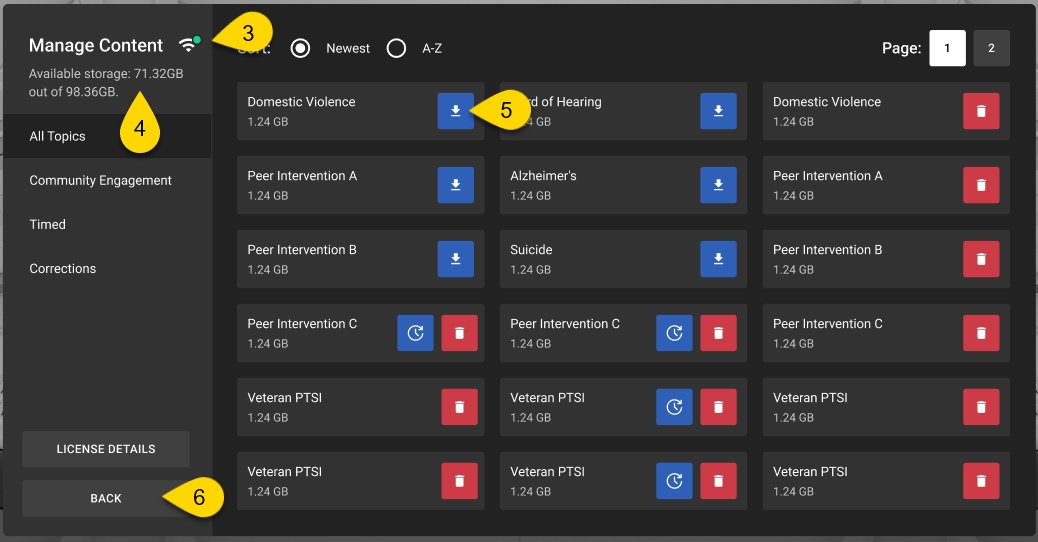
Download scenarios
Make sure you stay in the Community Engagement Training app during scenario downloads.
- Start Community Engagement Training.
- Select Manage Content.
- Confirm that you’re connected to Wi-Fi by checking the Wi-Fi status on the Manage Content page.
- Confirm the headset has enough storage space by checking the available storage on the Manage Content page.
- Select the blue download icon next to each scenario you want to download. A progress bar displays the status of the download.
- Select Back to return to the Community Engagement Training library.
Update scenarios
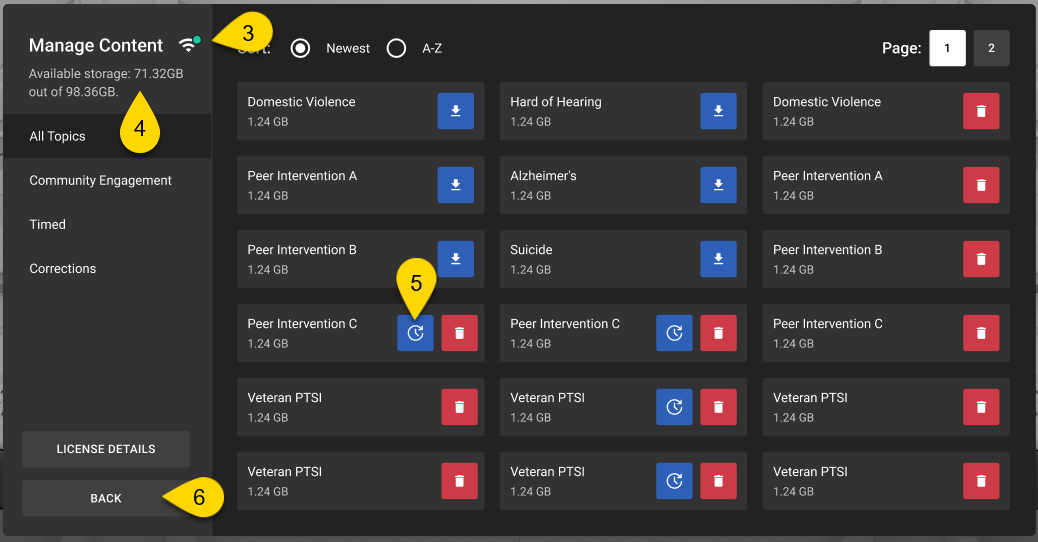
- Start Community Engagement Training.
- Select Manage Content.
- Confirm that you’re connected to Wi-Fi by checking the Wi-Fi status on the Manage Content page.
- Confirm the headset has enough storage space by checking the available storage on the Manage Content page.
- Select the blue update icon next to the scenario you want to update. A progress bar displays the status of the download.
- Select Back to return to the Community Engagement Training library.
Delete scenarios
Deleting a scenario can be helpful if your headset is running low on storage space, and you want to make more room.
- Start Community Engagement Training.
- Select Manage Content.
- Select the red trash can icon next to the scenario you want to delete.
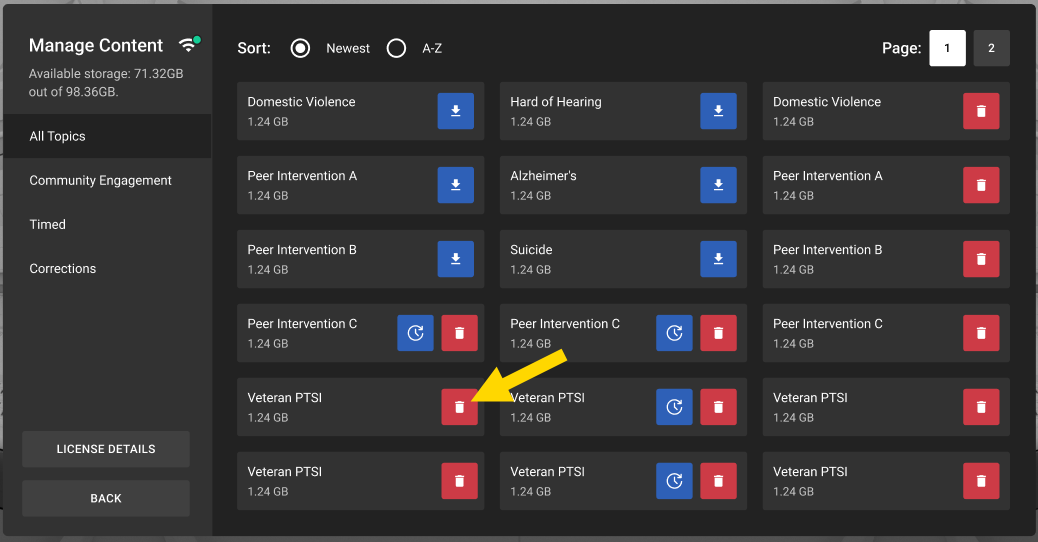
- Select Back to return to the Community Engagement Training library.
Sort scenarios
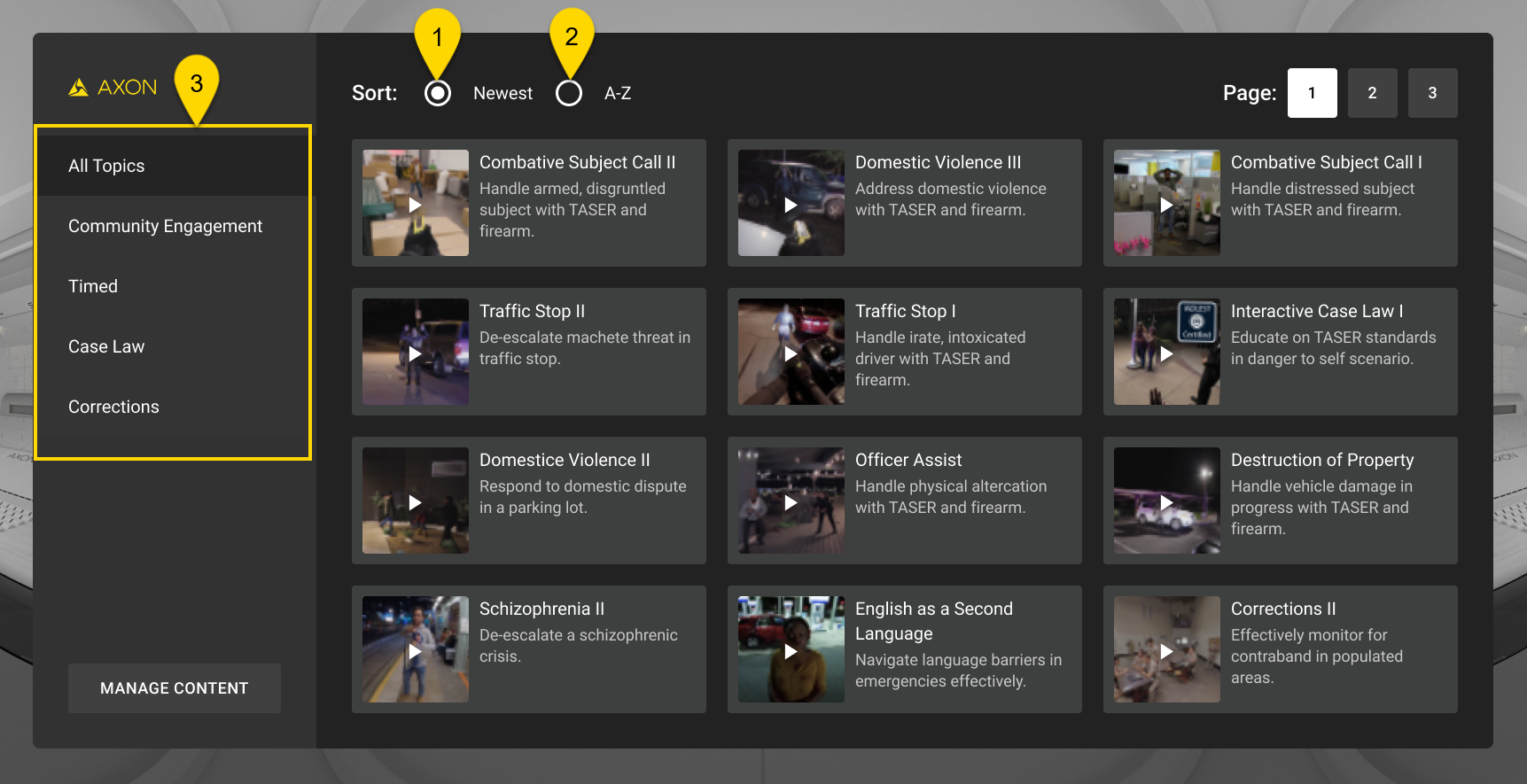
Options for sorting scenarios include:
- Select Newest to display scenarios from newest to oldest (default).
- Select A-Z to sort modules alphabetically.
- Select a category to narrow the list of displayed modules.
Start scenarios
The Community Engagement Training modules are designed for you to engage naturally, just as you would in real-life situations without the need for a VR Controller. During the scenario, you will need to respond to on-screen prompts by looking at an item ("gaze") until the circular crosshair fills in. The scenario will play out based on your selections.
Some scenarios have timed responses. These scenarios are sorted under the Timed category. If you don't make a selection within the time limit, the corresponding scene in the scenario will replay, and you'll be prompted to make a selection again.
To start a scenario:
- Start Community Engagement Training.
- Find and select the scenario you want to run. For more information on narrowing your search, see Sort scenarios above.
- Watch the scenario and respond to the on-screen prompts.
- At the end of the scenario, select Go Again to replay the scenario or Go to Lobby to return to the Community Engagement Training library.
- See your trainer for a debrief based on your agency policy.
Exit Community Engagement Training
- While in the middle of a scenario, you can exit by looking down and gazing at End Early. This will return you to the Community Engagement Training library.
- To exit the Community Engagement Training library, look down and gaze at Exit. This will take you back to the main library.
Launch CET
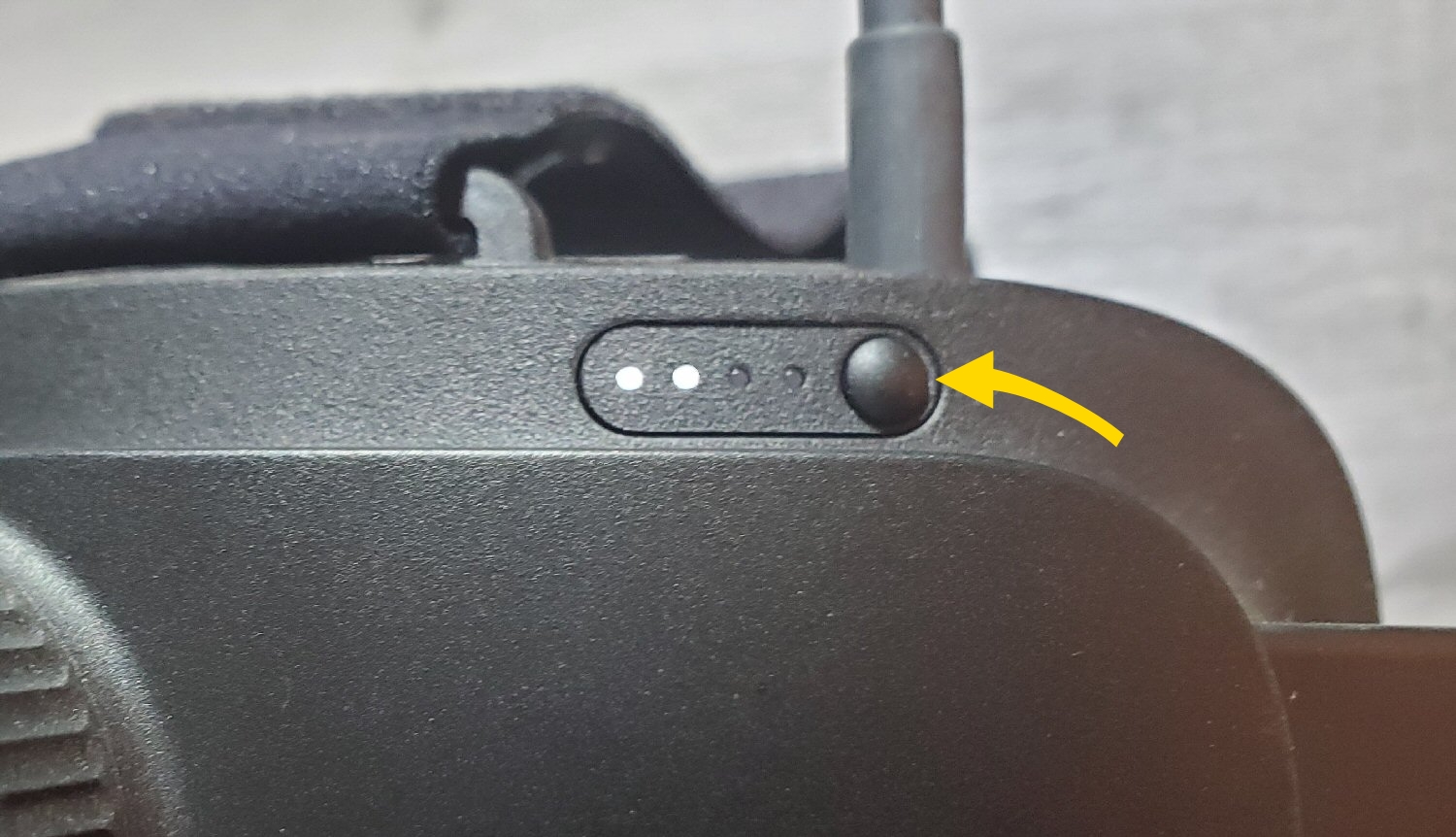
- Turn on your headset by pressing the Power button for five to seven seconds.
- Put on the headset.
- Accept the boundary messages.
- In the library, pinch to select Community Engagement Training. If you don't see the Axon apps shown below, see the FAQ Why are the Axon VR apps not in my library?
- Review and accept the content in the dialog boxes.
- If this is the first time launching CET on this headset, you'll be prompted to enter a license code. A license code is required to access CET. Select Scan License Code to enter your license code. Legacy users can select Manual Entry to scan their license QR code.
- CET checks for updates.
- The CET library displays. For information on downloading modules, see the section Download scenarios above.
Pause and play a scenario
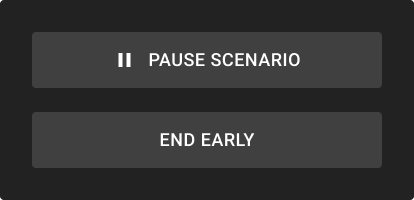
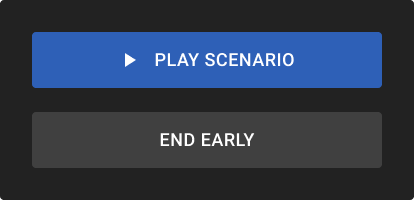
While running a scenario, you can pause or resume playback using the Pause Scenario or Play Scenario buttons by looking down in the headset.
You can pause a scenario at any time except during decision points, which are moments when you’re prompted to make a choice before the scenario continues. During decision points, the pause option is unavailable until a choice is made.
Troubleshooting
The app is unresponsive
If the app is unresponsive, try the following:
1. Exit the app: Depending on the app, either look down and select Exit, or use gaze selection to select Exit App.
2. In the library, use your hand to pinch and select the app tile to relaunch it.
"Checking license" message continuously spins
If you open CET and your headset displays the "Checking license" message for several minutes without progress, follow these steps:
- Exit CET.
- Power off the headset.
- Turn on the headset again.
- Ensure the headset has an active Wi-Fi connection.
- Launch CET again.
This process may help reset the connection, allowing CET to verify your license.
I cannot connect to Wi-Fi
Your Wi-Fi may require you to sign in first on a web page.
- In the headset, go to Settings > Network > Wi-Fi.
- If the message “Connected, not online” appears next to the network name, this indicates it reqires a sign-in via a web portal.
- From the Library, select Firefox to open a web page.
- If the network sign-in portal does not appear, open any other page, such as axon.com, google. com, or msn. com to trigger the sign-in portal.
- Sign in with your credentials.
- Try opening another web page. If the content loads, the headset is now online.


