Firmware updates
The Handgun VR Controller (VR19H) internal firmware provides functionality for all aspects of the VR Controller.
Available firmware updates are applied wirelessly to the VR Controller through the VR headset after a prompt and approval from the user. The controller will be unavailable until the Pairing LED is no longer flashing blue  and red
  , indicating the update is complete.
Check firmware manually
After you've paired a Handgun VR Controller (VR19H) to the headset, you can use the headset to check its firmware manually:
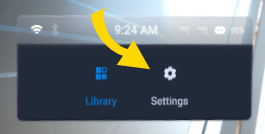
- From the library, select Settings.
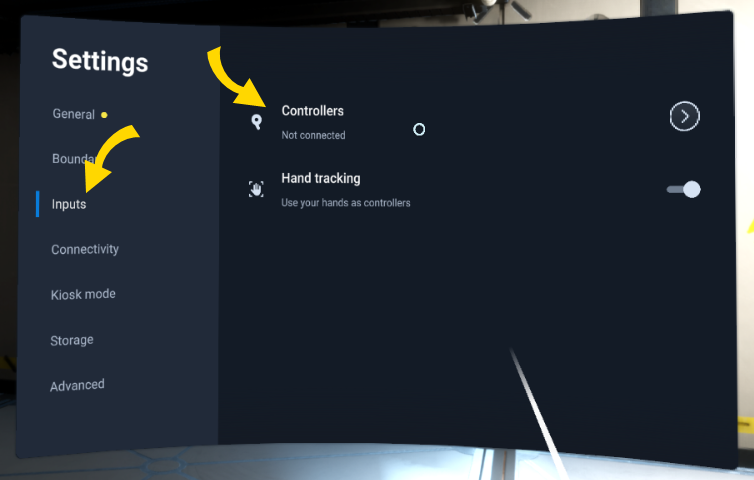
- Select Inputs, then Controllers.
- Firmware version is visible under the title of your controller.
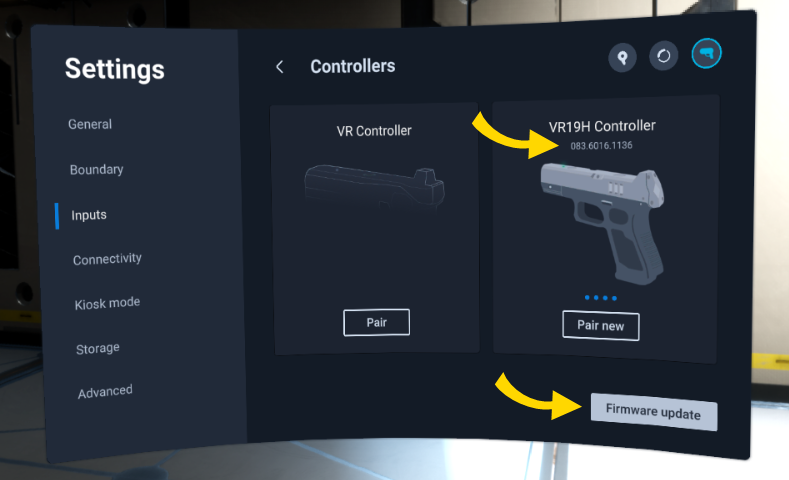
- If a firmware update is available, select Firmware update (shown above) and keep the headset and VR Controller powered on.
Care
The VR Controller is a sensitive piece of electronic equipment and should be handled with care. Avoid dropping the VR Controller and cease use if it becomes cracked.
Each agency should establish a maintenance and handling program that includes:
- Secure the VR Controller in a protective holster when not in use.
- Update the VR Controller's firmware when it is available.
Controller and water
Do not immerse the VR Controller in any liquids. Avoid exposing the VR Controller to excessive moisture.
The VR Controller is not a weatherproof device. Do not immerse the VR Controller in water or any other liquid. If a VR Controller has been submerged in liquid or exposed to a significant amount of moisture, immediately remove the battery pack, remove the controller from service, and contact Axon.


