Adjust the VR headset
When you wear the VR headset, it should feel snug yet comfortable. Furthermore, the visuals on your screen should be clear. If your headset does not meet this criteria, you can adjust the headset accordingly. There are four components to help you do this:
| Component | Description | Location |
|---|---|---|
| Hook and loop fastener | Set the height of the headset relative to your nose, forehead, and eye level. | Top of the headset |
| Adjustment knob |
Set the depth of the headset to ensure it is secure and snug around your head.
|
Back of the headset |
| Quick release button | Release the headband to take off or loosen the headset. This is useful if the headset is too tight and you need to adjust it. | Back of the headset on the bottom of the band |
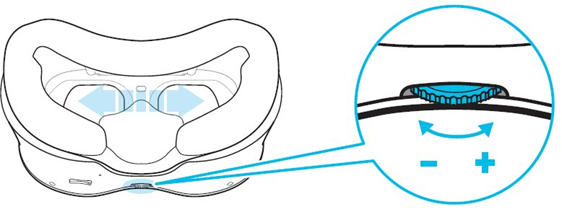
| Interpupillary distance (IPD) dial | Rotate clockwise or counter-clockwise to adjust the focus of the screen. This is useful if the screen appears blurry or doubled. | Below the VR lenses |
Put on the headset
The headset should feel snug yet comfortable.
If you have a ponytail or bun, consider loosening it slightly, and moving it to one side of the hook and loop fastener for increased comfort. Alternatively, wear your ponytail or bun at the lowest part of your head.
To put on the headset:
- Undo the hook and loop fastener at the top of the headset.
-
With one hand, press and hold the quick release button on the back of the headset.
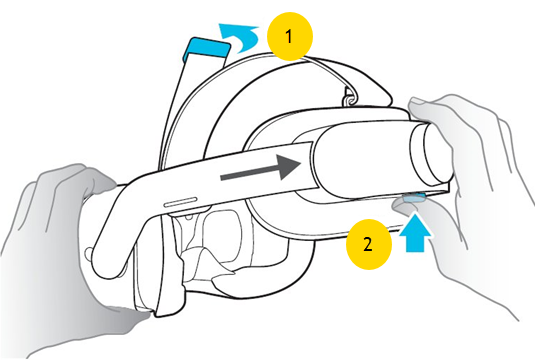
- With the other hand, extend the headset band to its widest setting.
- Place the headset over your head so it is positioned over your eyes. You can take your hand off the quick release button now.
-
Turn the adjustment knob to tighten the headset until snug.
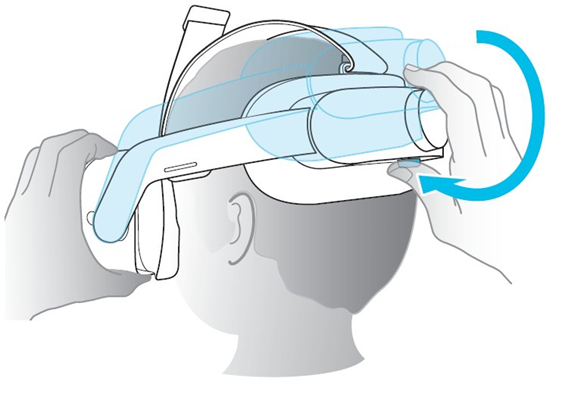
- Pull and secure the hook and loop fastener back over the headset.
Adjust the focus of the headset
When wearing the headset, ensure the text and visuals on the screen are clear. If the screen looks blurry or doubled, adjust the focus on the headset until it's clear. To do this, rotate the IPD dial below the VR lenses clockwise or counter-clockwise until the visuals sharpen.
Adjust headset volume
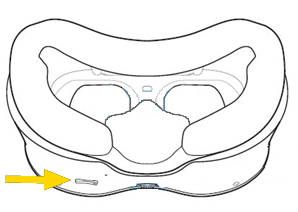
You can adjust the volume by pressing the left and right volume buttons on the bottom of the headset.
Remove the headset
To remove the headset:
- (Optional) Undo the hook and loop fastener at the top of the headset.
- With one hand, press and hold the quick release button on the back of the headset.
- With the other hand, extend the headset band to its widest setting.
- Pull the headset over your head.


