Install the headset battery
When your VR headset arrives, the battery will be separate from the headset in the packaging.
To install the headset battery:
- Remove the battery from the packaging.
- Hold the headset in your hands with the VR lenses facing towards you.
- Locate the magnetic padding along the back of the headset.
- Remove the padding by pulling gently on the fabric tag to reveal the battery slot.
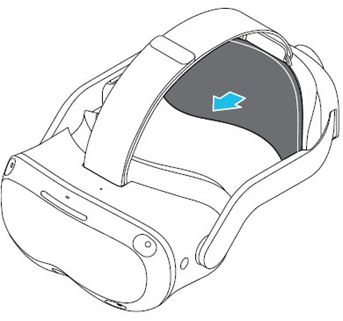
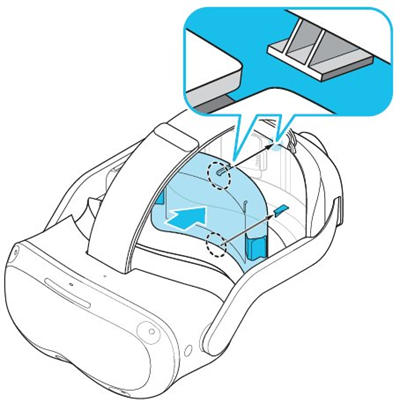
- Align the battery in the battery slot.
- Push the battery into the slot firmly until both sides click into place.
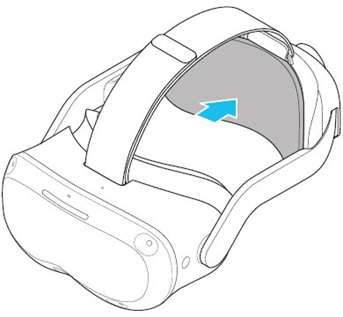
- Reattach the magnetic padding. If the padding doesn't reattach seamlessly, try rotating it so the fabric tag faces the opposite side.
Hot swap headset battery
When you need to replace a headset battery during a training session, you can do so without turning off the headset. Here's what you'll need:
- USB-C to USB-C power cord (typically used for charging cell phones)
- Maximum 50-60W AC to USB-C outlet adaptor
Note
You cannot use a USB-A to USB-C cord or USB-C Y cable.
Replace headset battery in sleep mode
Before you begin replacing the headset batter, read the following information carefully to prevent automatic power-off:
- After you take off the headset (in step 1) insert the USB-C into the headset within 10-15 seconds
- After the headset battery is replaced, remove the USB-C cord from the headset and put the headset back on within 10-15 seconds
To replace the headset battery while the headset is in sleep mode:
- Take off the headset. This will automatically put it in sleep mode.
- Immediately connect a USB-C into the headset USB-C port.
- Locate the magnetic padding along the back of the headset.
- Remove the padding by pulling gently on the fabric tag to reveal the battery slot.
- Remove the old battery.
- Push the new battery into the slot firmly until both sides click into place.
- Reattach the magnetic padding. If the padding doesn't reattach seamlessly, try rotating it so the fabric tag faces the opposite side.
- Remove the USB-C from the headset.
- Put the headset back on.
- Wake up the headset by tapping the left temple button.
- Resume training.


