Axon Training Pod
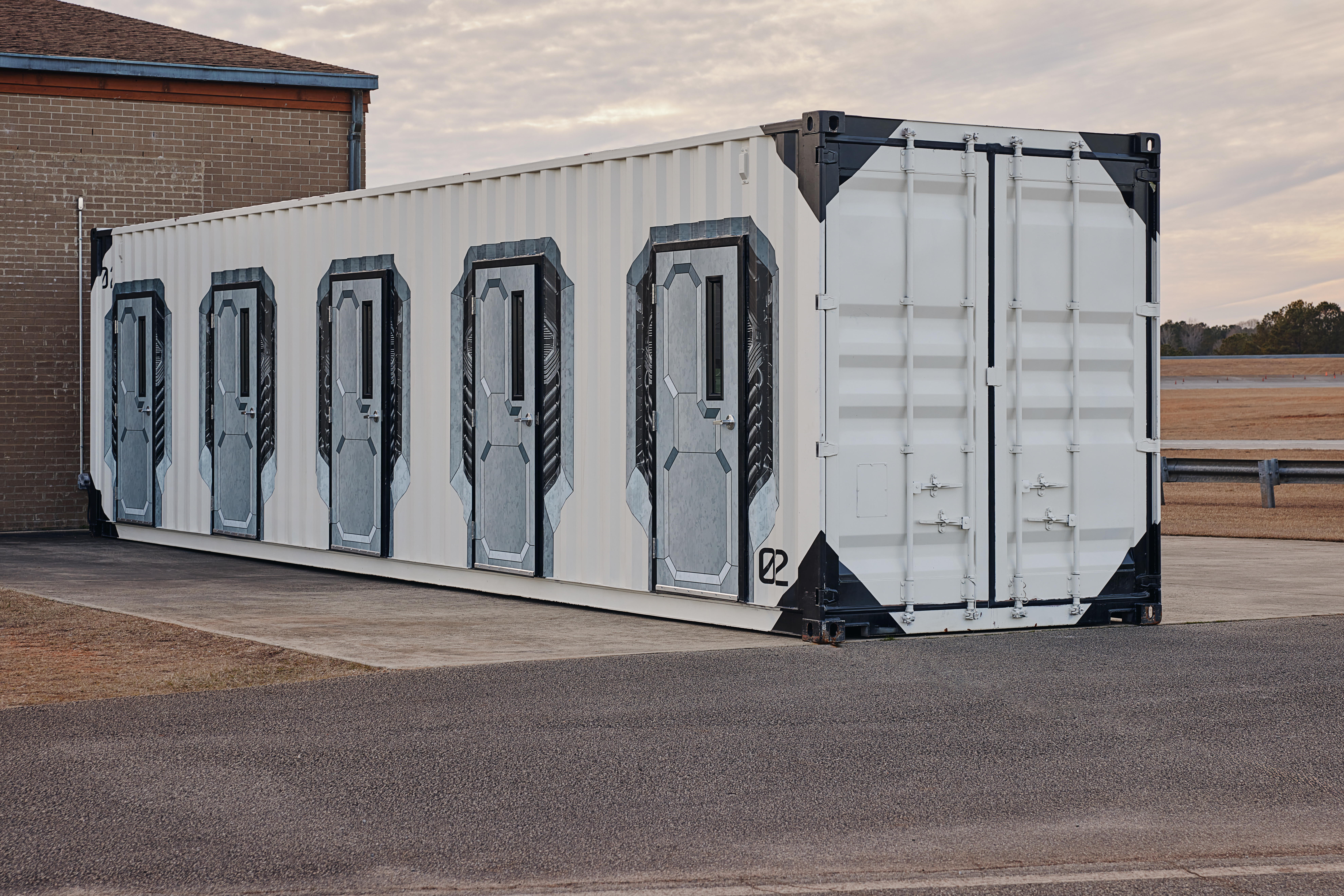
The Axon Training Pod (ATP) is a cost-effective solution tailored for law enforcement agencies and training academies facing space constraints. By converting a standard shipping container into a flexible, climate-controlled VR training environment with five VR training bays and a control room, the ATP enables frequent and effective use-of-force and de-escalation training sessions. This innovative approach eliminates the need for extensive facility expansions, streamlining the implementation process and reducing associated costs, while enhancing officer proficiency and safety.
To request an ATP, submit an inquiry here.
Requirements
There are several site and delivery requirements for the Axon Training Pod (ATP) that must be met to ensure a successful and efficient setup and installation. This articles describes those requirements.
Setup space
- The ATP occupies approximately six standard parking spots (dimensions: 40’ L x 9.5’ H x 8’ W).
- Keep at least 3 feet of space for HVAC (heating, ventilation, and air conditioning) access.
- Keep at least 6 feet of space for ATP swing doors to open.
- The setup requires approximately 100 linear feet of space for the delivery truck to back in and place the ATP in the appropriate spot.
Site accessibility
The site must be accessible by a semi-truck for delivery and setup of the ATP.
Drop-off and setup locations
- Identify 2–3 potential ATP drop-off and setup spots at the location.
- When selecting placement spots, consider any flooding zones, drainage areas, and severe weather concerns during storms.
Maximum weight
The drop-off and setup location must be able to support a weight of 11,000 lbs from the ATP.
Power
- A 50 Amp RV Outlet - NEMA 14-50R 240VAC or a 6-7 kW generator with a 50-amp single-phase outlet is required.
- Identify the location and path for the power cable to run for the trough cover (not included), such as walkways, parking lots, and grassy areas.
Internet connectivity options
Here is a tip for each internet connectivity option you can choose from:
- LTE: Identify the best cellular carrier for the location (AT&T or Verizon).
- Wi-Fi as WAN: Ensure the ATP is within reach and has a good connection to the outside access point (AP).
Regular servicing on the Axon Training Pod (ATP) will help prevent issues and maintain an optimal training environment.
Overview of equipment
The ATP is supplied with a variety of equipment. Refer to all manufacturers' documentation for troubleshooting.
- Intercom system: Valet System One Mini
- HVAC (heating, ventilation, and air conditioning): LG Multi V Four-way 2' x 2' Ceiling Cassette
- Monitors: Samsung
- Lockers: LockUp
- Door Keypads: Yale Assure Lever
Remember to turn off all equipment when the ATP is not in use.
Workflow
- Plug in the ATP. (First-time use only)
- Power on the ATP. (First-time use only)
- Open the ATP.
- Switch on the lights from the control center. This will also turn on lights in all training bays.
- Set the thermostat in each training bay.
- Use the lockers to store personal items and live weapons.
- Start training.
- Power on the monitors in the control center to watch the live feed.
- After training, turn off the thermostat in each training bay.
- Charge devices as needed.
- Power off the monitors in the control center.
- Flip off the switch in the control center to turn off all lights.
- Lock the ATP.
Plug in the ATP
A 50 Amp RV Outlet - NEMA 14-50R 240VAC or a 6-7 kW generator with a 50-amp single-phase outlet is required to connect the ATP. You can plug the power cable into either a compatible outlet or generator.
To plug in the ATP:
- Locate the power cable at the back of the ATP.
- Plug the power cable into a dedicated outlet or generator.
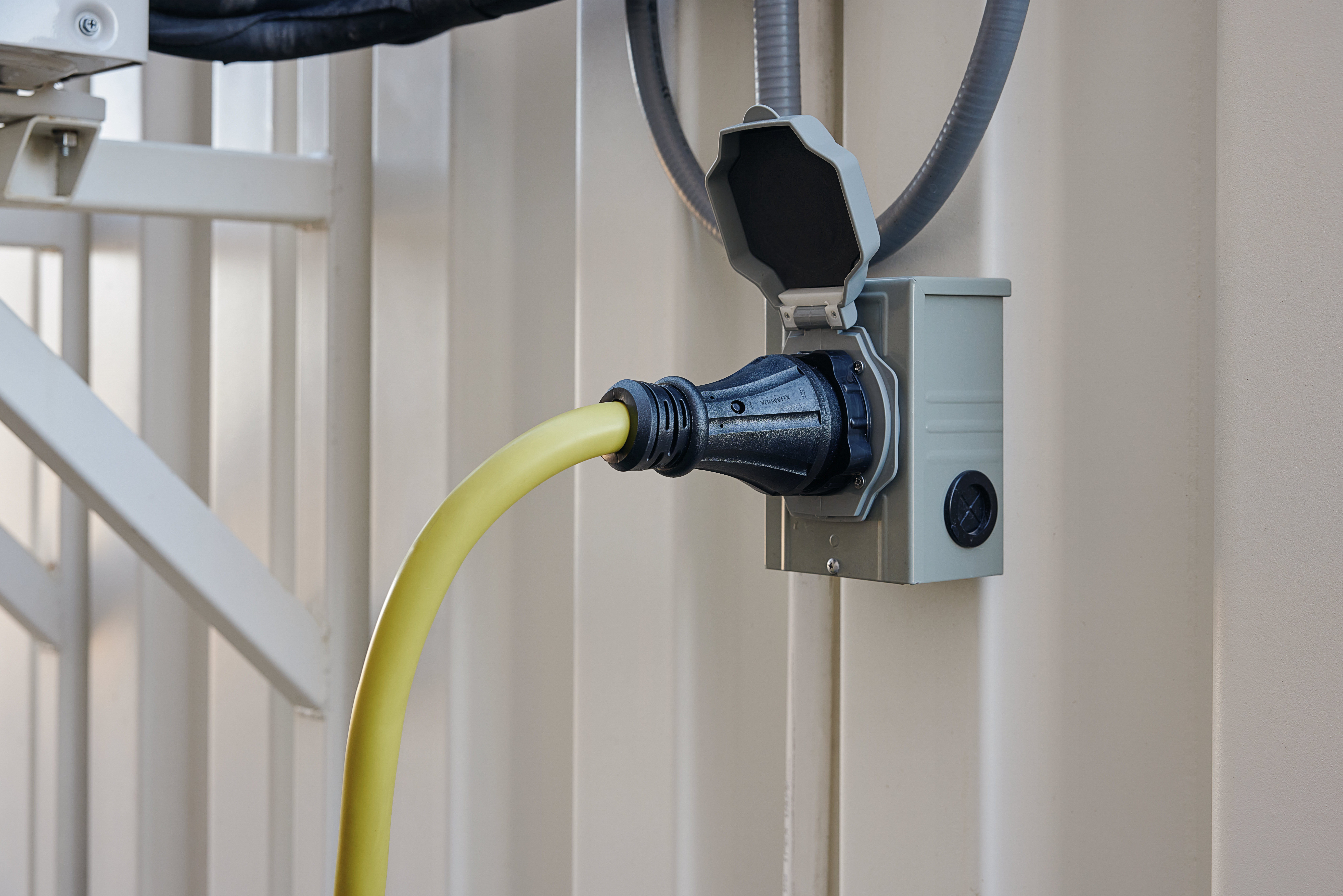
- Cover the entire power cable with a trough cover.
Power on the ATP
The fuse box includes breakers for the power, lights, and HVAC (heating, ventilation, and air conditioning).
Remember to always power off the ATP when not in use.
To power on the ATP:
- Ensure the ATP is plugged in.
- Locate the fuse box at the back of the ATP.
- Open the fuse box.
- Switch on all of the breakers to power on the ATP.
- Switch on the lights using the light switch located in the control center.
Open the ATP
You will receive 10 keys to the ATP. Each key will open up every door of the ATP. Remember to lock all of the doors when the ATP is not in use.
Switch on lights
The light switch in the control center manages all the lights in the ATP, including each training bay.
Manage the thermostat
The HVAC system is a LG Multi V Four-way 2' x 2' Ceiling Cassette. For more information, see the manufacturer's guide.
Each room is equipped with its own ceiling HVAC unit. Remember to turn off the HVAC system for each room when the ATP is not in use.
All thermostats must be set to the same mode (either Heat or Cool) for the system to function. However, individual temperatures can vary.
To turn on the HVAC system for a room:
- Press the Power button on the remote. You should hear the system turn on.
- The screen on the remote shows the set temperature.
- Press the Up and Down Temp arrows to adjust the temperature.
Use the lockers
There is a locker—made by LockUp—in each training bay. Use these lockers to store personal items and live weapons. All training rooms must be free of all firearms, TASER energy weapons, live TASER cartridges, and other weapons.
To lock the locker:
- Close the door.
- Press C.
- Enter any four digit code.
- Press the key button.
To unlock the locker:
- Press C.
- Enter the same four digit code.
- Press the key button.
- Open the door.
For more information, see the manufacturer's guide.
Turn on the monitors
There four monitors in the control center. These monitors will display a live feed of each training room.
To turn on the monitors, press the Power button located underneath each monitor.
Charge devices
- In the control center, use the charging docks to charge the VR Controller batteries.
- In the control center and each training bay, use the outlets to plug in and charge VR headsets.
- After charging, store all devices on the shelves located in each training bay.
Room layout
The ATP has five rooms: one control center and four training rooms. Each room has an assigned number on the door. The control center is located at the front of the ATP behind door marked 01, followed by the training rooms.
Use the intercom
Each room has an intercom system. The intercom system is a Valet System One Mini. For more information, see the manufacturer's guide.
You can use the intercom to communicate with people in different rooms. Each room has an assigned number—the control center is room number 1, followed by rooms 2 through 5. You'll need to know the room number of the room you want to reach. Room numbers are also displayed on the exterior doors.
To use the intercom system:
- Locate the intercom system on the wall.
- Enter the room number of the room you want to reach.
- Begin speaking.
- To adjust the volume, press the Left (volume down) or Right (volume up) buttons accordingly.
- To end the call, press Cancel.
Quick reference maintenance schedule
| Task | Frequency | Responsible Party | Tasks |
|---|---|---|---|
| Door & lock inspection | Monthly/quarterly | Agency staff |
|
| Rust & corrosion check | Monthly/quarterly | Agency staff | Identify and address rust promptly |
| Floor cleaning | Daily/weekly | Agency staff | Use mild detergent, avoid excess water |
| Full structural review | Annually | Agency staff |
|
| Basic HVAC cleaning | Monthly/quarterly | Agency staff | Wipe down vents and louvers with a soft cloth to remove dust |
| Professional HVAC cleaning | Annually | Professional HVAC tech |
|
| Breaker box & electrical check | Monthly/quarterly | Agency staff | Check wires, toggle breakers |
| Outlets & connections | Monthly/quarterly | Agency staff |
|
| VR gear cleaning | After each use/daily/weekly | Agency staff/trainers |
|
| VR firmware & scenario updates | Monthly/quarterly | Agency staff |
|
| Cradlepoint firmware updates | Monthly | Axon | Check NetCloud and apply updates |
| Antenna & cable inspection | Monthly/quarterly | Agency staff |
|
Container and structural maintenance
Maintaining the structural integrity of the ATP is essential for its long-term durability and safe operation. This includes regular inspections of doors, locks, floors, and the overall frame.
Inspection and cleaning
- Frequency: Monthly or quarterly
- Tasks:
- Inspect all door knobs and lock mechanisms for proper function
- Check hinges for rust or stiffness and lubricate as needed
- Examine weatherstripping to make sure it has a tight seal
Rust and corrosion check
- Frequency: Monthly or quarterly
- Tasks:
- Identify and address rust spots on the container exterior, doors, and edges
- Remove loose rust, apply rust-inhibiting primer and paint, and repair any structural damage
Flooring and interior finishes
- Frequency: Daily or weekly depending on usage volume
- Tasks:
- Sweep or vacuum debris regularly
- Mop with a mild, non-abrasive detergent
- Avoid excessive water exposure
Structural integrity
- Frequency: Annually
- Tasks:
- Conduct an annual inspection of the container frame for bending, warping, or dents
- Ensure the ATP remains level and doors align correctly
HVAC system
Proper HVAC (heating, ventilation, and air conditioning) maintenance ensures a stable indoor climate for training activities.
Basic cleaning
- Frequency: Monthly or quarterly depending on usage volume and environmental factors
- Task: Wipe down vents and louvers with a soft cloth to remove dust
Professional HVAC service
- Frequency: Annually
- Task: Have a certified technician check refrigerant levels, clean coils, inspect condensate drain lines, and confirm heating and cooling effectiveness
Electrical and power systems
Regular electrical maintenance helps prevent potential failures and hazards.
Breaker box and lighting
- Frequency: Monthly or quarterly
- Tasks:
- Inspect the breaker box for signs of charring, loose wires, or unusual odors
- Toggle each breaker off and on to ensure they function correctly
- Replace LED bulbs as necessary
Outlets and connections
- Frequency: Monthly or quarterly
- Tasks:
- Check the 50 Amp RV Outlet (NEMA 14-50R) for signs of wear or burn marks
- Secure all power cables to prevent tripping hazards and inspect extension cords for damage or loose connections
VR equipment and training hardware
Maintaining VR equipment helps make sure consistent and reliable training sessions.
Daily or weekly cleaning
- Disinfect the headset and VR Controllers with a diluted alcohol mixture (75%) (see Care & Cleaning of the Headset and Accessories for more information)
- Avoid submerging electronics in liquids
Monthly or quarterly updates
- Update headset firmware as needed
- Check for any broken pixels, lens scratches, or damaged controller triggers (see How do I create a return? for information on RMAing a VR device)
- Download and install new VR modules as needed
Some VR trainings require the headset to be connected to the internet for them to automatically download.
Firmware and software
- Frequency: Monthly or quarterly
- Tasks:
- Run OS and VR application updates on external PCs
- Ensure adequate storage space for scenarios (see Headset storage limitation for storage solutions)
- Verify that anti-virus and security software is up-to-date
Network and Cradlepoint (R1900 series)
Upkeep the network system for seamless training operations.
Software and firmware updates
- Frequency: Monthly
- Tasks:
- Sign in to NetCloud to check for firmware updates
- Apply updates remotely or on-site
- Verify LTE connectivity stability
Antenna and cable inspection
- Frequency: Monthly or quarterly
- Tasks:
- Inspect external antennas for damage and make sure secure connections
- Check cables for pinching, cracks, or water exposure
FAQ
How often does the ATP require maintenance?
Perform standard HVAC maintenance based on your location.
Are there security features for protecting equipment?
All doors are lockable by key.
Is there a backup power solution in case of power outages?
Although there is no backup power supply built in, the ATP can be run off a generator.
How is the ATP's power and internet connectivity managed and monitored remotely?
The ATP is monitored by the agency, while the router is managed by Axon.
Are there warranties that come with the ATP?
All equipment comes with a standard warranty. If you are experiencing issues with the ATP, contact our 24-hour tech support at 1-1-800-978-2737


