Requirements
Axon Evidence
Axon Fleet 3 requires the Axon Evidence platform to provide a cloud-connected in-car video solution for essential public service organizations. Depending on your need, Fleet 3 can provide video capture, secure digital media storage and management, and paperless tracking and reporting. This unique system is suitable for all sizes of agencies trying to streamline and become more economical.
Typically, the person most responsible for Axon Evidence at your agency owns the first administrator account created during initial implementation. They define security settings, create custom roles and permissions, add users, set evidence retention policies, set device permissions, and configure other administrative features of your Axon Evidence account.
Each active user requires a user license and appropriate permissions to sign into Fleet Dashboard and operate the Fleet 3 system.
Axon Signal Vehicle
The in-vehicle Axon Fleet Hub and Axon Signal Vehicle detect certain trigger events, such as turning on a vehicle’s light bar, and alert the connected Fleet camera and nearby Axon body cameras to start recording. With Axon Signal helping to record events, officers can focus on critical situations rather than on their cameras. The Axon Evidence administrator configures which Axon Signal, Fleet Hub, and weapon triggers will activate body-worn and vehicle cameras.
Axon Fleet 3 cameras are activated by their ethernet-connected Fleet Hub, while Axon body-worn cameras are activated by Axon Signal Vehicle. Agencies that don't want to activate body-worn cameras using Fleet trigger events do not need Axon Signal Vehicle.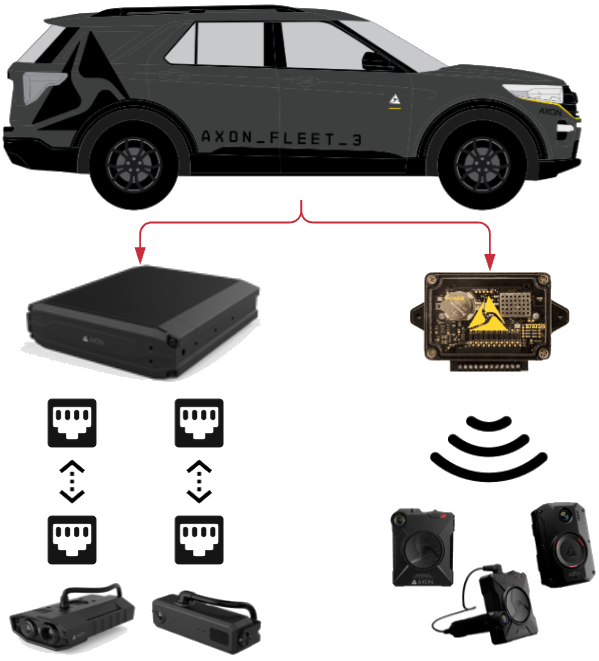
Additionally, certain TASER weapons equipped with a Signal Performance Power Magazine (SPPM) can trigger Axon body-worn and Fleet cameras to start recording. The system administrator can configure if the SPPM alerts cameras when the TASER is armed, when the trigger is pulled, and/or when the arc is energized.
Mobile Data Terminal/Computer (MDT/C)
Axon Fleet 3 uses the vehicle’s MDC to interface with the Fleet Hub through software that enables a verified user of the system to initiate and terminate recordings, review and tag videos, and modify user preferences.
System requirements
Axon Fleet Dashboard has the following minimum specifications for PC:
- Operating system – Windows 10 or later
- Processor – Intel Core i5-11th Gen or newer
- Memory – 8 GB RAM or more
- Storage – 10 GB of free space
- Display – 1024x768 or higher
- Network – 1 Gbps ethernet port or 1 Gbps USB3 ethernet adapter
While hardware with lower specs may still function, meeting these requirements will ensure the best possible experience with Axon Fleet Dashboard.
MDC alternatives
Without an MDC, the Axon Fleet 3 system may be configured to automatically upload evidence through the agency’s selected upload method at the end of each recording. However, users can't use Automatic License Plate Recognition (ALPR) without an MDC.
The Axon Fleet 3 system must be able to transfer data via WAN, otherwise firmware updates, product registration/synchronization, ALPR, system configuration and evidence upload will not occur.
Router/network
Axon Fleet 3 requires an ethernet connection to an in-vehicle mobile router for communications between the hub and Axon Evidence over LTE, Wi-Fi, or both. Axon does not provide LTE carrier service. Customers using an APN may require special configurations, including network firewall exemptions, to enable communication between the Fleet Hub and Axon Evidence.
Vehicle
The Axon Fleet 3 system is suitable for use in most emergency vehicles, including some electric vehicles, but excludes marine applications and motorcycles. All components of the system other the external antenna must be enclosed within the vehicle.
- Constant power voltage: 11.6 – 14.8 V, nominal 12 V
- Key ON voltage (Ignition Wire): 4 – 19.5 V, nominal 12 V
- Key OFF voltage: 30 mA
- Chassis ground: Impedance 0 – 0.25 Ω. Use dedicated ground bus bars or connect directly to the chassis.
- Do not use a floating ground.
- Do not use a ground path that may be compromised by vehicle shock and vibration.
- Do not share a ground path with UHF/VHF radios.
- Distance from system ground to high current load: >12 in. Examples of high current load: UHF/VHF radios or any device consuming more than 1 A.


