Axon Flex 2
The Axon Flex 2 is a camera system incorporating an audio and video recording device. This camera is designed for use in tough environmental conditions encountered in law enforcement, corrections, military, and security activities. The Axon Flex 2 camera is designed to record events for secure storage, retrieval, and analysis via Evidence.com services. The recorded events are transferred to your storage solution via the Axon Dock, or by using Evidence Sync software installed on a Windows computer.
The Axon Flex 2 camera has two operating modes designed to accommodate the needs of law enforcement, corrections, security, and the military. The default mode, BUFFERING mode, provides pre-event buffering to capture activities that occur prior to the user activating EVENT mode. In addition, the Axon View application enables playback of footage on a smart device for review prior to storing the data.
Downloads
User Guide
Axon Flex 2
Quick Start Guide
Axon Flex 2
Battery Guide
Body camera battery replacement
User Guide
Axon dock
Quick Start Guide
Axon dock
Reference Guide
Axon dock dimensions
Important safety and health information
Read, understand, and follow all warnings and instructions before using this product. The most up-to-date warnings and instructions are available at www.axon.com.
Axon Flex 2 features
The primary Axon Flex 2 components are the camera and controller.
Axon Flex 2 camera
The camera offers high quality video and low-light gathering capabilities. The camera is designed
to store at least 12 hours of video (and up to 70 hours based on the video setting). If the camera
is full (has reached its storage limit), the camera will not record over previous video but instead
stops recording. If notifications are turned on, the system will alert with 3 beeps and 3 vibrations
and the camera will not start recording when the memory is full.
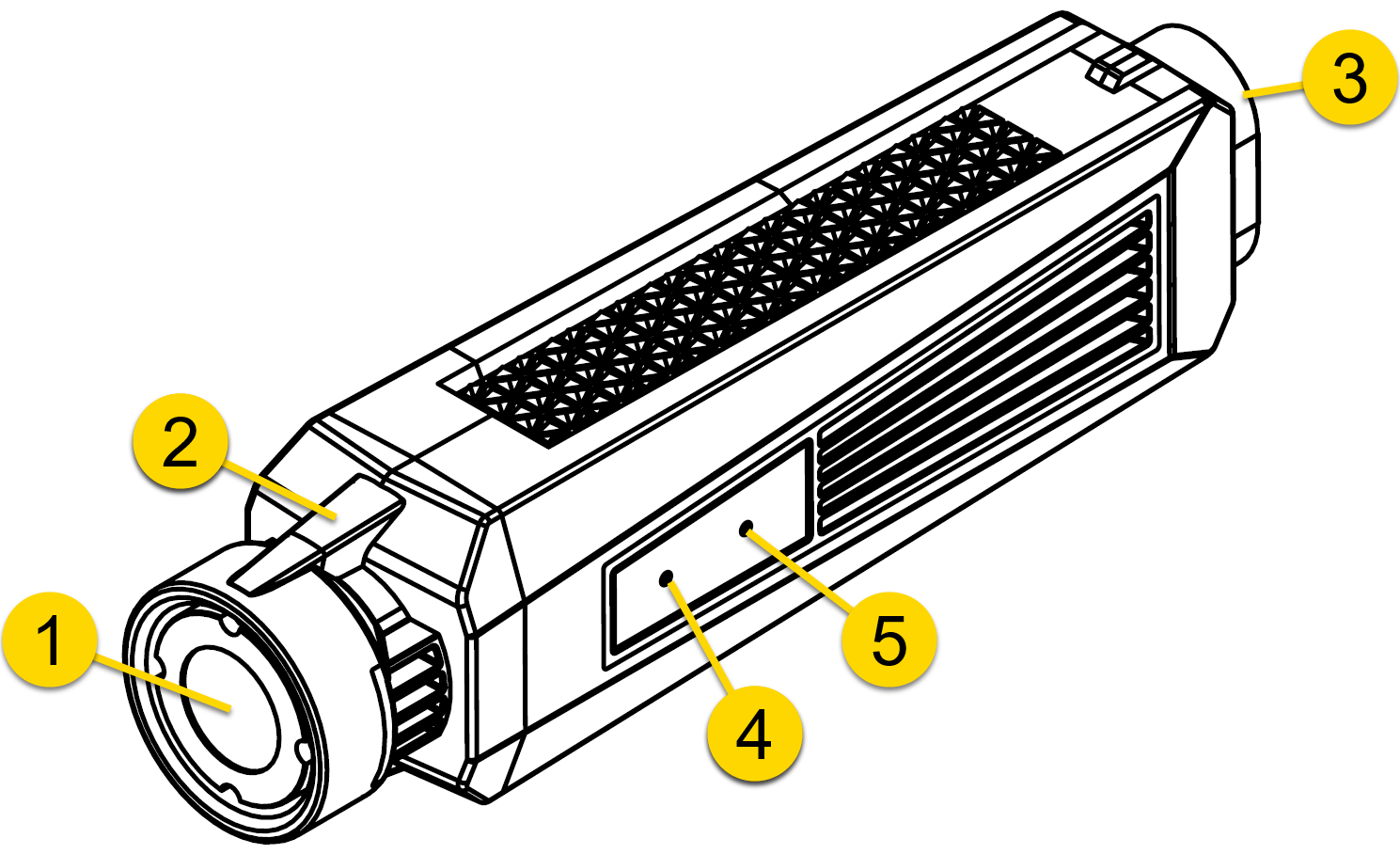
- Imager – This is the camera lens. Avoid touching the lens. For cleaning information, see Cleaning an Axon Flex 2 camera.
- LEDs – Illuminate when the camera is in the dock to signify status of uploads or firmware updates.
- USB Connector – Connects to a cable leading to the Axon Flex 2 controller.
- Microphone – Records ambient sound.
- Speaker – Issues alerts in the form of beeps.
Axon Flex 2 controller
The Axon Flex 2 camera includes physical controls to enable video and audio capture while providing visual, audible, and vibration notifications of the camera’s state of operation.
Note: You can turn off the controller LEDs if necessary. See Turning on or off camera lights.
Top view
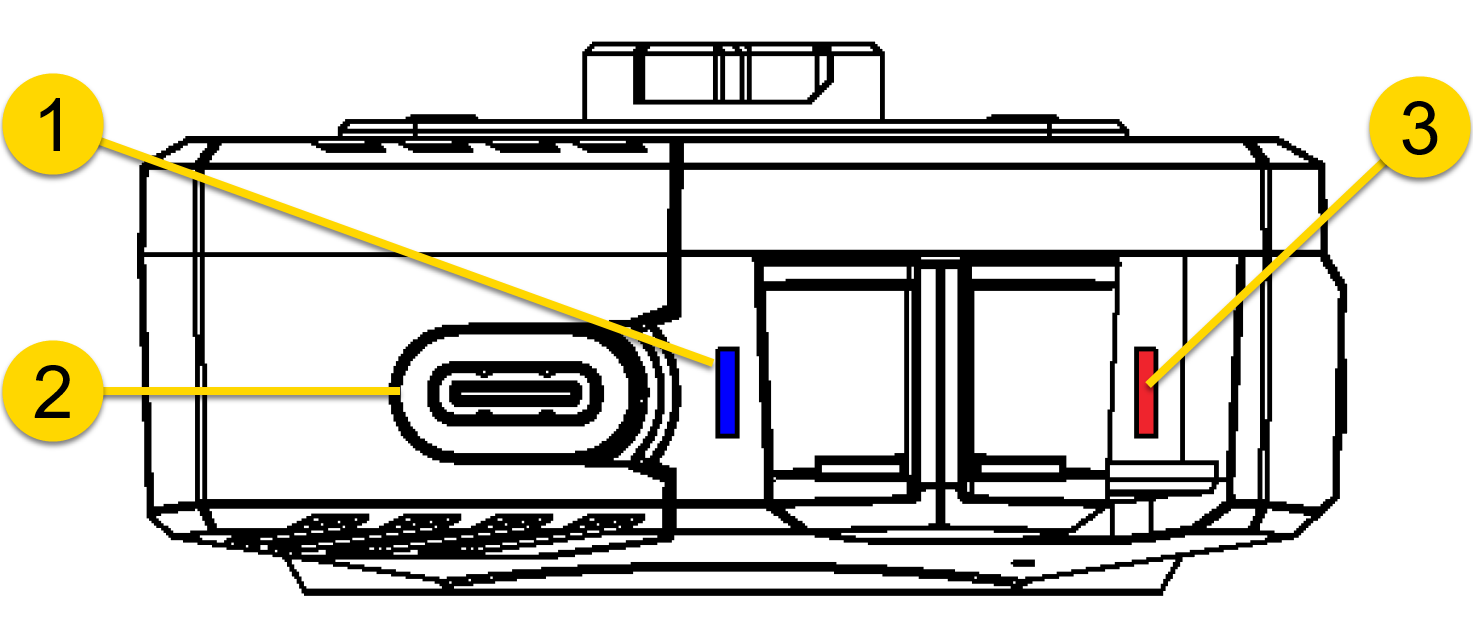
- Function LED
- Connection socket
- Operation LED
Front view
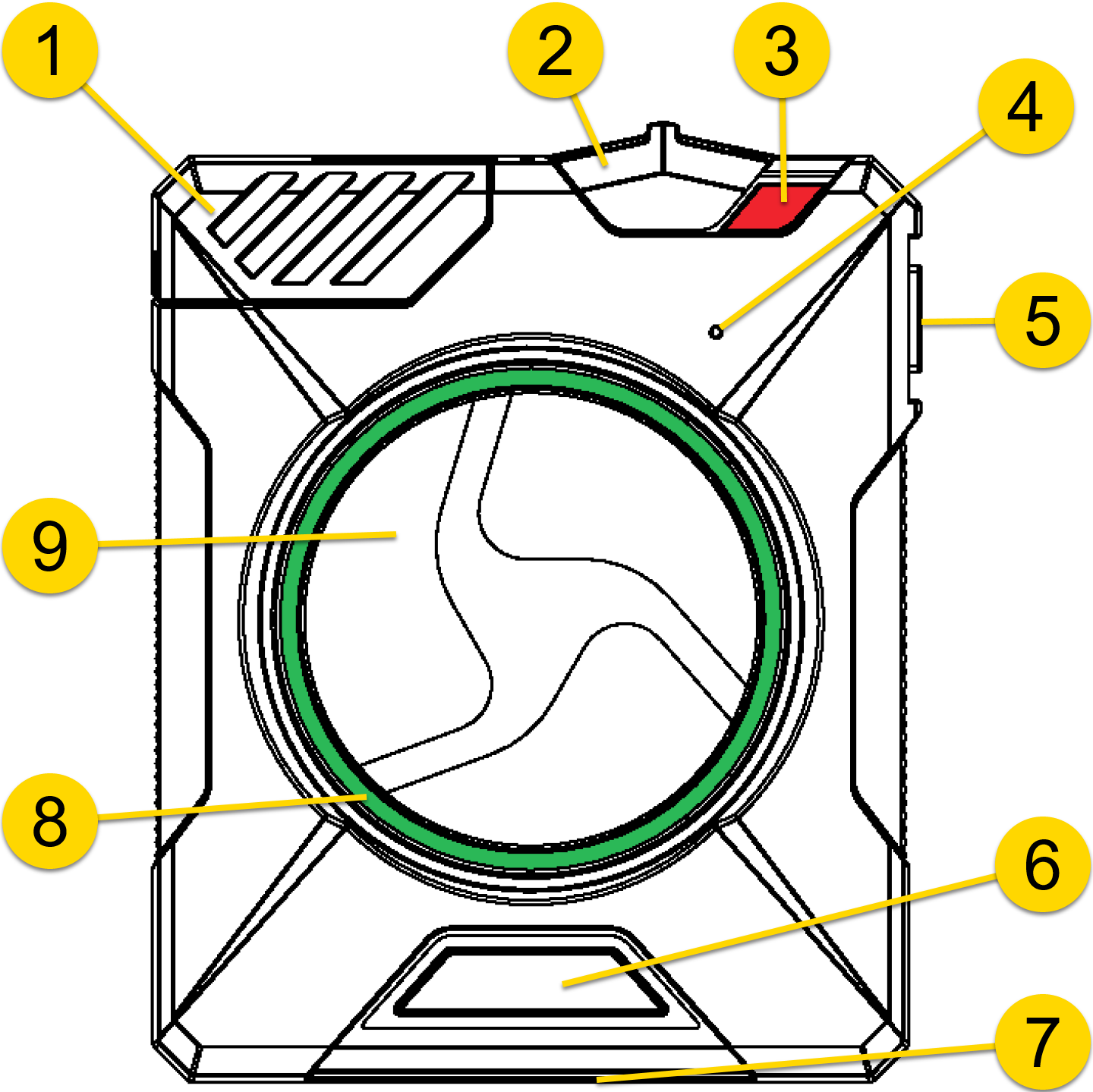
- Slide lock
- On/off switch
- On/off indicator
- Speaker
- Function button
- Battery status button
- Status LED (bottom of controller)
- Battery LED
- Event button
Operation LED
Shows the camera’s current operating mode.
| Operating Mode | Operation LED |
|---|---|
| EVENT | Blinking red |
| BUFFERING | Blinking green |
| Recovering interrupted video* | Blinking red |
| Booting up/powering down | Solid red |
| Error state** | Solid red |
| Cable disconnect | Blinking yellow |
| Pairing mode | Blinking green*** |
* When the Function LED is also blinking red.
** When the Function LED is solid red.
*** When the Function LED is blinking green.
Controller Function LED
Shows when certain functions are enabled.
| Function Enabled | Function LED |
|---|---|
| Mute | Blinking blue |
| Camera error* | Solid red |
| Pairing mode | Blinking green |
* Use the power switch to turn the camera off and on.
Controller Components
Connection Socket – Enables data transfer and recharging.
Slide Lock – Holds the cable to the controller.
On/Off Switch – Turns the camera power on or off.
On/Off Indicator – Red portion exposed when on; covered when off.
Speaker – Provides audio notifications.
Function Button – Used for pairing, muting, and adding markers.
EVENT Button – Double-press to start; hold 4 seconds to stop recording.
Battery Status Button – Lights the Battery LED to indicate remaining capacity.
Battery LED
Indicates remaining battery capacity.
| Battery Status | Battery LED |
|---|---|
| 40–100% | Green |
| 20–39% | Yellow |
| Less than 20% | Red |
Status LED
Displays device status when connected to an Axon Dock.
| Device Status | Status LED |
|---|---|
| Initial connection | Solid red |
| Awaiting upload | Solid yellow |
| Ready and fully charged | Solid green |
| Not assigned / error | Blinking red |
| Uploading | Blinking yellow |
| Firmware update / charging / memory full | Blinking red and yellow |
| Transfer error | Blinking green and yellow |
| Possible network error | Blinking red, yellow, green cycle |
| No communication | LED off |
Pressing buttons causes the Axon Flex 2 camera to emit audio alerts (beeps) to indicate system actions.


