View document evidence
View the contents of documents that are in PDF format.
PDF file size and system requirements for viewing
When viewing PDF files within Axon Evidence, be aware of the following size and system requirements:
File size limit
- Maximum file size for viewing: Up to 1.5 GB per PDF file.
System requirements
To successfully view PDF files, your system should meet the following criteria:
- Network speed: A minimum of 7 Mbps is required to ensure timely loading and interaction with documents.
- Request timeout: Requests will time out if not completed within 30 minutes.
Supported browsers
For optimal performance, use the latest version of one of the following browsers:
- Chrome version 60 or newer
- Firefox version 60 or newer
- Microsoft Edge version 79 or newer
- Safari version 11 or newer
Hardware requirements
- CPU: Intel Core i5 (or AMD/ARM equivalent) or higher
- RAM: At least 8 GB
Note: The ability to view PDF files effectively depends on the resources available on your local device at the time of access. Other concurrent tasks may consume system resources and affect download speeds.
PDF viewer controls
The following figure shows the controls that appear when you view a PDF document:
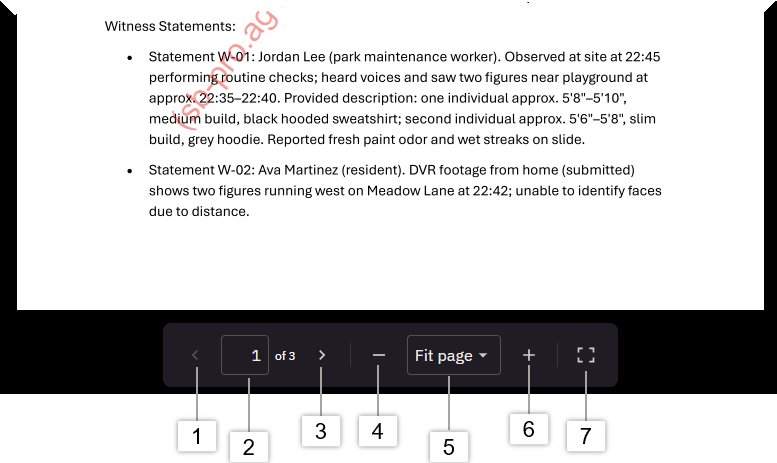
- Previous page
- Jump directly to a specific page number
- Next page
- Zoom out
- Fit page: Choose Fit page, Fit width, select a zoom level from 25% up to 1600%
- Full screen
PDF viewer actions
The following table describes the actions you can take with the PDF viewer:
| Action | Step |
| Previous page | Select the left arrow or press the left arrow key. |
| Page number box | Enter a page number in the box and press Enter to jump directly to that page. |
| Next page | Select the right arrow or press the right arrow key. |
| Zoom out | Select the minus (–) button to decrease the zoom level. |
| Zoom in | Select the plus (+) button to increase the zoom level. |
| fit page, fit width, and zoom level | Use the drop-down to fit the page, fit the width, or choose a zoom level from 25% to 1600%. |
| Full screen | To enter full-screen mode, select the Full screen button. To exit, press the ESC key. |
| View comments | Place your cursor over notes and highlighted text to view comments. |
| Links | Open external links and use internal links, such as table of contents links, to navigate the PDF. |


