Default sharing recipients
The option to set default sharing recipients in Axon Justice allows administrators to designate a default user or group for streamlined case sharing with partner agencies. Setting default recipients helps to reduce potential errors when information is transferred between agencies.
Watch this video to learn more about default sharing recipients.
Set a Default Sharing Recipient
Considerations when choosing a default sharing recipient
Before you set a default sharing recipient, it's important to understand their role and the necessary permissions they should have. Here are some key points to consider:
- Active user or group: The default sharing recipient should be an active user or group within your organization. Inactive users or groups cannot receive shared cases or evidence.
- Necessary permissions: The recipient should have permission to view, manage, and distribute the shared cases and evidence. This includes access to specific cases, the ability to download evidence, and permissions to share the information with other users or groups.
- Responsibilities: Ensure the selected default sharing recipient at the partner agency is someone who can efficiently manage and triage new cases. They should also be informed and prepared to receive case shares, understanding that this role involves regular engagement with incoming information.
How to set a default sharing recipient
Watch this video to learn how to configure default sharing recipients.
- Sign into your Axon Justice account.
- Select Admin, and then under Agency Settings, select Partner Agencies.
- On the My Agency Can Receive From tab, select Set recipient.
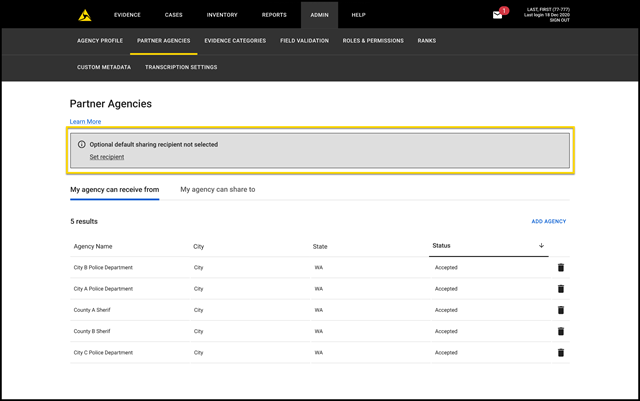
- On the Default Sharing pane, select the down arrow in the User or Group box, and then select a default sharing recipient from the list.
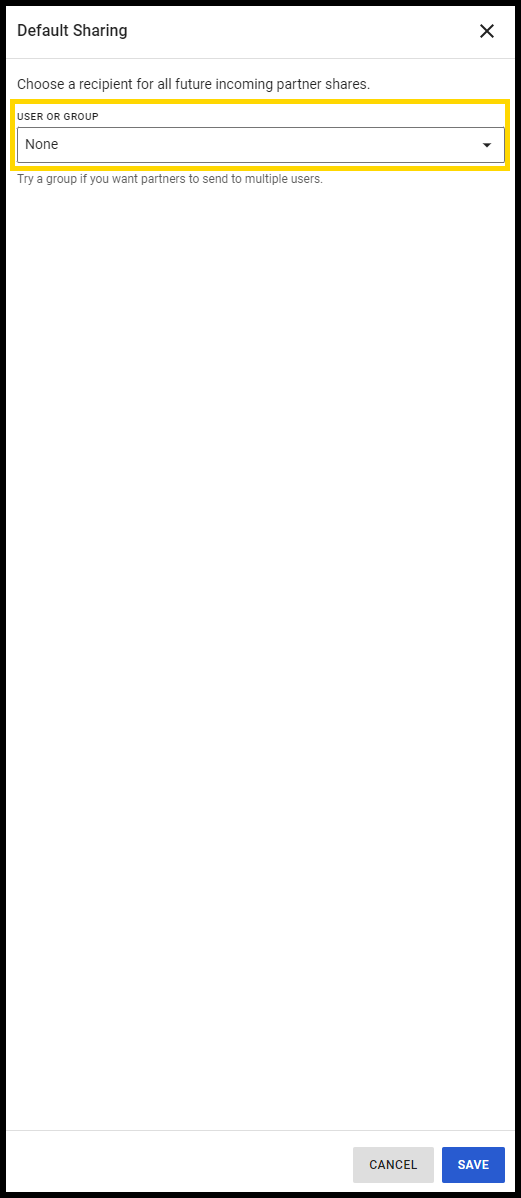
- Select Save.
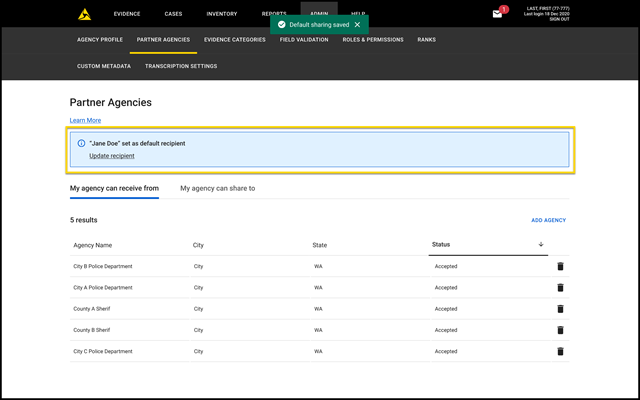
Update Default Sharing Recipients
- From the Admin menu, under Agency Settings, select Partner Agencies.
- Select the My Agency Can Send To tab, and then select Update recipient.
- On the Default Sharing pane, select the down arrow in the User or Group box, and then select a new default sharing recipient from the list.
- Select Save.
Understand Partner Agency Interactions
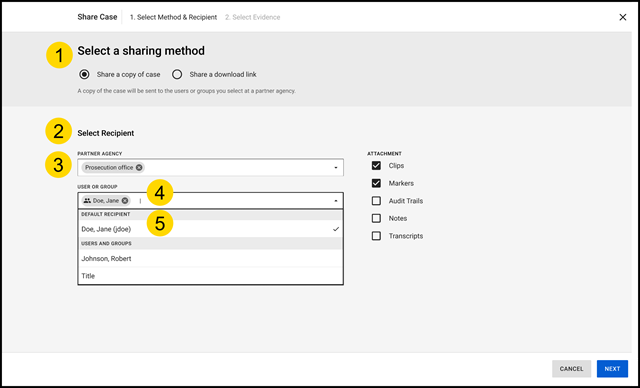
- Select a sharing method: (Only available for Share a copy of case) Upon choosing this method, there is an option to select the partner agency.
- Partner Agency: Select a partner agency to choose which agency is being shared to. The system automatically displays the default sharing recipients designated for that agency.
- User or Group: (Visible only if an administrator has set a default sharing recipient) Displays the default sharing user or group automatically, if one has been selected.
- Change the recipient or remove selections: Select Change recipient to override the default sharing setting. The **X** allows you to remove partners, users, or groups from sharing, regardless of their default recipient status. It also allows for the selection of a different recipient.
- View the default sharing recipient: In the User or Group box, the default sharing recipient is always shown at the top, followed by other users and groups that are being shared to.
Notifications Overview
You will receive notifications in the following scenarios:
- A default sharing recipient is inactive.
- A default sharing recipient is a group without any active users.
- A default sharing recipient is a group without external access permission.
View and respond to notifications
Administrators will be alerted through both an email notification and on-screen alerts.
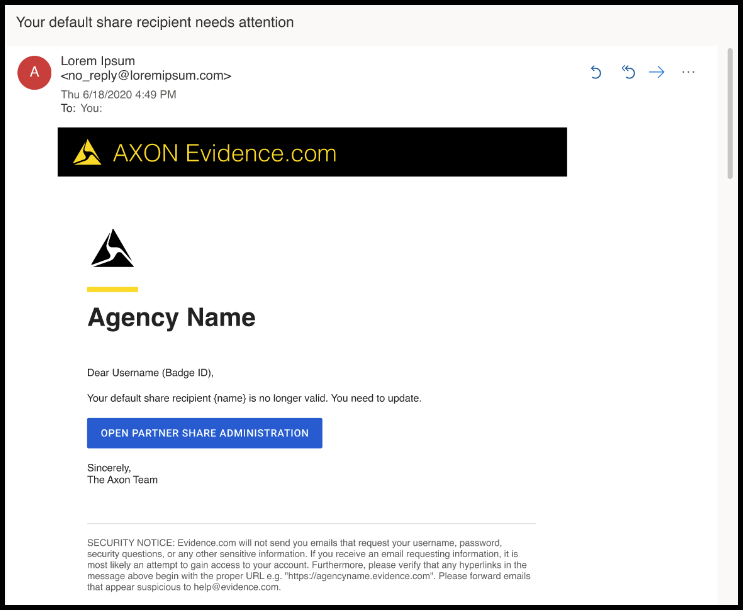
- Email notification: An email will briefly describe the issue and include a button that will take you directly to the Partner Agencies page where you can select a new default sharing recipient.
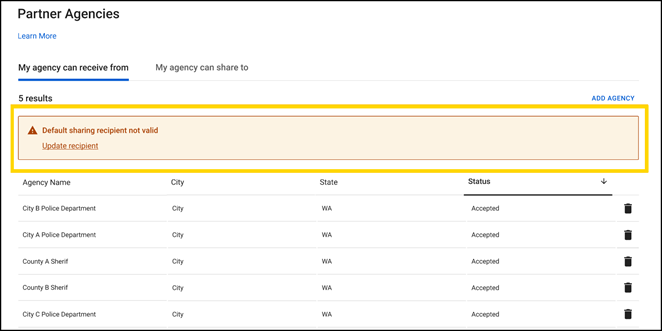
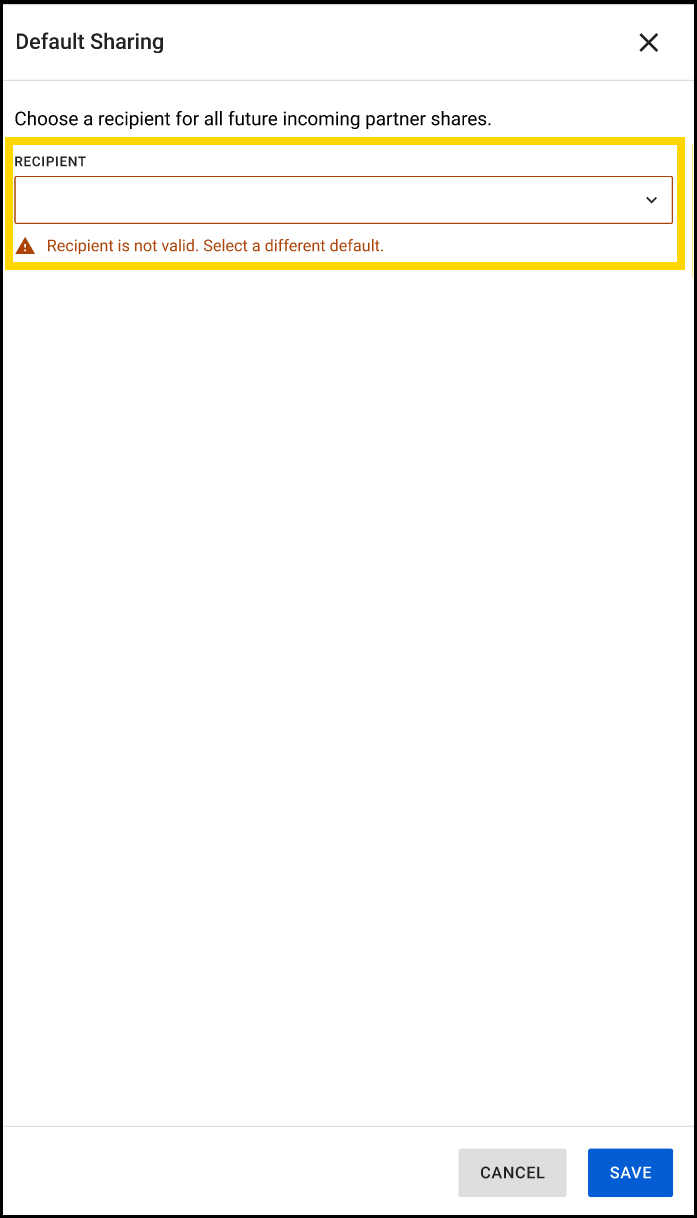
- On-screen notifications: Both the Partner Agencies page and the Default Sharing panel will display an alert that the default sharing recipient is not valid.
Frequently Asked Questions (FAQ)
Who can set a default sharing recipient?
Partner agency administrators can designate a default user or group for streamlined case sharing with partner agencies.
How many default sharing recipients can I set?
You can set one default sharing recipient per partner agency. If you wish to involve multiple users in receiving shared cases, consider assigning a group as the default recipient.
Who is the owner of the case when it is shared?
Initially, the designated default sharing user becomes the owner of the case. However, ownership can be changed within the destination case.
What happens when a default sharing user for an agency leaves the organization?
When the default sharing recipient leaves the organization and becomes inactive, administrators will receive a notification to alert them of the status change.
How will we know if there is an issue with a default recipient?
Administrators will be alerted through both an email notification and on-screen alerts within the Partner Agencies page and the Default Sharing pane.
What happens if one person is removed from the default recipient group?
If a person is removed from a group designated as the default recipient, as long as the group still contains at least one active user, sharing will proceed without disruption. If all users are removed, rendering a group inactive, administrators will receive an email notification prompting them to select a new default sharing recipient.
What happens if all individuals in a default group are deactivated?
If all members of a default sharing recipient group are deactivated, the group becomes inactive and is unable to receive shared cases. Administrators will receive an email notification and on-screen alerts to update the default sharing recipient.
Can a default group lose share permissions after it is set as the default?
Yes, if a group loses sharing permissions after being set as the default, administrators will receive an email notification. Immediate action is needed to either reinstate the group’s permissions or select a new default sharing recipient.


