Get to know your camera
Button mapping
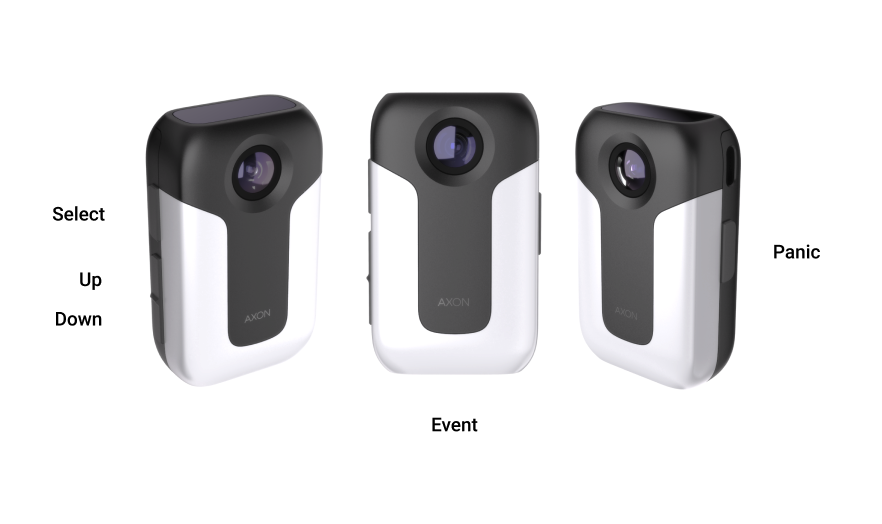
Button actions
There are several buttons and features that perform as described below.
| Action | Button Presses |
|---|---|
| Menus | Hold Select and Panic for 5 seconds |
| Pairing | Press Event and Select simultaneously |
| Power off | Hold Select and Panic for 5 seconds, navigate down to power off withVolume Down and press Select |
| Power on | Hold Vol Down until short vibration, then release |
| Panic | Double press Panic |
| Recording start | Double pressEvent |
| Recording stop | Hold Event for three seconds |
| Privacy mode, enter | Hold Select and Panic for 5 seconds, navigate down to privacy mode with Volume Down and press Select |
| Privacy mode, exit | Press Event or Select and Panic together for 3 seconds |
| Stealth mode, enter | Press Volume Down for three seconds |
| Stealth mode, exit | Press Volume Down for three seconds |
| Volume, speaker | Press Volume Up or Volume Down |
| Add marker or Smart Capture | Press Select |
| Interact with Translation assistant | Long hold Select |
| Interact with Axon assistant | Double press Select |
| Launch menu | Hold Select and Panic for 5 seconds* |
| Mute while recording | Long press Volume Up |
| Move to next screen | Tap Display |
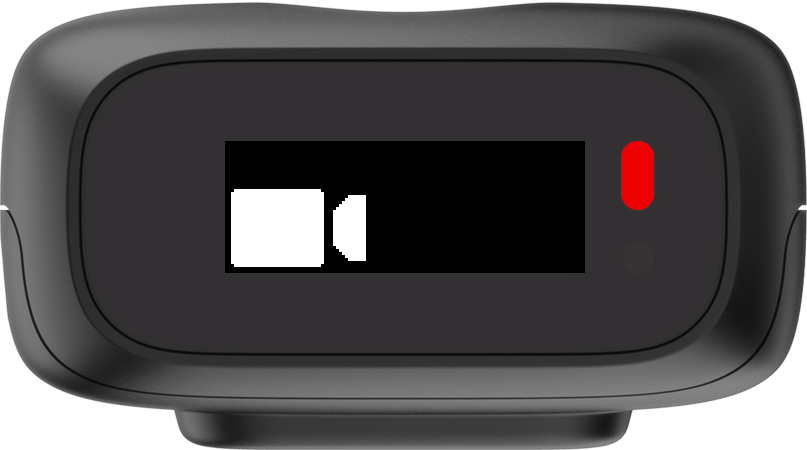
Display
The top screen of the Body Mini is an OLED display with a resolution of 120x44.
You can find further information on mounting options, including demonstration videos, at Body Camera Mounting Options.


