June 2025
The schedule for the June 2025 release is as follows:
- Customers in the Enterprise region (.ent.evidence.com), Canada (ca.evidence.com), the Netherlands, new European region (.eur.evidence.com), and European legacy region (.eu.evidence.com)regions receive on June 24, 2025.
- Customers in U.S. Federal (.evidence.com) and U.S. law enforcement receive on June 25, 2025.
- Customers in Australia and New Zealand (au.evidence.com), South America (.la.evidence.com), and the United Kingdom receive on July 1, 2025.
For information on the update schedule times for your region, refer to the Axon Evidence Maintenance Schedule on the Axon website.
We don’t expect any downtime during this update.
Additional help documentation for the products included in these release notes is located at axon.com/help.
Download this month's release notesCore platform updates
Security settings redesign
With the June release, the Security Settings under the Axon Evidence Admin tab will have a new look, with a new tile layout and clearer sections for easier navigation.
Improvement | Admin | Federal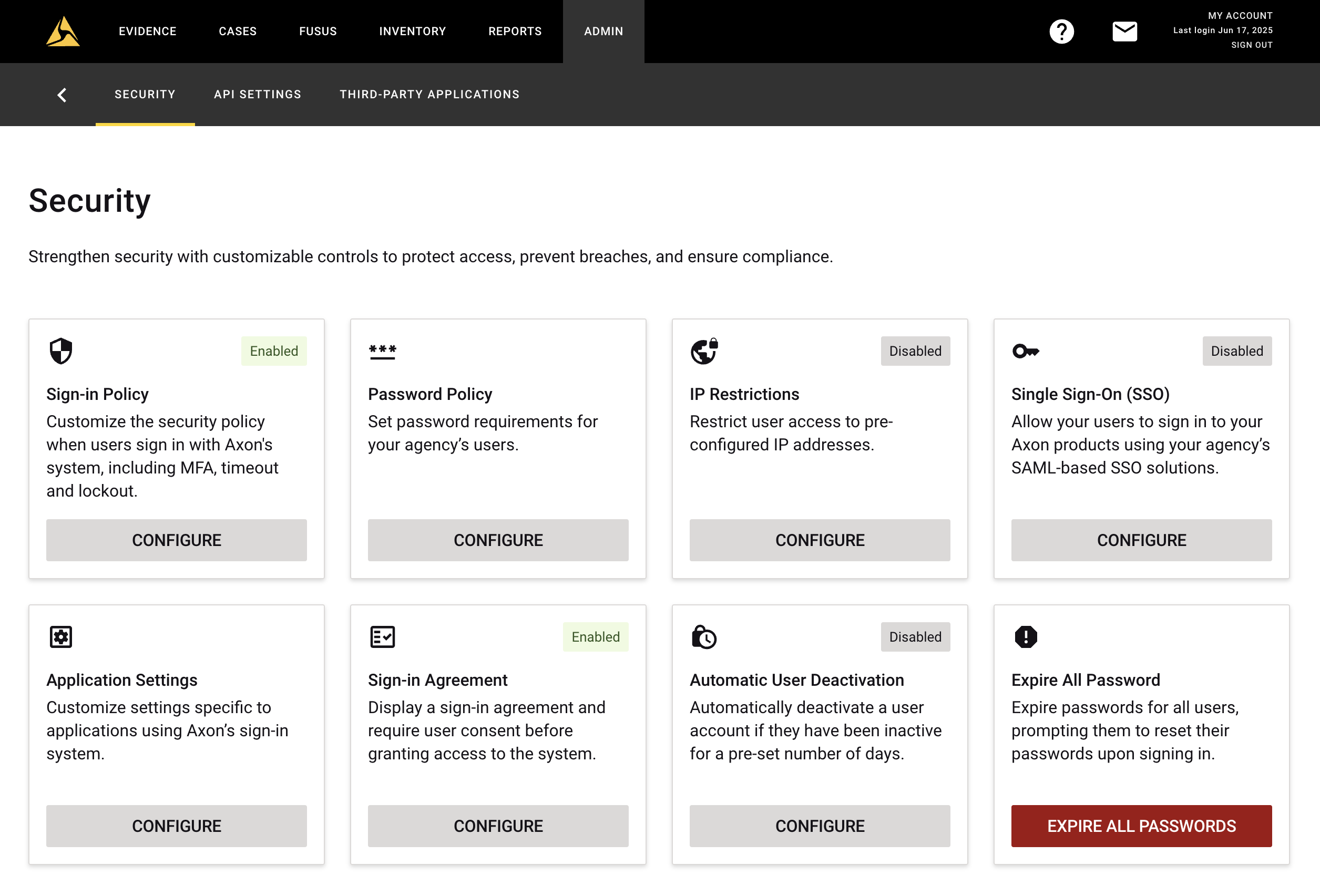
Partner API updates
The Axon Evidence Partner API Guide has been updated with the changes to the Partner API. You can view the API Guide at https://developers.axon.com. If you are unable to access the API Guide site, see Accessing the Axon Developer Community.
The following changes are part of the Axon Partner API for June:
- New permissions for Community Request endpoints - on the API Client registration page, you’ll find a section for Community Request with two new permissions: Create Invite (required for the Create Incident Report request) and Edit Portal (required for the Update Incident Report request).
AI-powered features
Features including the AI Era Plan tag (AI Era plan) use artificial intelligence to provide insights, recommendations, or analysis based on available data and user inputs. These outputs may include inaccuracies, limitations, or outdated information. These tools are designed to support—not replace—professional judgment, legal interpretation, and human oversight. Users are responsible for carefully reviewing and verifying AI-powered content before acting on it. Axon continually works to enhance AI accuracy, mitigate bias, and uphold ethical standards. Learn more at Axon AI.
Looking for what's next? See the Coming Soon section for AI-powered features planned for future releases.
Axon Evidence
Axon Auto-Transcribe
New transcription languages
New beta transcription languages are available, including Bulgarian, Norwegian, and Danish. Learn more at Language support.
Axon Community Request
Community Request captions
Administrators can configure portals to allow or prohibit community submitted captions. Captions allow the community member to provide a free text response with each file uploaded. The captions are stored with the evidence and available in the evidence and portal audit trails when sharing. For more information, see What Community Members See and General settings Axon Community Request.
Resolved issues
- We made a fix when some evidence uploaded from Android Devices using various versions of Google Chrome provided recorded on dates in 1899, 1900, 1901. When this occurs the user will see the recorded on date displayed as a blank value and must be manually updated. Recorded on date does not have an impact to retention of Community Request evidence.
- We corrected a bug when a user input '983' as an area code. We updated the product to support new area codes across the US.
Draft One
Draft One usage report
You can now generate a Draft One usage report from the Reports panel in Axon Evidence to see how often Draft One is being used by your agency.
Narrate more details
Now, after selecting evidence and generating an initial draft, you can select Narrate More Details to provide additional information that Draft One can incorporate into a second version of the draft narrative. After viewing the new version, you can provide additional narration to incorporate into another version. You can repeat this process as many times as desired.
Single acknowledgment signoff
Now, once you copy a draft narrative and sign the acknowledgment statement, you will not be asked to sign it again, even if you make edits or copy additional times. The initial signature of the acknowledgment statement will still be tracked in audit logs.
Policy Chat
Feedback on responses
Starting June 25, users will be able to share feedback on responses that were not helpful by selecting No to the “Was this helpful” message after each response.
Redaction
Notebook redaction
Beginning June 30, you can now redact notebooks. This process checks the video for physical notebooks or notepads that an officer might write in while at a scene. This also includes things like vehicle registration or other paper items. For more information, see Using Redaction Assistant.
Reporting
Resolved issues
- We fixed a bug related to downloading previous reports that impacted EU1 customers only. No data or report was lost. During the duration of the bug, users could simply rerun the report.
Third-Party Video Support
This update includes the following improvements:
- Improved handling of files with truncated frames caused by interrupted uploads or downloads.
- Added support for xpa_PLCO aceformat to process a new variation of .xpa files, support for exe_mirage aceformat to handle legacy Eclipse Nubix DVR files, and support for older Aira video formats.
- Enhanced parsing for .mp4 versions of Panasonic video files.
- Improved decoding and stability for HEVC/H.264 ExacqVision video formats.
- Improved compatibility with .n3r files for more consistent playback and processing.
If you encounter an unsupported format, contact [email protected].
Mobile
Axon App
Updated version of the Axon app required
For feature improvements, you must update the Axon app to Android version 1.1.0 or iOS version 1.3.0. Older app versions will no longer be supported and will display a warning when opened. See Keep your Axon apps up to date to learn more.
Multi-cam tagging
This feature uses signals from multiple cameras to relate video evidence to evidence from other officers that has already been tagged, saving time and making easier to get evidence properly categorized. Officers will be able to review the suggested multi-cam evidence and verify if it is related to the existing evidence.
Transcript Keyword Search
Transcript Keyword Search is now available in the Axon app for both iOS and Android. This feature requires customers to have purchased Unlimited Auto-Transcribe add-on plan and requires users to have the “Search across Transcripts” permission enabled. See Mobile search overview - Axon app and Keyword search across transcripts overview - Axon Auto-Transcribe to learn more.
Axon Capture
Updated version of Axon Capture required
For feature improvements, you must update Axon Capture to Android version 5.16.0 or iOS version 5.15.0. Older app versions will no longer be supported and will display a warning when opened. See Keep your Axon apps up to date for more information.
Axon View
Updated version of Axon View required
For feature improvements, you must update Axon View to Android version 6.3.1 or iOS version 6.6.0. Older app versions will no longer be supported and will display a warning when opened. See Keep your Axon apps up to date for more information.
Axon Evidence Sync
Updated version of Axon Evidence Sync required
For feature improvements, you must update Axon Evidence Sync to version 3.23.3. Older app versions will no longer be supported and will display a warning when opened. See Keep your Axon apps up to date for more information.
Axon Evidence Upload XT
Updated version of Axon Upload XT required
For feature improvements, you must update Axon Upload XT to version 2.12.2. Older app versions will no longer be supported and will display a warning when opened. See Keep your Axon apps up to date for more information.
Coming soon
Axon Evidence
Redesigned Axon Evidence
A redesigned version of Axon Evidence is coming this October, bringing a fresh look and feel to the platform you use every day. The new experience introduces a modern layout, streamlined sidebar navigation, and intuitive workflows—making it easier to navigate, organize, and take action across all your digital tools and data.
The redesigned Axon Evidence introduces a simplified new interface that adapts to how you work, with updates like light and dark mode, collapsible navigation, and improved search options with map-based filtering. The redesigned evidence detail page features expanded metadata, supports multi-cam playback, and so much more. Users can move between the current and redesigned versions throughout the rollout.
More details and training resources will be shared closer to release.
Smart Capture - Early Access
We're introducing a new Smart Capture feature in the Axon app as an Early Access option for U.S. and Canadian customers who have purchased the AI Era Plan. This new functionality enables users to scan barcodes on U.S. and Canadian driver's licenses automatically capturing information about the person. See Smart Capture in the Axon app to learn more.
Policy Chat
Early access for new regions
Policy Chat will be available for early access in the United Kingdom, Canada and Australia and New Zealand. Customers in these regions can trial Policy Chat. Contact your Axon representative for more details. For general information, see Policy Chat.
Axon Upload XT
Migration tab beta feature
The XTMT command-line migration tool will soon become part of the Upload XT user interface with the Migration tab beta feature. If your organization is interested in trying out this Upload XT beta, fill out the request form.


