Version 4.48 (May 2024)
Axon Capture mobile app
With this release Axon Evidence supports the Axon Capture Mobile App on iOS and Android. Axon Capture is an application designed for your smartphone, making it easy to record photo, audio, and video evidence while ensuring secure management. Evidence is automatically tagged with GPS locations, and metadata is synced to your Axon Evidence Local – all without leaving the scene. Axon Capture transforms your smartphone into an evidence collection powerhouse. Rather than carrying separate devices to collect photos, video and audio evidence in the field, Capture provides a unified platform in an easy to use mobile app. And because it is leveraging the secure Axon network, your data remains protected, chain of custody is maintained, and seamless uploads to Axon Evidence Local are ensured.
Axon Capture currently supports the following functions for evidence creation:
- Photos
- Audio
- Videos
Community Request is not supported yet with Axon Evidence Local.
Create digital evidence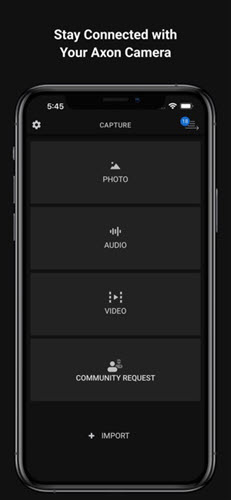 |
Select for secure offlload |
https://www.axon.com/products/axon-capture
Video retrieval feature for Axon Fleet 3
This release introduces the Video Retrieval feature for Axon Fleet 3. When Video Retrieval is activated and Axon Fleet 3 records a video, the in-car video system stores the video locally on the Axon Fleet 3 hub rather than offloading it immediately to Axon Evidence Local. With Video Retrieval enabled, the in-car system only sends an "Evidence Shell" (metadata including title, owner, and recorded date) to Axon Evidence Local for identification purposes. The actual video itself is not uploaded automatically. Users can manually retrieve needed videos using the Retrieval Button. Video Retrieval optimizes bandwidth, data usage, and storage by only offloading relevant videos. Videos not retrieved remain on the Axon Fleet 3 Hub until the set retention period expires, at which point they are automatically deleted.
Retention for Axon Fleet 3 Hub:
Agency administrators can set a global retention policy (in days) for videos stored on the Axon Fleet 3 hub before automatic deletion. During this period, videos can be manually retrieved and uploaded to Axon Evidence Local. Available retention settings include:
- Off
- 7 days
- 14 days
- 30 days
Enable Video Retrieval (Fleet 3) & Set Retention:
Video retrieval “On Demand Upload” is OFF by default. Once enabled, the retention period is set to "off" which means the hub will store it forever and not automatically delete the footage.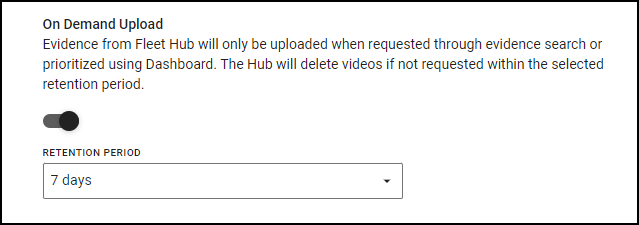
Axon Fleet Dashboard
Recording in progress.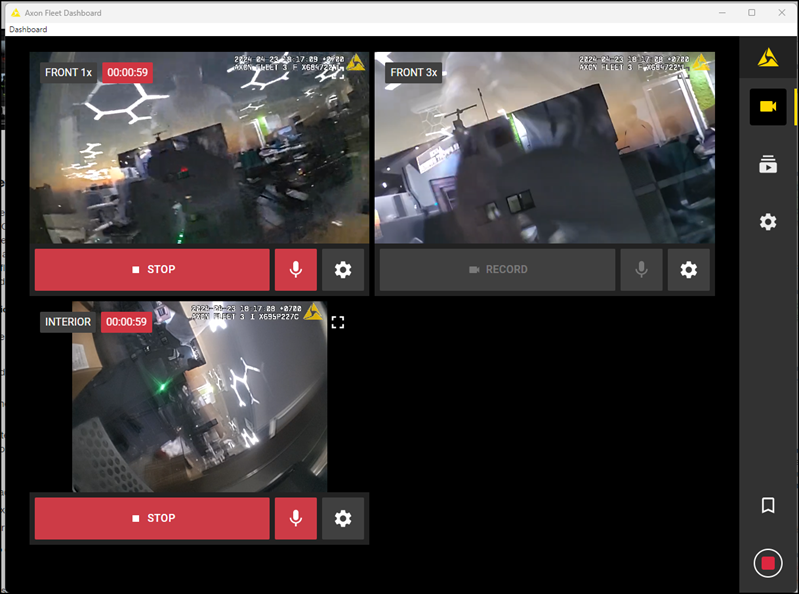
Video is “waiting for upload”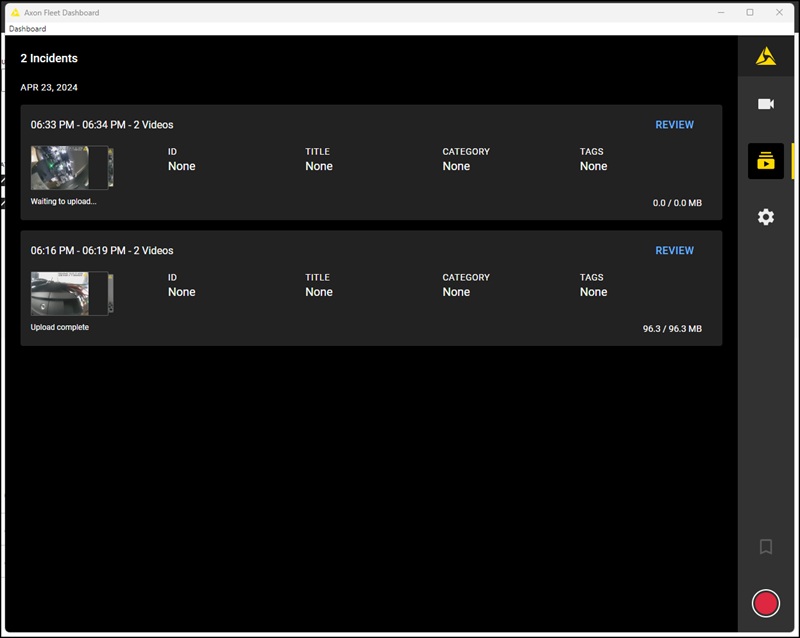
Evidence Search
Evidence Shell (metadata) gets uploaded and status shows: Evidence is “On Device”.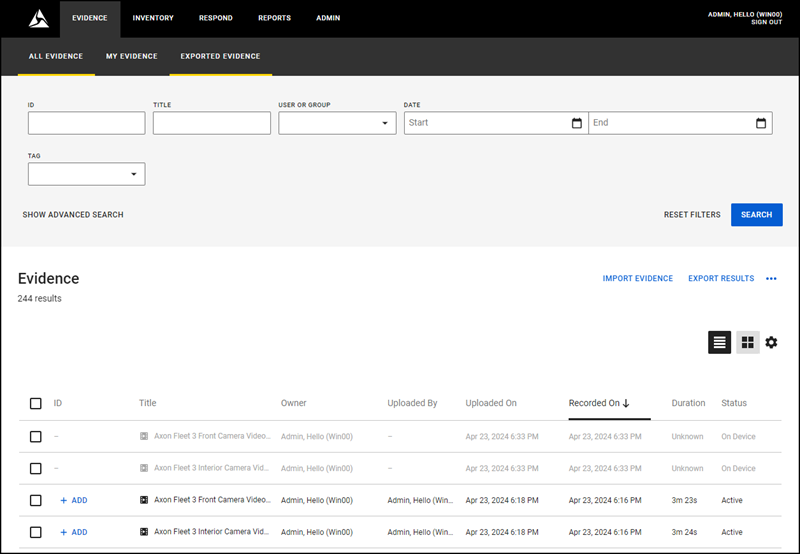
Single or multiple evidences can be selected and Video Retrieval initiated.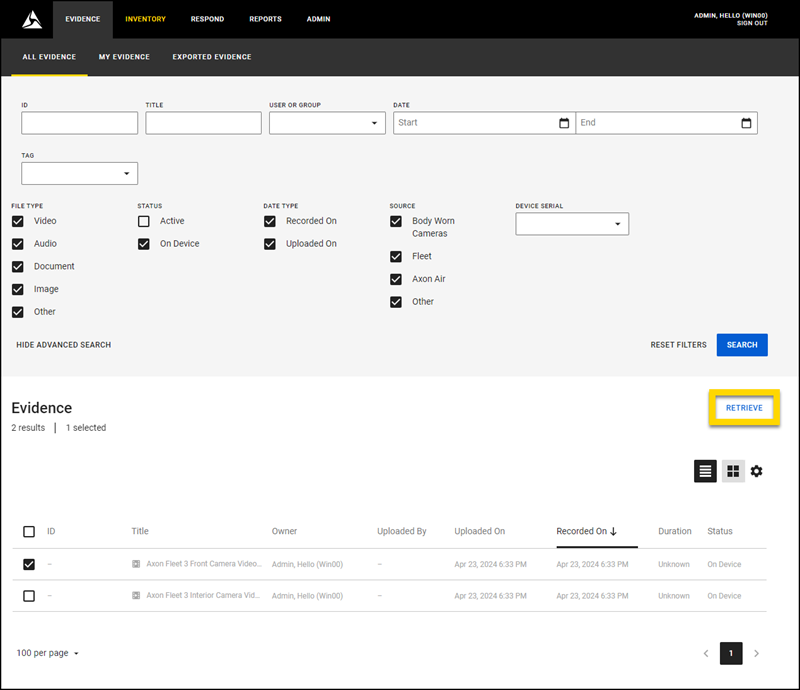
Upload Complete: Video Ready for Playback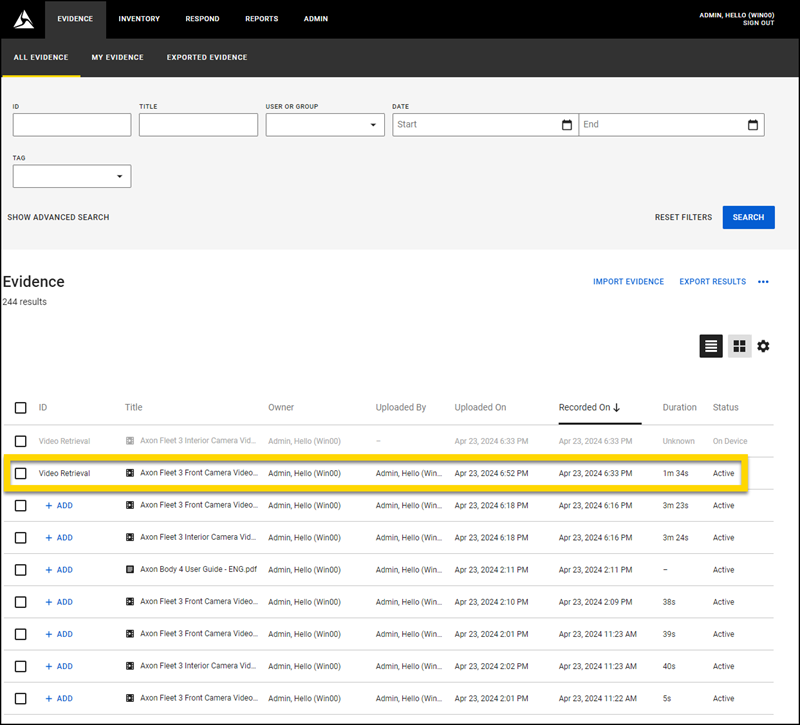
Centralized logging service
This release introduces a major upgrade to Axon Evidence Local's logging system, offering a centralized, unified, and user-friendly experience for troubleshooting and support. Leverage the power of Grafana dashboards for system health and diagnostics.
Key Features:
- Centralized Logging: Gain a comprehensive view of logs for all Commander components, regardless of single or multi-server deployments.
- Advanced Search & Query: Easily search across all logs with powerful query functions, simplifying advanced troubleshooting
- Customizable Dashboards: Create personalized dashboards to monitor critical services or pinpoint errors within specific timeframes. (See example below).
- One-Click Log Snapshots: Capture complete log sets for specific periods for effortless sharing with Axon support for in-depth analysis more efficient support.
- Simplified Integration: New log components integrate seamlessly with existing Commander installations, minimizing manual configuration.
- Future-Proof Design: The logging system automatically supports new Commander components as they are released in future updates.
These improvements empower users with greater control and visibility over Axon Evidence Local’s operations, leading to more efficient troubleshooting and improved support interactions. Create personalized dashboards to monitor critical services or pinpoint errors within specific timeframes.
Example:
For example, a filter can display all errors across all logs and services within the system for the past 6 hours, providing a quick and targeted view for troubleshooting.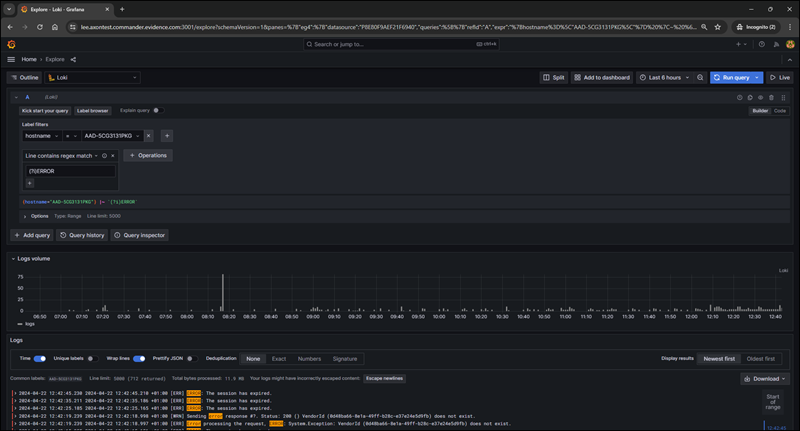
Web-UI migration: Folder and cabinet management (administrator section)
With the migration of the Folder and Cabinet Management to the Web-Interface, Axon Evidence Local empowers you to take control of your evidence organization. This functionality allows you to create and structure folders and cabinets for efficient storage. You can also define custom retention settings for your evidence, ensuring compliance with relevant policies. Additionally, granular access controls enable you to manage user permissions and ensure the security of sensitive data. This intuitive update mirrors the workflow and behavior of the cabinet / folder administration in the Desktop Client, providing a familiar and user-friendly experience.
Axon Evidence Local - Administration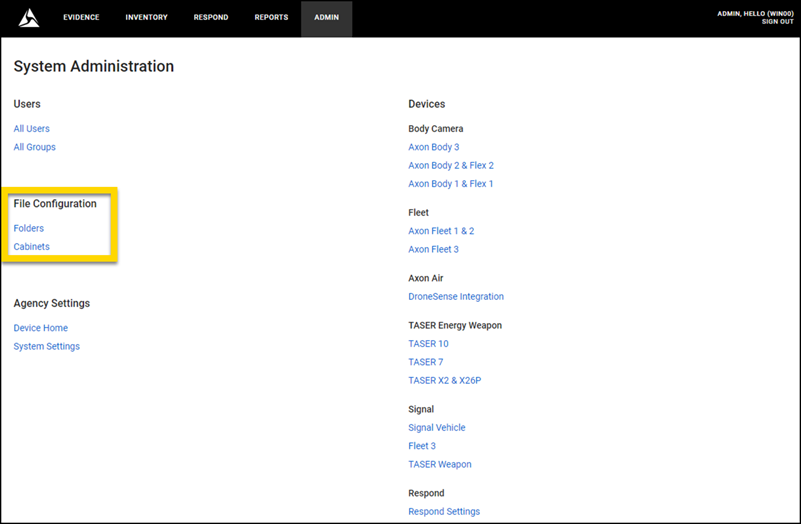
Folder Properties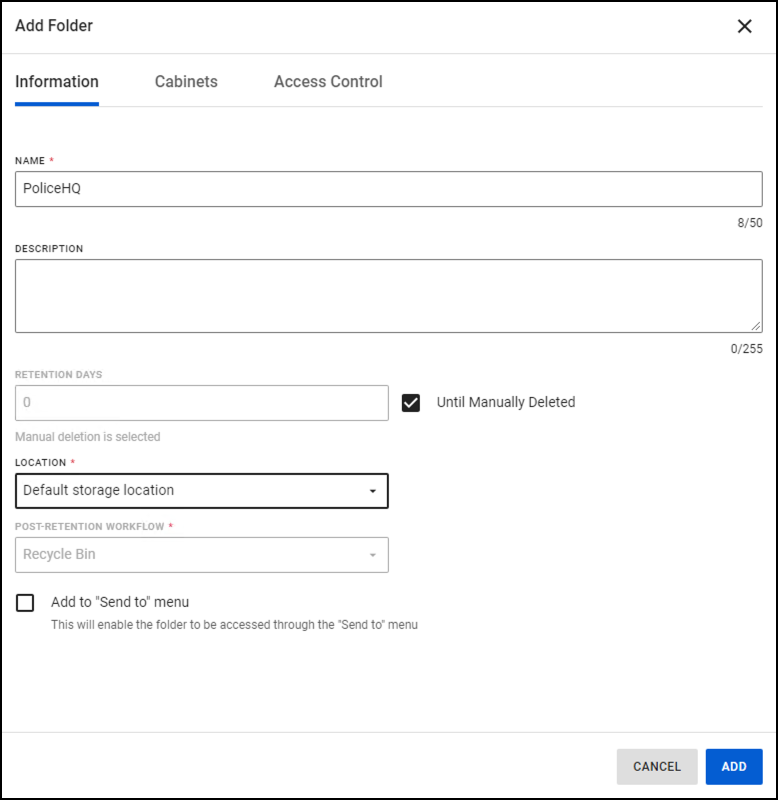
Access control of a folder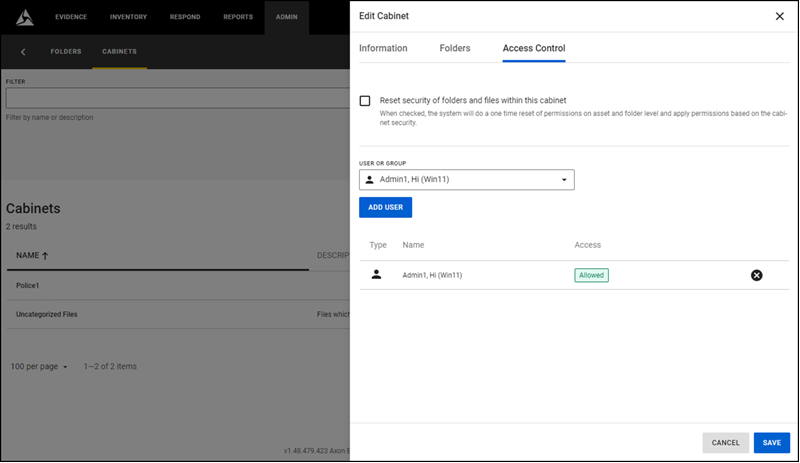
Web-UI: Digital evidence export (single or bulk) - security improvement
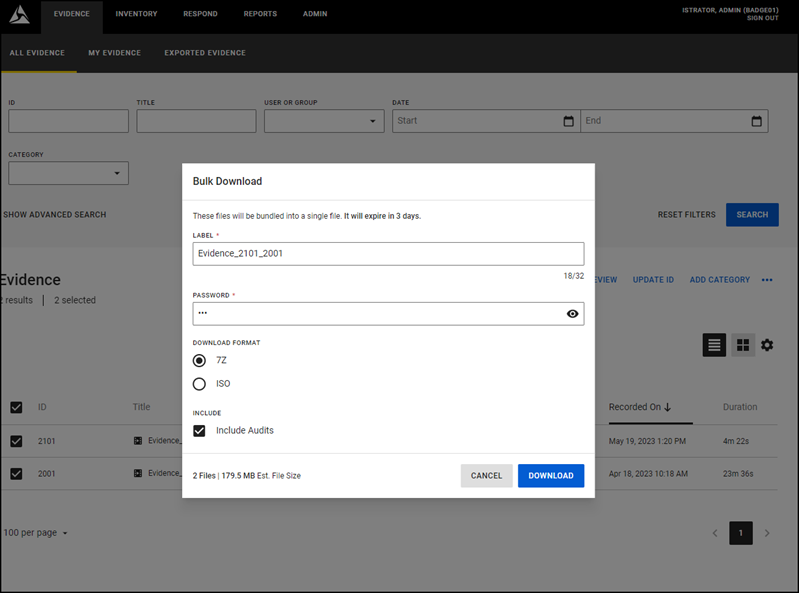
Security improvement: The Evidence Export in the Web-User Interface uses now the industry standard AES-256 encryption to encrypt the password and protect the exported digital evidence from unauthorized access.
Choose your preferred export method:
- 7-ZIP file with AES-256 encrypted password: Download a password-protected 7-ZIP file containing your chosen evidence files and audit logs, ensuring secure and convenient sharing.
- Burn to Disc with AES-256 encrypted password: Create an ISO file containing a password-protected 7-ZIP of your evidence files and audit logs, perfect for offline storage, archiving or sharing.
New language support
Starting with Axon Evidence Local (4.48.), the following new languages are supported.
- Slovak
Minor enhancements
- Improved timeout management during database upgrade from 4.46.
- Enhancements to prevent upgrade routine from overwriting custom Storage-Service configuration.
- Optimized limiting RAM consumption by Jester-Service.
- Decoupling Caching / Redis from the Installation Routine.
Bug fixes:
- Fixed an issue where the Web-Client switched back to English when logged in via Single Sign-On.
- Corrected desktop-Client showing an incorrect time stamp for “Last Uploaded".
- Resolved an issue with the Taser Report showing an incorrect time stamp.
- Corrected an issue where asset deletion could not be performed when Title length reached maximum supported characters
Dependency/Compatibility Updates
Firmware
|
Devices |
Version |
|---|---|
| Taser7 Handle | 2.0.4 |
| Taser7 Charger | 2.0.22 |
| AB2/Flex2 Dock | 3.17 |
| AB2/Flex2 | 1.27.7 |
| AB3 |
1.25.31 1.26.42 1.27.99 |
| Axon Fleet 3 Bundle | 2.2407.2990 |
Applications
|
Application |
Version |
|---|---|
| ADM - iOS | 3.2.4 |
| ADM - Android | 3.10.0 |
| View - iOS |
6.3.0 |
| View - Android | 6.1.3 |
| Capture - iOS | 5.13.1 |
| Capture - Android | 5.14.3 |
| ViewXL | 1.15.5 |
| Interview | 4.15.1.16 |
Other dependencies
- Evidence Local Server: Windows Server 2019, 2022
- Evidence Local Desktop Client: Windows 10-64bit, 11-64bit
- Evidence Local Web Client: Firefox, Chrome, Edge
- Database: MS SQL Server 2016, 2019
- Upgradable from Evidence Local version: 4.40, 4.42, 4.44, 4.46


