Version 5.4 (July 2025)
Introduction
Axon Evidence Local 5.4 marks a meaningful step forward in privacy, accountability, and integration for on-premises digital evidence management.
This release introduces integrated video and audio redaction capabilities, enabling agencies to redact sensitive content entirely within their secure environment. Redaction can now be performed directly in Evidence Local, streamlining the review process and helping ensure privacy during case preparation or disclosure.
New in this version, agencies can also convert TASER firing logs into standalone evidence items, simplifying the preservation, review, export, and management of these records alongside video, audio, and other digital files. This feature supports more comprehensive documentation of use-of-force events and enables consistent handling of log data across cases.
Additionally, version 5.4 debuts the Axon Evidence Local Partner API, offering secure and flexible integration with third-party software. This API supports automated workflows and data exchange, expanding system capabilities through controlled, standards-based integrations.
Further enhancements include an improved Evidence Maps experience, which now resolves geolocation data into human-readable addresses. This release also updates core dependencies and officially adds support for Microsoft SQL Server 2022 and Windows Server 2025.
Collectively, these updates address evolving compliance requirements, streamline internal workflows, and empower agencies to maintain full control over their evidence operations within their own infrastructure.
TASER Device Log to Evidence Conversion
You can handle mission-critical TASER device log files and improve usability by creating a workflow to convert a TASER device log into a digital asset, ensuring it is managed under a formal chain of custody and thereby establishing a new evidence type called Weapon Logs.
This feature is available for TASER7 and TASER10 devices and includes full metadata capabilities.
You can convert the entire device log into a PDF and store it as a separate digital evidence file. System audit log entries document every action taken on this digital evidence to support chain of custody requirements as well as reinforcing the integrity of the evidence by applying an SHA-2 hash to the digital evidence. The new evidence can be viewed as any other evidence file in evidence review.
On the TASER device log page, one or more events can now be selected to show a new button Copy to Evidence.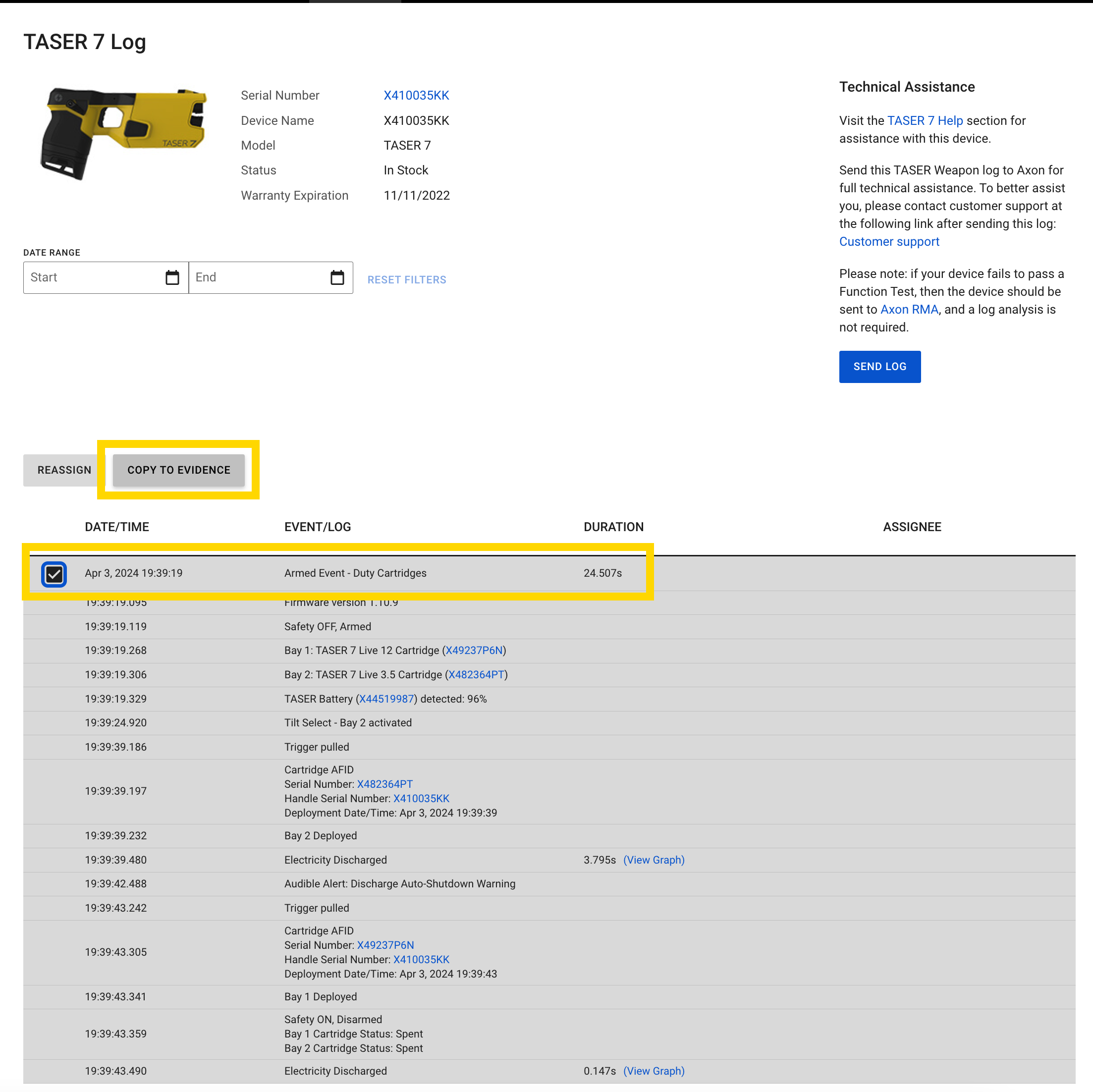
After the process of converting the entries into a PDF is complete, you can access the evidence using evidence search or by reviewing the TASER device profile page under Recent Evidence.
When reviewed in the Evidence review mode, you can download the evidence.
The file defaults to a .firingLog extension to support TASER logs ingestion. Once a TASER log evidence report is downloaded, you can change the file extension .firingLog to PDF to use it as an ordinary PDF file.
Permissions
To enable TASER logs, you must enable the permission TASER Logs administration (manage TASER logs).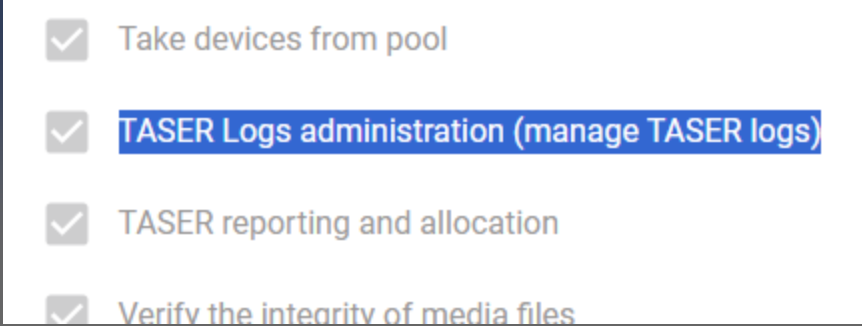
Audit log
Each TASER log to evidence retains the audit log and applies an SHA-2 hash to the digital evidence and documents it in the audit log, reinforcing the integrity and custody of the evidence.
Due to the difference of available data with the TASER 10, there may be minor visual and format differences when comparing both TASER 7 and TASER 10 device pages and audit logs.
Redaction Studio
You can use Redaction Studio in Axon Evidence Local to redact personally identifiable information (PII) and other sensitive content directly within the platform. These built-in capabilities remove the need to export files to third-party software, supporting chain-of-custody integrity and streamlined workflows.
Key features
- In-Platform Redaction: Redactions are performed on a duplicate of the original file, preserving the integrity of the original evidence. Changes are tracked and logged for full audit capability.
- Audit Trail: All redaction activity is captured in a detailed, time-stamped audit log that supports evidentiary standards and transparency.
- Secure File Management: Redacted copies can be managed and shared independently from the original file with authorized third-parties, ensuring secure and appropriate distribution.
| Note | Redaction tools currently support only video files recorded on Axon devices. |
Redaction capabilities
Redaction in Axon Evidence Local can be performed manually or assisted by automation. The platform offers a robust toolset designed for both precision and efficiency.
Manual redaction tools
- Masks: Apply various mask shapes and blur levels to targeted areas in the video.
- Object and text annotation: Add context with object markers or on-screen text.
- Spray paint tool: Quickly mask multiple areas across video segments by “spray painting” them manually. Fast-forward and navigation features accelerate editing when compared to frame-by-frame methods.
Object tracking (automation)
- Redaction automation: Select an object within the video, and the smart object tracking automatically redacts that object throughout the entire video, providing significant time savings, especially when redacting recurring or moving objects in lengthy recordings.
Audio redaction
- Edit audio in-line: Remove or mask sensitive spoken content from embedded audio tracks in videos recorded by Axon devices.
For more information on using Redaction Studio, see Redaction.
Axon Evidence Local Partner API
Axon Evidence Local includes a powerful partner API, bringing industry-grade integration capabilities to locally hosted environments. Designed to meet the highest standards of performance, security, and interoperability, the partner API enables seamless data exchange between Axon Evidence Local and a broad range of third-party systems used by law enforcement and public safety agencies.
Key benefits
Agencies can now directly integrate Axon Evidence Local with mission-critical systems, such as:
- Records Management Systems (RMS)
- Case Management Systems (CMS)
- Forensic analysis tools
- Other public safety applications
These integrations streamline workflows, eliminate data silos, and enable more effective and secure collaboration across agency systems.
Technical architecture and security
The partner API is built using industry-standard design and authentication models to ensure secure and scalable integration.
- RESTful API design: Core resources such as users, devices, and evidence metadata are accessible through standard HTTP methods (GET, POST, PUT, DELETE) and use JSON payloads for efficient communication.
- Authentication and authorization: The API supports OAuth2 and OpenID connect protocols, utilizing JSON web tokens (JWT) to ensure secure and controlled access.
- Secure credential management: Access tokens are generated via a secure client credentials workflow, incorporating encrypted secrets and agency-defined access policies.
API client management
Evidence Local now supports API Client Management, enabling agencies to:
- Create and configure API clients based on specific integration needs.
- Define which API endpoints each client is authorized to access.
- Generate secure credentials for use in external applications.
This structure ensures both flexibility and control, while maintaining strict data access and audit standards.
Developer Support and Documentation
To simplify integration, the partner API is backed by extensive self-service developer resources:
- Interactive swagger documentation: Accessible directly through the Evidence Local web interface, swagger-based documentation enables fast onboarding, exploration, and implementation of the API.
- Customization support: The documentation includes comprehensive integration guides, enabling agencies and partners to quickly adapt the API to their unique workflows and technical environments.
API-client managment
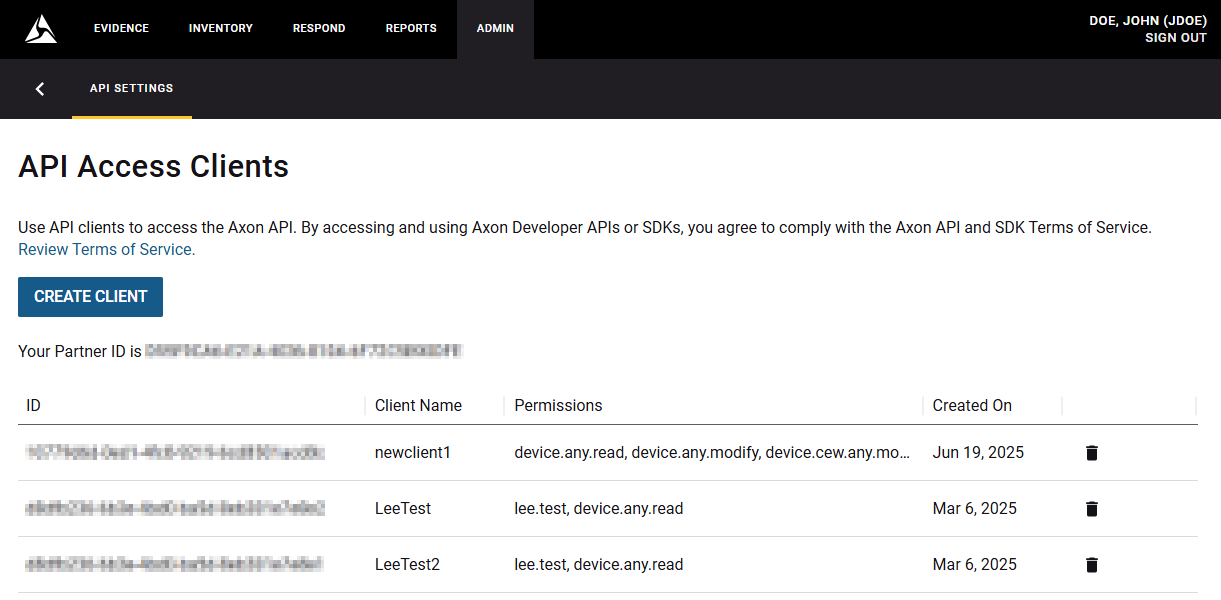
Open the API settings in the Admin page under Security Settings.
To create a new API access client complete the following:
- Select Create Client.
- Enter the name and select the device, partner, and evidence permissions.
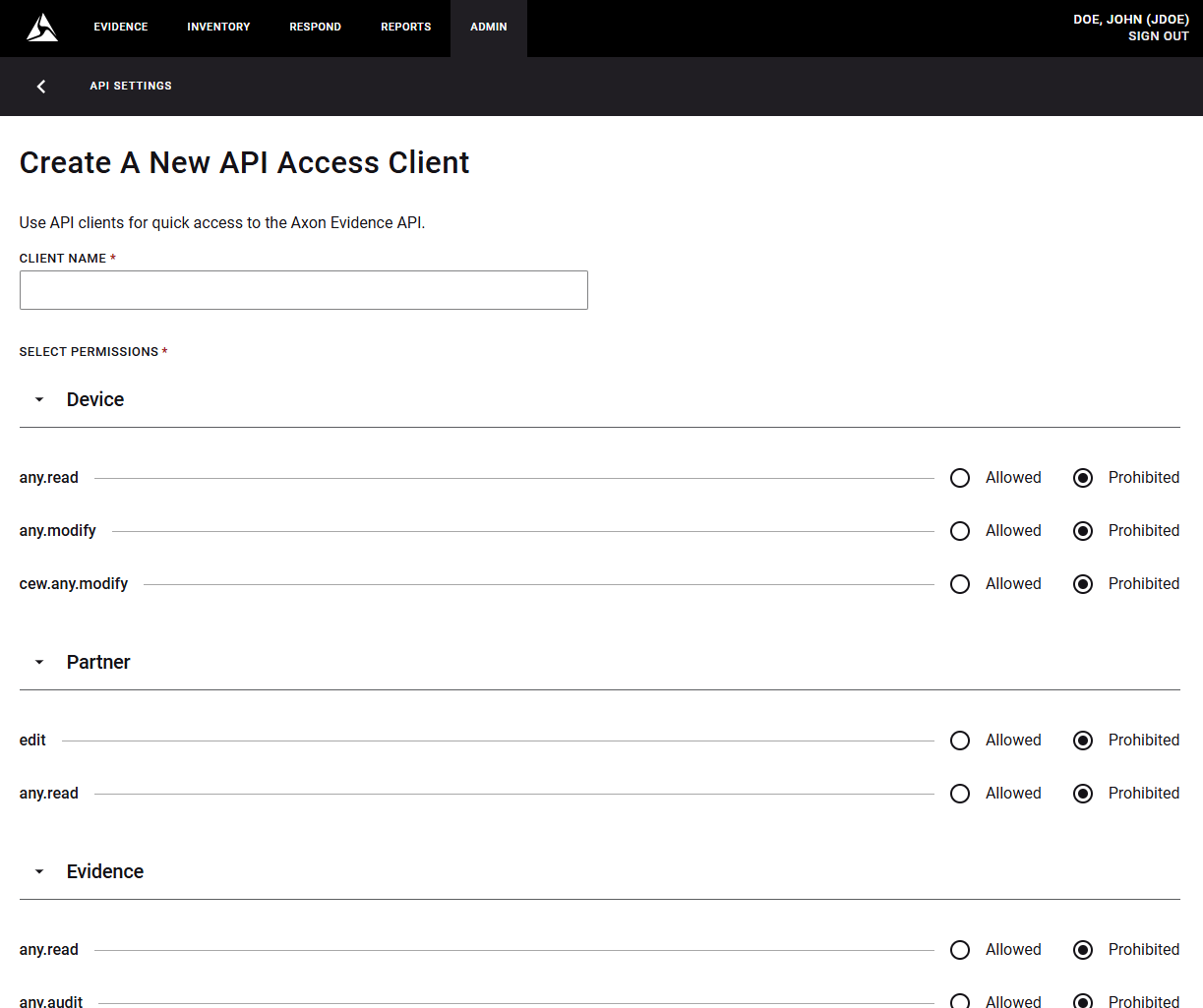
- Select Save.
Evidence Maps Address Translation for Approximate Address
Axon Evidence Local displays approximate, human-readable addresses on the Evidence Map within the Evidence Details page. This feature enhances map readability by converting Global Navigation Satellite System (GNSS) coordinates into address-level location context.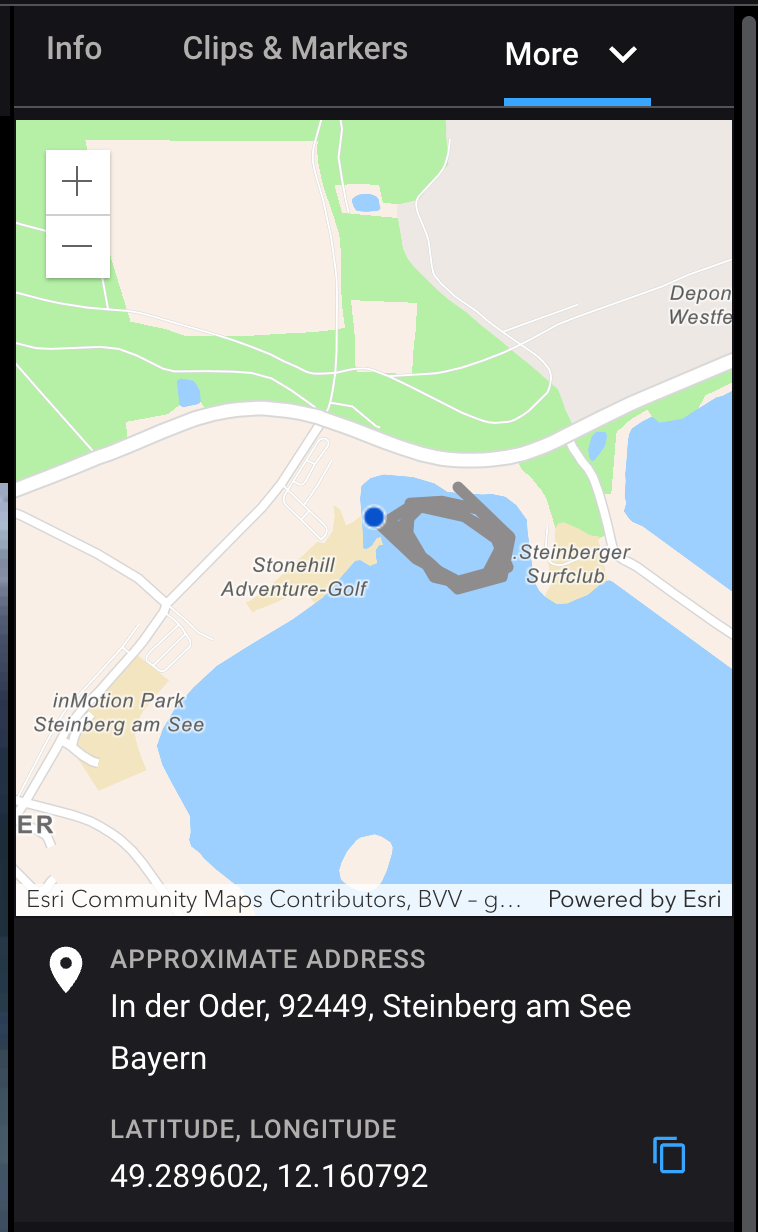
To perform this conversion, the system sends latitude and longitude data to ArcGIS (arcgis.com), which returns the corresponding approximate address. Because this involves transmitting location data to a third-party service, administrators are given full control over its use by adding the appropriate toggle in system settings.
To configure, perform the following:
- Navigate to Admin > Agency Settings > System Settings > Third-Party Service.
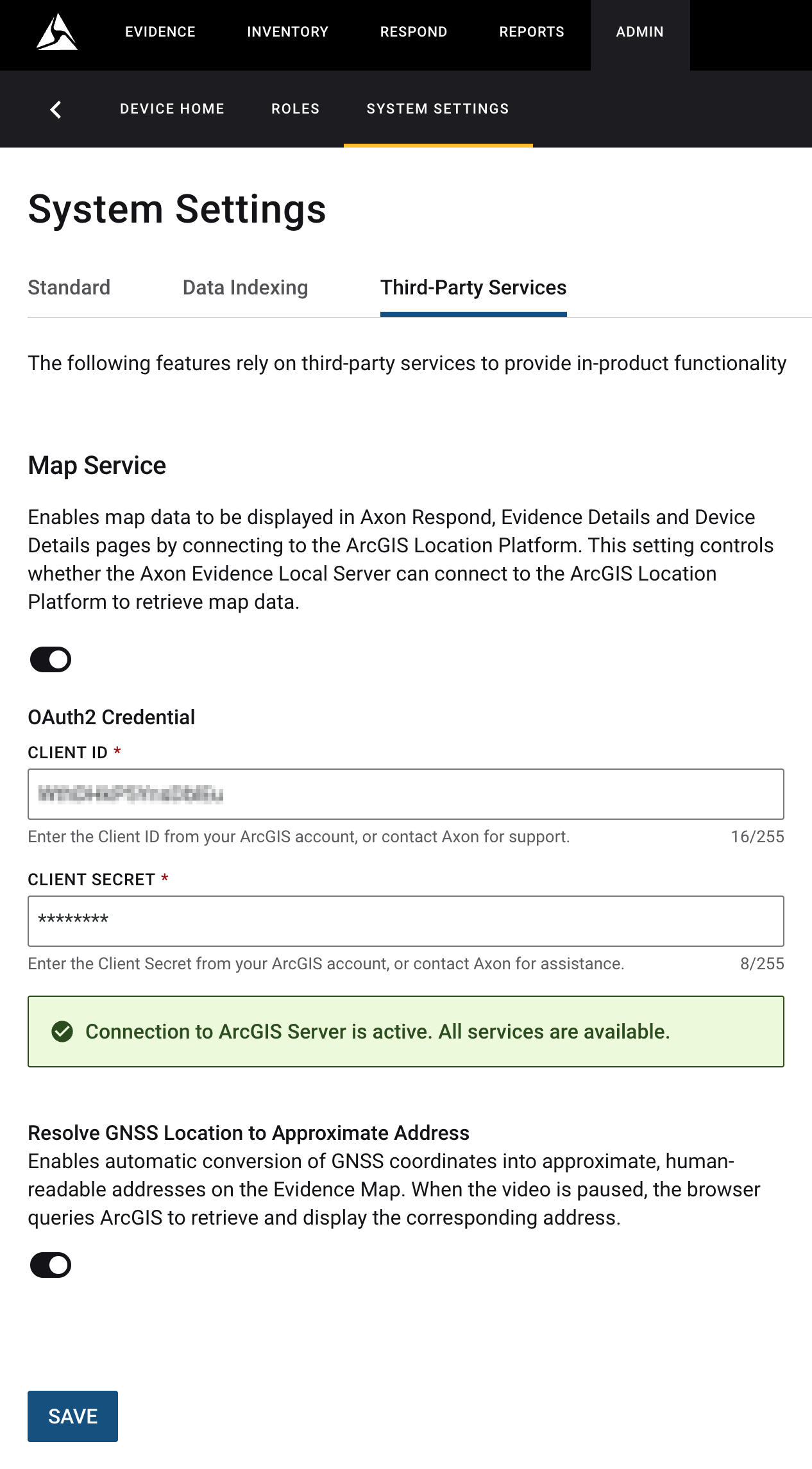
- Select the toggle for Resolve GNSS Location to Approximate Address. When enabled, this feature allows the browser to query ArcGIS while a video is paused in the Evidence Map view, retrieving and displaying an approximate address corresponding to the captured location.
- Select Save.
Dependencies
With this release, Axon Evidence Local officially supports Microsoft Server 2025 as a supported operating system. As a result, the following versions of Microsoft Server are now supported:
- Microsoft Server 2019
- Microsoft Server 2022
- Microsoft Server 2025
Please ensure you are running one of these supported versions before installing or upgrading Axon Evidence Local. If you are currently using Microsoft Server 2016 or an earlier version, you must upgrade your server operating system before proceeding with the Axon Evidence Local installation or upgrade.
Devices Firmware
| Devices | Supported FW Version |
|---|---|
| AB2 / Flex2 | 1.27.7 |
| AB3 | 1.33.31 1.34.45 1.35.58 |
| AB4 | 1.2450.15 1.2504.15 |
| AB 2 / Flex 2 / TASER Dock | 3.20.240801.0336 |
| Flex 2 Controller | 0.7.3 |
| Fleet 3 | 2.2439 |
| TASER 7 | 2.0.6 |
| TASER 10 | 1.5.39 |
| TASER Dock Charger | 2.7.14 |
| TASER BLE Bundle | 1.4.2 |
Applications
| Application | Supported App Version |
|---|---|
| Axon Device Manager iOS | 3.2.5 |
| Axon Device Manager Android | 3.13.1 |
| Axon View iOS | 6.6.2 |
| Axon View Android | 6.4 |
| Axon Capture iOS | 5.17 |
| Axon Capture Android | 5.16 |
| Axon Device Checkout iOS | 2.0.3 |
| Axon Device Checkout Android | 0.6.2 |
| Axon ViewXL | 1.27.4 |
| Axon Interview | 4.16.4.7 |
Other dependencies
- Evidence Local Server: Windows Server 2019, 2022, 2025
- Evidence Local Web Client: Firefox, Chrome, Edge
- Database: MS SQL 2019, 2022
- Upgradable from Evidence Local version: 4.52, 5.0, 5.2


