Version 6.2 (July 2026)
These release notes correspond to the following software version: 6.2.5.
Introduction
Axon Evidence Local v6.2 focuses on giving agencies more control, clearer visibility, enhanced reporting and less day-to-day administrative effort. This release gives administrators fine-grained control over who can see which live streams in Axon Respond, so visibility can exactly mirror the way an agency is organized—right down to individual teams, districts or units. It brings RFID card management for Device Pooling directly into the web interface, replacing manual, one-by-one handling with bulk tools built for large fleets. And for the first time, Axon Evidence Local can actively keep users informed about what's happening within the system, through a new in-app notification system and inbox for every user as well as optional email alerts sent from the agency's own mail server.
Reporting takes a significant step forward too, with a faster, more consistent reporting engine, a predictable report structure agencies can build on and new user-focused reports. Inventory management is extended to Axon Docks for TASER and Axon Body 2/Flex 2 devices, making it easier to manage and keep track of Axon Docks and docked devices across the fleet.
This release delivers:
- Granular Respond permissions, letting administrators scope which live streams a user or group can view on the Respond map
- RFID Card Management for Device Pooling, with bulk CSV import and export directly in Axon Evidence Local
- A new notification system with an in-app inbox and optional email delivery through an agency-configured SMTP server
- A modernized reporting engine with a consistent report structure, plus new User Summary and User Device History reports
- Axon Dock de-registration and improved dock inventory visibility
Together these updates continue Axon's commitment to giving agencies operating on-premises the same control, visibility and efficiency they'd expect from a modern Digital Evidence Management System—on their own infrastructure.
The redesigned interface is now the only experience—the option to revert to the legacy look has been removed. As announced in the v6.0 (Q1 2026) release, the option to switch back to the previous Axon Evidence Local look and feel was temporary. Starting with v6.2, that option has been removed and the redesigned Axon Evidence Experience introduced in v6.0 is now the standard and only experience, giving all agencies a single, consistent interface aligned with Axon Evidence.
No workflows are affected by this change. Users can play evidence, review clips and markers, apply redactions, view related evidence and manage access exactly as before—only the option to return to the older styling is gone. Agencies that have not yet moved their users to the redesigned interface should plan for everyone to be working in it after upgrading to v6.2.
Granular permissions for Axon Respond
Axon Respond lets authorized users watch live camera streams on a map, directly within the Axon Evidence Local user interface. 
Until now this was all-or-nothing: a user could either see every live stream in the agency or none at all. For agencies with several districts, units or divisions sharing one system, that was a choice between visibility and access control, and it meant supervisors often saw far more than they needed to.
In v6.2 that changes. Administrators can now define a live stream scope per user or group. Two options can be selected:
- All live streams: See everything, as before.
- Specific users and groups: See only the cameras belonging to the people you choose.
When All live streams is selected, the user can view every camera in the agency:

When Specific users and groups is selected, the user views only the cameras belonging to the users and groups chosen in the list:
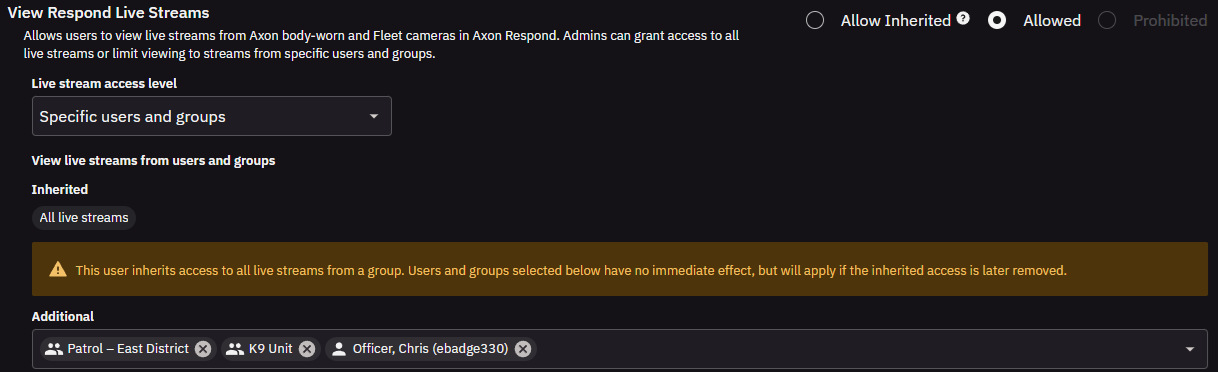
Where access is inherited from a group, the inherited scope is shown separately, and any additional users or groups selected only take effect if the inherited access is later removed:

For example, a District Commander may be permitted to view and manage Axon Respond activity only within their assigned district, while a Headquarters Operations Commander may have visibility across all districts within the agency.
Configuration is available on the existing Group permissions page as well as on the individual User permissions page, which inherits the Group selection. All scope changes are written to the Audit Trail.
Before upgrading—check your Respond permissions: The way the "Prohibited" livestream setting behaves is changing. Previously, a user set to Prohibited could still see cameras on the Axon Respond map but could not start a stream. After upgrading to v6.2, a user set to Prohibited will no longer see the map at all. If you have users who are meant to view the Axon Respond map, make sure their livestream access is set to Allowed (with either All live streams or specific users and groups) before you upgrade, so they keep the access they need.
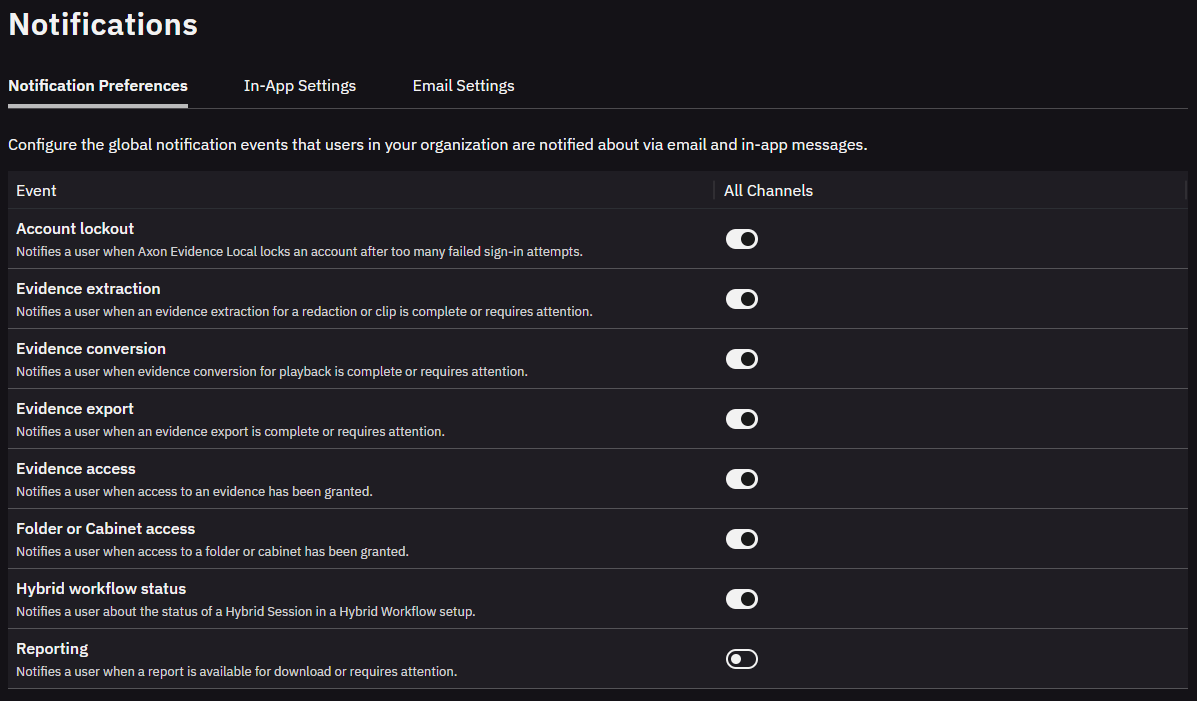
Notifications and email server integration
Axon Evidence Local 6.2 introduces full built-in system notification functionality for the first time, so users no longer have to actively watch the system to know when something needs their attention. Important system events—for example an evidence extraction, conversion or export they requested has finished, or evidence has been shared with them—can now surface automatically in a new in-app inbox and, optionally, by outbound email through an agency-configured SMTP server. An administrator controls which events generate notifications for the organization from a single Notification Preferences page and configures in-app and email delivery on the accompanying settings tabs. This is especially useful for lightly-staffed or single-administrator deployments, where being told about an event is far more practical than having to go looking for it, and it keeps officers, investigators and reviewers moving without having to sit and watch the system.
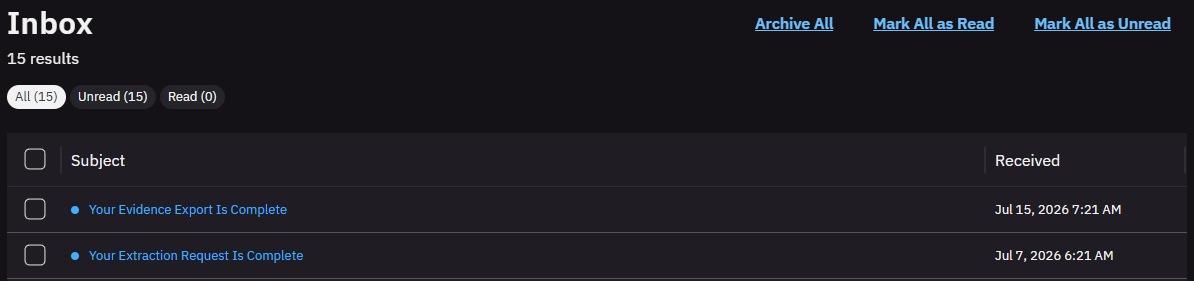
The in-app inbox is always active and requires no configuration. It provides a persistent, searchable record of system notifications with read/unread state, an archive and configurable retention—notifications are kept in the inbox for 90 days before being moved to archive and permanently removed after a further 30 days.
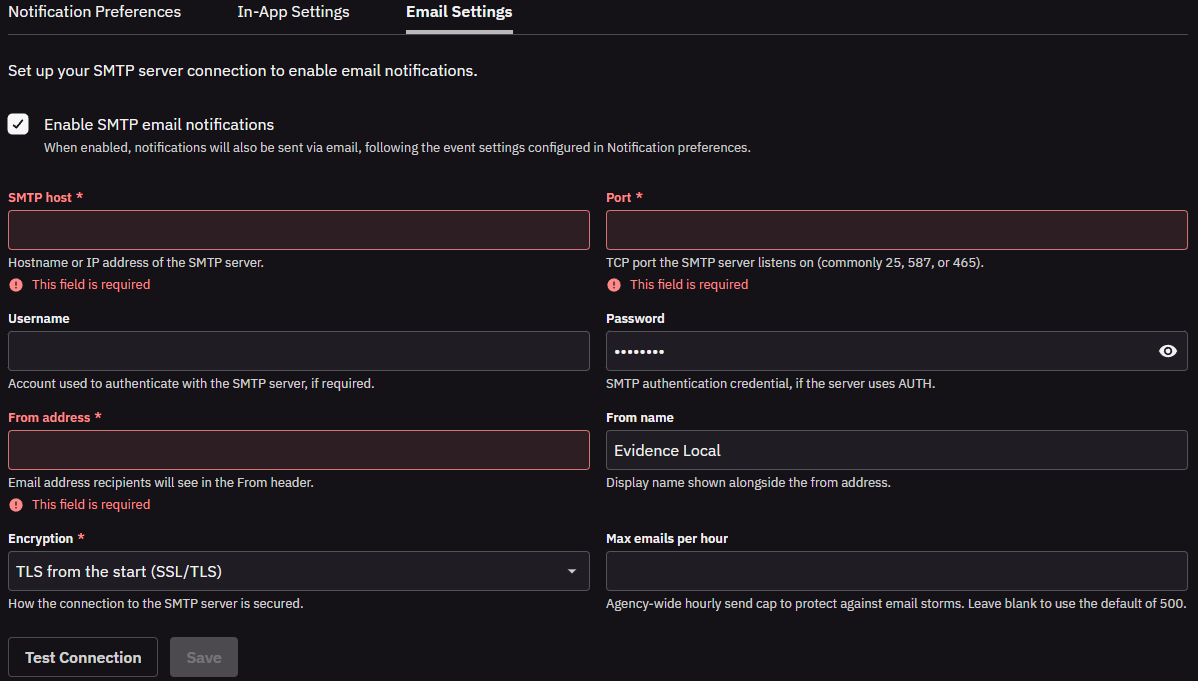
Email delivery is completely opt-in. Administrators can connect any SMTP server under Admin > Notification Settings, selecting the server address, port, authentication credentials and encryption mode. A built-in Test Connection diagnostic validates the configuration before it is saved. Per-agency settings configure the global notification events that users are notified about via email and in-app messages.
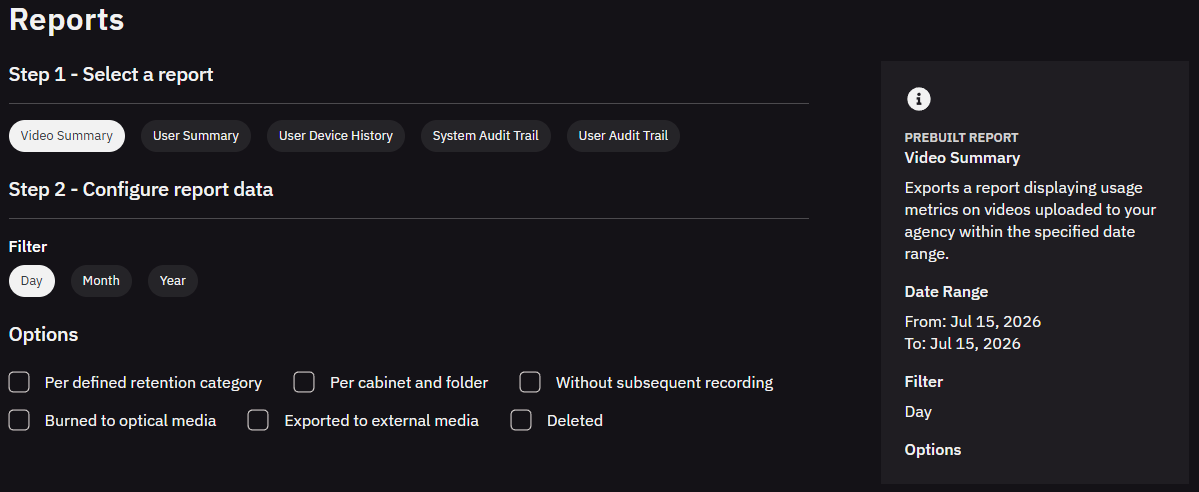
Notifications are handled separately from the system's core work, so they never slow down or interfere with everyday operations such as evidence upload, processing or user sign-in. If email delivery is temporarily unavailable, in-app notifications are unaffected.
In-app notifications appear in real time. Email notifications are sent as quickly as possible, but because emails depend on the agency server and network, they may occasionally arrive in a slightly different order than the events happened. For a definitive, time-ordered record of what happened in the system, the Audit Trail is always the authoritative source.
Improved reporting
Axon Evidence Local 6.2 ships a completely new PDF reporting engine, adding new report types and a consistent, predictable structure across every report.
A consistent structure across all reports
Every report now shares the same conventions, so a report is self-describing and easy to work with wherever it ends up:
- Each export includes an information sheet—in XLSX it's a dedicated tab, in CSV it's a separate Info.csv file in the download. It records the report name, schema version, who generated the report and when, the selected date range and the agency time zone, so an exported report stays traceable long after it leaves the system.
- Every report and export also carries a schema version (starting at v1), shown on the information sheet and in the file name. If the structure of a report ever changes in a future release, the version makes that explicit, so spreadsheets, scripts or archiving tools that consume the exports have a stable, documented format to rely on.
- All timestamps use a single consistent format across every report: ISO 8601 with a UTC offset, written as YYYY-MM-DDThh:mm:ss±hh:mm—for example 2026-06-18T14:30:00+07:00.
- File names follow one convention: EL_<ReportName>_<DateFrom>_to_<DateTo>_v1.<ext>—for example EL_UserSummary_2026-01-01_to_2026-01-31_v1.xlsx.
- Reports are available in XLSX and CSV, and the format determines the packaging. XLSX produces a single workbook with the information sheet and each dataset on its own tab. CSV produces a zip archive containing the information file (Info.csv) plus one file per dataset—so a report always arrives as a self-contained package. For large agencies, CSV is faster to generate and produces a smaller download.
Updated Video Summary Report
The Video Summary report is expanded in v6.2. Alongside the existing high-level metrics—total videos, body-camera recordings, active assets, storage used and average recording length—it now presents its data across three tabs:
- Video Summary keeps the aggregate totals and the historical vs. current-state split, plus the breakdown per cabinet and folder. The average body-camera recording length is now shown in hh:mm:ss. The previous free-form metadata breakdown is replaced by a focused Retention Category Breakdown, which reports asset counts by retention category value rather than listing every custom metadata field.
- Uploads by Period is a new upload-volume view, broken down by day, month or year (selectable via a filter), with columns for Date, Videos, Hours of Video and GB of Video.
- Breakdown per Cameras keeps the historical offload totals per camera and adds a current-state block showing each device's assigned Device Home as of the report date.
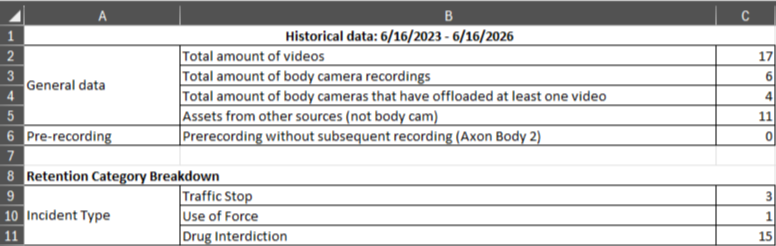
The Video Summary tab presents the historical totals, general data and the Retention Category Breakdown side by side:
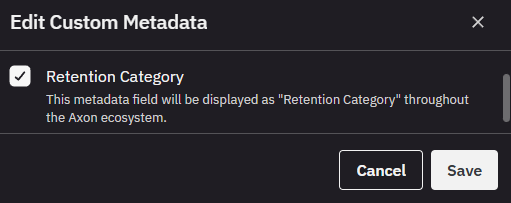
The Retention Category Breakdown only includes custom metadata fields that are marked as retention categories. If your agency currently uses custom metadata that isn't yet set up this way, an administrator can promote an existing Choice-type field by navigating to Admin > File Configuration > Custom Metadata, editing the field and enabling the Retention Category attribute. (Only Choice-type fields can be retention categories; free-text fields cannot.) Once a field is marked as a retention category, its values appear in this breakdown. If no retention categories are configured, the section is omitted.

Audit Trail reports remain available as PDF
The existing Audit Trail reports (System, User, Device, Evidence and the Respond audit trail export under Admin > Respond Settings) continue to be exportable as PDF, as before. In v6.2 these run on Evidence Local's new reporting engine, which improves generation speed, reduces file size and supports substantially larger reports than before. There is no change to how these reports are requested or to the information they contain—only the underlying generation is improved.
New reports in 6.2
This version introduces two net-new reports, now available under the Reports section:
User Summary gives administrators a single exportable view of user accounts—useful for access reviews, audits or compliance reporting. It can be run for all users or a single user, selected at generation time (a required user field appears when Single User is chosen). Each row covers one user, with 15 columns:
- Last Name, First Name, BadgeID, Username, Email Address
- Role, User Status
- Modified on, Disabled on, Last Login at, Login count (within the selected date range)
- Group membership
- Assigned Device Count, Assigned Evidence Count (primary), Assigned Evidence Count (secondary)
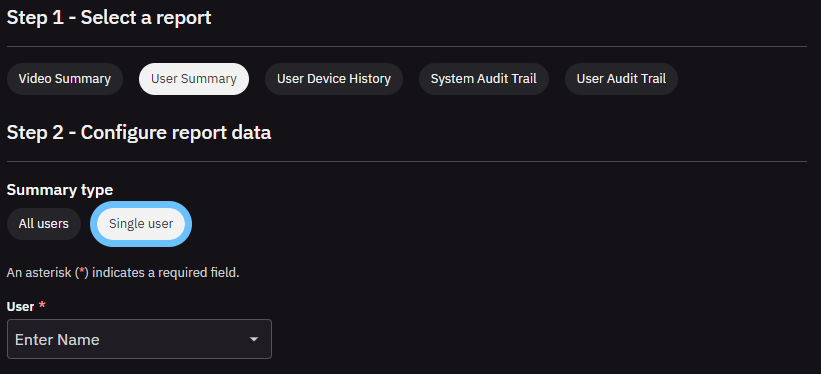
User Device History reports every device assignment for a selected user within a chosen date range—supporting device accountability and chain-of-assignment questions. It is run for a single user and includes five columns:
- Device Model, Device Name, Serial Number
- Assigned Date, Unassigned Date (the unassigned date is left empty while a device is still assigned)
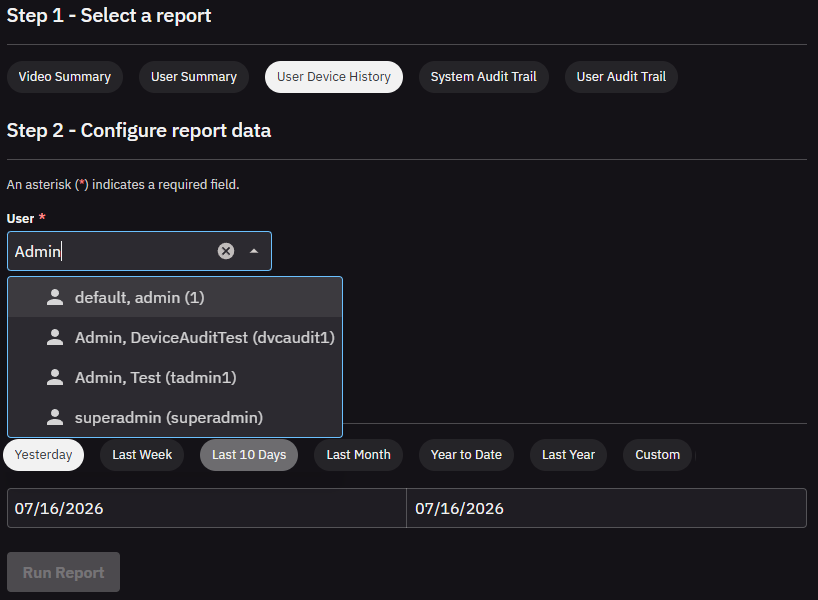
Both reports run as background jobs and can be downloaded once complete.
RFID card management for Device Pooling
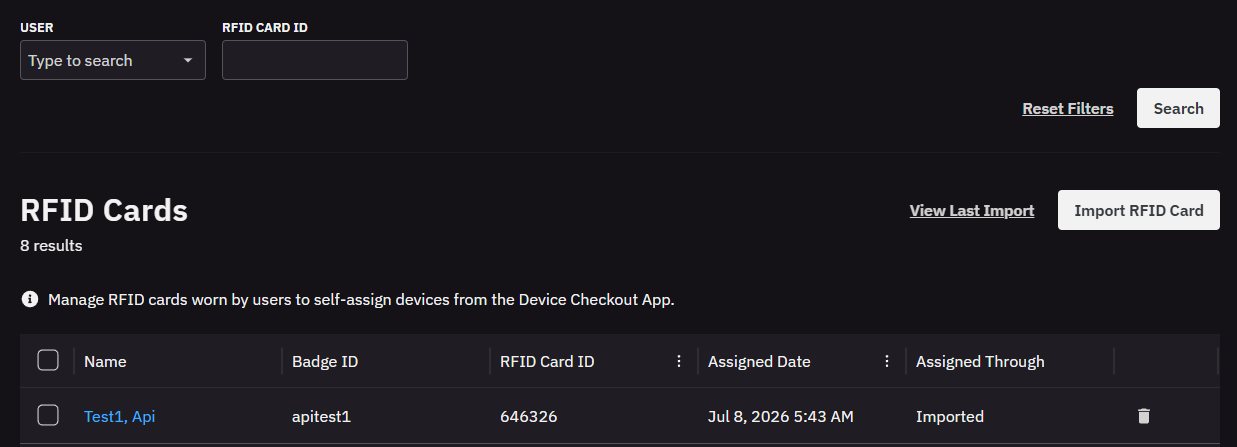
Device Pooling lets officers self-assign a shared camera by swiping their RFID card at the Axon checkout kiosk. Until now the card-to-user assignments behind that workflow could not be viewed or managed directly by administrators in the Axon Evidence Local web interface. Axon Evidence Local v6.2 now adds full RFID Card Management, giving administrators a place to view, search and manage those assignments at scale under Users > RFID Cards (Device Pooling).
The RFID Cards page lists current assignments—showing Name, Badge ID, RFID Card ID, Assigned Date and Assigned Through—and can be filtered by user or RFID Card ID.
From here administrators can:
- Search and review existing card assignments
- Assign or unassign individual cards
- Bulk-unassign cards
- Bulk-import card assignments from a CSV (Import RFID Card), with a View Last Import option to review the most recent import
- Export current assignments to CSV
Guided CSV import
Selecting Import RFID Card opens a guided import that walks an administrator through three steps:
- Select identifier: Choose the identifier the uploaded data will be matched against: Badge ID, Username or Email. Rows that don't match existing agency user data are not assigned.
- Enter the assignment list: Download a ready-made template to start a new list from scratch, or download a backup file of the current assignments to work from a copy. Entering "unassign" in the identifier cell clears that card, and an uploaded file merges into the existing records rather than replacing them.
- Upload file: Upload the completed CSV, with file content matching the identifier chosen in step 1.
A View Last Import option lets an administrator review the most recent import. Bulk import and export operations run as background jobs, so a large operation can be started while other work continues. Should individual rows fail during an import, a CSV of the failed rows is available to download for review and correction. The feature requires the existing Manage Device Pooling permission.
Duplicate RFID card assignments: Device Pooling already stores an RFID card assignment per user. Evidence Local v6.2 begins enforcing that each card maps to only one user. During upgrade, any existing cases where the same card was assigned to more than one user are automatically resolved: the enabled user with the most recent change keeps the assignment and the others are cleared. Each cleared user receives a System Audit Trail entry so administrators can identify who needs re-assignment after upgrading. Agencies with no duplicate assignments are unaffected.
Axon Dock de-registration and inventory
Axon Evidence Local v6.2 extends the device de-registration workflow to Axon Docks (for TASER, AB2 and Flex 2 devices). Administrators can now de-register Axon Docks through the same Device De-Registration user interface used for body-worn cameras, with all registration and de-registration events written to the Audit Trail.
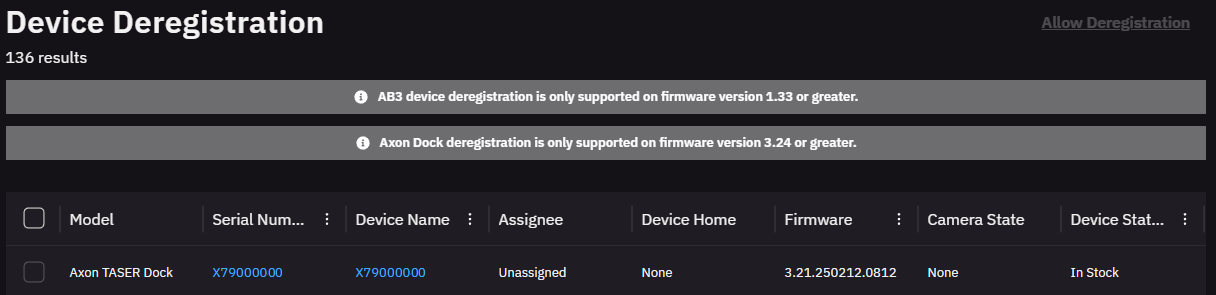
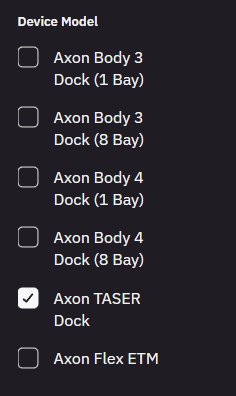
This release also adds Axon TASER Docks to the Docks inventory. Previously the Docks page listed the body-camera docks (Axon Body 3 and Axon Body 4 docks); with v6.2 an administrator can now see and search Axon Docks (for TASER, AB2 and Flex 2 devices) there too, giving a single place to review the full dock fleet. Each dock's details include its network information and the devices currently connected to it. Dock information refreshes automatically; if a dock is briefly offline, its details update again as soon as it reconnects. Registration and de-registration records are always kept accurately regardless of a dock's momentary connection state.
Security and platform updates
Axon Evidence Local 6.2 now fully supports TLS 1.3 for all encrypted connections on supported platforms. TLS 1.3 requires Windows Server 2022 or newer; on earlier Windows Server versions, Evidence Local continues to use TLS 1.2. No configuration or customer action is required.
Dependency / compatibility overview
Devices firmware
| Device | Supported FW Version |
|---|---|
| AB2 / Flex2 | 1.28 |
| AB3 | v1.2601.7 (For SSR: min. 1.2607.11) |
| AB4 | v1.2601.14 (For SSR: min. 1.2607.40) |
| AB 2 / Flex 2 / TASER Dock | 3.24 |
| Flex 2 Controller | 0.7.3 |
| Fleet 3 | 2.2529.4025 (For SSR: min. 2.2612.4638) |
| TASER 7 | 2.0.6 |
| TASER 10 | 2.7.13 (live) / 1.5.39 (inert) |
| TASER Dock Charger | 2.7.13 |
| TASER BLE Bundle | 1.4.2 |
| Signal Sensor | 1.2610.3 |
Applications
| Application | Supported App Version |
|---|---|
| Axon Device Manager iOS | 3.3.1 (For SSR: min. v3.2613.0) |
| Axon Device Manager Android | 3.2 |
| Axon View iOS | 6.8 |
| Axon View Android | 6.7.0 |
| Axon Capture iOS | 5.17.1 |
| Axon Capture Android | 5.18.1 |
| Axon Device Checkout iOS | 2.1.0 |
| Axon Device Checkout Android | 1.2.1 |
| Axon Fleet 3 Dashboard (Win) | 1.2.7446 |
| Axon ViewXL | 1.32.4 / 1.33.1 |
| Axon Interview | 4.16.4.7 |
| Axon Evidence Upload XT | 2.14.1 |
Other dependencies
- Evidence Local Server: Microsoft Windows Server 2019, 2022, 2025
- Evidence Local Web Client: Firefox, Chrome, Edge
- Database: Microsoft SQL Server 2019, 2022, 2025
- Upgradable from Evidence Local version: from v4.36+


