August 2024
These release notes describe all user-facing changes that will be included in the next Axon Records and Standards releases, along with advance notice of major upcoming features, updates, and applications.
There are two releases scheduled for August:
- August 6, 2024
- August 21, 2024
Releases begin rolling out at 11 AM Pacific time and may continue through the following day. We do not expect any downtime during these updates. Please note that availability is subject to change. Depending on the complexity and amount of items included in a release, some items in these notes may not be available until two days after the release.
Additional help documentation for Axon Records and Standards is located at axon.com/help. Do you have feedback about Axon's release notes? Submit it here.
Download this month's release notesRecords preview release
This section includes information about upcoming features and updates that are available for testing in training environments. These are beta features, and all functionality may not be fully present or completely reliable.
Case Management
The following features will be available on August 6, 2024. Contact your Axon representative to have them activated in your agency's training environment.
- Privileges for the new Records review of NIBRS Case Disposition updates will now appear in the Administrator Console. These privileges will NOT be functional unless this feature has been activated for you agency. Contact your Axon representative to have this feature activated for your agency.
- For more information about this feature, see MyAxon.
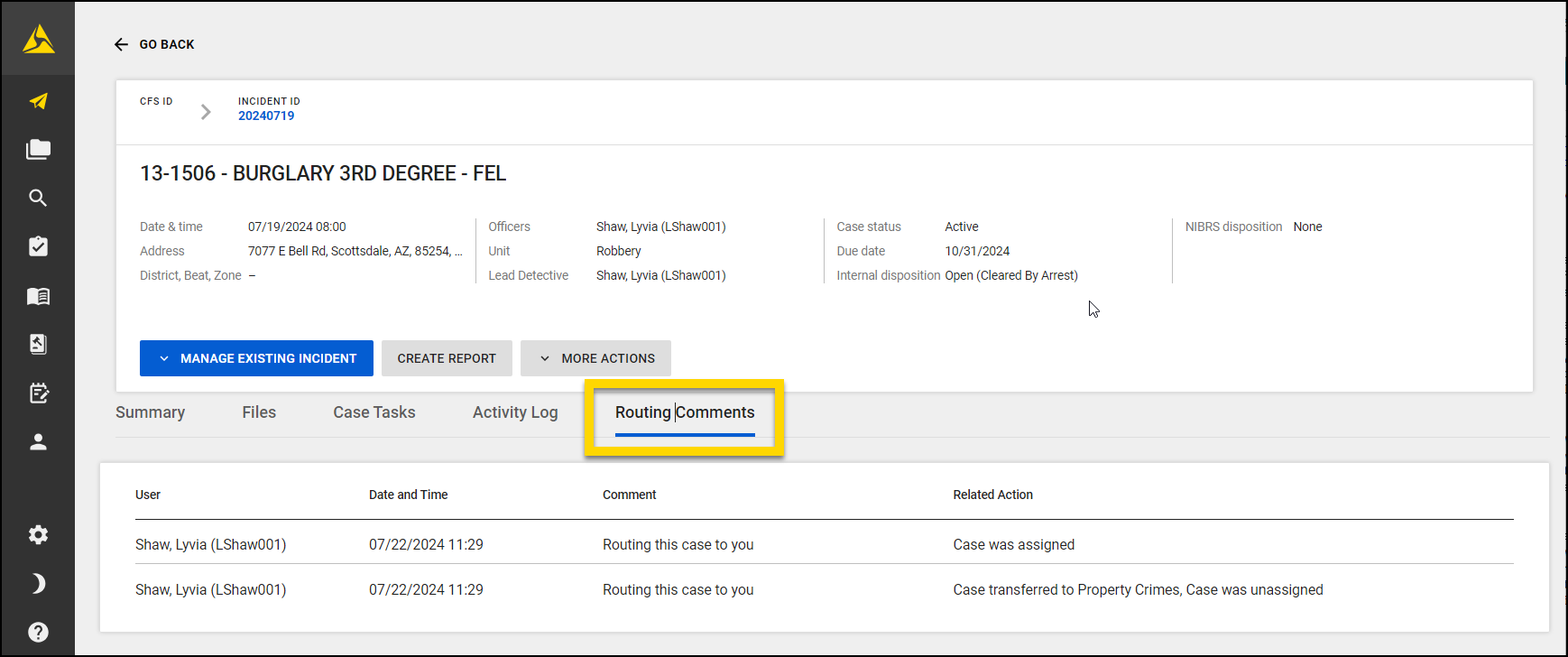
- A new Routing Comments tab now appears on case profiles. This new tab displays all routing comments that have been made on the case (during case creation, unit transfers, or case reassignments).
- The comments are displayed in descending order, with the most recent comments displayed first. Each comment includes the name of the person who left the comment and the date/time they made it.
- These comments are NOT included in case shares or case
Task Inboxes
The following feature is now available. Contact your Axon representative to have it activated in your agency's training environment.
- You can now route incident reports from Supervisor Review to Supervisor Review to better support approval workflows that involve multiple levels of supervision.
Property Management
The following feature will be available on August 6, 2024. Contact your Axon representative to have it activated in your agency's training environment.
- You can now track who the Responsible Officer is for a property item. A Responsible Officer receives email notifications when the retention period for an item is close to expiring. They can then update the retention period as needed.
- When an item is submitted to the Property department, the user who submits the property item is assigned as the Responsible officer.
- If the incident is turned into a case, the Responsible Officer is re-assigned to the case’s Lead Detective. If the case is ever transferred or reassigned, the Responsible Officer is updated accordingly.
Records general release
This section includes information about upcoming features and updates that are available in all production environments.
Report Writer
The following features will be available for all agencies to use in their production environments on August 6, 2024.
- Now, when you create a Standards report from a Records incident, any people you have added to the Records incident will be automatically copied into the Standards report, eliminating the previous requirement to manually enter the person information in Standards.
- You can now copy data from an existing report to a new report, even if the report types differ.
- This feature can be found in the More Actions [...] menu in when viewing a report in Report Writer.
- If the original report is associated with an incident, the new report will also be associated with that incident. If the original report is a standalone report, the new report will also be a standalone report that's not associated with an incident.
- This feature does not allow you to copy information from a Records report into a Standards report, and vice versa.
Task Inboxes
The following features will be available for all agencies to use in their production environments on August 6, 2024. Contact your Axon representative to have them activated for your agency.
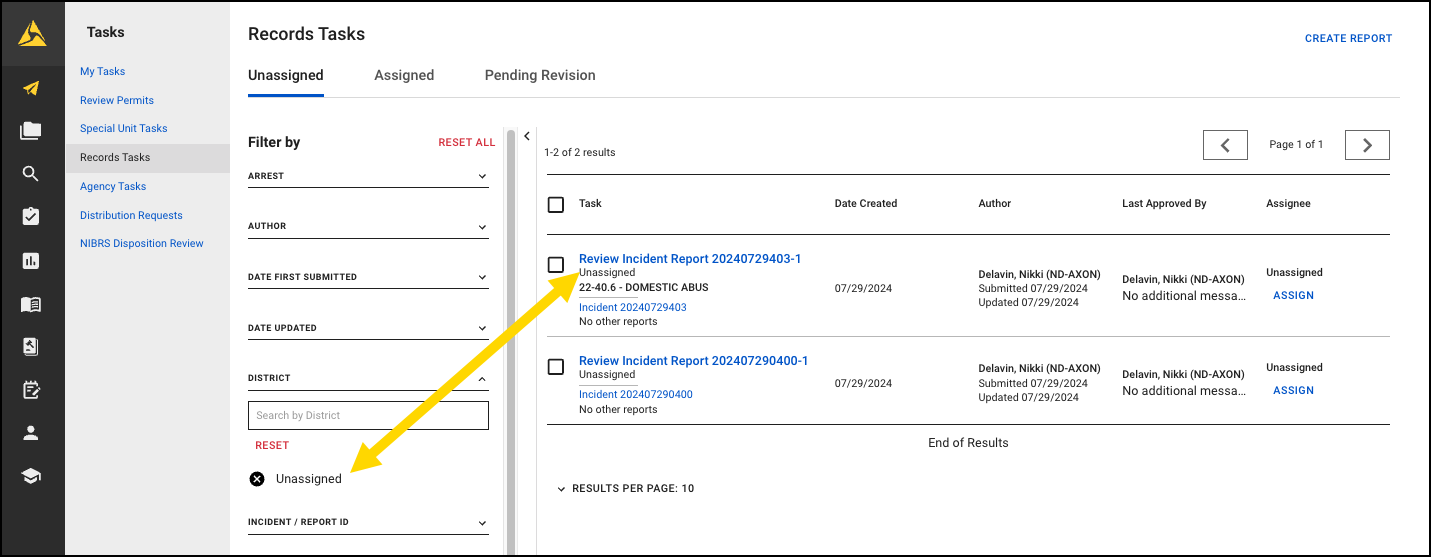
- Now, when you open the Records Tasks inbox the Unit/District filter automatically applies your assigned unit/district to the task list and displays only tasks for your unit/district. For example, if you are assigned to District 1, "District 1" is automatically selected in the District filter when you open the inbox.
The following features will be available for all agencies to use in their production environments on August 21, 2024. Contact your Axon representative to have them activated for your agency.
- Email notifications for task assignments can now include Officer, District/Beat/Zone, and Location information in the body of the email, when this information appears in the report.
Search
The following update will be applied to the production environments of all agencies on August 21, 2024.
- CSV search exports will now include a Report ID column. As a result, if an incident contains multiple reports, each report will appear on its own row with its unique Report ID. Each report row will also indicate the associated Incident ID.
Case Management
The following update will be applied to the production environments of all agencies on August 6, 2024:
- Now on the Case Tasks tab on case profiles, you can change the order in which tasks are listed by selecting a heading in the table. If a task doesn't have data for a field (e.g., due date), that task appears at the bottom of the list. The columns you can sort include:
- Task: Sort alphabetically (A to Z or Z to A) by task name.
- Assignee: Sort alphabetically (A to Z or Z to A) by the name of the person assigned to the task.
- Creation Date: Sort (newest to oldest or oldest to newest) by the date the task was created.
- Due Date: Sort (newest to oldest or oldest to newest) by the task due date.
- Status: Sort alphabetically (A to Z or Z to A) by task status.
Property Management
The following feature will be available for all agencies to use in their production environments on August 21, 2024. Contact your Axon representative to have it activated for your agency.
- You can now view a property item's recovery details on the property profile and in the item's chain of custody.
- These recovery details are captured in the incident report and include:
- Recovery Date
- Recovery Time
- Recovered By
- Recovery Location (location type, address/cross streets, and location note)
- These recovery details are captured in the incident report and include:
The following feature will be applied to the production environments of all agencies on August 21, 2024.
- Now, when assigning a property item to a location if you enter the exact storage location in the Location field, the matching location name will appear at the top of the list. Previously, the location appeared lower in the list of location options.
Records resolved issues
This section includes information about upcoming bug fixes and resolved issues that will be released to all production environments.
Task Inboxes
The following issue will be resolved on August 21, 2024:
- Previously, after a report was unlinked from an incident, the old Incident ID still appeared in the My Tasks inbox as being associated with that report. This issue has been resolved, and the unlinked Incident ID now no longer appears as associated with the report.
NIBRS
This section includes information about upcoming updates and bug fixes for NIBRS validation rules, errors, and submissions.
Illinois Agencies
The following update will be applied to the production environments of the agency listed above on August 21, 2024:
- Previously, the Property Value field validation was not enforced on Credit Cards (09), Nonnegotiable Instruments (22), Documents/Personal or Business (48), Identity Documents (65), and Identity Intangible (66), allowing users to leave the field blank. Users will now be required to enter a zero (0) as the property value for NIBRS reporting.
Ohio Agencies
The following updates will be applied to the production environments of the agency listed above on August 6, 2024:
- Validation rules for Ohio Revised Codes: 2903.18, 2903.18B1, 2903.18B2, and 2903.18B3 have been updated to require users to choose 'Yes' for the Weapon/Force Type Involved field. Additionally, users cannot select Simulated Firearm (17) in the Weapon/Force Type checkbox.
- Validation rules for Ohio Revised Codes: 2903.05 have been updated. Users can no longer select Simulated Firearm (17) as a Weapon/Force Type for this offense. Additionally, the Victim Type of 'P' is now visible.
- Validation rules for the Ohio NIBRS submission logic have been updated to address the reporting of duplicate ORC Offense Codes 2913.02 (Theft) and 2905.32 (Human Trafficking). The JSON submission will now report the NIBRS UCR Code instead of the ORC Offense Code.
- Previously, homicide and assault offenses did not allow users to select Attempted in the Offense Attempted/Complete field. This fix will now allow agencies to select this as an option.
- 2903.01
- 2903.01A
- 2903.01B
- 2903.01C
- 2903.01D
- 2903.01E1
- 2903.01E2
- 2903.01F
- 2903.02
-
2903.03
- 2903.03A
- 2903.03B
-
2903.04
- 2903.04A
- 2903.04B
- 2903.041
- 2903.01
- The following Ohio Revised Code (ORC) sections and subsections have been updated:
- 2903.21
- 2903.211 (including subsections A1, A2, A3)
- 2903.22 (including subsections A1, A2A, A2B)
For these codes:- Data Element #46 (Agg. Assault/Homicide Circumstance) will only be shown if Data Element #48 (Type of Injury) is 1-6 or 8, and Data Element #18 (Type of Weapon/Force Used)is not 99 or 17, ensuring DE #46 must be 01-06, 08-09, or U.
- Additionally, if Data Element #18 is any code other than 16, 17, 18, 40, 80, 99, or U, then DE #46 must be 01-06, 08-09, or U.
- The Type of Criminal Activity/Gang Involvement field will now require a selection if the Property Type of Gambling (16) is associated to one of the following Ohio Revised Codes:
| 2915.02 | 2915.09 | |
|---|---|---|
|
2915.02A1 2915.02A2 2915.02A3 2915.02A4 2915.02A5 2915.02A6 2915.02A7 |
2915.09A1 2915.09A2 2915.09A3 2915.09B1 2915.09B2 2915.09B3 2915.09C1 2915.09C2 2915.09C3 2915.09C4 |
2915.09C5 2915.09C6 2915.09C7 2915.09C8 2915.09C9 2915.09C10 2915.09C11 2915.09C12 2915.09D1 2915.09D2 |
Oklahoma Agencies
The following update will be applied to the production environments of the agency listed above on August 6, 2024:
- Oklahoma 80-series offenses will no longer require the Offender Suspected of Using? (Data Element 8) and Was Bias Motivation Involved? (Data Element 8A) fields required.
Standards preview release
This section includes information about upcoming features and updates that are available for testing in training environments. These are beta features, and all functionality may not be fully present or completely reliable.
Case Management
The following feature will be available on August 6, 2024. Contact your Axon representative or Axon Support to have it activated in your agency's training environment.
- A new Routing Comments tab now appears on case profiles. This new tab displays all routing comments that have been made on the case (during case creation, unit transfers, or case reassignments).
- The comments are displayed in descending order, with the most recent comments displayed first. Each comment includes the name of the person who left the comment and the date/time they made it.
- These comments are NOT included in case shares or case printouts.
Standards general release
This section includes information about upcoming features and updates that are available in all production environments.
Report Writer
The following update will be applied to the production environments of all agencies on August 6, 2024:
- Now, when you create a Standards report from a Records incident, any people you have added to the Records incident will be automatically copied into the Standards report, eliminating the previous requirement to manually enter the person information in Standards.
- You can now copy data from an existing report to a new report, even if the report types differ.
- This feature can be found in the More Actions [...] menu in when viewing a report in Report Writer.
- If the original report is associated with an incident, the new report will also be associated with that incident. If the original report is a standalone report, the new report will also be a standalone report that's not associated with an incident.
- This feature does not allow you to copy information from a Records report into a Standards report, and vice versa.
Search
The updates in this section will only be applied for agencies using the new search experience. Contact your Axon representative to have this new experience activated for your agency.
The following update will be applied to the production environments of all agencies on August 21, 2024.
- CSV search exports will now include a Report ID column. As a result, if an event contains multiple reports, each report will appear on its own row with its unique Report ID. Each report row will also indicate the associated Event ID.
Case Management
The following update will be applied to the production environments of all agencies on August 6, 2024:
- Now on the Case Tasks tab on case profiles, you can change the order in which tasks are listed by selecting a heading in the table. If a task doesn't have data for a field (e.g., due date), that task appears at the bottom of the list. The columns you can sort include:
- Task: Sort alphabetically (A to Z or Z to A) by task name.
- Assignee: Sort alphabetically (A to Z or Z to A) by the name of the person assigned to the task.
- Creation Date: Sort (newest to oldest or oldest to newest) by the date the task was created.
- Due Date: Sort (newest to oldest or oldest to newest) by the task due date.
- Status: Sort alphabetically (A to Z or Z to A) by task status.
Task Inboxes
The following feature will be available for all agencies to use in their production environments on August 21, 2024. Contact your Axon representative or Axon Support to have it activated for your agency.
- Email notifications for task assignments can now include Officer, District/Beat/Zone, and Location information in the body of the email, when this information appears in the report.
Administrator Console
The following feature will be available for all agencies to use in their production environments on August 6, 2024.
- Now, the EIS Alert Policies table shows comprehensive information on the metric and tracked groups for each policy. This provides you with a more complete overview at a glance.
Standards resolved issues
This section includes information about upcoming bug fixes and resolved issues that will be released to all production environments.
There are no resolved issues for Standards in August.
Records DataStore
This section includes information about upcoming changes to the Records DataStore.
Upcoming deprecations
The following fields in axon.WarrantsCharges view will be deprecated on August 28, 2024. Until this date, these fields will be set to NULL.
|
|
The following columns will be deprecated from axon.Cases on September 17, 2024. To access this data, perform a Join between axon.Cases and axon.Incidents.
UCRDispositionClearanceDateClearedExceptionally
The following fields in axon.MissingPersons view will be deprecated on October 1, 2024.
|
|
August 6 updates
- The following fields will be added to the
axon.MissingPersonsview:MissingPersonIdNoticedMissingAtReportedAtLastContactedAtLastContactedLocationLastContactedLocationNotePossibleDestinationLocationPossibleDestinationLocationNotePhotoPhotoAgeFingerPrintXRaysDentalsClothingSizeDescriptionJewelryTypeDescriptionBracesDenturesAccidentalDentalWorkDescriptionDentalWorkDescriptionOfBrokenBonesMissingOrgansDispositionDispositionDetailsReportCreatedAtReportUpdatedAt
Standards DataStore
This section includes information about upcoming changes to the Standards DataStore.
Upcoming deprecations
The following column in axon.PersonnelProfiles will be deprecated on
August 6, 2024:
| Being deprecated | Use instead |
|---|---|
PersonnalPhoneNumber
|
PersonalPhoneNumber
|
PersonnalEmail
|
PersonalEmail
|
August updates
No updates are planned for the Standards DataStore in August 2024.


