November 2024
These release notes describe all user-facing changes that will be included in the next Axon Records and Standards releases, along with advance notice of major upcoming features, updates, and applications.
There are two releases scheduled for March:
- November 5, 2024
- November 19, 2024
Releases begin rolling out at 11 AM Pacific time and may continue through the following day. We do not expect any downtime during these updates. Please note that availability is subject to change. Depending on the complexity and amount of items included in a release, some items in these notes may not be available until two days after the release.
Additional help documentation for Axon Records and Standards is located at axon.com/help. Do you have feedback about Axon's release notes? Submit it here.
Download this month's release notesRecords preview release
This section includes information about upcoming features and updates that are available for testing in training environments. These are beta features, and all functionality may not be fully present or completely reliable.
Report Writer
Contact your Axon representative to have the following feature activated in your agency's training environment.
- The Offense/Charges field now includes an infinite scroll. When you select this field, you can now scroll through the entire offense/charge list, rather than the shortened list that was previously displayed.
The following feature will be available on November 19, 2024. Contact your Axon representative to have it activated in your agency's training environment.
- You can now use a Middle Name filter when searching to add an existing person to a report.
Printing
The following feature will be available on November 5, 2024. Contact your Axon representative to have it activated in your agency's training environment.
- You can now download report printouts as a DOCX files.
This only applies when reports are printed using certain Agency print templates. Contact your Axon representative for more information.
Search
The following feature will be available on November 5, 2024. Contact your Axon representative to have it activated in your agency's training environment.
You can now select an X button to clear text entered in the top Search box. This button will not reset any filters that have been applied to the search.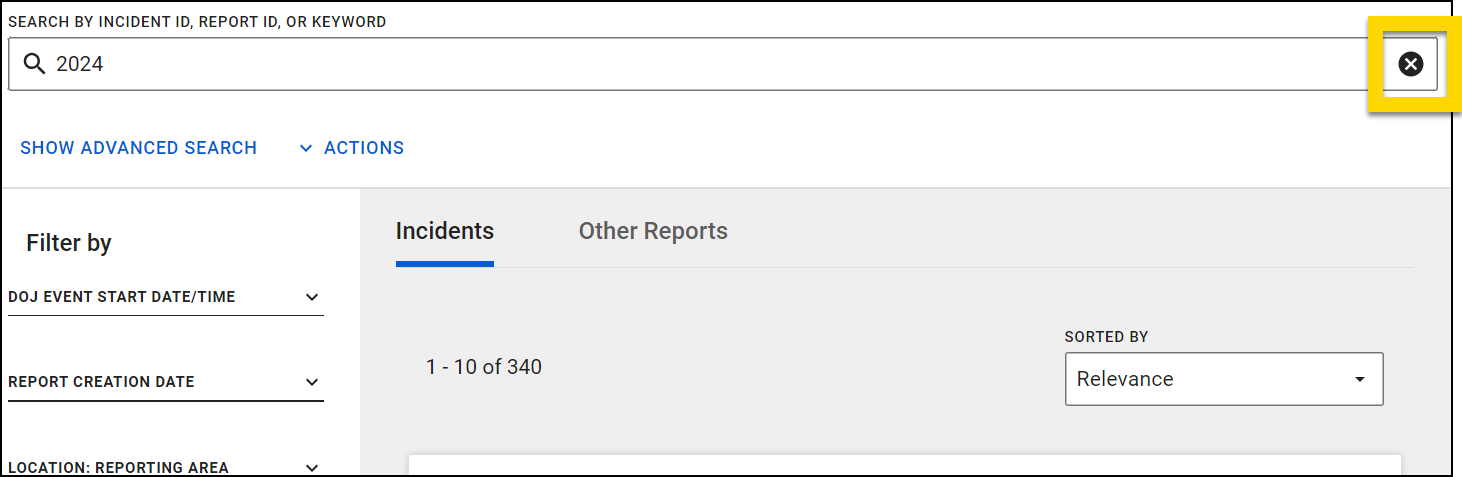
The following feature will be available on November 19, 2024. Contact your Axon representative to have it activated in your agency's training environment.
- Now, when you perform a search in Incidents Search, your search results will only include the latest version of incident reports.
- To also search for previous versions of incident reports, use the Match all versions checkbox in the Match Preferences filter.
Locations
The following feature will be available on November 5, 2024.
- The subaddress feature that was released in June for the desktop application now works in the mobile app.
- If your agency is already using this feature on desktop, it will automatically appear on mobile. If your agency is not yet using this feature on desktop, contact your Axon representative to have it enabled for both the desktop and mobile experience.
- With this feature, you can now add subaddress information to verified addresses (also called auto addresses). This subaddress functionality includes:
- Adding subaddress information (e.g. apartment number) when entering location data into a report without having to resort to using manual addresses
- Unique apartment numbers are treated as unique locations even if they share the same street address
- Viewing associations unique to the specific unit number at a given address
- Viewing and using unit information in searches and search results
- For administrators, viewing and using unit information in reporting
Case Management
The following features will be available on November 19, 2024. Contact your Axon representative to have them activated in your agency's training environment. Please note that it may take several weeks for your activation request to be completed.
- You can now create custom names for case tasks, making it easier to identify and manage multiple tasks within your case. Custom names appear on the Case Tasks tab of case profiles, in the case task window, and when printing.
Property Management
The following feature will be available on November 5, 2024. Contact your Axon representative to have it activated in your agency's training environment.
- If your agency captures electronic signatures during property workflows (check in/out, release, etc.), you can now see from an item’s chain of custody whether a signature was captured for a specific entry.
- Additionally, you can print any signed affidavits at the same time as printing the chain of custody.
Form Builder
- On November 20, 2024, the new Form Builder tool will be available in the Administrator Console of all training environments.
- Previously, this tool was used only by Axon employees to configure Records and Standards forms pre- and post go-live. Many agencies have requested to make this tool available to agency administrators to enable them to make these changes themselves. The Axon Product team spent the past year putting guardrails in place to protect form dependencies (e.g., integrations, analytics, NIBRS fields, etc.), and the Form Builder tool is now ready for testing in your training environments.
- In this first phase, Form Builder is only available in training. Please take some time to test it out and give us feedback so we can address concerns and fix issues before the tool is made available in production. Please leave feedback by filing a ticket in the Support Portal with the Area > “Forms” > Request Type > “Form Builder Tool”.
- Form Builder will become available in production environments in a few months. In the meantime, any form changes that are needed in your production environments should still be requested and filed in the Support Portal as usual.
- See MyAxon for additional information and instructions for using Form Builder. (There is one main callout for this training iteration of Form Builder that will not be true once the tool is released to production):
- If you publish a form with a new field, you won't be able to remove the field. If you need to remove the field, please contact your Axon representative and request that they remove it.
- Previously, this tool was used only by Axon employees to configure Records and Standards forms pre- and post go-live. Many agencies have requested to make this tool available to agency administrators to enable them to make these changes themselves. The Axon Product team spent the past year putting guardrails in place to protect form dependencies (e.g., integrations, analytics, NIBRS fields, etc.), and the Form Builder tool is now ready for testing in your training environments.
Records general release
This section includes information about upcoming features and updates that are available in all production environments.
Report Writer
The following features will be applied to the production environments of all agencies on November 5, 2024.
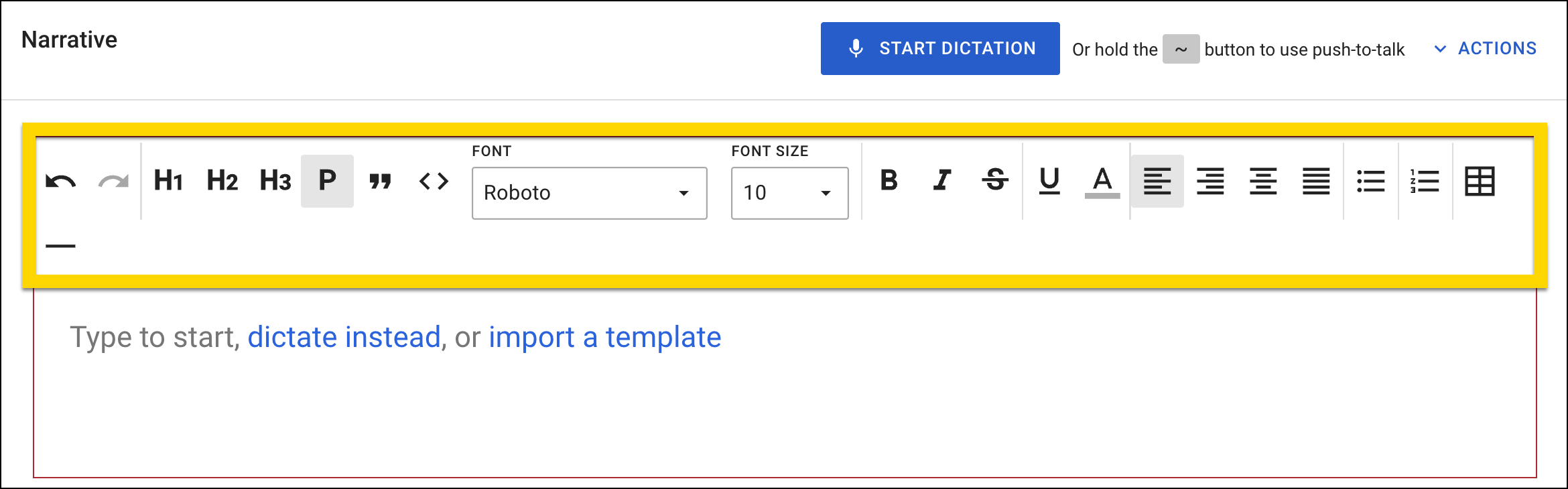
- You can now apply the following rich text formatting styles when writing report narratives:
- Bold
- Italic
- Strikethrough
- Underline
- Additional text colors
- Text size
- Additional text styles
- Text alignment (left, right, center, justify)
- Tables
- Paragraph styling (headings, paragraph, bullet list, numbered list, code, quote)
- This formatting will appear in report printouts as well.
- If your agency uses both Records and Standards, you can now link standalone, custom forms in Records to Standards events.
Search
The following feature will be applied to the production environments of all agencies on November 5, 2024.
- Now, when searching to add an existing person to a report, and there are more than 10 results, the search results appear on pages that you can move through. Previously, only 10 results were displayed in the list of search results.
- Now, when you export a CSV file of search results, each report within an incident will appear on its own row. The Incident ID, Report ID, and all other report details appear in each report's row.
The following feature will be applied to the production environments of all agencies on November 19, 2024.
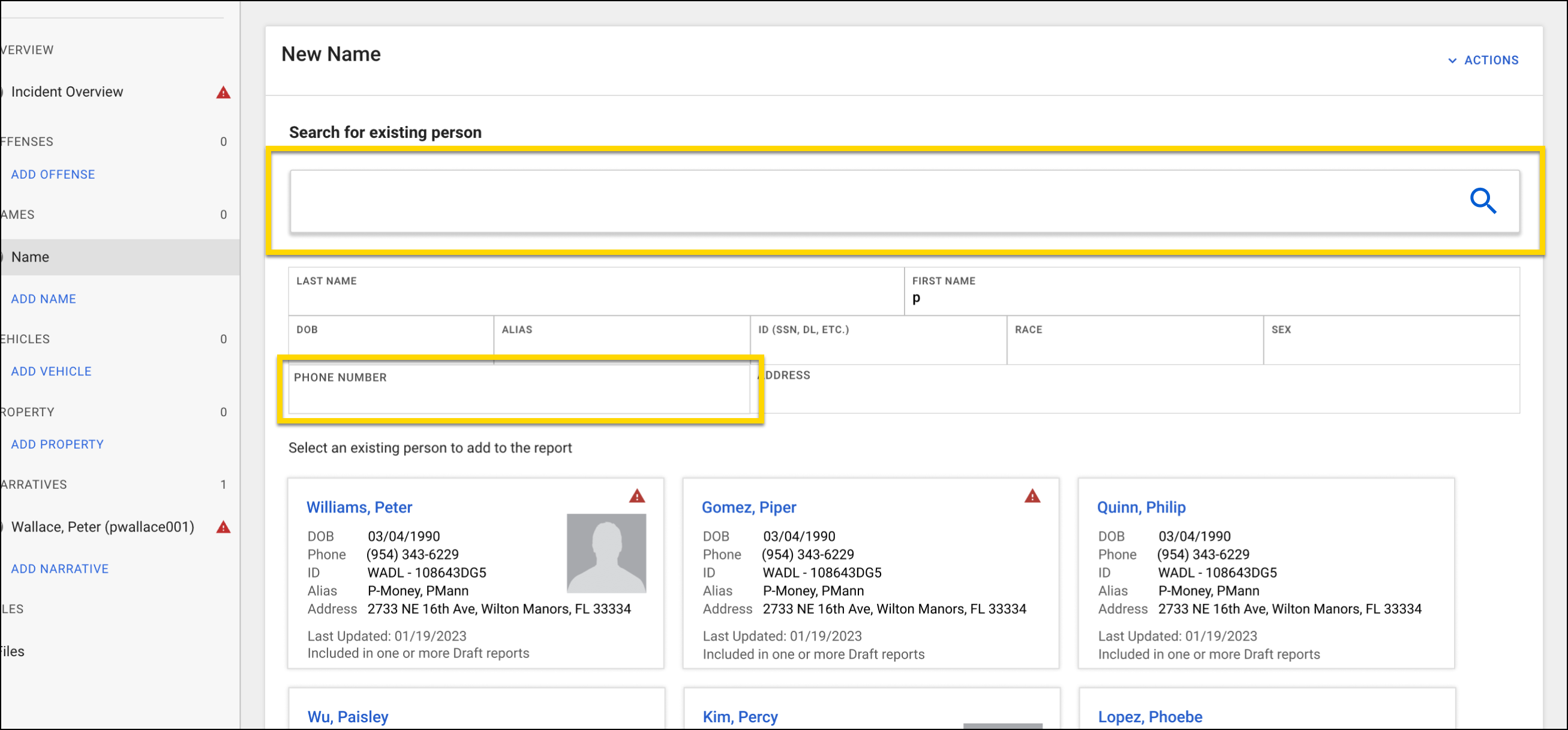
- You can now search for an existing person by entering names, IDs or keywords in a search bar that will now appear above the search filters. You can also search for a person with the new Phone Number filter.
Case Management
The following features will be applied to the production environments of all agencies on November 5, 2024.
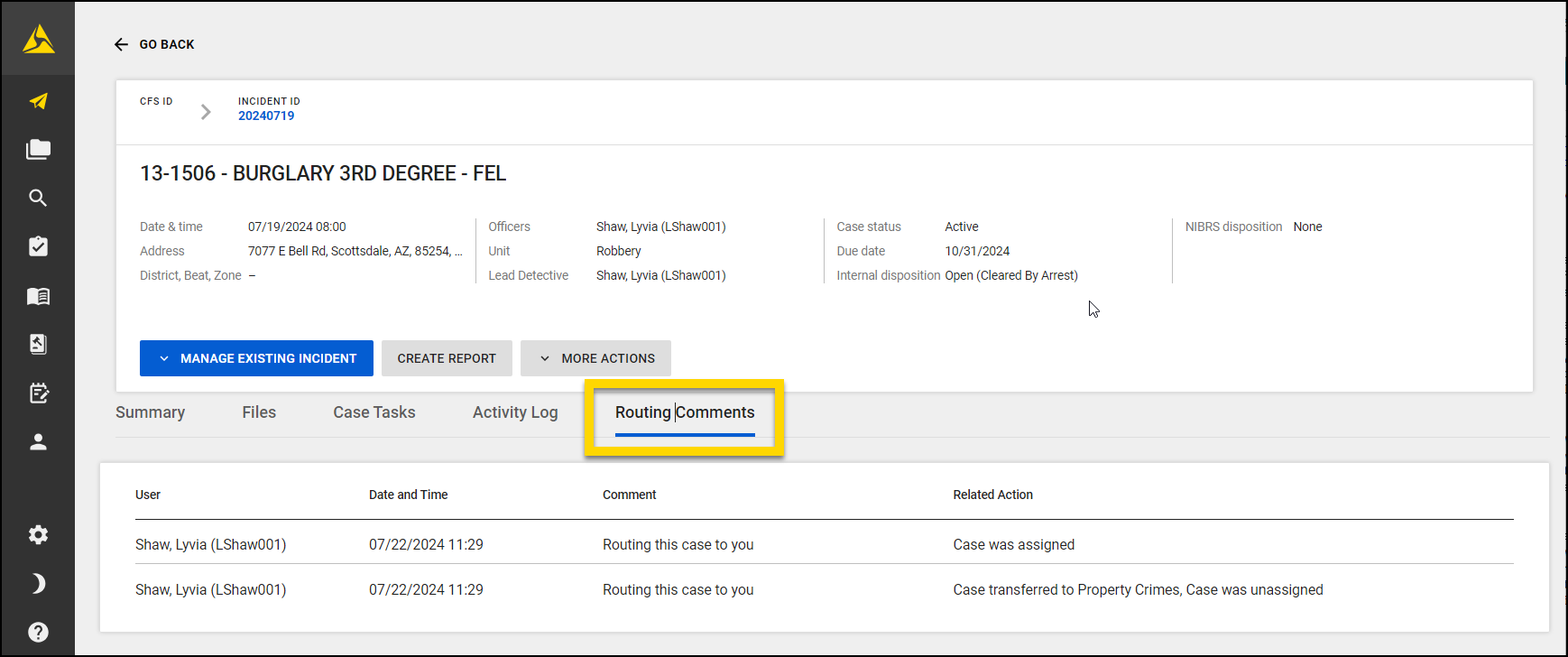
- A new Routing Comments tab now appears on case profiles. This new tab displays all routing comments that have been made on the case (during case creation, unit transfers, or case reassignments).
- The comments are displayed in descending order, with the most recent comments displayed first. Each comment includes the name of the person who left the comment and the date/time they made it.
- These comments are NOT included in case shares or case
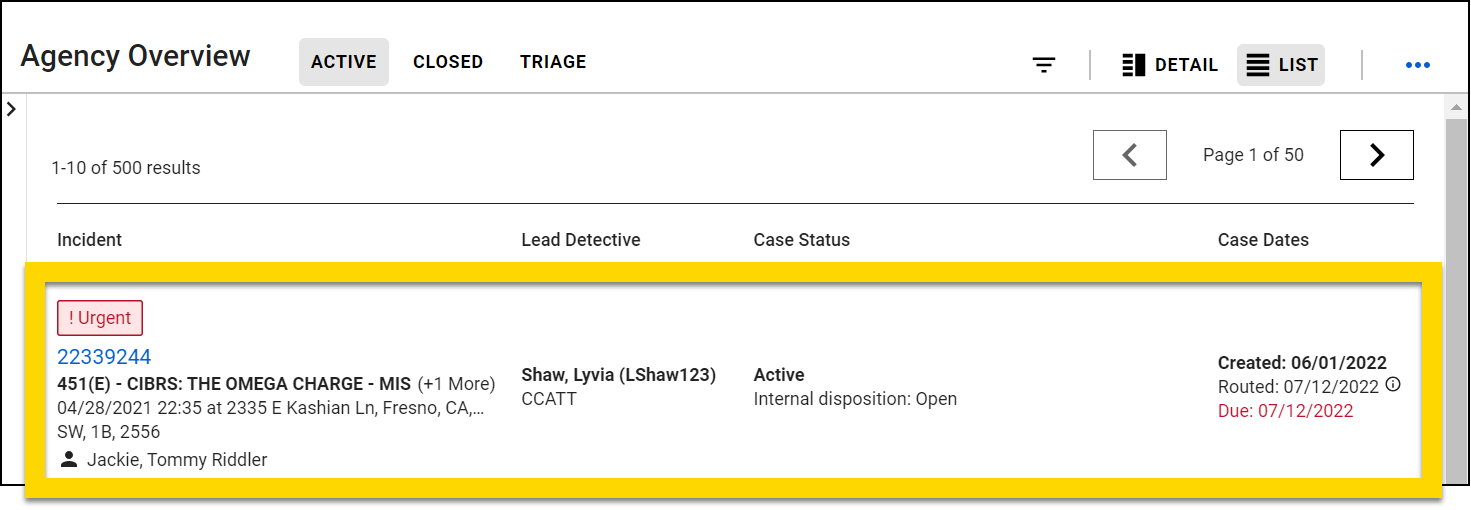
- The case inbox list view experience now includes the following fields:
- Offense(s)
- Incident location
- District, Beat, Zone
- Created date
- Persons involved (victim, offender, arrestee)
- Vehicle and organization(s) involved
- Disposition Reason
- Arrest flag based on role set in the incident report
- You can now manage case files using subfolders. This enhancement addresses the limitations of the previous flat folder hierarchy by letting users create and manage nested folders (subfolders) within a case. This improvement aims to better meet users' organizational needs and streamline evidence management in both Axon Records and Axon Evidence. New features and enhancements include:
- Creating Subfolders
- You can now create subfolders within a case, providing a more flexible and organized structure for evidence management.
- Adding Evidence to Subfolders
- You can add evidence to subfolders, allowing for more precise categorization and easier retrieval of specific evidence items.
- Viewing Evidence in Subfolders
- You can view all evidence contained within subfolders, ensuring clear visibility and access to organized evidence.
- Synchronization with Axon Evidence
- Subfolders created in Axon Records also appear in the corresponding Axon Evidence case, maintaining the folder structure and hierarchy across both systems. Evidence appears in the appropriate folder in both Axon Records and Axon Evidence.
- Removing Evidence from Subfolders
- You can remove evidence from a subfolder within a case, providing flexibility in managing evidence as cases evolve.
- Deleting Subfolders
- You can delete subfolders from a case, simplifying the reorganization of evidence as needed.
- Importing Subfolders
- You can import subfolders from your computer's local file system into a case, facilitating the transfer of pre-organized evidence structures into Axon Records.
- Creating Subfolders
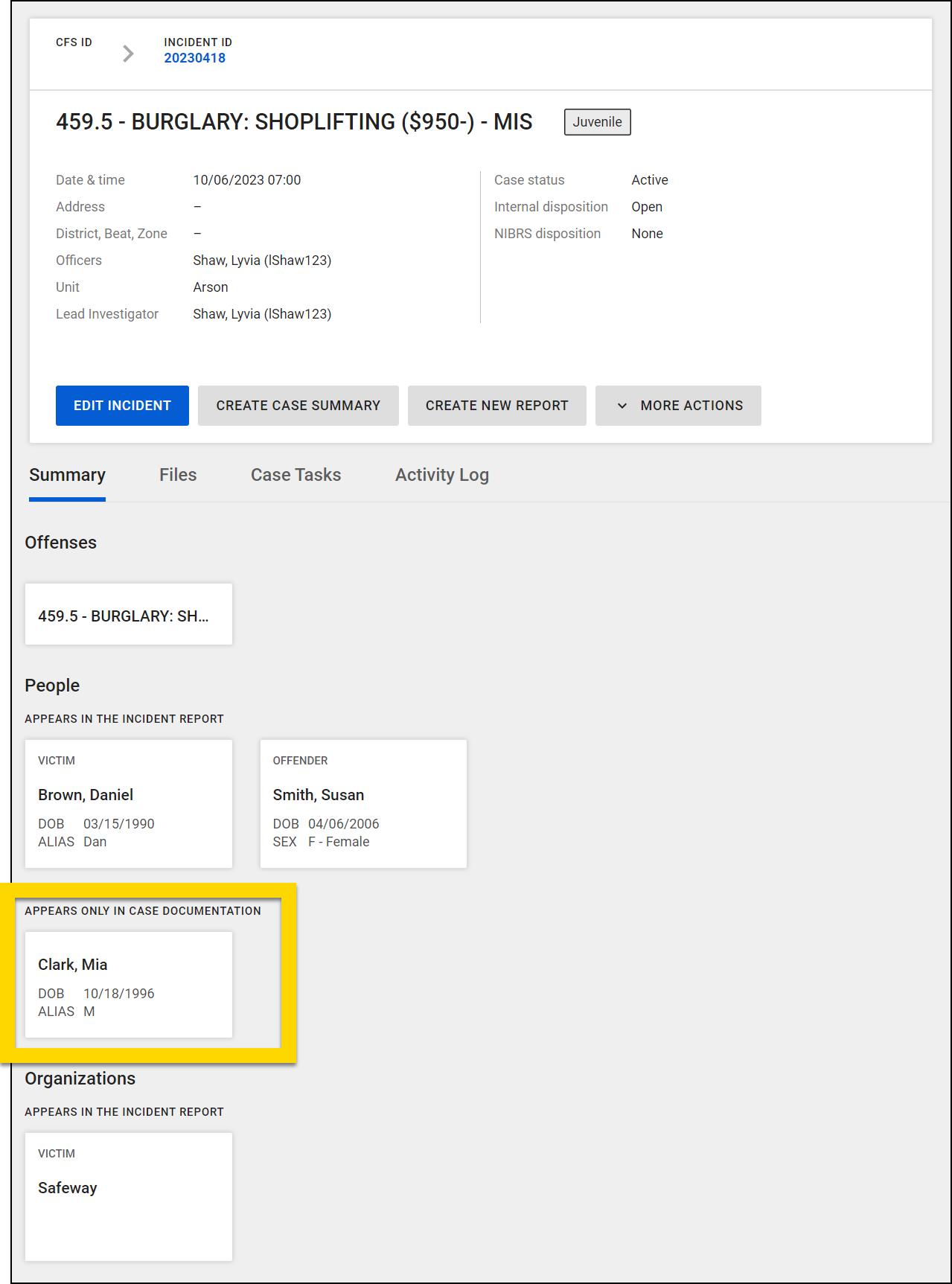
- People, vehicle, and organization cards are now displayed on the case profile when they are added to a case document.
- The cards are displayed in a new Appears Only in Case Documentation section and are only visible to users who have access to the case.
- If the person, vehicle, or organization is referenced in both the incident report and case documents, it is displayed in the Appears in the Incident Report section.
- The cards show the latest information about that person, vehicle, or organization from any of the documents associated with the case.
- Select a card to open the corresponding profile for that person, vehicle, or organization.
- Select a card to open the corresponding profile for that person, vehicle, or organization.
- The cards are displayed in a new Appears Only in Case Documentation section and are only visible to users who have access to the case.
Property Management
The following update will be applied to the production environments of all agencies on November 5, 2024.
- The Notes field has been renamed to Reason / Notes.
- You'll now see Print Affidavit instead of Print Receipt on check-in and other property action screens when electronic signatures are enabled for Physical Evidence and Property.
The following feature will be available for all agencies to use in their production environments on November 19, 2024. Contact your Axon representative to have it activated for your agency.
- When completing a release affidavit, you'll see the following changes in name fields:
- The Name field has been changed to Owner Name.
- A new Release to Name field appears when you select the Other or External Agency options.
- When the Authorized to Release To, Other, and External Agency are selected, the signature lines will display a Release To Name field.
- When the Owner options is selected, the signature lines will display an Owner Name field.
Administrator Console
The following feature will be available on November 19, 2024. Contact your Axon representative to have it activated in your agency's training environment.
- If your organization uses both Records and Standards, you can now create and manage a separate announcement banner for the Records and Standards My Tasks inboxes. This update lets you share specific information relevant to the users of each product.
Records resolved issues
This section includes information about upcoming bug fixes and resolved issues that will be released to all production environments.
Profiles
The following issue will be resolved on November 5, 2024:
- Fixes an issue where you previously saw invalid or blank information in a profile. Document and ID type fields now display correctly, only appearing when you've entered data and showing each entry once. You'll no longer see empty fields or duplicate entries.
Case Management
The following issue will be resolved on November 19, 2024:
- Now, you will only receive email notifications when new evidence is added to a case. Previously, you would incorrectly receive notifications about evidence being added when users viewed the Files tab on the case profile, even when no new evidence was added.
NIBRS
This section includes information about upcoming updates and bug fixes for NIBRS validation rules, errors, and submissions.
All Agencies
The following updates will be applied to the production environments of all agencies on November 5, 2024.
- Previously, stolen property associated to a Motor Vehicle Theft (240) offense did not show the Property Status field to users, and the property could not be reported. This fix adjusts the rule validation and will allow users to report stolen property with a motor vehicle theft offense.
- Previously, Stolen Property Offenses (280) required users to select "Stolen" as the Property Status for vehicles before they could choose "Recovered." With this update, users can now directly select "Recovered" as an option without also having to mark the vehicle as stolen.
The following updates will be applied to the production environments of all agencies on November 19, 2024.
- Previously, on Justifiable Homicides (09C) offenses, the Bias Motivation field was hidden from users and was not sending the “88” ‘None’ value in the submission file. This fix will now include ‘88’ in the submission file, since this is the only value that can be sent for a Justifiable Homicide.
- This fix addresses a specific issue related to arrestees solely linked to a non-NIBRS offense. Previously, users encountered an error when selecting a non-NIBRS offense in the Primary Offense for Arrest field on an Arrest form. With this update, users can now freely choose a non-NIBRS offense, provided that the arrestee is not connected to any other NIBRS offenses.
Ohio Agencies
The following updates will be applied to the production environments of all agencies on November 5, 2024.
- Previously, Group B offenses were only submitted if an arrest was made. This update modifies the submission logic to now include reporting Group B offenses even in the absence of an arrest. Furthermore, Group B offenses will now be reported alongside Group A offenses.
- Due to the nature of this change, Ohio agencies should contact Axon Support to request previous incident reports already submitted to be requeued and transmitted again to Ohio NIBRS.
- Per the State of Ohio, for ORC 2909.07 (NIBRS UCR Code 290) attempted offenses, property information will no longer be reported. Additionally, the rule validations requiring users to enter property will be removed.
Oklahoma Agencies
The following updates will be applied to the production environments of all agencies on November 5, 2024.
- The NIBRS Rule Validation for Oklahoma has been updated to enforce the correct use of relationship codes for same-sex couples. The following rules were implemented:
- Validation rules were adjusted to detect and prevent the use of heterosexual relationship codes (e.g., Boyfriend/Girlfriend, Spouse, Ex-Spouse, Ex-Boyfriend/Girlfriend) between same-sex victims and offenders.
- Instead, the system will now require the appropriate code for homosexual relationships, ensuring compliance with Oklahoma UCR standards.
- Previously, Runaway (90I) offenses were not including the victim type of Society in the XML. This fix will now correctly associate this Group B offense as a Society crime and submit this value in the submission file.
Standards preview release
This section includes information about upcoming features and updates that are available for testing in training environments. These are beta features, and all functionality may not be fully present or completely reliable.
Report Writer
Contact your Axon representative or Axon Support to have the following feature activated in your agency's training environment.
- The Offense/Charges field now includes an infinite scroll. When you select this field, you can now scroll through the entire offense/charge list, rather than the shortened list that was previously displayed.
Printing
The following feature will be available on November 5, 2024. Contact your Axon representative or Axon Support to have it activated in your agency's training environment.
- You can now download report printouts as a DOCX files.
This only applies when reports are printed using certain Agency print templates. Contact your Axon representative or Axon Support for more information.
Search
The feature in this section will only be available for agencies using the new search experience. Contact your Axon representative to have this new experience activated for your agency.
The following feature will be available on November 5, 2024. Contact your Axon representative or Axon Support to have it activated in your agency's training environment.
- You can now select an X button to clear text entered in the top Search box. This button will not reset any filters that have been applied to the search.
Locations
The following feature will be available on November 5, 2024.
- The subaddress feature that was released in June for the desktop application now works in the mobile app.
- If your agency is already using this feature on desktop, it will automatically appear on mobile. If your agency is not yet using this feature on desktop, contact your Axon representative or Axon Support to have it enabled for both the desktop and mobile experience.
- With this feature, you can now add subaddress information to verified addresses (also called auto addresses). This subaddress functionality includes:
- Adding subaddress information (e.g. apartment number) when entering location data into a report without having to resort to using manual addresses
- Unique apartment numbers are treated as unique locations even if they share the same street address
- Viewing associations unique to the specific unit number at a given address
- Viewing and using unit information in searches and search results
- For administrators, viewing and using unit information in reporting
Form Builder
- On November 20, 2024, the new Form Builder tool will be available in the Administrator Console of all training environments.
- Previously, this tool was used only by Axon employees to configure Records and Standards forms pre- and post go-live. Many agencies have requested to make this tool available to agency administrators to enable them to make these changes themselves. The Axon Product team spent the past year putting guardrails in place to protect form dependencies (e.g., integrations, analytics, NIBRS fields, etc.), and the Form Builder tool is now ready for testing in your training environments.
- In this first phase, Form Builder is only available in training. Please take some time to test it out and give us feedback so we can address concerns and fix issues before the tool is made available in production. Please leave feedback by filing a ticket in the Support Portal with the Area > “Forms” > Request Type > “Form Builder Tool”.
- Form Builder will become available in production environments in a few months. In the meantime, any form changes that are needed in your production environments should still be requested and filed in the Support Portal as usual.
- See MyAxon for additional information and instructions for using Form Builder. (There is one main callout for this training iteration of Form Builder that will not be true once the tool is released to production):
- If you publish a form with a new field, you won't be able to remove the field. If you need to remove the field, please contact your Axon representative and request that they remove it.
- Previously, this tool was used only by Axon employees to configure Records and Standards forms pre- and post go-live. Many agencies have requested to make this tool available to agency administrators to enable them to make these changes themselves. The Axon Product team spent the past year putting guardrails in place to protect form dependencies (e.g., integrations, analytics, NIBRS fields, etc.), and the Form Builder tool is now ready for testing in your training environments.
Standards general release
This section includes information about upcoming features and updates that are available in all production environments.
Report Writer
The following features will be applied to the production environments of all agencies on November 5, 2024.
- You can now apply the following rich text formatting styles when writing report narratives:
- Bold
- Italic
- Strikethrough
- Underline
- Additional text colors
- Text size
- Additional text styles
- Text alignment (left, right, center, justify)
- Tables
- Paragraph styling (headings, paragraph, bullet list, numbered list, code, quote)
- This formatting will appear in report printouts as well.
- If your agency uses both Records and Standards, you can now link standalone, custom forms in Records to Standards events.
Search
The features in this section will only be applied for agencies using the new search experience. Contact your Axon representative to have this new experience activated for your agency.
The following feature will be applied to the production environments of all agencies using the new Search experience on November 5, 2024.
- Now, when searching to add an existing person to a report, and there are more than 10 results, the search results appear on pages that you can move through. Previously, only 10 results were displayed in the list of search results.
- Now, when you export a CSV file of search results, each report within an event will appear on its own row. The Event ID, Report ID, and all other report details appear in each report's row.
The following feature will be applied to the production environments of all agencies using the new Search experience on November 19, 2024.
- You can now search for an existing person by entering names, IDs or keywords in a search bar that will now appear above the search filters. You can also search for a person with the new Phone Number filter.
Case Management
The following features will be applied to the production environments of all agencies on November 5, 2024.
- A new Routing Comments tab now appears on case profiles. This new tab displays all routing comments that have been made on the case (during case creation, unit transfers, or case reassignments).
- The comments are displayed in descending order, with the most recent comments displayed first. Each comment includes the name of the person who left the comment and the date/time they made it.
- These comments are NOT included in case shares or case.
- You can now manage case files using subfolders. This enhancement addresses the limitations of the previous flat folder hierarchy by letting users create and manage nested folders (subfolders) within a case. This improvement aims to better meet users' organizational needs and streamline evidence management in both Axon Records and Axon Evidence. New features and enhancements include:
- Creating Subfolders
- You can now create subfolders within a case, providing a more flexible and organized structure for evidence management.
- Adding Evidence to Subfolders
- You can add evidence to subfolders, allowing for more precise categorization and easier retrieval of specific evidence items.
- Viewing Evidence in Subfolders
- You can view all evidence contained within subfolders, ensuring clear visibility and access to organized evidence.
- Synchronization with Axon Evidence
- Subfolders created in Axon Records also appear in the corresponding Axon Evidence case, maintaining the folder structure and hierarchy across both systems. Evidence appears in the appropriate folder in both Axon Records and Axon Evidence.
- Removing Evidence from Subfolders
- You can remove evidence from a subfolder within a case, providing flexibility in managing evidence as cases evolve.
- Deleting Subfolders
- You can delete subfolders from a case, simplifying the reorganization of evidence as needed.
- Importing Subfolders
- You can import subfolders from your computer's local file system into a case, facilitating the transfer of pre-organized evidence structures into Axon Records.
- Creating Subfolders
- People, vehicle, and organization cards are now displayed on the case profile when they are added to a case document.
- The cards are displayed in a new Appears Only in Case Documentation section and are only visible to users who have access to the case.
- If the person, vehicle, or organization is referenced in both the incident report and case documents, it is displayed in the Appears in the Incident Report section.
- The cards show the latest information about that person, vehicle, or organization from any of the documents associated with the case.
- Select a card to open the corresponding profile for that person, vehicle, or organization.
- Select a card to open the corresponding profile for that person, vehicle, or organization.
- The cards are displayed in a new Appears Only in Case Documentation section and are only visible to users who have access to the case.
Administrator Console
The following feature will be available on November 19, 2024. Contact your Axon representative to have it activated in your agency's training environment.
- If your organization uses both Records and Standards, you can now create and manage a separate announcement banner for the Records and Standards My Tasks inboxes. This update lets you share specific information relevant to the users of each product.
Standards resolved issues
This section includes information about upcoming bug fixes and resolved issues that will be released to all production environments.
Profiles
The following issue will be resolved on November 5, 2024:
- Fixes an issue where you previously saw invalid or blank information in a profile. Document and ID type fields now display correctly, only appearing when you've entered data and showing each entry once. You'll no longer see empty fields or duplicate entries.
Case Management
The following issue will be resolved on November 19, 2024:
- Now, you will only receive email notifications when new evidence is added to a case. Previously, you would incorrectly receive notifications about evidence being added when users viewed the Files tab on the case profile, even when no new evidence was added.
Axon App
This section includes all updates that are being released to the mobile experience of Axon Records and Standards in November.
Locations
The following feature will be available on November 5, 2024.
- The subaddress feature that was released in June for the desktop application now works in the mobile app.
- If your agency is already using this feature on desktop, it will automatically appear on mobile. If your agency is not yet using this feature on desktop, contact your Axon representative or Axon Support to have it enabled for both the desktop and mobile experience.
- With this feature, you can now add subaddress information to verified addresses (also called auto addresses). This subaddress functionality includes:
- Adding subaddress information (e.g. apartment number) when entering location data into a report without having to resort to using manual addresses
- Unique apartment numbers are treated as unique locations even if they share the same street address
- Viewing associations unique to the specific unit number at a given address
- Viewing and using unit information in searches and search results
- For administrators, viewing and using unit information in reporting
Records DataStore
This section includes information about upcoming changes to the Records DataStore.
Upcoming deprecations
The following fields in axon.MissingPersons view will be deprecated on November 5, 2024.
|
|
November 5 updates
-
The following indexed column is now availalable in
dw.Incidents:- dw.Incidents
IncidentClearanceDate
-
The following columns are now available in
axon.Incidents:IncidentClearanceDateIncidentClearanceDate_Indexed_UtcIncidentClearedExceptionally- Note: If your organization uses the case disposition update experience, the
IncidentClearanceDateis filled; otherwise theClearanceDateis filled.
- You can now view flag information from the following view:
axon.Flags
November 19 updates
- Activity Log information can now be found in the following view:
axon.ActivityLog
Standards DataStore
This section includes information about upcoming changes to the Standards DataStore.
Upcoming deprecations
There are no upcoming deprecations scheduled for Axon Standards.
November 5 updates
- You can now access Standards Case Management data in the Standards DataStore from the following views:
axon.StandardsCaseaxon.StandardsCaseTaskNotes
- You can now view flag information from the following view:
axon.Flags
November 19 updates
- Activity Log information can now be found in the following view:
axon.ActivityLog


