March 2025
These release notes describe all user-facing changes that will be included in the next Axon Records and Standards releases, along with advance notice of major upcoming features, updates, and applications.
There are two releases scheduled for March:
- March 11, 2025
- March 25, 2025
Releases begin rolling out at 11 AM Pacific time and may continue through the following day. We do not expect any downtime during these updates. Please note that availability is subject to change. Depending on the complexity and amount of items included in a release, some items in these notes may not be available until several days after the release.
Additional help documentation for Axon Records and Standards is located at axon.com/help. Do you have feedback about Axon's release notes? Submit it here.
Download this month's release notesRecords preview release
This section includes information about upcoming features and updates that are available for testing in training environments. These are beta features, and all functionality may not be fully present or completely reliable.
Profiles
The following features are now available. Contact your Axon representative to have it activated in your organization's training environment.
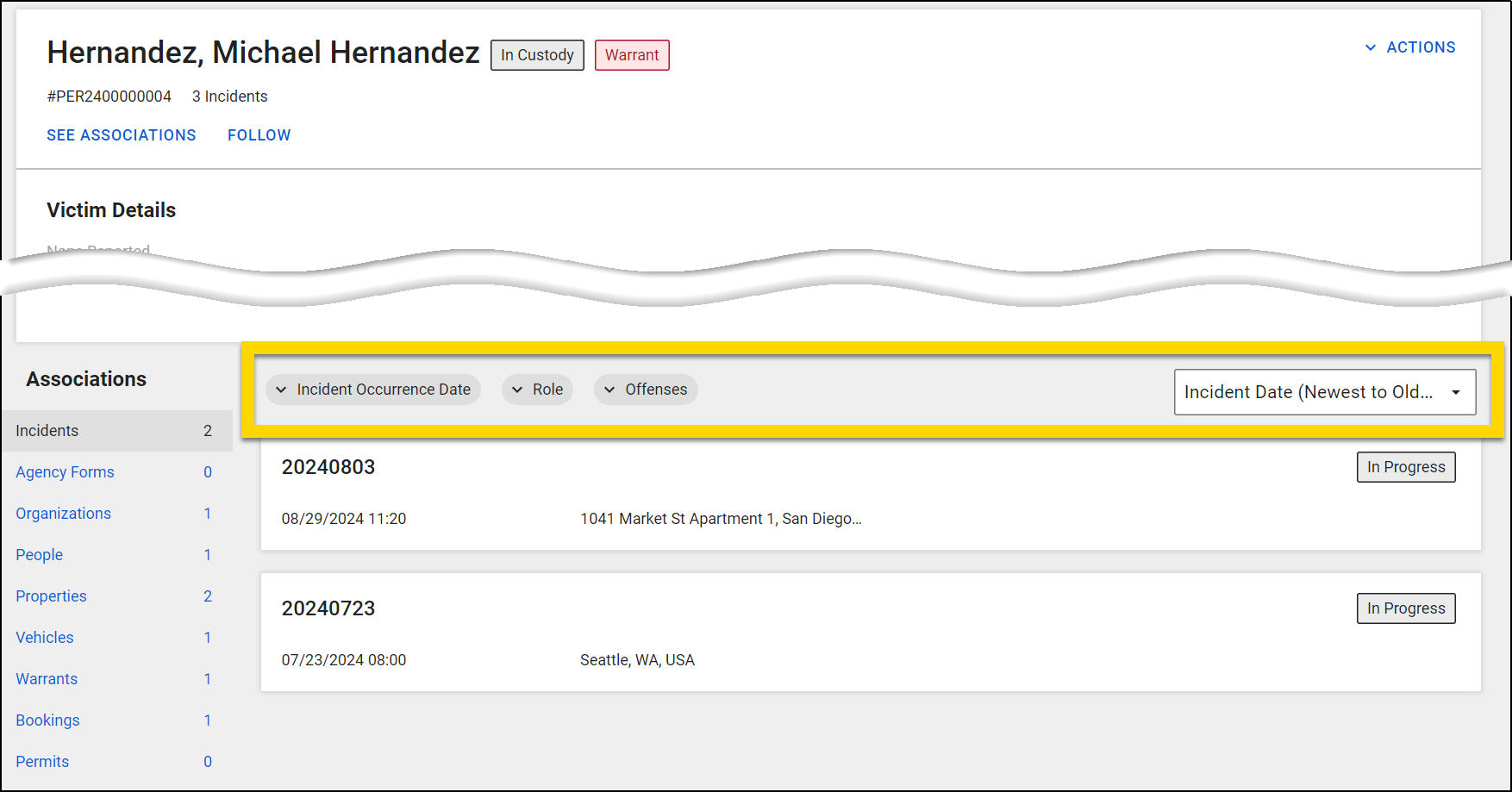
- Sorting and filtering capabilities are now available in the Associations section on profile pages. You can now:
- In Records, filter Incident associations using Incident Occurrence Date, Role, and Offenses filters
- In Records, filter Agency Forms associations using Report Creation Date and Report Type filters
- In Records and Standards, sort Associations by the date the association was created
- In Records, for Incident and Agency Forms associations, you can instead sort by Relevance, Incident Date, and Incident Number.
- In Records and Standards, easily navigate between Association pages across different profiles
- You can now Follow person, vehicle, and location profiles, and receive email notifications whenever there’s an update regarding these followed profiles.
See MyAxon for more information.

Records general release
This section includes information about upcoming features and updates that are available in all production environments.
Report Writer
The following updates will be applied to the production environments of all organizations on March 11, 2025.
- Users can now configure flags on standalone forms without attaching them to a Flags workflow. However, this limitation still exists for incident reports.
Draft One
The following updates will be applied to the production environments of all organizations on March 19, 2025.
- Narration in Draft One
- We’ve encouraged officers to narrate details into their camera during the incident, as this significantly improves the quality of drafts generated with Draft One. However, sometimes officers forget, don’t have the opportunity, or find it awkward. With this new feature, officers can now narrate AFTER the incident, from within their browser, right before generating the draft. Draft One adds the transcribed text of the narration to the transcripts of the selected evidence files to produce a higher quality draft. Officers can also choose to create a Draft One narrative using narration only, without selecting any evidence files. The narrated audio and transcribed text are not saved into evidence, although a note is created in the audit trail that narration was used during the creation of the draft narrative.
- Your narration doesn't need to be perfectly spoken or organized, as if you were dictating. Instead, think of it as an informal voice memo that lets you add all the necessary details to your narrative. Draft One will "clean up" your details and work them into its generated narrative.
- Learn more about Generating a narrative draft with Draft One.
- Evidence preview in Draft One
- We’ve heard feedback that it’s difficult to know which evidence items to select when using Draft One. Now, when picking evidence files, you can select an expanding arrow to view the audio/video player and ensure it’s the correct file for your narrative.
- Learn more about Generating a narrative draft with Draft One.
- New Draft One settings
- Two new settings are now available on the Draft One Settings page:
- Allow draft generation from all accessible evidence: By default, a user can only use Draft One on evidence items assigned to them. When this setting is enabled, users can generate narratives for any evidence files they have permission to access.
- Allow drafts to be generated based solely on Audio Narration: When enabled, users can narrate a draft using Draft One without selecting any evidence.
- Learn more about Draft One Settings.
- Two new settings are now available on the Draft One Settings page:
- Viewing the transcript beside the draft narrative
- After generating a draft, you can now select a camera icon in the Report Writer sidebar to view the transcripts and media player for the evidence items you used to generate the draft. You can interact with these elements the way you would from the Axon Evidence Details page (search for words, select words to navigate to the moment in the audio/video, etc.).
- Learn more about Generating a narrative draft with Draft One.
Printing
The following update will be applied to the production environments of all organizations on March 11, 2025.
- You can now print the contents of restricted reports when printing with custom print templates in the same way you can when printing with the default Axon templates.
The following feature will be available for all organizations to use in their production environments on March 11, 2025. Contact your Axon representative to have it activated for your organization.
- Axon print templates can now display the rank of the author and contributors when printing from the report or incident page.
The following update will be applied to the production environments of all organizations on March 25, 2025.
- Dates on printouts now use slashes ("/") instead of hyphens ("-") for consistency across date and date/time formats.
Case Management
The following feature will be available for all organizations to use in their production environments on March 11, 2025. Contact your Axon representative to have it activated for your organization.
- Agencies can now customize case disposition reasons tied to specific internal dispositions. This update displays only relevant disposition reasons based on the selected internal disposition in the Update Disposition window. If your agency adopts this structure, you'll see refined reason lists for all cases. Agencies maintaining their current setup will continue using their existing consolidated list without disruption.
Administrator Console
The following update will be applied to the production environments of all organizations on March 25, 2025.
- Previously, when Person A was merged with Person B, audit logs for Person A were inaccessible without unmerging them. Now, the Audit Log tool includes the history of all previously merged persons within the primary person’s audit log.
Form Builder
The following feature will be available for all organizations to use in their production environments on March 11, 2025. Contact your Axon representative to have it activated for your organization.
- The new Form Builder tool is available for production environments. Form Builder is in the Administrator Console, where users with administrator access can create and publish changes to their agency’s forms in Axon Records and Standards. It is highly encouraged to test changes in your training environment first before making changes in your production environment. For additional information and instructions, visit MyAxon.
- If you need new forms or advanced changes to existing forms such as new search filters, validation rule updates, or entity changes please request them through the Support Portal as a Forms update.
The following update will be applied to the production environments of all organizations on March 11, 2025.
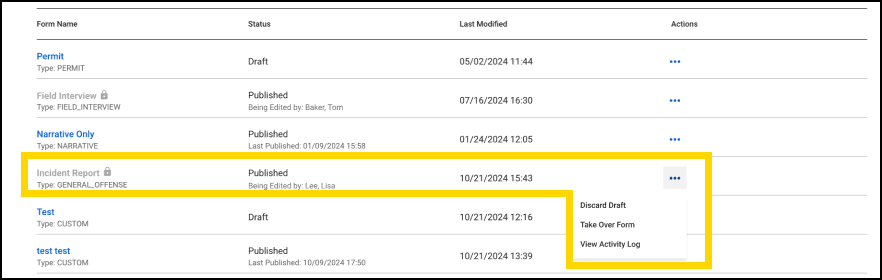
- A new safeguard prevents multiple users from editing the same form simultaneously. When another user is editing a form, a lock icon will appear next to the form name. If you need to make a change before the other person has completed their edits, you can select Take Over Form from the Actions menu. Keep in mind, any unsaved changes made by the other person will be lost when you take over the form.
The following update will be available to the production environments for Florida agencies on March 11, 2025.
- The Drivers License Restrictions field is now a dropdown menu with predefined options, eliminating the need for users to memorize the restrictions options.
Records resolved issues
This section includes information about upcoming bug fixes and resolved issues that will be released to all production environments.
Report Writer
The following issue will be resolved on March 11, 2025:
- A fix is being implemented to ensure reports in Supervisor Review status will default to displaying the full report view when the user has multiple contributions assigned to them.
Profiles
The following issue will be resolved on March 11, 2025:
- Now, person profiles are correctly associating to the Involved at this location section of the Location profile page. Any person that has a role in the incident will appear in this tab.
- Previously, the people count displayed an incorrect number of people associated to a specific location. Now, the People count will accurately show the total number of people from each subtab.
Case Management
The following issue will be resolved on March 11, 2025:
- Previously, Investigative unit name updates in inboxes weren't appearing in the Transfer Unit & Create Case pane and Unit filter in the Agency Overview case inbox. Now, Investigative unit name changes display consistently across all relevant areas.
NIBRS
This section includes information about upcoming updates and bug fixes for NIBRS validation rules, errors, and submissions.
All Agencies
The following update will be applied to the production environments of all agencies on March 11, 2025:
- This update enforces NIBRS Illogical Property Rule 390, preventing structures such as dwellings, commercial buildings, and storage units from being incorrectly linked to Motor Vehicle Theft (240) offenses. Users must ensure only valid vehicle-related properties are associated with these offenses.
- Previously, the rules governing relationships such as Parent/Child, Grandparent/Grandchild, and Stepparent/Stepchild permitted scenarios where a child could be older than a parent, or a parent could be younger than their child. This update will now establish a strict age dynamic within these relationships, ensuring that the age hierarchy is correctly maintained.
The following update will be applied to the production environments of all agencies on March 25, 2025:
- Previously, there was an issue with Value and Recovered Values reporting when connected to a 77 - Other Property Type. The rule is now adjusted to require both a Value and Recovered Value when the associate roles are Stolen and Recovered for the same offense.
- Previously, for flat file agencies, the submission file was reporting duplicate Property Type “10” (Drugs) codes in the Property Segment, when the property was associated to more than one offense. This fix will now resolve the duplicate code in the segment for accurate reporting.
- Axon Records now provides enhanced handling for the Suspected Drug Type field in incident reporting. These updates ensure compliance with reporting requirements and improve usability for different scenarios involving offenses with or without a NIBRS classification. Behavior varies by offense type:
- Non-NIBRS offenses:
- The Suspected Drug Type field is now visible.
- This field is not required for submission.
- The Suspected Drug Type field is now visible.
- 35A Offenses (drug/narcotic violations):
- If Attempted and Status is set to 1 - None:
- The Property Description (Type) field is required.
- The only available option in this field is 10 - Drugs/Narcotics.
- The Suspected Drug Type field is required.
- The Property Description (Type) field is required.
- If Attempted and Status is set to 8 - Unknown:
- No changes to the current behavior.
- If Completed and Status is set to 1 - None:
- The Property Description (Type) field is required.
- The only available option in this field is 10 - Drugs/Narcotics.
- The Suspected Drug Type field is required.
- The Property Description (Type) field is required.
- If Completed and Status is set to 6 - Seized:
- No changes to the current behavior.
- If Attempted and Status is set to 1 - None:
Colorado Agencies
The following update will be applied to the production environments of all agencies on March 25, 2025:
- Previously, on Rape - Strong Arm offenses (NCIC 1103), users were allowed to select any Weapon/Force Type value. Users will now be restricted to only choosing Personal Weapons (40), Other (90), and Unknown (95).
Florida Agencies
The following update will be applied to the production environments of all agencies on March 25, 2025:
- A previous issue with code table translations affected Florida NIBRS agencies, specifically regarding the accurate reporting of the Juvenile Disposition value. This fix will ensure that the correct code is reported moving forward. For incidents that were impacted by this error, Axon will take the necessary steps to resubmit those incidents.
Ohio Agencies
The following update will be applied to the production environments of all agencies on March 11, 2025:
- Previously, there was an issue with a validation rule that was erroneously flagging on offenses not related to 2907.05 offenses.
Texas Agencies
The following update will be applied to the production environments of all agencies on March 5, 2025:
- A fix has been implemented for the Texas flat file submission, addressing the issue of incorrect character length in the offense segment.
Standards preview release
This section includes information about upcoming features and updates that are available for testing in training environments. These are beta features, and all functionality may not be fully present or completely reliable.
Profiles
The following features will be available on March 11, 2025. Contact your Axon representative or Axon Support to have it activated in your organization's training environment.
- Sorting and filtering capabilities are now available in the Associations section on profile pages. You can now:
- Sort Associations by the date the association was created
- Easily navigate between Association pages across different profiles
- You can now Follow person, vehicle, and location profiles, and receive email notifications whenever there’s an update regarding these followed profiles.
See MyAxon for more information.
Standards general release
This section includes information about upcoming features and updates that are available in all production environments.
Report Writer
The following updates will be applied to the production environments of all organizations on March 11, 2025.
- Users can now configure flags on standalone forms without attaching them to a Flags workflow. However, this limitation still exists for incident reports.
Draft One
The following updates will be applied to the production environments of all organizations on March 19, 2025.
- Narration in Draft One
- We’ve encouraged officers to narrate details into their camera during the incident, as this significantly improves the quality of drafts generated with Draft One. However, sometimes officers forget, don’t have the opportunity, or find it awkward. With this new feature, officers can now narrate AFTER the incident, from within their browser, right before generating the draft. Draft One adds the transcribed text of the narration to the transcripts of the selected evidence files to produce a higher quality draft. Officers can also choose to create a Draft One narrative using narration only, without selecting any evidence files. The narrated audio and transcribed text are not saved into evidence, although a note is created in the audit trail that narration was used during the creation of the draft narrative.
- Your narration doesn't need to be perfectly spoken or organized, as if you were dictating. Instead, think of it as an informal voice memo that lets you add all the necessary details to your narrative. Draft One will "clean up" your details and work them into its generated narrative.
- Learn more about Generating a narrative draft with Draft One.
- Evidence preview in Draft One
- We’ve heard feedback that it’s difficult to know which evidence items to select when using Draft One. Now, when picking evidence files, you can select an expanding arrow to view the audio/video player and ensure it’s the correct file for your narrative.
- Learn more about Generating a narrative draft with Draft One.
- New Draft One settings
- Two new settings are now available on the Draft One Settings page:
- Allow draft generation from all accessible evidence: By default, a user can only use Draft One on evidence items assigned to them. When this setting is enabled, users can generate narratives for any evidence files they have permission to access.
- Allow drafts to be generated based solely on Audio Narration: When enabled, users can narrate a draft using Draft One without selecting any evidence.
- Learn more about Draft One Settings.
- Two new settings are now available on the Draft One Settings page:
- Viewing the transcript beside the draft narrative
- After generating a draft, you can now select a camera icon in the Report Writer sidebar to view the transcripts and media player for the evidence items you used to generate the draft. You can interact with these elements the way you would from the Axon Evidence Details page (search for words, select words to navigate to the moment in the audio/video, etc.).
- Learn more about Generating a narrative draft with Draft One.
Printing
The following update will be applied to the production environments of all organizations on March 11, 2025.
- You can now print the contents of restricted reports when printing with custom print templates in the same way you can when printing with the default Axon templates.
The following feature will be available for all organizations to use in their production environments on March 11, 2025. Contact your Axon representative or Axon Support to have it activated for your organization.
- Axon print templates can now display the rank of the author and contributors when printing from the report or incident page.
The following update will be applied to the production environments of all organizations on March 25, 2025.
- Dates on printouts now use slashes ("/") instead of hyphens ("-") for consistency across date and date/time formats.
Case Management
The following feature will be available for all organizations to use in their production environments on March 11, 2025. Contact your Axon representative or Axon Support to have it activated for your organization.
- Agencies can now customize case disposition reasons tied to specific internal dispositions. This update displays only relevant disposition reasons based on the selected internal disposition in the Update Disposition window. If your agency adopts this structure, you'll see refined reason lists for all cases. Agencies maintaining their current setup will continue using their existing consolidated list without disruption.
Administrator Console
The following update will be applied to the production environments of all organizations on March 25, 2025.
- Previously, when Person A was merged with Person B, audit logs for Person A were inaccessible without unmerging them. Now, the Audit Log tool includes the history of all previously merged persons within the primary person’s audit log.
Form Builder
The following feature will be available for all organizations to use in their production environments on March 11, 2025. Contact your Axon representative or Axon Support to have it activated for your organization.
- The new Form Builder tool is available for production environments. Form Builder is in the Administrator Console, where users with administrator access can create and publish changes to their agency’s forms in Axon Records and Standards. It is highly encouraged to test changes in your training environment first before making changes in your production environment. For additional information and instructions, visit MyAxon.
- If you need new forms or advanced changes to existing forms such as new search filters, validation rule updates, or entity changes please request them through the Support Portal as a Forms update.
The following update will be applied to the production environments of all organizations on March 11, 2025.
- A new safeguard prevents multiple users from editing the same form simultaneously. When another user is editing a form, a lock icon will appear next to the form name. If you need to make a change before the other person has completed their edits, you can select Take Over Form from the Actions menu. Keep in mind, any unsaved changes made by the other person will be lost when you take over the form.
The following update will be available to the production environments for Florida agencies on March 11, 2025.
- The Drivers License Restrictions field is now a dropdown menu with predefined options, eliminating the need for users to memorize the restrictions options.
Standards resolved issues
This section includes information about upcoming bug fixes and resolved issues that will be released to all production environments.
Case Management
The following issue will be resolved on March 11, 2025:
- Previously, Investigative unit name updates in inboxes weren't appearing in the Transfer Unit & Create Case pane and Unit filter in the Agency Overview case inbox. Now, Investigative unit name changes display consistently across all relevant areas.


