August 2025
These release notes describe all user-facing changes that will be included in the next Axon Records and Standards releases, along with advance notice of major upcoming features, updates, and applications.
There are two releases scheduled for August:
- August 12, 2025
- August 26, 2025
Releases begin rolling out at 11 AM Pacific time and may continue through the following day. We do not expect any downtime during these updates. Please note that availability is subject to change. Depending on the complexity and amount of items included in a release, some items in these notes may not be available until two days after the release.
Additional help documentation for Axon Records and Standards is located at axon.com/help. Do you have feedback about Axon's release notes? Submit it here.
Download this month's release notesRecords preview release
This section includes information about upcoming features and updates that are available for testing in training environments. These are beta features, and all functionality may not be fully present or completely reliable.
Report Writer
The following update will be available on August 26, 2025. Contact your Axon representative to have it activated in your organization's training environment.
- Now, when using the Copy information to new report feature, you can use the checkboxes to select which specific parts of the report you would like to copy into the new report.
- For example, if the report contains three people, you can indicate that only two of the people should be copied to the new report.
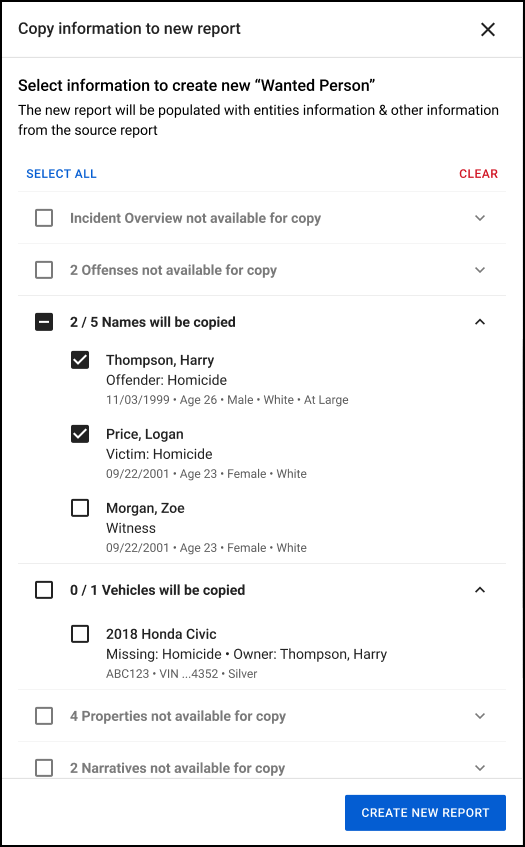
- For example, if the report contains three people, you can indicate that only two of the people should be copied to the new report.
Records general release
This section includes information about upcoming features and updates that are available in all production environments.
Draft One
The following updates will be applied to the production environments of all organizations on August 26, 2025.
- We’ve found that using narration to provide additional details about an incident results in far better draft quality and fewer edits. To encourage the use of this time-saving feature, in the Draft One workflow narration now appears a standalone, optional “step” after evidence file selection. (You can choose to skip this step and immediately generate a Draft One narrative using only the selected evidence files.)
- Now, in addition to using your voice and narrating to provide additional details, you can also type relevant information that Draft One will incorporate into the generated narrative draft.
- You will now see a warning if you select evidence files whose transcripts are of lower quality, indicating that they may not result in a high-quality draft.
- You can still use these evidence files, but Draft One will encourage you to provide additional details to result in a higher quality generated draft.
Search
The following updates will be applied to the production environments of all organizations on August 26, 2025.
- You can now use a Primary offense for arrest filter in Incidents Search to filter incidents by primary arrest offense.
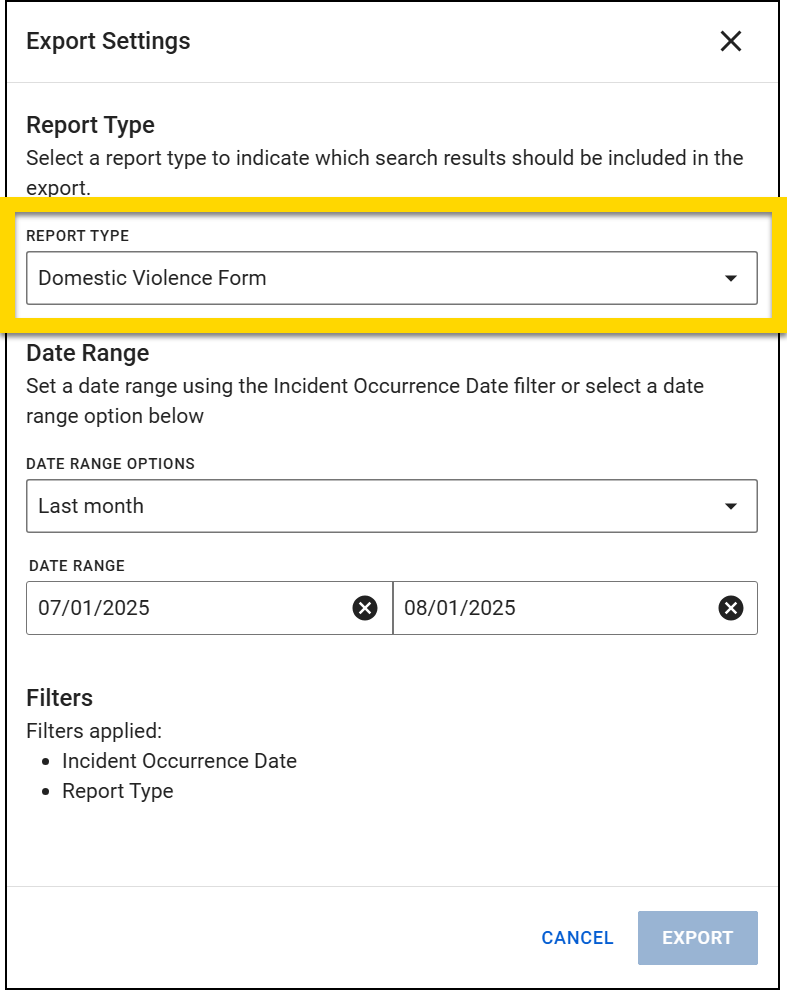
- Now, when exporting form data from search results, the search result export only includes rows for the types of reports selected in the Report type field on the Export Settings screen. Previously, the export included all reports associated with the incident.
Profiles
The following update will be applied to the production environments of all organizations on August 12, 2025.
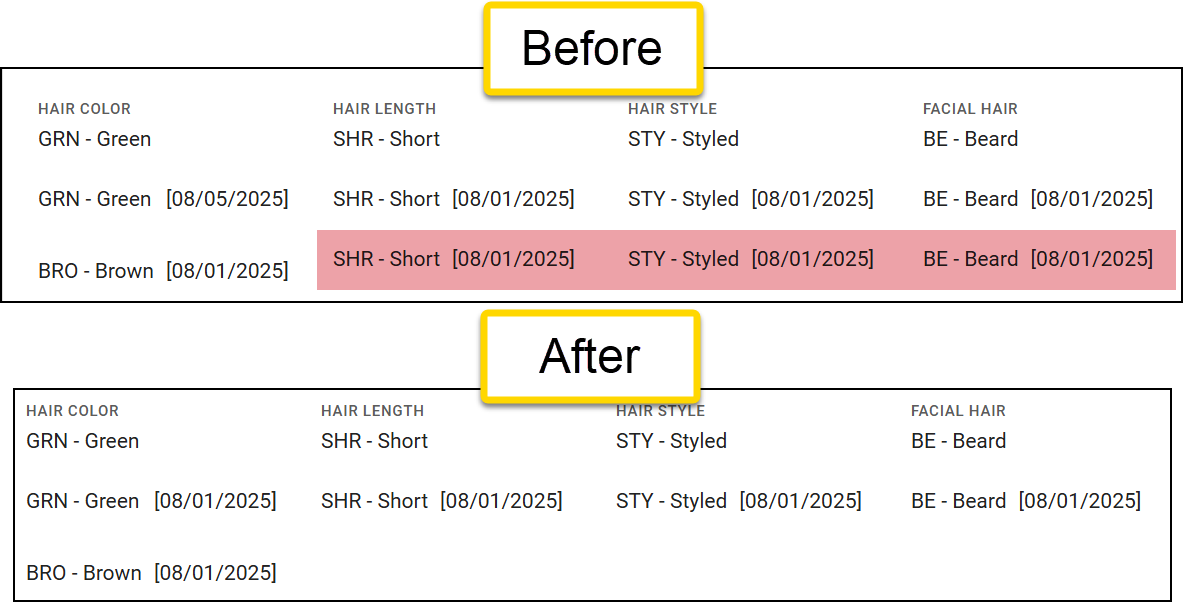
- The Show Person History experience on person profiles is being improved to prevent duplicate entries from appearing.
- Previously, every field on a profile displayed an entry any time any other field on the profile was changed. This resulted in a large number of duplicate entries for each field (see the red highlighting in the image below).
- These duplicate entries will no longer appear, allowing for a cleaner person history experience.
Calls for Service
The following update will be applied to the production environments of all organizations on August 12, 2025.
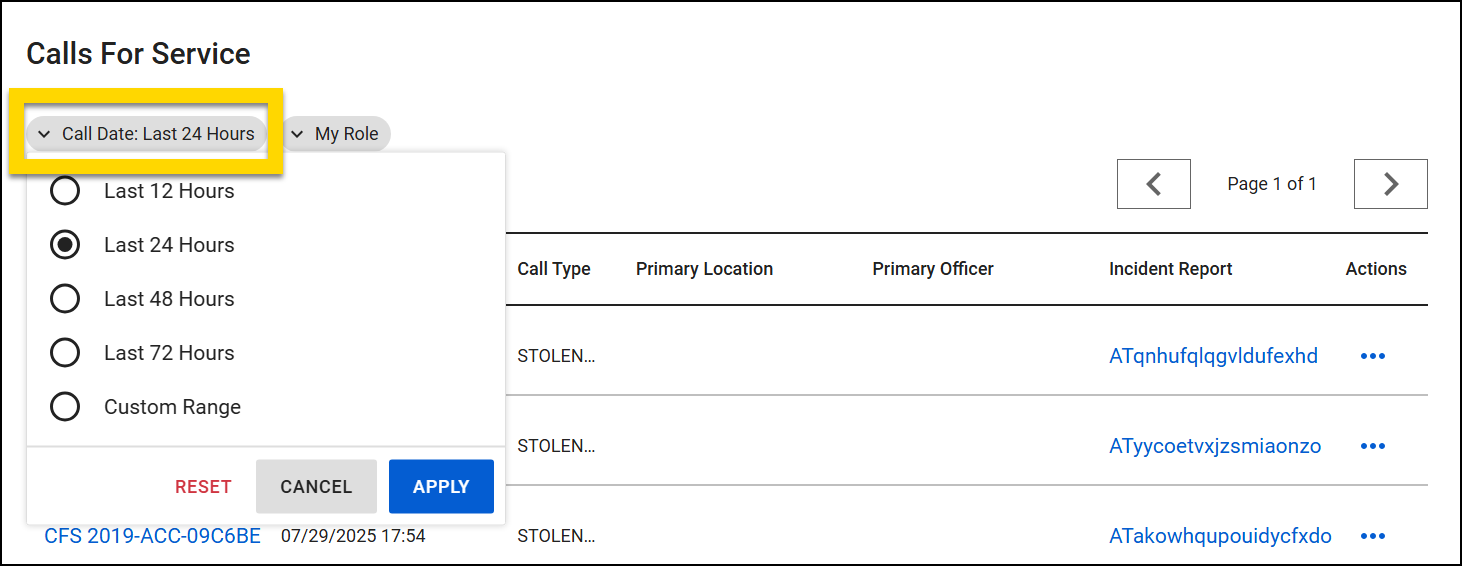
- In the Calls for Service inbox you can now use a Call Date filter to narrow down which calls are displayed.
- Filter options include: Last 12 hours, Last 24 hours, Last 48 hours, Last 72 hours, and Custom range.
- Filter options include: Last 12 hours, Last 24 hours, Last 48 hours, Last 72 hours, and Custom range.
Analytics
The following update will be applied to the production environments of all organizations currently using the export Analytics dashboards functionality on August 12, 2025.
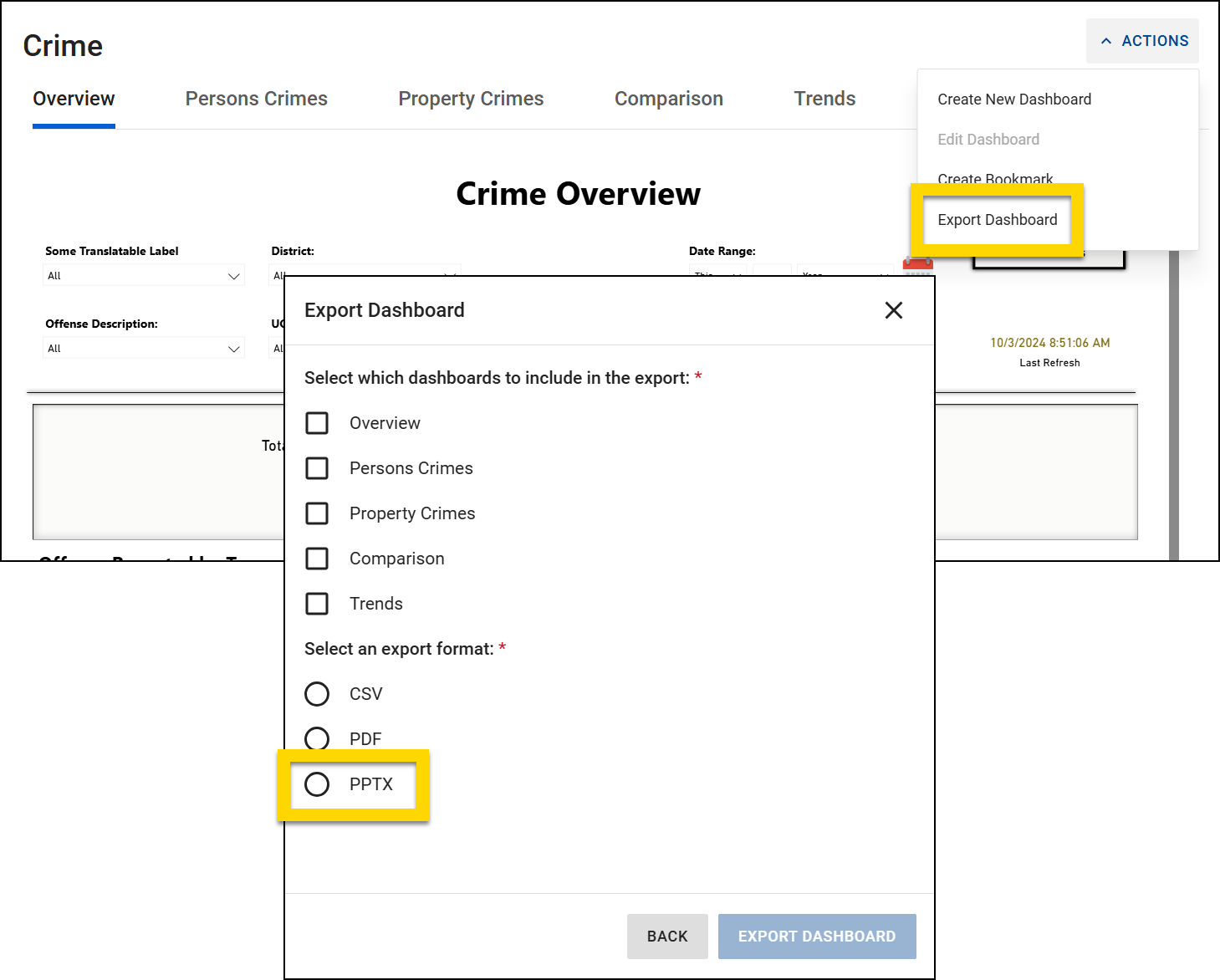
- You can now export dashboards as PowerPoint (PPTX) files. Each dashboard tab selected for export appears as a slide in the PPTX file.
- Contact your Axon representative to have the export Analytics dashboards functionality activated for your organization.
Personnel
The following feature will be available for all organizations to use in their production environments on August 12, 2025. Contact your Axon representative or Axon Support to have it activated for your organization.
- Feedback Notes is a feature within the Personnel module that allows supervisors to create, view, and manage feedback for their team.
Sealing
The following update will be applied to the production environments of all organizations on August 12, 2025.
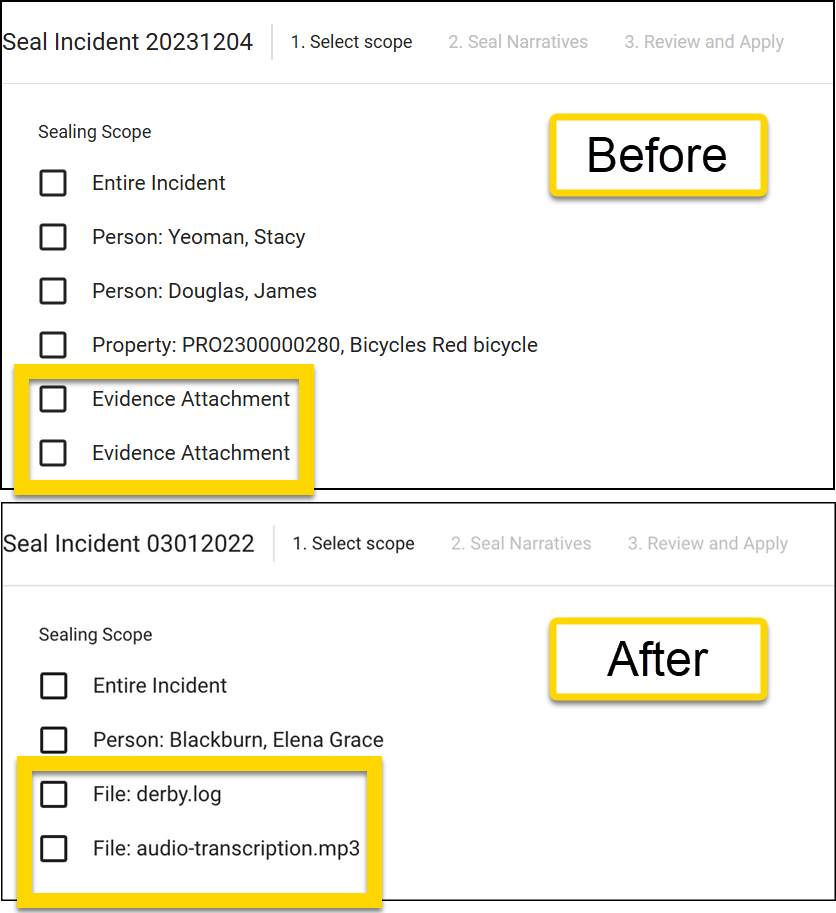
- Now, when sealing incidents or reports, the name and type of associated files is listed during the Select scope step, helping you better understand the information that is being sealed.
- Previously, this information was simply listed as "Evidence Attachment".
- Previously, this information was simply listed as "Evidence Attachment".
Records resolved issues
This section includes information about upcoming bug fixes and resolved issues that will be released to all production environments.
Search
The following issue will be resolved on August 12, 2025:
- An issue has been resolved where there was an occasional mismatch between the number of incidents that appeared in search results and the corresponding search result CSV export.
Form Builder
The following issue will be resolved on August 26, 2025:
- An issue has been resolved where some validation errors did not appear when viewing a form in Preview mode.
NIBRS
This section includes information about upcoming updates and bug fixes for NIBRS validation rules, errors, and submissions.
All agencies
The following update has been applied to the production environments of all agencies:
- Previously, Data Element 33 (Type of Injury) was incorrectly included in submissions for victims associated only with offenses that agencies had explicitly excluded from NIBRS reporting.
- This issue has been resolved, and the system now correctly omits Data Element 33 when the victim is not tied to any other reportable offense requiring this data, ensuring compliance with state submission guidelines.
The following update will be applied to the production environments of all agencies on August 26, 2025:
- The reporting of UNKNOWN suspected drug types has been updated to comply with FBI guidance.
- The system now consolidates multiple UNKNOWN entries into a single drug item with a measurement of DU (Unknown) and a default quantity of 000000001000, reducing submission errors while allowing agencies to update with lab results later.
Federal agencies
The following updates will be applied to the production environments of all federal agencies on August 12, 2025:
- An issue has been resolved where Crimes Against Society were incorrectly rejected during submission due to a missing victim segment.
- The system now correctly generates the required “society” victim segment during translation, ensuring these offenses are submitted successfully.
- Previously, the Number of Stolen Motor Vehicles (Data Element 18) and Number of Recovered Motor Vehicles (Data Element 19) were not being correctly processed in the backend translator, resulting in submission errors.
- This issue has been resolved, and both counts are now submitted properly in compliance with FBI requirements.
Louisiana agencies
The following update will be applied to the production environments of all agencies on August 12, 2025:
- Previously, users could submit Statutory Rape (36B) offenses with victims aged 12 and under or 18 and over without error.
- Now, the system prevents submission unless the victim is between 13 and 17 years old, and displays the following message: "Statutory rape offenses require a victim who is between and including 13 and 17 years of age."
Oklahoma agencies
The following updates will be applied to the production environments of all agencies on August 26, 2025:
- An issue has been resolved where arrest locations entered as cross streets were not fully included in the XML submission file.
- The system now ensures the full street name is populated, even for cross street entries, so that complete location data is properly reported to the state.
- An issue has been resolved where warrant numbers in NIBRS XML submissions were improperly truncated and triggering duplicate errors.
- The system now removes non-alphanumeric characters and ensures only unique, properly formatted warrant numbers (up to 12 characters) are included in the submission, preventing rejections by the state.
Standards preview release
This section includes information about upcoming features and updates that are available for testing in training environments. These are beta features, and all functionality may not be fully present or completely reliable.
Report Writer
The following update will be available on August 26, 2025. Contact your Axon representative or Axon Support to have it activated in your organization's training environment.
- Now, when using the Copy information to new report feature, you can use the checkboxes to select which specific parts of the report you would like to copy into the new report.
- For example, if the report contains three people, you can indicate that only two of the people should be copied to the new report.
- For example, if the report contains three people, you can indicate that only two of the people should be copied to the new report.
Early Intervention System (EIS)
The following feature is now available. Contact your Axon representative or Axon Support to have it activated in your organization's training environment.
- You can now update and better manage your organization’s existing EIS polices. With this update, you can:
- Edit and create new versions of existing EIS policies.
- Recalculate existing alerts to reflect policy changes.
- Maintain historical data accuracy and compliance.
- Streamline alert management and reduce manual interventions.
Standards general release
This section includes information about upcoming features and updates that are available in all production environments.
Report Writer
The following update is now available in the production environments of all organizations.
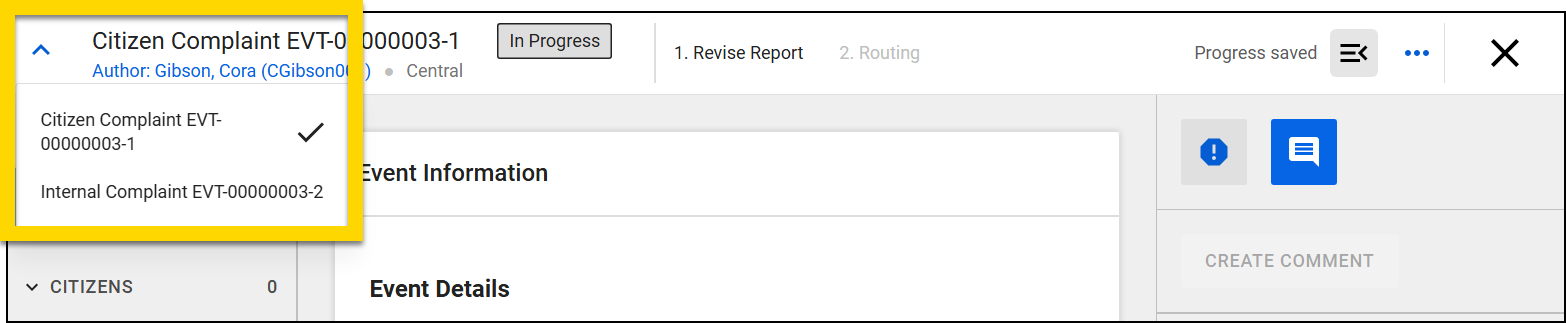
- If an event contains multiple reports, you can now switch between reports by using a dropdown in the top right corner of Report Writer.
Draft One
The following updates will be applied to the production environments of all organizations on August 26, 2025.
- We’ve found that using narration to provide additional details about an incident results in far better draft quality and fewer edits. To encourage the use of this time-saving feature, in the Draft One workflow narration now appears a standalone, optional “step” after evidence file selection. (You can choose to skip this step and immediately generate a Draft One narrative using only the selected evidence files.)
- Now, in addition to using your voice and narrating to provide additional details, you can also type relevant information that Draft One will incorporate into the generated narrative draft.
- You will now see a warning if you select evidence files whose transcripts are of lower quality, indicating that they may not result in a high-quality draft.
- You can still use these evidence files, but Draft One will encourage you to provide additional details to result in a higher quality generated draft.
Search
The following update will be applied to the production environments of all organizations on August 26, 2025.
- Now, when exporting form data from search results, the search result export only includes rows for the types of reports selected in the Report type field on the Export Settings screen. Previously, the export included all reports associated with the incident.
Profiles
The following updates will be applied to the production environments of all organizations on August 12, 2025.
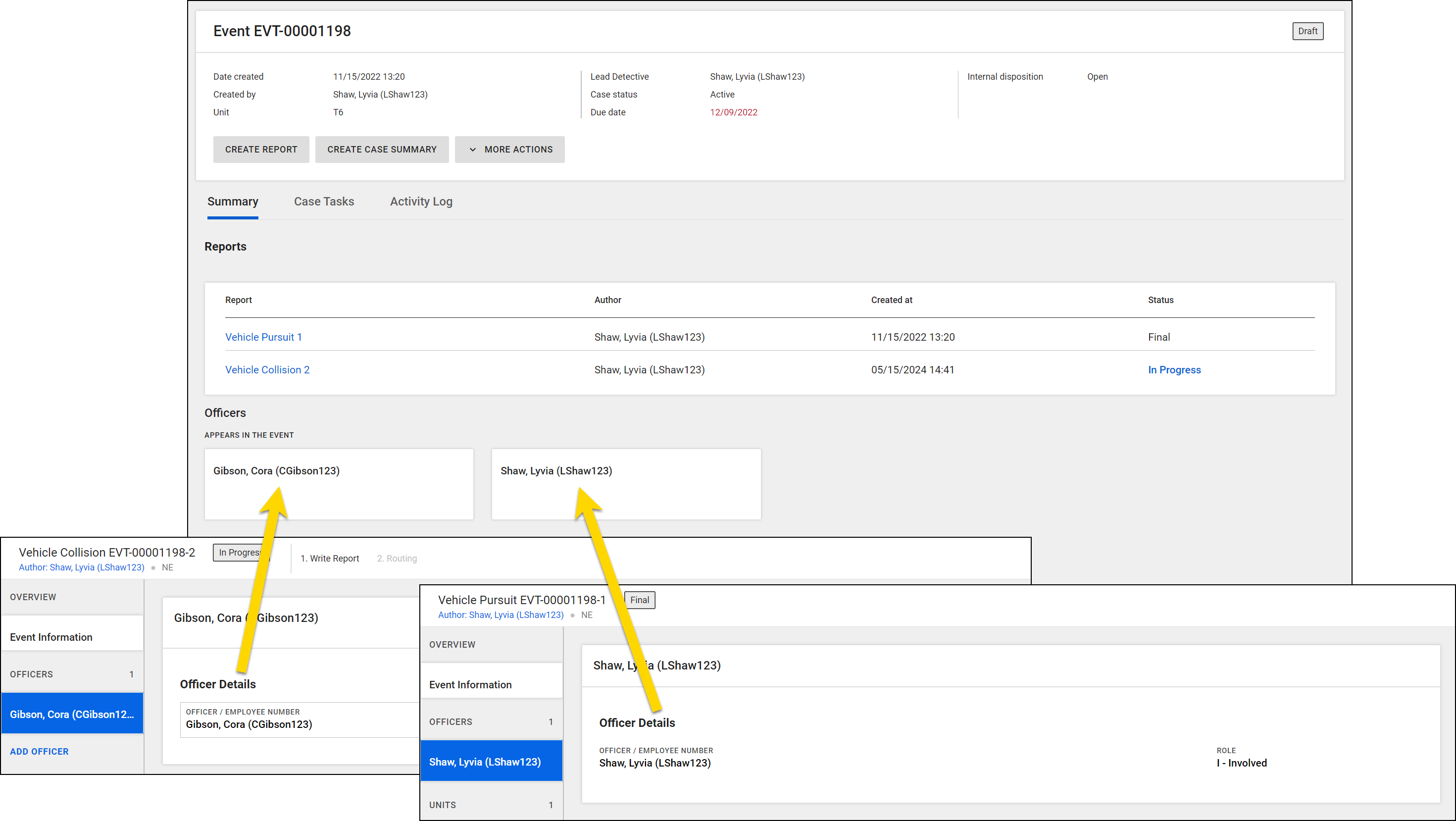
- Now, event profiles include an Officers section, which displays all officers that have been added to any reports associated with that event.
- Selecting an officer from the event profile opens the officer’s profile page, in the same way that selecting a person on the event profile opens that person’s profile page.
- For example, an event contains two reports, and a different officer has been added to each report. Both officers appear in the Officers section on the event profile.
- The Show Person History experience on citizen profiles is being improved to prevent duplicate entries from appearing.
- Previously, every field on a profile displayed an entry any time any other field on the profile was changed. This resulted in a large number of duplicate entries for each field (see the red highlighting in the image below).
- These duplicate entries will no longer appear, allowing for a cleaner person history experience.
Analytics
The following update will be applied to the production environments of all organizations currently using the export Analytics dashboards functionality on August 12, 2025.
- You can now export dashboards as PowerPoint (PPTX) files. Each dashboard tab selected for export appears as a slide in the PPTX file.
- Contact your Axon representative to have the export Analytics dashboards functionality activated for your organization.
Personnel
The following feature will be available for all organizations to use in their production environments on August 12, 2025. Contact your Axon representative or Axon Support to have it activated for your organization.
- Feedback Notes is a feature within the Personnel module that allows supervisors to create, view, and manage feedback for their team.
Standards resolved issues
This section includes information about upcoming bug fixes and resolved issues that will be released to all production environments.
Search
The following issue will be resolved on August 12, 2025:
- An issue has been resolved where there was an occasional mismatch between the number of events that appeared in search results and the corresponding search result CSV export.
Form Builder
The following issue will be resolved on August 26, 2025:
- An issue has been resolved where some validation errors did not appear when viewing a form in Preview mode.
Axon DataStore
This section includes information about upcoming changes to the Axon Records and Standards DataStore.
Upcoming deprecations
- Azure Data Studio will be deprecated in February 2026 and will no longer support connections to the Axon DataStore. To maintain uninterrupted access, please begin using Visual Studio Code or SQL Server Management Studio to connect to the DataStore.
- See MyAxon for more information on connecting with Visual Studio Code or SQL Server Management Studio.


