April 2026
These release notes describe all user-facing changes that will be included in the next Axon Records and Standards releases, along with advance notice of major upcoming features, updates, and applications.
There is one release scheduled for April:
- April 22, 2026
Releases begin rolling out at 11 AM Pacific time and may continue through the following day. We do not expect any downtime during these updates. Please note that availability is subject to change. Depending on the complexity and amount of items included in a release, some items in these notes may not be available until several days after the release.
Additional help documentation for Axon Records and Standards is located at axon.com/help. Do you have feedback about Axon's release notes? Submit it here.
Download this month's release notesRecords preview release
This section includes information about upcoming features and updates that are available for testing in training environments. These are beta features, and all functionality may not be fully present or completely reliable.
Report Writer
The following feature is now available for all organizations to use in their training environments. Contact your Axon representative or Axon Support to activate it for your organization.
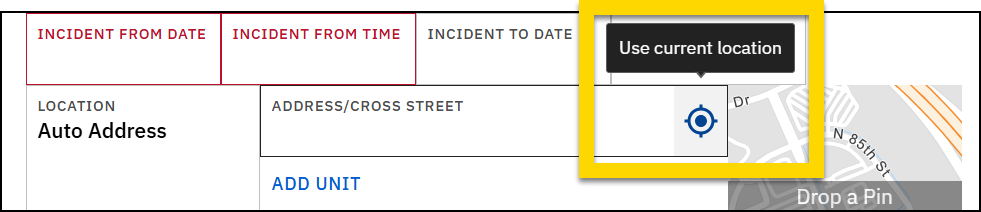
- When filling out reports in Report Writer and using the Auto Address location type, you can now select the compass icon in the Address/Cross Street field to auto-fill the location fields with your current location. This feature is currently available on desktop only.
Case Management
The following feature will be available for all organizations to use in their training environments on April 22, 2026. Contact your Axon representative or Axon Support to activate it for your organization.
- You can now capture and manage property by adding property items to case and investigation documents.
- These property items appear on the associated case and investigation pages. The property items also appear in search results, but their association with the case and investigation documents is only visible to users who have the unit-based case management privileges to see them.
- Note that while property items can be added to case and investigation documents, they cannot be submitted to the Property module. If property needs to be submitted to the Property department, it must be added to the incident report. An update to submit property items from case and investigation documents is planned for a future release.
Records general release
This section includes information about upcoming features and updates that are available in all production environments.
Search
The following featureis now available for all organizations to use in their production environments. Contact your Axon representative or Axon Support to activate it for your organization.
- Incident and standalone report search result cards can now be configured to display linked persons and vehicles.
- On incident search result cards, the names of involved vehicles and people as well as the roles they played in the incident can be displayed; on standalone documents, associated people and vehicle names can be displayed (but not role information).
The following updates will be applied to the production environments of all organizations on April 22, 2026.
- Search results now take up the full width of the screen, enabling more information to be visible on smaller screens.
- Now, in the phone number filter, you can now search for partial numbers, as well as international (non-US format) numbers.
Locations
The following feature will be available for all organizations to use in their production environments on April 22, 2026. Contact your Axon representative or Axon Support to activate it for your organization.
- Administrators can now work with their Axon representative or Axon Support to configure the Unit Type field in address entries to display as a dropdown instead of a free-text field. This type of field standardizes data entry, reduces typos, and improves the accuracy of location-based reporting and analytics.
- Administrators can create a predefined list of unit type options (e.g. APT, STE, BLDG, UNIT, FL, RM).
- Once configured, users must select from the dropdown rather than typing freehand, ensuring consistent values across all reports/
Profiles
The following feature will be available for all organizations to use in their production environments on April 22, 2026. Contact your Axon representative or Axon Support to activate it for your organization.
- Administrators can now work with their Axon representative or Axon Support to define a required number of photos for photo lineups in Axon Records. Previously, lineups were fixed at 6 photos. With this update:
- Organizations can define a custom photo count (e.g., 8 or 10) to match their jurisdiction’s policy.
- If no custom value is configured, the default remains 6 photos.
- Lineups cannot be finalized, previewed, or presented until the exact number of photos is met.
- Clear validation messaging guides users if they attempt to proceed with too few or too many photos.
- Organizations can define a custom photo count (e.g., 8 or 10) to match their jurisdiction’s policy.
Case Management
The following features will be available for all organizations to use in their production environments on April 22, 2026. Contact your Axon representative or Axon Support to activate it for your organization.
- Axon Records now exports approved incident reports to Axon Evidence automatically.
- When a supervisor approves an incident report or one of its supplements, the system exports the report as an evidence file and links it to the Axon Evidence case if associated, or uploads it as standalone evidence if no linked case exists.
- This feature reduces manual work when supervisors or Records staff use the Prepare Documents for Sharing workflow to upload a single approved incident report to Axon Evidence, reducing delays and case-association errors.
- You can now generate PDF files of an incident and upload them to Axon Evidence without an automatic case creation occurring. This improvement reduces duplicate cases, streamlines document preparation, and allows Records staff and digital evidence units to manage sharing workflows more effectively.
- The ability to generate PDFs and upload them to Axon Evidence, is controlled by the following privileges:
- Prepare documents for sharing: When allowed, users can see the “Prepare documents for sharing” option in the incident profile’s More actions menu.
- Manage case shares with external partners: When allowed, users can see the “Manage Shares” option in the incident profile’s More actions menu.
- The ability to generate PDFs and upload them to Axon Evidence, is controlled by the following privileges:
Draft One
The following updates will begin rolling out at the end of April and be generally available for all organizations by the end of May.
- Now, Draft One analyzes the evidence items you select to for your draft narratives and prompts you with questions you can answer to provide additional details about the incident--such as what specific actions you took and why, or key details not captured in the evidence audio.
- This analysis and the suggestions provided by Draft One result in a higher quality and more comprehensive first draft, making it easier for you to revise and complete the narrative before copying it and submitting it in your reports.
- Learn more about generating narratives with Draft One.
- Now, Draft One uses fields filled out in the report when generating a draft, including details about people, vehicles, and property.
- For example, if the victim's details have been added to the report, Draft One uses this information to ensure their name, descriptions, and other key details are accurate in the draft.
- As a result of this update, you should fill out the report fields BEFORE using Draft One to generate their narrative. This way, Draft One can incorporate that information into the draft, and you will spend less time editing and revising the draft to add details that already exist in the report fields.
Property Management
The following feature will be available for all organizations to use in their production environments on April 22, 2026. Contact your Axon representative or Axon Support to activate it for your organization.
- You can now work with your Axon representative or Axon Support to configure your organization’s property management system to apply auto-retention periods to property items based on custom property roles that have been configured for your organization. These automatically applied retention dates appear in Report Writer, as well as on the property profile.
Warrants
The following update will be applied to the production environments of all organizations on April 22, 2026.
- Previously, when a warrant's status was updated to a custom Active status (from the Court Papers inbox > More actions menu > Update status option), the Warrant flag on the person's profile could fail to appear — or disappear entirely — if the warrant document did not have a value set in the Flag Category field. This behavior required a cumbersome workaround of unfinalizing the warrant, editing the report to add Flag Category, and refinalizing the warrant.
- With this update, changing a warrant's status to any Active status (out-of-the-box or custom) now automatically displays the Warrant flag on the person's profile. There is no longer a dependency on the Flag Category field being configured or filled out in the warrant document, and no need to unfinalize/refinalize a warrant to correct the flag.
Administrator Console
The following feature will be available for all organizations to use in their production environments on April 22, 2026. Contact your Axon representative or Axon Support to activate it for your organization.
- You can now manage your organization's list of charges using an updated and easier-to-use Master Charge Tool. New features include:
- Charge search and filtering: Use the Search box and filters to quickly find charges
- Edit charges: After finding a charge, you can quickly edit any of its fields within the Master Charge tool. Previously, edits had to be performed using CSV import and export.
- Create single charges: You can now create a new single charge within the Master Charge tool by selecting Add single charge. Previously, new charges could only be created using CSV import and export.
Form Builder
The following update will be applied to the production environments of all organizations on April 22, 2026.
- You can now use a new Time field in forms that captures hours, minutes, and seconds (HH:MM:SS )to allow for more precise time tracking.
- The existing Time field only captures hours and minutes (HH:MM).
Records resolved issues
This section includes information about upcoming bug fixes and resolved issues that will be released to all production environments.
Search
The following issues will be resolved on April 22, 2026.
- Previously, clicking anywhere at the top of a Search page would reset all search criteria (filters, keywords in search box). Now, you must click directly on the ‘Search’ text at the top of the screen to reset search criteria.
- An issue has been resolved where the cursor did not appear in the main search box after users opened the Search module. This has been resolved, and the cursor now starts in the main search box, allowing users to quickly perform searches.
- An issue was resolved where text was overflowing outside of search result cards. Text will now wrap or truncate as expected rather than overflowing.
- Previously, property roles were not included in Property search result exports. This issue has been resolved, and property roles are now included in the export.
- Previously, custom property fields were not included in Property search result exports. This issue has been resolved, and custom property fields are now included in the export.
- Previously, inmate status was not included in Bookings search result exports. This issue has been resolved, and the inmate status is now included in the export.
Case Management
The following issue will be resolved on April 22, 2026.
- Previously, if any case task in a case were marked as In progress, the status of the incident report was shown as In progress in search results. This issue has been resolved, and now the report status displayed in search results is consistent with the report’s actual state.
Property Management
The following issue will be resolved on April 22, 2026.
- Previously, a property item’s Authorized Disposition was not printing consistently on property labels. This issue has been resolved, and printed labels now always include the Authorized Disposition.
NIBRS
This section includes information about upcoming updates and bug fixes for NIBRS validation rules, errors, and submissions.
Agencies using automatic submission organizations
The following feature is now available for all organizations using automatic web service submissions.
- Axon Records can be configured to submit reports automatically to third-party systems (such as the state or court systems) in accordance with compliance and reporting requirements. Once these reports are submitted, users can access a new Compliance module to monitor submissions, identify rejections or submission issues, and take corrective action to ensure appropriate submission.
- The Compliance module can be configured for organizations that use automatic web service submissions. The module currently does not support states that accept manual exports and submissions. Supported states include California, Florida, Georgia, Minnesota, Illinois, Michigan, Indiana, Ohio, Maryland, and North Carolina.
- If your organization uses automatic web service submission, and you are interested in enabling this new module, contact your Axon representative so they can work with you to set up and configure this integration.
- For more information about the module, see Axon Help.
Florida organizations
The following update has been applied to the production environments of all Florida organizations.
- An issue has been resolved where selecting a value in the Degree field on the Offenses card satisfied the Offense field requirement, even when no offense had been entered. This allowed reports to be completed without an offense. The Offense field is now properly required regardless of the Degree field selection.
- No action is required. The validation has been automatically applied.
The following update will be applied to the production environments of all Florida organizations on April 22, 2026.
- An issue has been resolved where victim data was not included in the NIBRS submission file for Stalking and Intimidation offenses, even though victims were correctly listed and associated on the incident report. This caused submissions to be rejected with FLPRT Error 00084 (Each Offense must be connected to a Victim). Victim information is now correctly included in the submission file for these offenses.
- Impacted reports must be resubmitted. Contact Axon Support or your NIBRS Customer Support Specialist for assistance.
Indiana organizations
The following update will be applied to the production environments of all Indiana organizations on April 22, 2026.
- An issue has been where the Offense Attempted/Completed field was not required on Group B arrest reports for Indiana agencies with TS-NIBRS enabled. When left blank, the submission was rejected by Indiana State Police with a validation error. The Offense Attempted/Completed field is now required on Group B arrest reports, ensuring a valid value is always included in the submission.
- If your agency has received rejections related to this error, please contact Axon Support or your NIBRS Customer Support Specialist to have the affected incidents requeued for submission.
Louisiana organizations
The following updates will be applied to the production environments of all Louisiana organizations on April 22, 2026.
- Previously, Louisiana NIBRS submissions sent the Victim Injury Type (Data Element 33) as a single value in the submission file. The state has since corrected its technical specification to require this field as a list, supporting up to 5 injury types per victim. This mismatch caused state submission errors for affected reports.
- This issue has been resolved, and the submission file now sends Victim Injury Type in the correct list format required by the updated Louisiana specification.
- No action is required. Impacted reports will be resubmitted by your NIBRS Customer Support Specialist.
- Several issues have been resolved with Louisiana NIBRS submission files that caused state rejections or prevented the submission file from generating:
- Offense sequence numbers were duplicated when multiple victims were connected to the same offense, causing state rejection errors. Each offense-victim association now receives a unique sequence number.
- The submission file failed to generate when a non-numeric age value (such as an infant code) was present. All age fields are now correctly formatted for submission.
- The Weapons field sent an empty value when no weapon was involved instead of the required "None" code. The system now correctly defaults to "None" for weapon-eligible offenses with no weapon data.
- These issues have been corrected. Louisiana NIBRS submission files now generate successfully and pass state validation.
- Impacted reports must be resubmitted. Contact Axon Support or your NIBRS Customer Support Specialist for assistance.
Michigan organizations
The following updates will be applied to the production environments of all Michigan organizations on April 22, 2026.
- An issue has been resolved where single-digit victim ages (1–9) were not formatted correctly in Michigan NIBRS submission files. Ages were being sent as one-digit values instead of the required two-digit format (e.g., "3" instead of "03"), causing MICR rejection errors. Victim ages are now correctly zero-padded in the submission file per MICR requirements.
- If your agency received rejections related to victim age formatting, please contact Axon Support or your NIBRS Customer Support Specialist to have the affected incidents requeued for submission.
- A new validation rule has been added for Michigan NIBRS submissions to restrict the Property Loss Type for Offense File Classes 24002 and 28000 when Attempted/Completed is set to Completed. Previously, officers could select any Property Loss Type Code for these offenses, which resulted in MICR rejection errors. Only Property Loss Type 0 (None) or 8 (Recovered) can now be selected for these offense classes, preventing invalid submissions.
- No action is required. The validation rule will be automatically applied, and users will see a validation error if an unsupported Property Loss Type is selected for these offenses.
- A new validation rule has been added for Michigan NIBRS submissions to limit Weapon Type to one selection per offense and Injury Type to one selection per victim. Previously, selecting multiple values for either field caused MICR XML formatting errors upon submission. Users will now see a validation error if more than one Weapon Type or Injury Type is selected.
- No action is required. The validation rule will be automatically applied.
- Previously, when multiple offenses shared the same UCR code but had different Offense File Class (OFC) values, the system could incorrectly combine (roll up) those offenses in the Michigan submission file. This could result in distinct offenses being merged when they should have been reported separately.
- This issue has been resolved and offenses are now merged only when they have the exact same Offense File Class (OFC). Offenses with different OFCs will be reported separately, even if they share the same UCR code. Additionally, when more than four offenses exist on an incident, the system will follow Michigan’s hierarchy rules and submit the top four offenses as required by MICR standards.
- No action is required by agencies. This update ensures Michigan incidents are reported in compliance with MICR offense reporting rules.
- An issue has been resolved where NIBRS submission values for Exceptional Clearance, Offense Weapon Type, and LEOKA Victim Type were not formatted according to MICR requirements. The system was sending numeric codes instead of the alpha codes required by the state, causing MICR errors 114 (Exceptional Clearance) and 166 (Invalid Weapon). These values are now correctly converted per MICR specifications.
- If your agency has received rejections for these error codes, please contact Axon Support or your NIBRS Customer Support Specialist to have the affected incidents requeued for submission.
Minnesota organizations
The following update will be applied to the production environments of all Minnesota organizations on April 22, 2026.
- The following fields are now required on 999 (Non-Reportable/Investigative) offense reports for Minnesota NIBRS submissions: Offender Suspected of Using and Bias Motivation Involved. These validations align 999 offense reports with the requirements already in place for Group B reports, ensuring complete submissions.
- No action is required. The validation rules will be automatically applied, and users will see a validation error if these fields are left blank on a 999 offense report.
Ohio organizations
The following updates will be applied to the production environments of all Ohio organizations on April 22, 2026.
- An issue has been resolved where certain offenses could be submitted without a linked victim, even though Ohio NIBRS requires every offense to have at least one victim. This caused state error 2039 (Offense code reported that is not linked to any victims). A validation rule has been added to require a victim linked to each offense before the report can be submitted.
- If your agency has received rejections for error 2039, please contact Axon Support or your NIBRS Customer Support Specialist to have the affected incidents requeued for submission after adding the required victim.
- An issue was resolved where Data Element 17 (Type of Criminal Activity) was incorrectly included in NIBRS submissions for offenses 2921.33 and 2921.33A (Resisting Arrest). Type of Criminal Activity values should only be reported when specific conditions are met, including the victim being a Law Enforcement Officer. The submission now correctly omits these values when the conditions are not met, preventing Error 2046.
- If your organization has received rejections for Error 2046 related to these offenses, please contact Axon Support or your NIBRS Customer Support Specialist to have the affected incidents requeued for submission.
Pennsylvania organizations
The following update will be applied to the production environments of all Pennsylvania organizations on April 22, 2026.
- An issue was resolved an issue where NIBRS submissions were rejected when a Victim's Identity Type was set to "U - Unknown." The system was not automatically reporting Sex and Race as Unknown in the submission file, requiring users to manually set these fields as a workaround.
- The system now automatically sets Sex and Race to Unknown when the Victim Identity Type is Unknown, preventing the rejection.
Virginia organizations
The following updates will be applied to the production environments of all Virginia organizations on April 22, 2026.
- An issue has been resolved where the Special Case Indicator value was being duplicated in the NIBRS flat file submission, causing error 206 (Special Case Indicator cannot contain duplicate values). When a single value such as "N" was entered, the submission file incorrectly repeated it across both positions, resulting in a rejection. The Special Case Indicator is now correctly reported in the submission file.
- If your agency has received rejections for error 206, please contact Axon Support or your NIBRS Customer Support Specialist to have the affected incidents requeued for submission.
- An issue has been resolved where the Special Case Indicator value was being duplicated in the NIBRS flat file submission, causing error 206 (Special Case Indicator cannot contain duplicate values). When a single value such as "N" was entered, the submission file incorrectly repeated it across both positions, resulting in a rejection. The Special Case Indicator is now correctly reported in the submission file.
- If your organization has received rejections for error 206, please contact Axon Support or your NIBRS Customer Support Specialist to have the affected incidents requeued for submission.
- Axon continues to apply the updates required by the Virginia IBR Technical Specification versions 2025.1 (January 2026), v2025.1.1 (January 2026), and v2025.2 (March 2026).
- Virginia IBR now includes several new and expanded data elements.
- Agencies can now record R–Drone/Unmanned Aircraft System under Offender Suspected of Using (Data Element 8).
- The Victim Was Injured field is now available for homicide offenses (09A, 09B, 09C), allowing optional injury reporting when applicable.
- New victim-to-offender relationship values—CO (Cohabitant, non-intimate), FP (Foster Parent), and FC (Foster Child)—have been added to Data Element 35.
- THe Sex of Arrestee field now supports the value Unknown to meet updated state requirements.
- A new Special Case Indicator field (VA Data Element 66) was added for all Group A offenses, along with split fields for Type of Criminal Activity and Gang Information.
- The Type of Weapon field is now required when reporting the offense of Animal Cruelty (720).
- Virginia IBR now includes several new and expanded data elements.
Standards preview release
This section includes information about upcoming features and updates that are available for testing in training environments. These are beta features, and all functionality may not be fully present or completely reliable.
Report Writer
The following feature is now available for all organizations to use in their training environments. Contact your Axon representative or Axon Support to activate it for your organization.
- When filling out reports in Report Writer and using the Auto Address location type, you can now select the compass icon in the Address/Cross Street field to auto-fill the location fields with your current location. This feature is currently available on desktop only.
Standards general release
This section includes information about upcoming features and updates that are available in all production environments.
Search
The following updates will be applied to the production environments of all organizations on April 22, 2026.
- Search results now take up the full width of the screen, enabling more information to be visible on smaller screens.
- Now, in the phone number filter, you can now search for partial numbers, as well as international (non-US format) numbers.
The following feature will be available for all organizations to use in their production environments on April 22, 2026. Contact your Axon representative or Axon Support to activate it for your organization.
- Now, Event search results in Axon Standards can be configured to display any people or vehicles associated with the event, along with the roles they played in the event.
Locations
The following feature will be available for all organizations to use in their production environments on April 22, 2026. Contact your Axon representative or Axon Support to activate it for your organization.
- Administrators can now work with their Axon representative or Axon Support to configure the Unit Type field in address entries to display as a dropdown instead of a free-text field. This type of field standardizes data entry, reduces typos, and improves the accuracy of location-based reporting and analytics.
- Administrators can create a predefined list of unit type options (e.g. APT, STE, BLDG, UNIT, FL, RM).
- Once configured, users must select from the dropdown rather than typing freehand, ensuring consistent values across all reports/
Draft One
The following updates will begin rolling out at the end of April and be generally available for all organizations by the end of May.
- Now, Draft One analyzes the evidence items you select to for your draft narratives and prompts you with questions you can answer to provide additional details about the incident--such as what specific actions you took and why, or key details not captured in the evidence audio.
- This analysis and the suggestions provided by Draft One result in a higher quality and more comprehensive first draft, making it easier for you to revise and complete the narrative before copying it and submitting it in your reports.
- Learn more about generating narratives with Draft One.
- Now, Draft One uses fields filled out in the report when generating a draft, including details about people, vehicles, and property.
- For example, if the victim's details have been added to the report, Draft One uses this information to ensure their name, descriptions, and other key details are accurate in the draft.
- As a result of this update, you should fill out the report fields BEFORE using Draft One to generate their narrative. This way, Draft One can incorporate that information into the draft, and you will spend less time editing and revising the draft to add details that already exist in the report fields.
Administrator Console
The following feature will be available for all organizations to use in their production environments on April 22, 2026. Contact your Axon representative or Axon Support to activate it for your organization.
- You can now manage your organization's list of charges using an updated and easier-to-use Master Charge Tool. New features include:
- Charge search and filtering: Use the Search box and filters to quickly find charges
- Edit charges: After finding a charge, you can quickly edit any of its fields within the Master Charge tool. Previously, edits had to be performed using CSV import and export.
- Create single charges: You can now create a new single charge within the Master Charge tool by selecting Add single charge. Previously, new charges could only be created using CSV import and export.
Form Builder
The following update will be applied to the production environments of all organizations on April 22, 2026.
- You can now use a new Time field in forms that captures hours, minutes, and seconds (HH:MM:SS )to allow for more precise time tracking.
- The existing Time field only captures hours and minutes (HH:MM).
Standards resolved issues
This section includes information about upcoming bug fixes and resolved issues that will be released to all production environments.
Search
The following issues will be resolved on April 22, 2026.
- Previously, clicking anywhere at the top of a Search page would reset all search criteria (filters, keywords in search box). Now, you must click directly on the ‘Search’ text at the top of the screen to reset search criteria.
- An issue has been resolved where the cursor did not appear in the main search box after users opened the Search module. This has been resolved, and the cursor now starts in the main search box, allowing users to quickly perform searches.
- An issue was resolved where text was overflowing outside of search result cards. Text will now wrap or truncate as expected rather than overflowing.
Axon Notes Module preview release
The Axon Notes Module contains a set of features that enable digital in-field note writing. Contact your Axon representative or Axon Support to discuss if this product is a good fit for your organization's use case.
This section includes information about upcoming features and updates that are available for testing in training environments. These are beta features, and all functionality may not be fully present or completely reliable.
There are no preview release items for the Axon Notes Module in April.
Axon Notes Module general release
This section includes information about upcoming features and updates that are available in all production environments.
There are no general release items for the Axon Notes Module in April.


