Registration and sign-in
After receiving an invitation email, you must register with Axon Evidence to access your organization. You must have access to the email account that the administrator specified when adding you to Axon Evidence.
Invitations to join Axon Evidence expire within 7 days. If your invitation expires, an organization administrator can re-invite you.
Administrators can assign devices to their organization's active users who haven't yet registered with Axon Evidence.
Passkey sign-in is rolling out to credential-based, non-SSO organizations from late April 2026 through the end of May 2026. After rollout reaches your organization, users can enroll a passkey after a successful sign-in and use it for future sign-in. Password and verification-code sign-in remains available as a fallback during and after rollout.
Registration
Watch this video for an overview of registering your Axon Evidence account.
- Locate the invitation email that Axon Evidence sent to the address entered by your administrator during the creation of your account.
- Select the registration link in the email.
- Your default browser opens your Axon Evidence organization Registration page.
- Alternatively, in the email, copy the invite code, and then select the second link. After the registration page opens, paste the invite code and choose OK.
- Complete the registration form.
- Select Submit.
Axon Evidence sends you a welcome email.
Sign in
Watch this video for an overview of how to sign in to Axon Evidence.
Depending on your agency configuration and rollout status, your sign-in experience may include passkey enrollment and passkey sign-in options.
To sign in to Axon Evidence:
- Open a web browser, and use the following format to enter your organization's unique URL:
https://yourorganizationname.evidence.com (where yourorganizationname is replaced with your organization information).
- If you do not know your organization URL, enter evidence.com in your browser address bar, enter your email address, and then select Search to find your organization. If this does not find your organization, contact Customer Service at 1-800-978-2737 ext 4 or your Axon representative for assistance.
- In the Username and Password boxes, enter the required information. You can enter your assigned username or email address in the Username field.
- Select Sign In.
- If Axon Evidence challenges you for a security code or answers to your security questions, enter the required information and then select Sign In again.
If you sign in to the same Axon Evidence account while you are already signed in from another location, Axon Evidence terminates the original session.
Find your way around the sign in page
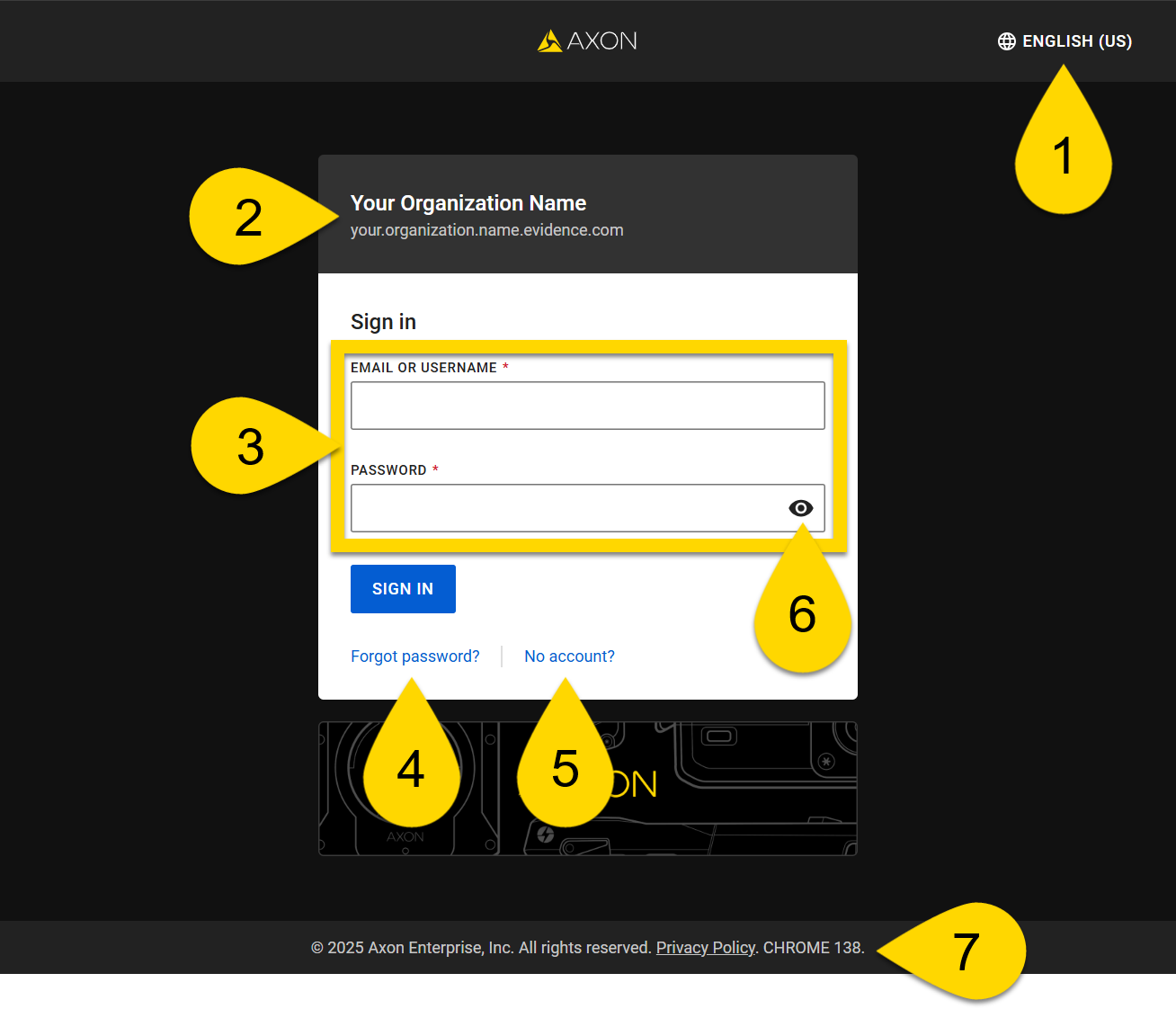
- Language selector
- Your organization name and URL
- Enter your email or username and password
- Forgot password link
- Invitation page link
- Show or hide password
- Browser type and version


