Announcement Banner Update
Using the Announcement Banner Update tool, you can customize the content of the announcements banner that appears at the top of the My Tasks inbox.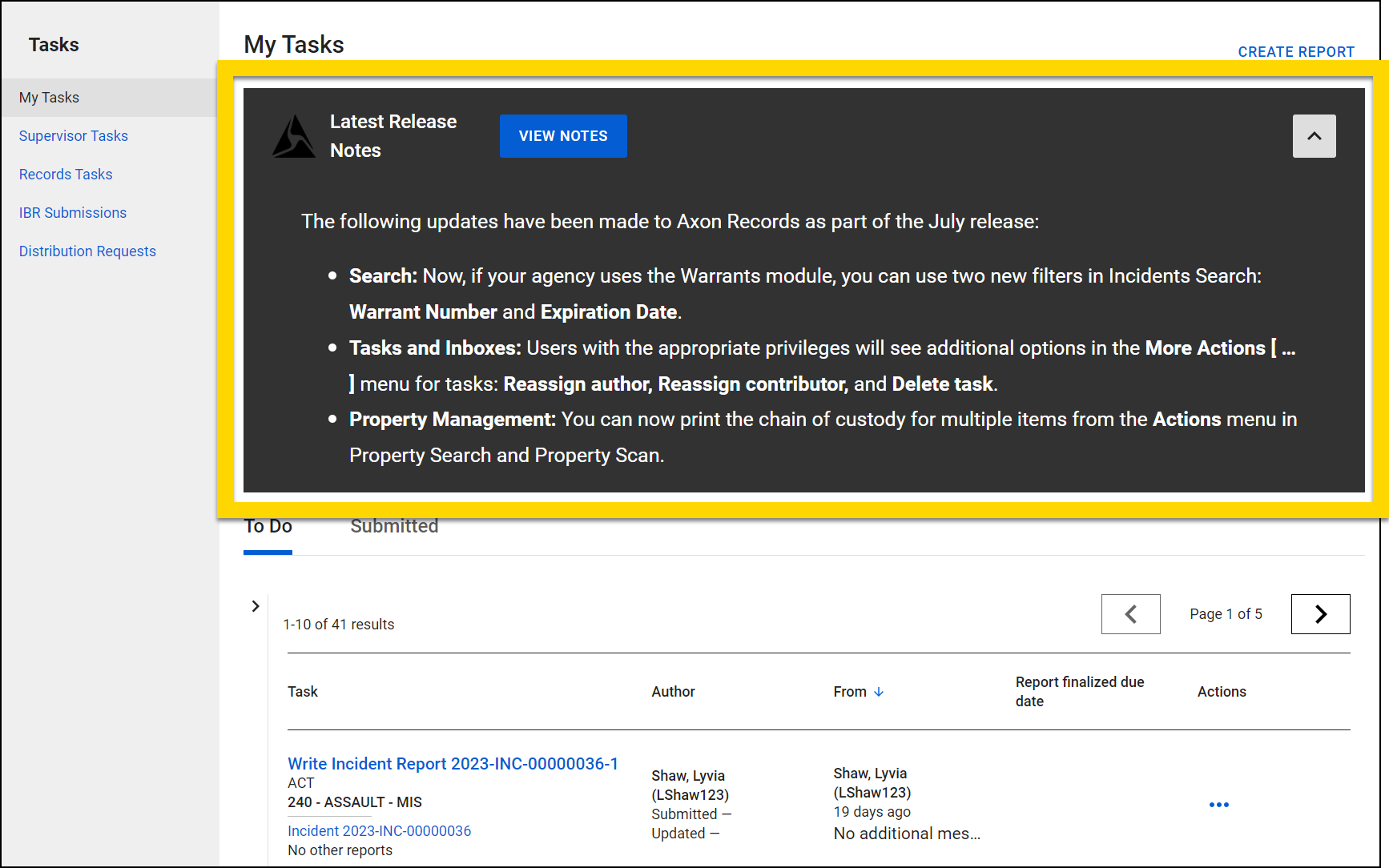

|
To access this tool, open the Administrator Console by selecting the gear icon in the main navigation menu, then select Announcements Banner Update from the tool list. |
Note
Users must have the Announcement Banner privilege to access this tool and update the Announcement banner.
To update the banner:
- Open the Announcements Banner Update tool in the Administrator Console.
- Select Clear existing banner to delete all existing content.
- Update the various banner fields:
- Banner header: Appears at the top of the banner
- Action button text: The text that appears on the blue banner button.
- Action button URL: The URL users will be taken to if they click the blue banner button.
Warning
To maintain the security, do not enter links here that are not owned by your agency or Axon.
- Text field: The main text of the banner. Use the top toolbar to format text into headings and bulleted/numbered lists.
- Switch to the Preview changes tab to preview your new content.
- Select Publish new banner to make the content visible to your users.
The logo that appears in the top left corner of the banner can be managed from your Agency Profile in the Axon Evidence Admin panel.


