Operation
| Tip | Admins or armorers looking for setup guidance should see Installation. |
Axon Signal Sidearm alerts nearby Axon cameras when a user draws their firearm. It attaches to compatible duty holsters and is powered by a CR2430 coin cell battery.
Sensor controls
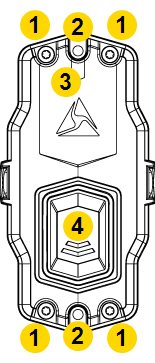
|
|
Operating modes
Axon Signal Sidearm has the following operating modes.
| Mode | Access | LED | Description |
|---|---|---|---|
| Field | Automatic after exiting Test mode, or press button for three seconds | Green for 30 seconds, then off | The sensor alerts nearby Axon cameras when the firearm is removed. |
| Mute | Press button for three seconds | Green or Red | Allows firearm removal without triggering recording. LED color indicates battery status. |
LED reference
| Mode | Status LED indication |
|---|---|
| Field | Solid green followed by three slow green blinks. LED off indicates holstered or removed. |
| Mute | Solid green followed by green or red blinking. Green = good battery. Red = replace battery. |
| Sensor reset | Green = good battery. Red = replace battery. Blinking blue = reset in progress. |
Field mode
The sensor can only enter Field mode from Test mode.
Press and hold the button for three seconds. The LED turns green and blinks three times to confirm.
Mute mode
- While in Field mode, press and hold the button for three seconds.
- LED color indicates battery status:
- Green — Battery is good
- Red — Battery needs replacement
- Remove firearm.
The sensor returns to Field mode when the firearm is returned to the holster or after 30 seconds.


