February 2025
The schedule for the February 2025 release is as follows:
- Customers in the Enterprise region (.ent.evidence.com), Canada (.ca.evidence.com), the Netherlands, new European region (.eur.evidence.com), and European legacy region (.eu.evidence.com) receive on March 5, 2025.
- Customers in U.S. Federal (.evidence.com) and U.S. Law Enforcement region (.evidence.com) receive on March 6, 2025.
- Customers in Australia (.au.evidence.com) receive on March 11, 2025.
- Customers in South America (.la.evidence.com) and the United Kingdom receive on March 12, 2025.
For information on the update schedule times for your region, refer to the Axon Evidence Maintenance Schedule on the Axon website.
We don’t expect any downtime during this update.
Additional help documentation for the products included in these release notes is located at axon.com/help.
Download this month's release notesCore platform and UI updates
Updates to MyAxon sign-in
MyAxon will soon offer the ability to sign in without a password. If your email address is verified—either through a password reset or by signing in with your email and password—you can choose to sign in using a verification code sent to your email. However, you can still sign in with your existing credentials (email and password) if you prefer.
This feature is expected in late February.
Learn more about MyAxon sign-in methods.
Axon Body 4 Multi-Factor Authentication
Axon Body 4 cameras can now be used as an MFA method for signing into Axon apps. Axon Body 3 and Axon Body Workforce will have this feature in March.
For more information, see MFA Admin Guide, and MFA User Guide.
UI and accessibility updates
- Axon Evidence Top Navigation Bar Updates – New Help icon and adaptive menu.
- Bulk ID Improvements in Axon Evidence (GA) – New error dashboard and ability to reattempt failed actions.
- System Status page – Now accessible to all users in Axon Evidence from My Dashboard.
- Deleting ALPR Records from Search Results – New deletion functionality in UI.
- Triage Requests Dashboard Access – New red badge and UI change in Community Request.
- Community Request Hyperlink Support – Adds support for hyperlinks in request descriptions.
- Evidence Certificates in Community Request – New UI for certificate management.
- Sleep Mode Metrics in Performance Dashboards – New tracking metric in UI.
- Metric buffer on Performance Dashboards – New configuration setting for grace period.
- Priority Ranked Video Audit (PRVA) Updates – Updated keyword detection and sampling rate settings.
- Case Resharing in Justice (GA) – Changes to reshare workflows.
- Draft One Launch Button on the Evidence Detail Page – New button in UI.
- Keyboard Shortcuts for Evidence Viewing and Playback – New keyboard controls in UI.
Changes applicable to Axon federal customers
This section provides a list of updates that are applicable to Axon Federal customers. For a more detailed understanding of each update, refer to the corresponding sections within these release notes.
- Core platform and UI updates
- Updates to MyAxon sign-in Axon Evidence
- Axon Evidence
- Updates to the top navigation bar
- Bulk ID improvements in Axon Evidence
- Device Home limit increase and pagination in Axon Evidence
- Auto-Tagging
- Choose which metadata fields Auto-Tagging applies to evidence
- Community Request
- Triage requests dashboard access for Community Request
- Hyperlink support in Community Request descriptions
- Evidence certificates in Community Request
- Performance
- Sleep cycling in Performance
- Metric buffer on Performance dashboards
- Priority ranked video audit (PRVA) updates
- Third party video supported file type updates
- Evidence viewing and playback
- Keyboard shortcuts for evidence viewing and playback
Partner API updates
Access token format change
We are changing our API authentication to enhance security. These changes will affect all API users and might require action from agencies using our services.
What’s changing
- New token format: JSON Web Encryption (JWE - https://datatracker.ietf.org/doc/html/rfc7516)
- The new token format with enhanced security features will be issued by Axon when your software requests a new token using the POST /api/oauth2/token request.
- Token sizing will increase from 800 bytes up to 4 kilobytes.
Change dates
From March 10th, 2025 to March 21st, 2025: The new token format will be gradually avaiable via the Axon Partner API request token endpoint for all Axon customers.
During the transition from the old token format to the new one, tokens in the old format will remain valid until they expire. After expiration, your API client will receive tokens in the new format, ensuring no downtime for your application.
We understand these changes may require updates to your software. If needed, we can extend the transition period until May 1st, 2025, when the old token format handling system will be deprecated. For any questions or concerns, please contact our developer support team.
Partner API
The Axon Evidence Partner API Guide has been updated with the changes to the Partner API. You can view the API Guide at https://developers.axon.com. If you are unable to access the API Guide site, see Accessing the Axon Developer Community.
The following changes are part of the Axon Partner API for February:
- The deletedBy, thumbnails, and files fields in the API response have been removed because they never returned data.
Axon Evidence
Axon Evidence
Updates to the top navigation bar
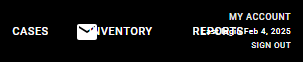
The Axon Evidence top navigation bar has been improved to enhance usability and responsiveness. Help icon update: The Help menu text item has been replaced with a Help icon (?), making it easier to locate help resources.
| Before | After |

|

|
Adaptive menu: When the available space in the navigation bar is limited, a More ( ⌄ ) icon appears, consolidating additional menu options into a dropdown for easy access.
| Before | After |
|

|
Bulk ID improvements now generally available
Bulk metadata editing for ID actions is now available to all organizations in all environments. This update supports selecting up to 5,000 pieces of evidence for ID actions and select all evidence up to 5,000 for ID actions only. This update also introduces an error dashboard and the ability for users to re-attempt failed metadata actions.
Learn more about Leveraging Bulk Actions.
Device Home limit increase and pagination
The maximum number of Device Homes an organization can create has increased to 1,000, improving scalability for device inventory management. Pagination has also been added, making it easier to navigate and manage large lists of Device Homes.
Learn more about Device Home.
Group-based categories
Group-based categories is now available as an Alpha release for select customers in the U.S. Federal region. This feature allows administrators to control which evidence categories users can select based on their assigned groups, ensuring users can only see categories relevant to their roles.
Learn more about Group-Based Categories in Axon Evidence.
People Detection thumbnail download permissions
Users with the Start and View People Detection permission must now also have the Download permission in the Evidence Management section of the user role and permission page to download people detection thumbnails from the Evidence Detail Page. Users who previously had access to download thumbnails but do not have the Evidence Management Download permission will lose this capability but can still view and click on thumbnails.
Admins should review and update user permissions as needed to ensure continued access.
System Status page now accessible to all users
With this release, the System Status page is now available to all users from My Dashboard – no special permissions required. Users can access the page to check the real-time status of Axon cloud services, and our new livestream diagnostics test.
Learn more about the System Status Page.
Axon Auto-Tagging
Customize metadata fields
Organizations can now choose which metadata fields Auto-Tagging applies to evidence. By default, all fields are tagged automatically, but specific fields can be disabled if they are no longer needed. Changes only apply to newly updated evidence and do not affect previously tagged files. To configure this feature, contact your Axon representative.
Learn how to Customize Metadata Fields in Auto-Tagging.
Axon Auto-Transcribe
“Public Beta” Transcription languages are now available in AU1.
Learn more about beta languages.
Axon Community Request
Triage requests dashboard access
Users can now access triage requests directly from My Dashboard. In the Community Request tile, a red badge next to Triage requests indicates the total number of requests requiring triage. Select Triage requests to open the portal detail page with filters applied to only show submissions pending triage.
For more details, see Use Community Request to Triage Submissions.
Hyperlink support in request descriptions
Users can now add hyperlinks to the Request Description field for Individual Invites and Public Portals. Hyperlinks support both websites and email addresses.
For more information, see Create and Submit a Community Request.
Evidence certificates
Organizations can now attach Evidence Certificates to Community Request Individual Invites to collect required statements or certifications from community members. Completed certificates are automatically attached to submitted evidence and securely stored in Axon Evidence, where they can be viewed, downloaded, or audited. Learn more about how to Manage Evidence Certificates and Use Evidence Certificates.
Axon Performance
Sleep Cycling
New metric that compares the total time an officer’s BWC is not in sleep mode over the total time the officer’s BWC is powered and undocked.
For more information, see Performance Metrics Settings in Axon Performance.
New | Admin
Metric buffer on Performance Dashboards
Set the number of days before performance metrics are displayed when launching a group, squad, or officer dashboard. This setting is intended to ensure supervisors don’t see metrics for evidence uploaded within the grace period set by your organization.
For more information, see Supervisor and Audit Dashboards in Axon Performance.
Priority Ranked Video Audit Updates
Updated Keyword Detection and Sampling Rate settings.
For more information, see Priority Ranked Video Audit Settings in Axon Performance.
Draft One
New Draft One launch button on the evidence details page
Users can now launch Draft One directly from the evidence details page. Access to this feature requires the user to have permission to view the evidence.
Learn more about how to Generate a narrative draft with Draft One in Axon Evidence.
Evidence viewing and playback
Video playback keyboard shortcuts
Keyboard shortcuts are now available for evidence viewing and playback on the Evidence Detail page.
For more information, see Using the Media Player.
Third-Party Video Support
This update adds support for Nuvico .exe files, .dat format files, .av3 audio in HEVC files, Bottom Line MZP .exe files, new Vicon aggregate support for audio and video, and Eyeonet H.264. Additional improvements include:
- New subdirectory handling for Synetics .synav files
- Improved MJPEG handling for Avigilon files
- Enhancements to Airship and Milestone exports
If you encounter an unsupported format, contact [email protected]. View a list of all Supported File Types.
Axon Academy
Migration of select online training courses to MyAxon
We're migrating videos from 50 online training courses to MyAxon, making them accessible directly in relevant product guides. With this update, individual tracking will no longer be supported. However, Academy will continue to host registration and coursework for certification courses and TASER and Tactical Drone Operator courses.
MyAxon sign-in updates (available 2/28)
MyAxon now allows users with a verified email address to sign in using a one-time verification code.
This feature is expected in late February.
See MyAxon Sign-In Methods for details.
Resolved issues
| Axon Evidence |
|
| Evidence viewing and playback |
|
| Draft One |
|
| Axon app |
|
| Axon Capture |
|
| Axon View |
|
| Axon Device manager |
|
| Axon ViewXL |
|


Coming soon
Mobile
Axon app
End of support for iOS 16 and Android 11
The Axon App for mobile will soon end support for iOS 16 and Android 11. This will enable the app to take advantage of newer technology and features for mobile.


