Assembling or disassembling a TASER Weapons Dock for the TASER 7 and TASER 10 energy weapons
- Take the dock out of the box and confirm that all pieces are present.
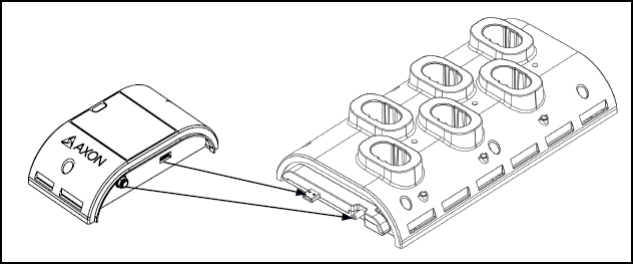
- Connect your core to all bays you plan to use.
Notes:
- Do not attach more than one multi-bay to one core.
- Do not attach more than one single-bay to one core.
- You should hear a click when pushing the core, bays, and bridge adapters together. If the TASER Weapons Dock assembly does not stay together, press the components together with more force. The parts need to fit flush together.
- Turn the dock assembly upside down.
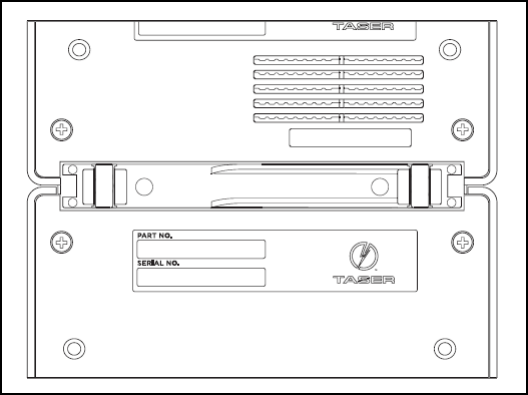
- Press the locking adapter into place between the core and bay. The two prongs on each end of the locking adapter should snap into place, helping to hold the core and bay together.
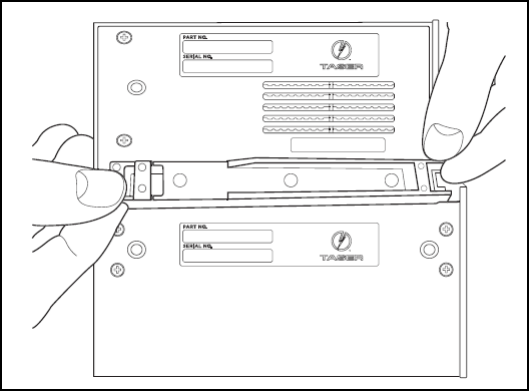
- When properly installed, the locking adapter is flush in place with the core and bay.
- Turn the connected dock right side up and place it on a flat surface within reach of power and ethernet connections but away from heat sources and direct sunlight.
- See Wall Mounting a TASER Weapons Dock for additional information on using the Wall Mount.


