Concepts and features
This section provides foundational guidance for working with the Axon DataStore v1, including how key fields like dates, identifiers, and employee data are structured and used. It also covers important concepts such as time zone handling, data types, and naming conventions, along with pre-built reporting views that streamline access to commonly requested records data.
Date and time fields
There are several different naming conventions to be aware of when viewing and using date and time fields from the Axon DataStore, including:
- Data types: datetime2 and datetimeoffset
- Time zone conversions
- Time zone conversion columns
- NoTz time zone columns
- Daylight savings time considerations
Data types: datetime2 and datetimeoffset
All date and time values in the DataStore are assumed to be in UTC (+00:00) unless a different time zone is explicitly specified.
There is a mixture of datetime2 and datetimeoffset data types in the DataStore. The datetimeoffset data type is like datetime2, except it also has time zone awareness. The datetimeoffset data type has the time zone offset (as calculated from UTC) appended to the column value. For example:
|
datetime2: |
2025-12-10 12:32:10
|
|
datetimeoffset: |
2025-12-10 12:32:10 +00:00
|
|
datetimeoffset converted to EST: |
2025-12-10 07:32:10 -05:00
|
In the Axon DataStore, you can recognize if the data type is a datetimeoffset if the time zone offset appears at the end in the format [+|-] hh:mm. A SQL Client like Azure Data Studio shows the column data types in a view: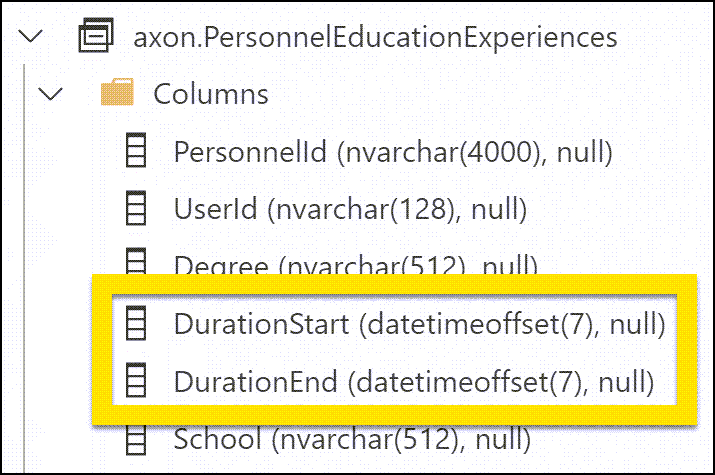
Time zone conversions
For better performance when you are filtering by date, use the UTC version of the field in your WHERE clause. Then use two AT TIME ZONE functions on the value you are comparing against, first to your local time zone and second to UTC. Example:
WHERE r.[CreatedAt] >

= CONVERT(datetime2, '2024-01-01T00:00:00.000') AT TIME ZONE 'Central Standard Time' AT TIME ZONE 'UTC'
This first converts the value to CST by adding the time zone offset:2024-01-01 00:00:00 -06:00
Then, that CST value is converted to UTC:2024-01-01 06:00:00 +00:00
Comparing the DataStore values against the UTC value (2024-01-01 06:00:00 +00:00) is the most efficient comparison and yields the fastest results since the values are stored and indexed in UTC.
The most common time zones are listed below, but the full list can be found here.
- Eastern Standard Time
- Central Standard Time
- Mountain Standard Time
- US Mountain Standard Time <-- use this one for Arizona
- Pacific Standard Time
Time zone conversion columns
For commonly selected fields in queries (e.g., OccurredTo and OccurredFrom), the values are converted to the five contiguous US time zones. This conversion is denoted by _Time Zone in the column name. For example:
OccurredFromDate_EasternOccurredFromDate_CentralOccurredFromDate_MountainOccurredFromDate_Arizona-
OccurredFromDate_Pacific
For better performance, use these converted columns only in select lists and not in any filters or WHERE clauses. For WHERE clauses, use the UTC column and convert your time zone to UTC as described above.
NoTz time zone columns
The time zone offset and millisecond precision can be challenging for tools like Excel or Power BI to understand, so in some dashboard views the datetime2 data type is converted and the milliseconds and offset (e.g., +5:00) do NOT appear at the end of the value.
To indicate that these columns are different from other views, NoTz appears in the column name. For example:
OccurredFromDateNoTz_EasternOccurredFromDateNoTz_CentralOccurredFromDateNoTz_MountainOccurredFromDateNoTz_ArizonaOccurredFromDateNpTz_Pacific
Note that while the values themselves have been converted to the indicated time zone, the time zone offset is not included at the end of the value. This makes export and analysis to external tools (e.g., Tableau, Excel) easier.
Daylight savings time considerations
When you are performing an analysis where precision and seconds count (e.g., how long did it take to arrive on-scene after being dispatched), Axon recommends using the UTC column.
Using the UTC column bypasses complications that arise from inaccurate daylight savings time conversions (which could incorrectly indicate that the officer arrived 60 minutes earlier or later than actual).
Identifiers
The table primary key ID columns are named Id prefixed by the singular version of the topic contained in the table.
These primary keys are auto-increment bigint values unique to the DataStore; they do not come from the source data and are typically regenerated when the data updates.
Fields ending in Number (e.g., IncidentNumber, ReportNumber, CallForServiceNumber) generally refer to the friendly ID of the entity in question.
Fields ending in ExternalId (e.g., CallForServiceExternalId, IncidentExternalId) refer to the unique ID in the native system of the entity in question.
- For Axon Records and Axon Standards, these are generally UUIDs.
- For Axon Dispatch, in many cases these are UUIDs, but for things like history records they can be bigint.
Employee data
Employees appear in the DataStore in three ways:
- Users
- Officers
- Authors
Users
In the DataStore, employees listed in Users means they were added to a report because they were involved somehow (for example, as a driver, passenger, arresting officer, witness, etc.). As a result, you will see ReportNumber as a column.
An employee might be listed in Users many times since there is a row for each report the employee has been added to.
Officers
Officers includes all people employed at the agency. These are not linked to reports, and each employee should only be listed once.
To retrieve employee information for a user, link Users to Officers using ExternalId:
SELECT o.FirstName,
    o.LastName,
    o.Username,
    o.BadgeNumber
FROM axon.Users u
INNER JOIN axon.Officers o ON o.OfficerExternalId = u.ExternalId
AND u.ReportNumber = '<insert report number here>'
Author
If the Author of the report is also a User (they were directly involved in the incident and appear in the report as an involved party), the author is listed in axon.Users for that report.
If the author was not involved in the incident and is only authoring the report, they are only listed under Author.
To retrieve the employee information for an author, link axon.Reports.AuthorExternalId to axon.Officers:
select o.FirstName,
    o.LastName,
    o.Username,
    o.BadgeNumber
FROM dw.Reports r
INNER JOIN axon.Officers o on o.OfficerExternalId = r.AuthorExternalId
AND r.ReportNumber = '<insert report number here>'
Reporting views for common Records requests
Reporting views provide all information in one view, so you don't need to join on additional objects. These views can be integrated to create dashboards or external reports an external tool (e.g., PowerBi, Tableau, Excel).
Contact your Axon representative if there are other dashboards type views you would like to see to answer your common reporting needs.
An Incident Report is what Axon uses to refer to a Crime Report or General Offense Report (GO).
Information from Incident Reports are sent to NIBRS and contain data about crimes that occurred.
Offense views
axon.MostRecentGeneralOffense
This view contains the most up to date information for an incident report and shows the latest data combined with the most recent contribution or supplement.
This view can give you information, such as:
- List incidents that occurred after Dec 1, 2023
SELECT *
FROM axon.MostRecentGeneralOffense
WHERE OccurredFromDate >

CONVERT(datetime2, '2023-12-01') AT TIME ZONE 'Eastern Standard Time' AT TIME ZONE 'UTC'- List incidents that were created in the last 24 hours
SELECT *
FROM axon.MostRecentGeneralOffense
WHERE CreatedAt > DATEADD(hour, -24, GETDATE())
axon.OffensesToLatestReport
This view contains all offenses in the latest information for an incident report. This view contains the following report location columns, so the data can be exported to an external mapping tool:
- Latitude
- Longitude
- District
- Sector
- Zone
This view can give you information, such as:
- List offenses that have individual exceptional clearance dates/types
- How many <insert offense here> happened in this district?
SELECT *
FROM axon.OffensesToLatestReport
WHERE NibrsUcrCode = '13A'
AND District = 'NORTHWEST'- How many <insert offense here> happened during this period?
SELECT *
FROM axon.OffensesToLatestReport
WHERE OccurredFromDateNoTz_Eastern > CONVERT(datetime2, '2023-10-01') AT TIME ZONE 'Eastern Standard Time' AT TIME ZONE 'UTC'
   AND OccurredFromDateNoTz_Eastern < CONVERT(datetime2, '2024-01-01') AT TIME ZONE 'Eastern Standard Time' AT TIME ZONE 'UTC'
   AND NibrsUcrCode = '220'
Vehicle views
axon.VehicleTheftsAndRecovery
This view contains all vehicle information where the involvement starts with "STOLEN" or "RECOVER." If there is a recovered date or recovered value, that information is also shown.
This view can give you information, such as:
- How many x make and y model were stolen or recovered in the last 6 months?
SELECT *
FROM axon.VehicleTheftsAndRecovery
WHERE Make = 'HONDA'
   AND Model = 'CIVIC'
   AND OccurredFromDate > DATEADD(Month, -6, GETDATE())
Property views
The Property views only include data for property items in the Axon Property Management module. These views do not contain data for property recorded in third-party property management systems.
axon.PropertyInCustody
This view allows for easy viewing of property item details (storage/home location, who collected). If the piece of property also has a related incident in Axon Records, some incident information is also included (Latitude, Longitude, Recovered Details).
This view can give you information, such as:
- How many x are on-hand?
- What is the property in location x?
- Who collected property x?
axon.PropertyStolenAndRecovery
This view lists property from incident reports where the involvement contains "STOLEN" or "RECOVER."
This view can give you information, such as:
- How many catalytic converters were stolen in the last 7 days?
- How many black bicycles were stolen this year?
Victim and suspect views
axon.VictimOffensesDashboard
This view allows you to easily see victim information (e.g., Age, Race, Ethnicity) and the related offenses (NIBRS Code, Description, Occurred From/To). Specifically, this view pulls in data for people from the latest incident report where the person's involvement or role is Victim.
This view can give you information, such as:
- How many people were victimized for x offense during last month?
- What were the injuries or weapons related to x offense?
axon.SuspectOffensesDashboard
This view allows you to easily see suspect information (e.g., Age, Race, Ethnicity) and the related offenses (NIBRS Code, Description, Occurred From/To). Specifically, this view pulls in data for people from the latest incident report where the person's involvement or role is Arrestee or Offender.
This view can give you information, such as:
- Demographic information (Height, Sex, Race, etc.) for x offense in the last 7 days
- What weapons were involved with x offense?
Field mappings
This guide shows how the fields in the Axon Records incident report map to the columns in the Axon DataStore. Each section also includes examples of SQL Select statements.
Incident
Overview
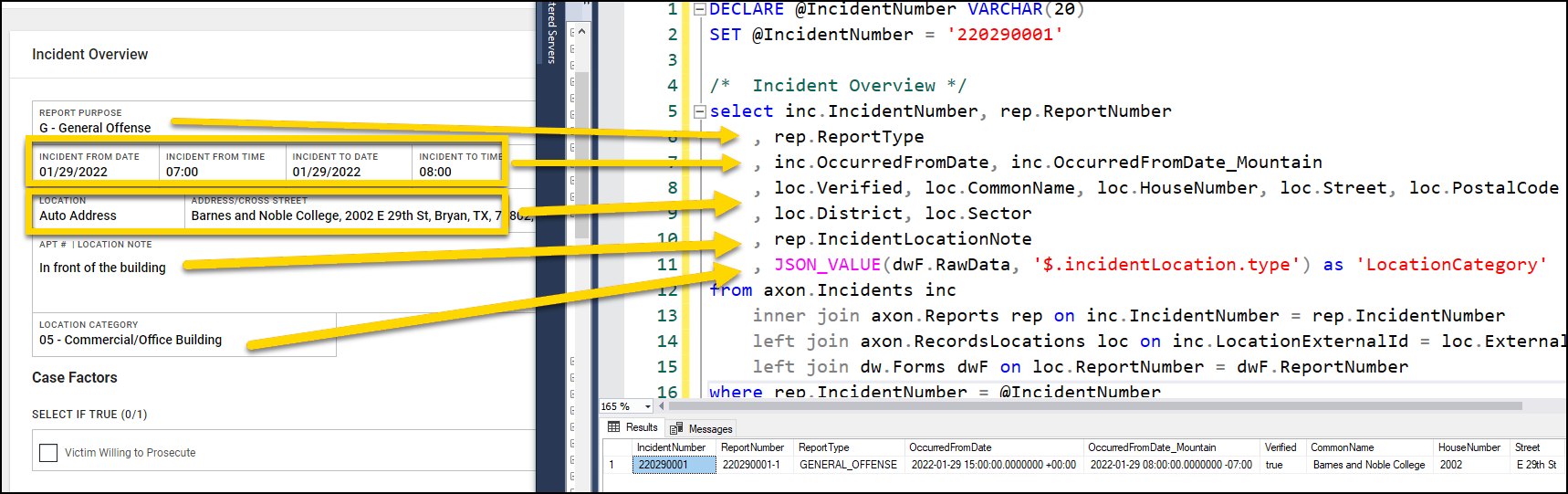
SQL Select Statement
/* Incident Overview */
SELECT inc.IncidentNumber,
    rep.ReportNumber,
    rep.ReportType,
    inc.OccurredFromDate,
    inc.OccurredFromDate_Mountain,
    loc.Verified,
    loc.CommonName,
    loc.HouseNumber,
    loc.Street,
    loc.PostalCode,
    loc.District,
    loc.Sector,
    rep.IncidentLocationNote,
    JSON_VALUE(dwF.RawData, '$.incidentLocation.type') AS 'LocationCategory'
FROM axon.Incidents inc
INNER JOIN axon.Reports rep ON inc.IncidentNumber = rep.IncidentNumber
LEFT JOIN axon.RecordsLocations loc ON inc.LocationExternalId = loc.ExternalId
AND inc.IncidentNumber = loc.IncidentNumber
LEFT JOIN dw.Forms dwF ON loc.ReportNumber = dwF.ReportNumber
WHERE rep.IncidentNumber = @IncidentNumber
Case factors
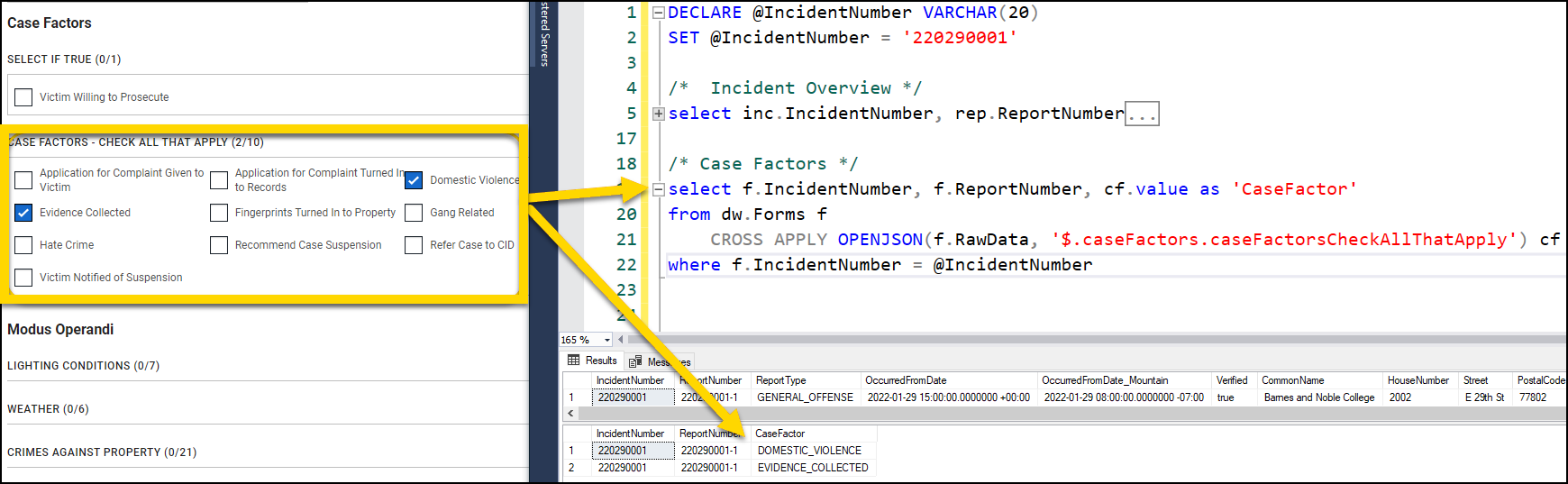
SQL Select Statement
/* Case Factors */
SELECT f.IncidentNumber,
    f.ReportNumber,
    cf.value AS 'CaseFactor'
FROM dw.Forms f CROSS APPLY OPENJSON(f.RawData, '$.caseFactors.caseFactors') cf
WHERE f.IncidentNumber = @IncidentNumber
Offense
Assault
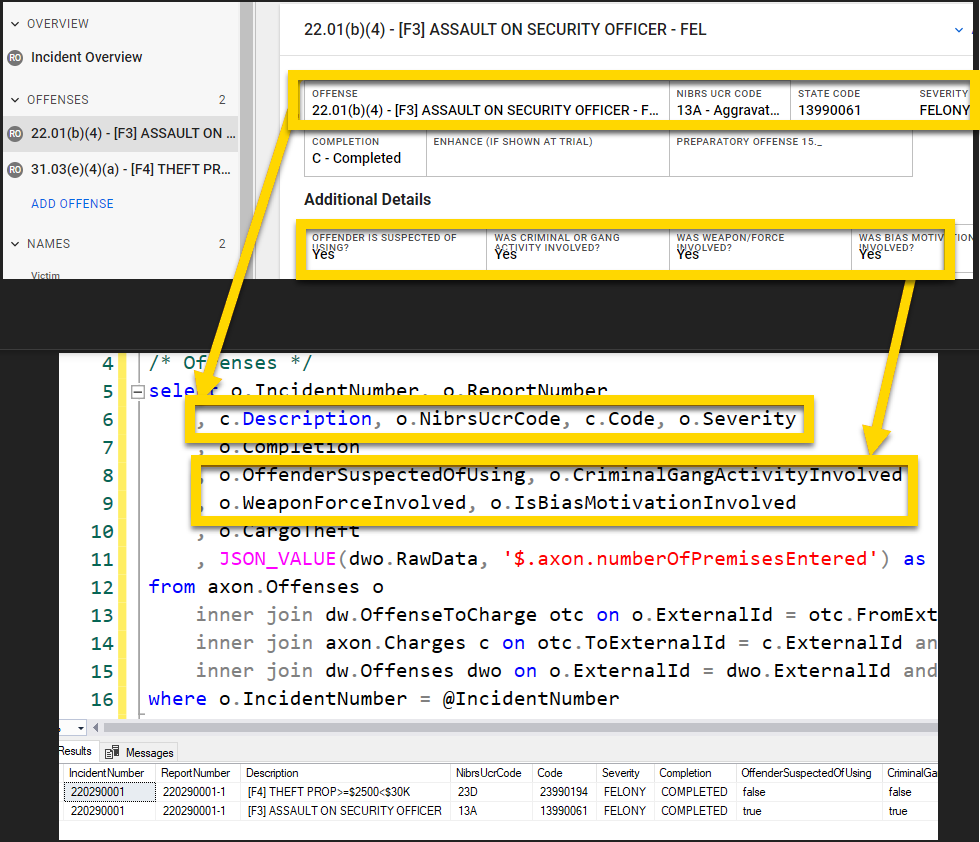
Theft
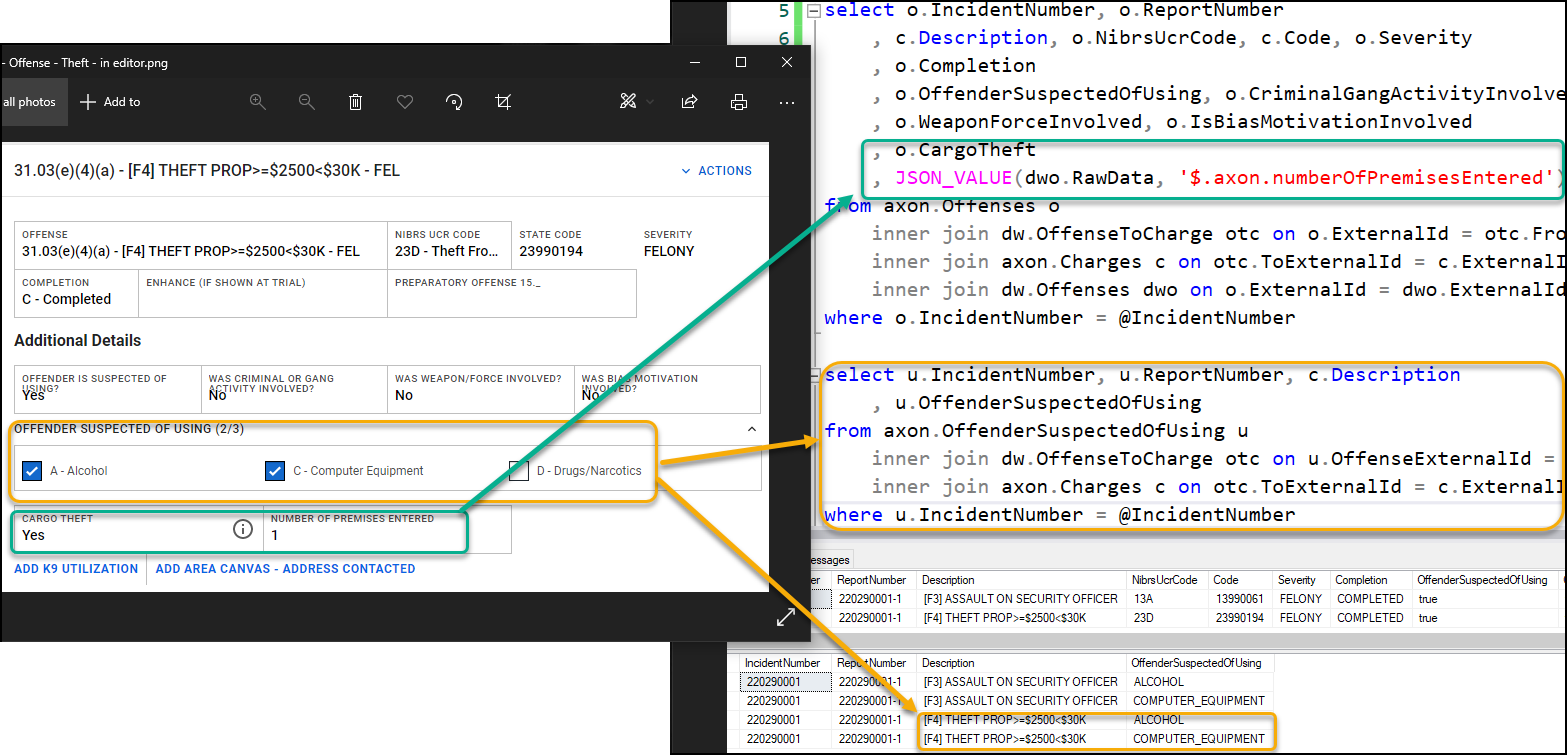
SQL Select Statement
/* Offenses */
SELECT o.IncidentNumber,
    o.ReportNumber,
    c.Description,
    o.NibrsUcrCode,
    c.Code,
    o.Severity,
    o.NibrsUcrCode,
    c.Ucr,
    o.Completion,
    o.OffenderSuspectedOfUsing,
    o.CriminalGangActivityInvolved,
    o.WeaponForceInvolved,
    o.IsBiasMotivationInvolved,
    o.CargoTheft /* Suspected of Using */
SELECT u.IncidentNumber,
    u.ReportNumber,
        c.Description,
    u.OffenderSuspectedOfUsing
FROM axon.OffenderSuspectedOfUsing u
INNER JOIN dw.OffenseToCharge otc ON u.OffenseExternalId = otc.FromExternalId
AND otc.ReportNumber = u.ReportNumber
INNER JOIN axon.Charges c ON otc.ToExternalId = c.ExternalId
AND otc.ReportNumber = c.ReportNumber
WHERE u.IncidentNumber = @IncidentNumber
Person
General description
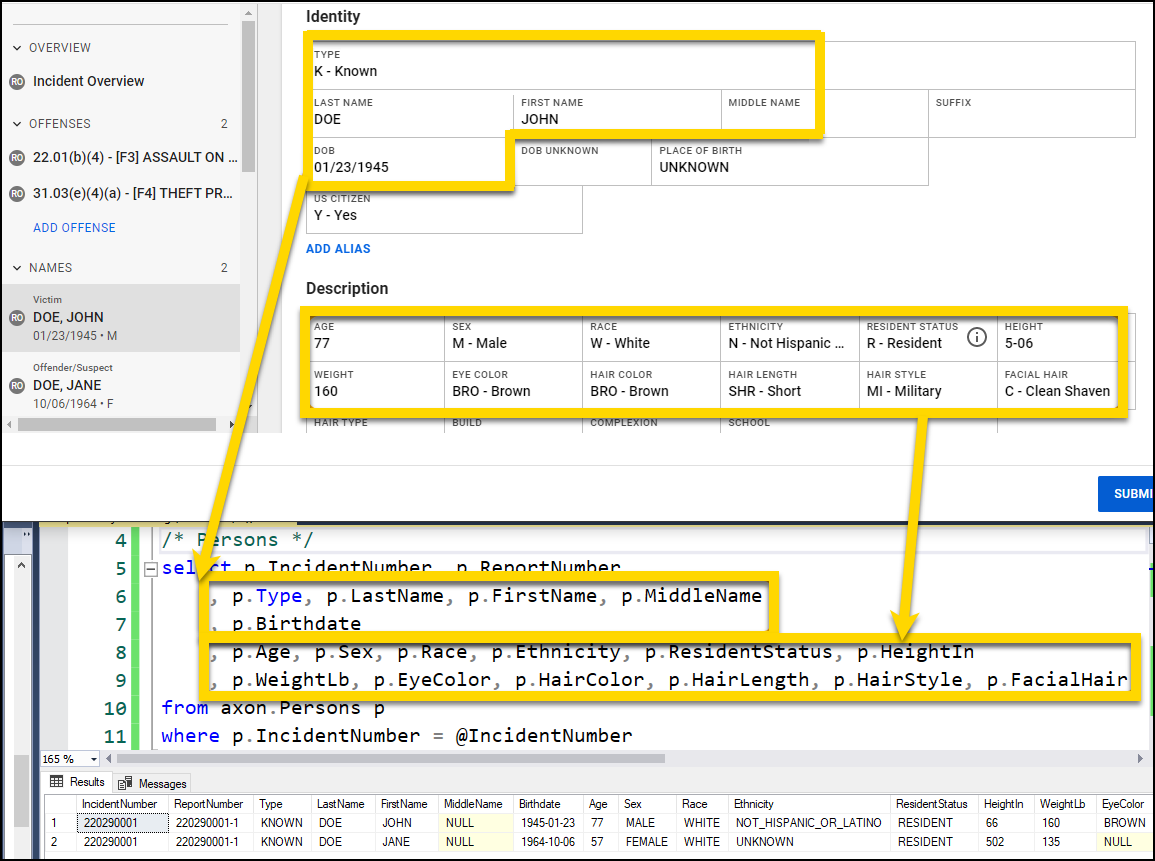
SQL Select Statement
/* Persons */
SELECT p.IncidentNumber,
    p.ReportNumber,
    p.Type,
    p.LastName,
    p.FirstName,
    p.MiddleName,
    p.Birthdate,
    p.Age,
    p.Sex,
    p.Race,
    p.Ethnicity,
    p.ResidentStatus,
    p.HeightIn,
    p.WeightLb,
    p.EyeColor,
    p.HairColor,
    p.HairLength,
    p.HairStyle,
    p.FacialHair
FROM axon.Persons p
WHERE p.IncidentNumber = @IncidentNumber
Involvement
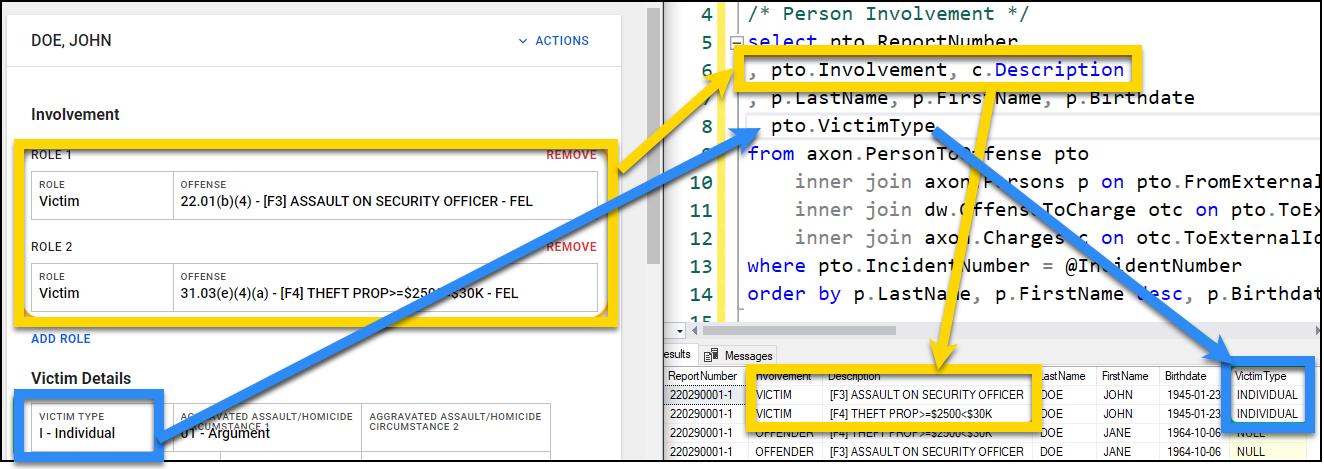
SQL Select Statement
/* Person Involvement */
SELECT pto.ReportNumber,
    pto.Involvement,
    c.Description,
    p.LastName,
    p.FirstName,
    p.Birthdate,
    pto.VictimType
FROM axon.PersonToOffense pto
INNER JOIN axon.Persons p ON pto.FromExternalId = p.ExternalId
AND pto.ReportNumber = p.Report Number
INNER JOIN dw.OffenseToCharge otc ON pto.ToExternalId = otc.FromExternalId
AND pto.ReportNumber = otc.ReportNumber
INNER JOIN axon.Charges c ON otc.ToExternalId = c.ExternalId
AND otc.ReportNumber = c.ReportNumber
WHERE pto.IncidentNumber = @IncidentNumber
ORDER BY p.LastName,
    p.FirstName DESC,
    p.Birthdate
Identifying documents
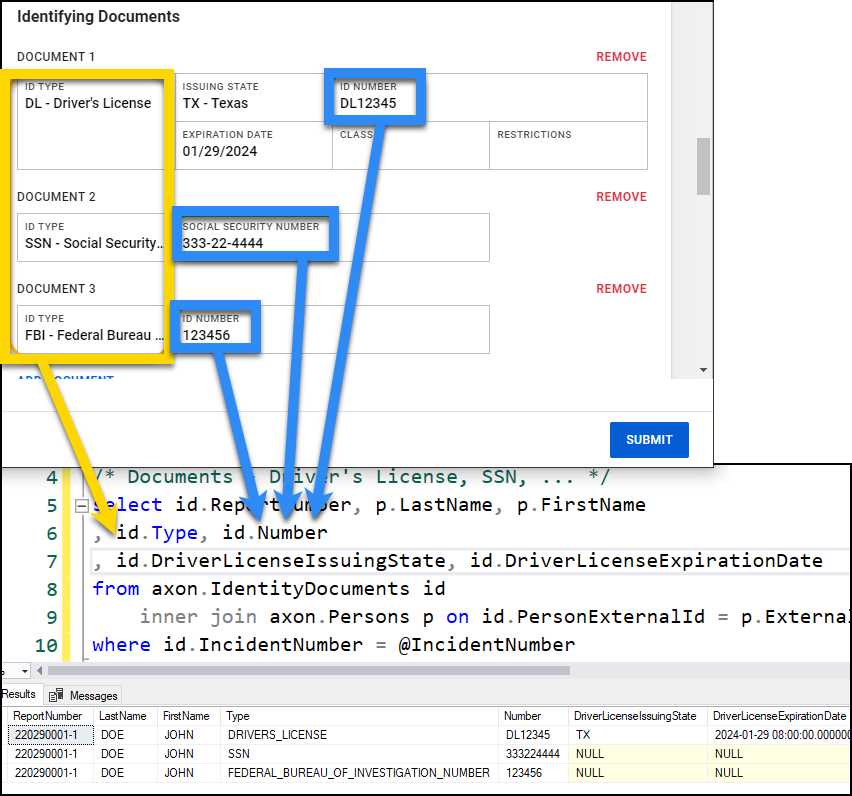
SQL Select Statement
/* Documents - Driver's License, SSN, ... */
SELECT id.ReportNumber,
    p.LastName,
    p.FirstName,
    id.Type,
    id.Number,
    id.DriverLicenseIssuingState,
    id.DriverLicenseExpirationDate
FROM axon.IdentityDocuments id
INNER JOIN axon.Persons p ON id.PersonExternalId = p.ExternalId
AND id.ReportNumber = p.Report Number
WHERE id.IncidentNumber = @IncidentNumber
Markings

SQL Select Statement
/* Scars/Marks/Tattoos */
SELECT smt.ReportNumber,
    smt.ParentEntityType,
    smt.Type,
    smt.Location,
    smt.Description,
    p.LastName,
    p.FirstName
FROM axon.Markings smt
INNER JOIN axon.Persons p ON smt.ParentExternalId = p.ExternalId
AND p.ReportNumber = smt.ReportNumber
WHERE smt.IncidentNumber = @IncidentNumber
Phone numbers
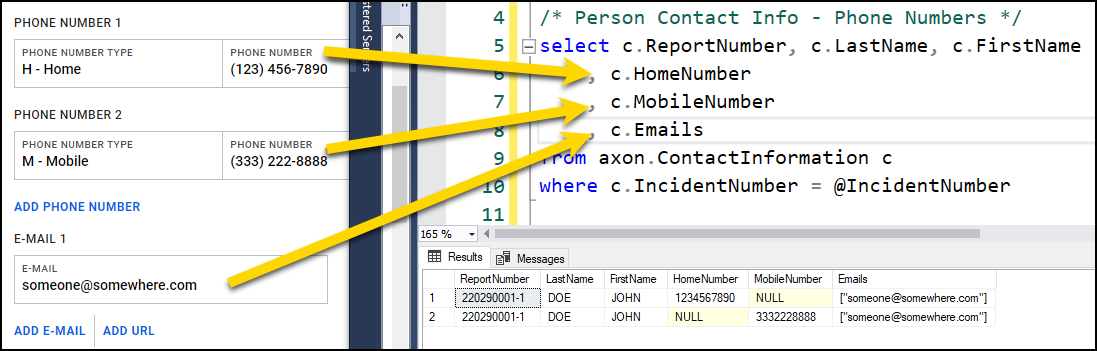
SQL Select Statement
/* Person Contact Info - Phone Numbers */
SELECT c.ReportNumber,
    c.LastName,
    c.FirstName,
    c.HomeNumber,
    c.MobileNumber,
    c.Emails
FROM axon.ContactInformation c
WHERE c.IncidentNumber = @IncidentNumber
Person-to-person relationships

SQL Select Statement
/* Person to Person Relationships */
SELECT ptp.ReportNumber,
    f.FirstName,
    ptp.Type,
    t.FirstName
FROM axon.PersonToPerson ptp
INNER JOIN axon.Persons f ON ptp.FromExternalId = f.ExternalId
AND f.ReportNumber = ptp.Report Number
INNER JOIN axon.Persons t ON ptp.ToExternalId = t.ExternalId
AND t.ReportNumber = ptp.ReportNumber
WHERE ptp.IncidentNumber = @IncidentNumber
Arrest
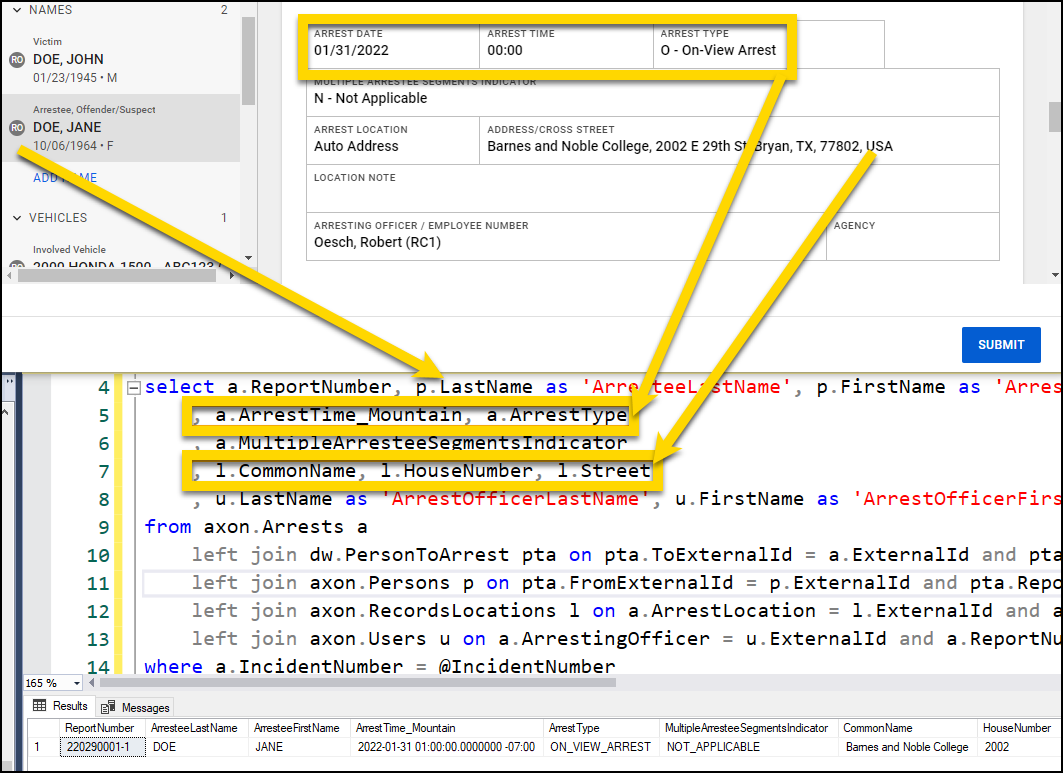
SQL Select Statement
/* Person - Arrest */
SELECT a.ReportNumber,
    p.LastName AS 'ArresteeLastName',
    p.FirstName AS 'ArresteeFirstName',
    a.ArrestTime_Mountain,
    a.ArrestType,
    a.MultipleArresteeSegmentsIndicator,
    l.CommonName,
    l.HouseNumber,
    l.Street,
    u.LastName AS 'ArrestOfficerLastName',
    u.FirstName AS 'ArrestOfficerFirstName',
    u.BadgeNumber AS 'ArrestOfficerBadge'
FROM axon.Arrests a
LEFT JOIN dw.PersonToArrest pta ON pta.ToExternalId = a.ExternalId
AND pta.ReportNumber = a.ReportNumber
LEFT JOIN axon.Persons p ON pta.FromExternalId = p.ExternalId
AND pta.ReportNumber = p.ReportNumber
LEFT JOIN axon.RecordsLocations l ON a.ArrestLocation = l.ExternalId
AND a.ReportNumber = l.ReportNumber
LEFT JOIN axon.Users u ON a.ArrestingOfficer = u.ExternalId
AND a.ReportNumber = u.ReportNumber
WHERE a.IncidentNumber = @IncidentNumber
Arrest charges
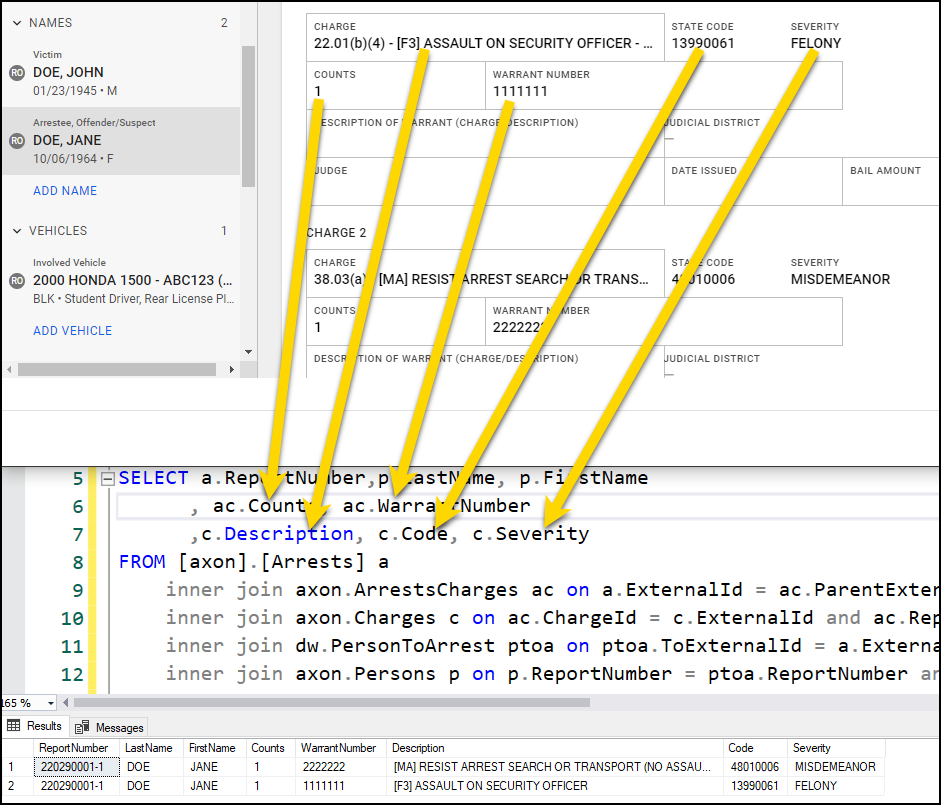
SQL Select Statement
/* Person - Arrest Charge */
SELECT a.ReportNumber,
    p.LastName,
    p.FirstName,
    ac.Counts,
    ac.WarrantNumber,
    c.Description,
    c.Code,
    c.Severity
FROM [axon].[Arrests] a
INNER JOIN axon.ArrestsCharges ac ON a.ExternalId = ac.ParentExternalId
AND a.ReportNumber = a c.ReportNumber
INNER JOIN axon.Charges c ON ac.ChargeId = c.ExternalId
AND ac.ReportNumber = c.ReportNumber
INNER JOIN dw.PersonToArrest ptoa ON ptoa.ToExternalId = a.ExternalId
AND ptoa.ReportNumber = a.ReportNumber
INNER JOIN axon.Persons p ON p.ReportNumber = ptoa.ReportNumber
AND ptoa.FromExternalId = p.ExternalId
WHERE a.IncidentNumber = @IncidentNumber
Vehicle
Details

SQL Select Statement
/* Vehicle */
SELECT v.ReportNumber,
    v.Type,
    v.Year,
    v.Make,
    v.Model,
    v.Style,
    v.Color,
    v.LicensePlateNumber,
    v.LicensePlateState,
    v.Vin,
    v.MonetaryValueCents
FROM axon.Vehicles v
WHERE v.IncidentNumber = @IncidentNumber
Role

SQL Select Statement
/* Vehicle Role */
SELECT v.ReportNumber,
    v.Year,
    v.Make,
    vto.Involvement,
    c.Description,
    vto.VehicleStatus
FROM axon.Vehicles v
LEFT JOIN axon.VehicleToOffense vto ON vto.FromExternalId = v.ExternalId
AND vto.ReportNumber = v.ReportNumber
INNER JOIN axon.Offenses o ON vto.ToExternalId = o.ExternalId
AND vto.ReportNumber = o.ReportNumber
INNER JOIN dw.OffenseToCharge otc ON otc.FromExternalId = o.ExternalId
AND otc.ReportNumber = o.ReportNumber
INNER JOIN axon.Charges c ON otc.ToExternalId = c.ExternalId
AND otc.ReportNumber = c.ReportNumber
WHERE v.IncidentNumber = @IncidentNumber
Markings

SQL Select Statementc
/* Vehicle Markings */
SELECT m.ReportNumber,
    m.ParentEntityType,
    m.Type,
    m.Description,
    v.Year,
    v.Make,
    v.LicensePlateNumber
FROM axon.Markings m
INNER JOIN axon.Vehicles v ON m.ParentExternalId = v.ExternalId
AND v.ReportNumber = m.ReportNumber
WHERE m.IncidentNumber = @IncidentNumber
Property

SQL Select Statement
/* Property */
SELECT p.Type,
    p.MonetaryValueCents,
    p.RecoveredValueCents
SQL select statements: Full list
DECLARE @IncidentNumber VARCHAR(20)
SET @IncidentNumber = '22033001' /* Incident Overview */
SELECT inc.IncidentNumber,
    rep.ReportNumber,
    rep.ReportType,
    inc.OccurredFromDate,
    inc.OccurredFromDate_Mountain,
    loc.Verified,
    loc.CommonName,
    loc.HouseNumber,
    loc.Street,
    loc.PostalCode,
    loc.District,
    loc.Sector,
    rep.IncidentLocationNote,
    JSON_VALUE(dwF.RawData, '$.incidentLocation.type') AS 'LocationCategory'
FROM axon.Incidents inc
INNER JOIN axon.Reports rep ON inc.IncidentNumber = rep.IncidentNumber
LEFT JOIN axon.RecordsLocations loc ON inc.LocationExternalId = loc.ExternalId
AND inc.Inciden tNumber = loc.IncidentNumber
LEFT JOIN dw.Forms dwF ON loc.ReportNumber = dwF.ReportNumber
WHERE rep.IncidentNumber = @IncidentNumber

/* Case Factors */
SELECT f.IncidentNumber,
    f.ReportNumber,
    cf.value AS 'CaseFactor'
FROM dw.Forms f CROSS APPLY OPENJSON(f.RawData, '$.caseFactors.caseFactors') cf
WHERE f.IncidentNumber = @IncidentNumber

/* Offenses */
SELECT o.IncidentNumber,
    o.ReportNumber,
    c.Description,
    o.NibrsUcrCode,
    c.Code,
    o.Severity,
    o.NibrsUcrCode,
    c.Ucr,
    o.Completion,
    o.OffenderSuspectedOfUsing,
    o.CriminalGangActivityInvolved,
    o.WeaponForceInvolved,
    o.IsBiasMotivationInvolved,
    o.CargoTheft,
JSON_VALUE(dwo.RawData, '$.axon.numberOfPremisesEntered') AS 'NumberOfPremisesEntered'
FROM axon.Offenses o
INNER JOIN dw.OffenseToCharge otc ON o.ExternalId = otc.FromExternalId
AND otc.ReportNumber = o.ReportNumber
INNER JOIN axon.Charges c ON otc.ToExternalId = c.ExternalId
AND otc.ReportNumber = c.ReportNu mber
INNER JOIN dw.Offenses dwo ON o.ExternalId = dwo.ExternalId
AND o.ReportNumber = dwo.ReportNum ber WHERE o.IncidentNumber = @IncidentNumber

/* Suspected of Using */
SELECT u.IncidentNumber,
    u.ReportNumber,
    c.Description,
    u.OffenderSuspectedOfUsing
FROM axon.OffenderSuspectedOfUsing u
INNER JOIN dw.OffenseToCharge otc ON u.OffenseExternalId = otc.FromExternalId
AND otc.ReportNu mber = u.ReportNumber
INNER JOIN axon.Charges c ON otc.ToExternalId = c.ExternalId
AND otc.ReportNumber = c.ReportNu mber WHERE u.IncidentNumber = @IncidentNumber
/* Persons */
SELECT p.IncidentNumber,
    p.ReportNumber,
    p.Type,
    p.LastName,
    p.FirstName,
    p.MiddleName,
    p.Birthdate,
    p.Age,
    p.Sex,
    p.Race,
    p.Ethnicity,
    p.ResidentStatus,
    p.HeightIn,
    p.WeightLb,
    p.EyeColor,
    p.HairColor,
    p.HairLength,
    p.HairStyle,
    p.FacialHair
FROM axon.Persons p WHERE p.IncidentNumber = @IncidentNumber

/* Person Involvement */
SELECT pto.ReportNumber,
    pto.Involvement,
    c.Description,
    p.LastName,
    p.FirstName,
    p.Birthdate,
    pto.VictimType
FROM axon.PersonToOffense pto
INNER JOIN axon.Persons p ON pto.FromExternalId = p.ExternalId
AND pto.ReportNumber = p.Report Number
INNER JOIN dw.OffenseToCharge otc ON pto.ToExternalId = otc.FromExternalId
AND pto.ReportNumbe r = otc.ReportNumber
INNER JOIN axon.Charges c ON otc.ToExternalId = c.ExternalId
AND otc.ReportNumber = c.ReportNumber WHERE pto.IncidentNumber = @IncidentNumber
ORDER BY p.LastName,
    p.FirstName DESC,
    p.Birthdate /* Documents - Driver's License, SSN, ... */
SELECT id.ReportNumber,
    p.LastName,
    p.FirstName,
    id.Type,
    id.Number,
    id.DriverLicenseIssuingState,
    id.DriverLicenseExpirationDate
FROM axon.IdentityDocuments id
INNER JOIN axon.Persons p ON id.PersonExternalId = p.ExternalId
AND id.ReportNumber = p.Report Number
WHERE id.IncidentNumber = @IncidentNumber

/* Scars/Marks/Tattoos */
SELECT smt.ReportNumber,
    smt.ParentEntityType,
    smt.Type,
    smt.Location,
    smt.Description,
    p.LastName,
    p.FirstName
FROM axon.Markings smt
INNER JOIN axon.Persons p ON smt.ParentExternalId = p.ExternalId
AND p.ReportNumber = smt.ReportNumber WHERE smt.IncidentNumber = @IncidentNumber

/* Person Contact Info - Phone Numbers */
SELECT c.ReportNumber,
    c.LastName,
    c.FirstName,
    c.HomeNumber,
    c.MobileNumber,
    c.Emails
FROM axon.ContactInformation c WHERE c.IncidentNumber = @IncidentNumber

/* Person to Person Relationships */
SELECT ptp.ReportNumber,
    f.FirstName,
    ptp.Type,
    t.FirstName
FROM axon.PersonToPerson ptp
INNER JOIN axon.Persons f ON ptp.FromExternalId = f.ExternalId
AND f.ReportNumber = ptp.Report Number
INNER JOIN axon.Persons t ON ptp.ToExternalId = t.ExternalId
AND t.ReportNumber = ptp.ReportNumber WHERE ptp.IncidentNumber = @IncidentNumber

/* Person - Arrest */
SELECT a.ReportNumber,
    p.LastName AS 'ArresteeLastName',
    p.FirstName AS 'ArresteeFirstName',
    a.ArrestTime_Mountain,
    a.ArrestType,
    a.MultipleArresteeSegmentsIndicator,
    l.CommonName,
    l.HouseNumber,
    l.Street,
    u.LastName AS 'ArrestOfficerLastName',
    u.FirstName AS 'ArrestOfficerFirstName',
    u.BadgeNumber AS 'ArrestOfficerBadge'
FROM axon.Arrests a
LEFT JOIN dw.PersonToArrest pta ON pta.ToExternalId = a.ExternalId
AND pta.ReportNumber = a.ReportNumber
LEFT JOIN axon.Persons p ON pta.FromExternalId = p.ExternalId
AND pta.ReportNumber = p.ReportNumber
LEFT JOIN axon.RecordsLocations l ON a.ArrestLocation = l.ExternalId
AND a.ReportNumber = l.ReportNumber
LEFT JOIN axon.Users u ON a.ArrestingOfficer = u.ExternalId
AND a.ReportNumber = u.ReportNumber WHERE a.IncidentNumber = @IncidentNumber

/* Person - Arrest Charge */
SELECT a.ReportNumber,
    p.LastName,
    p.FirstName,
    ac.Counts,
    ac.WarrantNumber,
    c.Description,
    c.Code,
    c.Severity
FROM [axon].[Arrests] a
INNER JOIN axon.ArrestsCharges ac ON a.ExternalId = ac.ParentExternalId
AND a.ReportNumber = a c.ReportNumber
INNER JOIN axon.Charges c ON ac.ChargeId = c.ExternalId
AND ac.ReportNumber = c.ReportNumber
INNER JOIN dw.PersonToArrest ptoa ON ptoa.ToExternalId = a.ExternalId
AND ptoa.ReportNumber = a.ReportNumber
INNER JOIN axon.Persons p ON p.ReportNumber = ptoa.ReportNumber
AND ptoa.FromExternalId = p.ExternalId WHERE a.IncidentNumber = @IncidentNumber

/* Vehicle */
    SELECT v.ReportNumber,
    v.Type,
    v.Year,
    v.Make,
    v.Model,
    v.Style,
    v.Color,
    v.LicensePlateNumber,
    v.LicensePlateState,
    v.Vin,
    v.MonetaryValueCents
FROM axon.Vehicles v WHERE v.IncidentNumber = @IncidentNumber

/* Vehicle Role */
SELECT v.ReportNumber,
    v.Year,
    v.Make,
    vto.Involvement,
    c.Description,
    vto.VehicleStatus
FROM axon.Vehicles v
LEFT JOIN axon.VehicleToOffense vto ON vto.FromExternalId = v.ExternalId
AND vto.ReportNumber = v.ReportNumber
INNER JOIN axon.Offenses o ON vto.ToExternalId = o.ExternalId
AND vto.ReportNumber = o.ReportNumber
INNER JOIN dw.OffenseToCharge otc ON otc.FromExternalId = o.ExternalId
AND otc.ReportNumber = o.ReportNumber
INNER JOIN axon.Charges c ON otc.ToExternalId = c.ExternalId
AND otc.ReportNumber = c.ReportNumber WHERE v.IncidentNumber = @IncidentNumber

/* Vehicle Markings */
SELECT m.ReportNumber,
    m.ParentEntityType,
    m.Type,
    m.Description,
    v.Year,
    v.Make,
    v.LicensePlateNumber
FROM axon.Markings m
INNER JOIN axon.Vehicles v ON m.ParentExternalId = v.ExternalId
AND v.ReportNumber = m.ReportNumber WHERE m.IncidentNumber = @IncidentNumber

/* Property */
SELECT p.Type,
    p.MonetaryValueCents,
    p.RecoveredValueCents


