Concepts and features
This section introduces the core structure and concepts behind DataStore v2, which powers advanced reporting and analytics for Axon Records and Standards. It explains how tables are named and organized, the roles of entity and relation types, how to join across tables using primary and foreign keys, and how time zones and data types are handled. You’ll also find guidance on versioning, schema evolution, command hierarchy modeling, and how to replicate or query your data using DataStore’s flexible, read-only architecture.
Naming conventions
The Data Model V2 uses a consistent global naming convention for all tables to improve clarity and organization. Table names are composed of multiple parts written in PascalCase and joined by underscores (_). Each part may include one of the following prefixes to indicate the table type:
- Ent: Entity
- Rel: Relationship
- Sub: Sub-document
For example, in a table named IncidentReport_EntPerson,
IncidentReport: Parent tableEntPerson: Related child table
Additionally, prefixes appear at the start of view and column names to indicate the source of the data:
- Axon: Data from a generic (standard) form or field
- Custom: Data from a custom form or field
These naming rules ensure consistency across the DataStore and help you quickly understand the structure and source of each table and field.
Schemas
In DataStore V2, all tables are accessed through base schemas, with each product—such as Axon Records, Axon Standards, or Personnel—having its own dedicated schema. For example, all base tables for Axon Records are found in the records.* schema.
Base schemas are implemented as views that have a one-to-one mapping with their corresponding physical tables. For instance, records.* views map directly to tables in the dboRecords.* schema. For simplicity, this document uses the terms base schema and physical table interchangeably.
In addition to base schemas, the following schemas are available for managing reusable queries and supporting analytics:
axonV2.*: Used to store frequently used queries.- To store a query in
axonV2.*, contact Axon Support.
- To store a query in
analyticsV2.*Used to store queries that power datasets on analytics dashboards.
These schemas help organize data access and support efficient query reuse across various use cases.
Table types
The following table types appear in DataStore v2:
- Report (or Document) tables
- Embedded (or Child) tables
- Entity tables
- Relation tables
- SubDocument tables
- Array tables
Report (or Document) tables
In DataStore V2, each report type—whether out-of-the-box reports (e.g., Incident Report, Field Interview) or custom forms created in Form Builder—has its own dedicated table. The table name matches the form name defined in Form Builder and does not include any prefixes. Each report table name consists of a single part, such as:
Records.IncidentReportRecords.FieldInterview
This is a key difference from DataStore V1, where all report data was stored in a single view, axon.Reports, and individual report types were distinguished using the ReportTypeName column.
By separating report types into individual tables, DataStore V2 improves clarity, simplifies querying, and aligns more closely with how reports are defined and used.
Embedded (or Child) tables
An embedded table is a child table that stores data directly related to a specific parent table, preserving a one-to-many relationship between them. Embedded tables typically contain detailed or nested information that extend the parent table’s data model.
Embedded table names use the parent table as a prefix to clearly indicate the relationship between the two tables.
For example, in a table named IncidentReport_EntPerson:
IncidentReport: Parent tableEntPerson: Embedded table
This relationship is maintained through a Primary Key (PK) in the parent table and a Foreign Key (FK) in the embedded table. See Identifiers for additional details on PK/FK mappings.
An embedded table can belong to one of the following types:
- Entity table
- Relation table
- SubDocument table
- Array table
Entity tables
An entity table represents a core entity such as an Incident, Case, Person, Vehicle, or Offense. These tables follow a naming convention with the Ent prefix, such as EntPerson.
There are two types of entity tables in DataStore V2:
- Embedded entity table: Captures a snapshot of the entity as it appeared at the time the report was written
- This is a child table nested under a report table (e.g.,
IncidentReport_EntPerson). - Useful for historical context and audit trails.
- This is a child table nested under a report table (e.g.,
- Master entity table: Contains the most recent version of the entity, updated based on the latest report in the system
- This is a standalone table (e.g.,
EntPerson) that is not embedded within a report table. - These are also referred to as MxI (Master Indices) tables.
- This is a standalone table (e.g.,
Example scenario (illustration only)
Consider a person involved in two different offenses documented three years apart. In the first report, the person is described as having brown hair, while in the second report, they are described as having black hair.
- The
EntPersontable (master entity) reflects the latest information about this person—black hair. - The
IncidentReport_EntPersontable (embedded entity) from the first report retains the original information—brown hair.
This structure ensures both the most current and historical representations of an entity are preserved and accessible.
Relation tables
A relation table defines the relationship between two entities or between a report and an entity. These tables are essential for modeling many-to-many relationships. Relation tables follow a naming convention that uses the Rel prefix—for example, RelCaseIncident.
Each relation table includes two key columns:
FromId: The ID of the first entity or report in the relationship.ToId: The ID of the second entity or report.
The order of these fields follows the sequence in the table name. For example, in RelCaseIncident:
FromId: Case IDToId: Incident ID
DataStore V2 supports two types of relation tables:
- Embedded relation table: Represents relationships between two embedded entities within the same report
- Example:
IncidentReport_RelPersonToOffenseshows how a person was involved in a specific offense documented in an incident report.
- Example:
- Master relation table: Represents relationships between two master entities (e.g.,
RelCaseIncident)- This can also represent relationships between a report and a master entity (e.g.,
RelIncidentDocument).
- This can also represent relationships between a report and a master entity (e.g.,
SubDocument tables
A SubDocument table stores supplementary information related to a primary report. These tables capture additional structured data that extend the main report’s content and are especially useful for specialized forms or modules.
SubDocument tables follow a naming convention that includes the Sub prefix. For example, in IncidentReport_SubDomesticViolence:
IncidentReport: The primary reportSubDomesticViolence: The Domestic Violence sub-form within the primary report
Array tables
An array table is used to store fields that contain multiple values or lists of objects with their own attributes. These are typically generated from multi-select fields (e.g., checkboxes) or nested repeatable sections within a report or entity.
Each value or object in the list is stored as a separate row in a child table that maintains a one-to-many relationship with the parent table using a Primary Key (PK) and Foreign Key (FK).
Examples
- In the Offense section of an Incident Report, multiple selected values for Bias Motivation are stored in the child table
IncidentReport_EntOffense_AxonBiasMotivationInvolved. Each selected value appears as a separate row, with the value stored in theKeycolumn. - A person’s multiple Markings (e.g., tattoos, scars) are stored in the child table
EntPerson_AxonMarkings, with one row per marking.
Array tables can also represent arrays of arrays, where a list of objects contains nested lists or additional multi-value fields. Each child table name extends its parent table name using underscores (_), reflecting the data hierarchy.
Identifiers
Understanding how identifiers work in DataStore V2 is key to navigating table relationships and querying data effectively. This section explains the use of the following identifiers across different table types:
- Primary keys
- Foreign keys
- Other ID columns
Primary keys
Primary keys are defined differently depending on the table type:
- For most tables, the primary key is the
Idcolumn. - For embedded entity, subdocument, and embedded relation tables, the primary key is a composite of (
Id,ReportId). - For master relation tables, the primary key consists of (
FromId,ToId), representing the source and target entities or reports in the relationship.
In DataStore v2, the Id field serves as a globally unique identifier—equivalent to the ExternalId in v1. It uniquely identifies reports, entities, and subdocuments across products like Axon Records and Axon Standards.
In the embedded entity table the Id field will always be the Entity Id. For example:
IncidentReport_EntPerson.Id: Person IdIncidentReport_EntVehicle.Id: Vehicle Id
In array tables, the Id is auto-generated by THE DataStore and is only meaningful within the context of DataStore itself—it is not globally unique or externally meaningful.
Foreign keys
DataStore V2 maintains Parent Key / Foreign Key (PK/FK) relationships between:
- Master tables (e.g., Reports, Master Entities, Master Relation Tables)
- their corresponding child and grandchild tables (e.g., embedded entities, array tables, subdocuments, array-of-array tables)
This structure ensures hierarchical integrity and enables recursive navigation through complex, nested datasets.
Other ID columns
Each entity and report table, along with all of their child (embedded or array) tables, includes a set of standard ID columns used to link related data across the schema:
ReportId: A UUID that uniquely identifies a report (formerlyExternalIdin V1).- This column is present in all child tables of a report and is used to join data across embedded entities, sub-documents, and array tables associated with the same report.
- The
Idin the root report table is equivalent toReportId.
<Entity>Id(e.g.,ArrestId,IncidentId): A UUID that uniquely identifies an entity (also formerlyExternalIdin V1).- This column is available in all child tables of the same entity and is used to group or join related records.
- The
Idin the root embedded entity table is equivalent to the corresponding <Entity>Id. For example,IdinIncidentReport_EntArrestis equivalent toArrestId.
<Entity>FriendlyId: A user-friendly, organization-wide unique identifier corresponding to<Entity>Id(e.g.,ReportFriendlyId,IncidentFriendlyId).- This value appears in Axon Records and Axon Standards, including in URLs, links, and titles. It replaces fields such as
IncidentNumberandReportNumberfrom V1.
- This value appears in Axon Records and Axon Standards, including in URLs, links, and titles. It replaces fields such as
ParentId: In array tables, this column serves as a foreign key that links each row to its parent entity or report.- It helps maintain the hierarchical relationship between parent and child records.
Summary of table types, and their primary and foreign keys
| Table type hierarchy | Example | Primary Key | Foreign Key | |
|---|---|---|---|---|
| Report (or Document) table | IncidentReport
|
Id
|
N/A | |
| Array, array of array table of Report (or Document) | IncidentReport_AxonParties
|
Id
|
ParentId
|
|
| Embedded Entity table | IncidentReport_EntPerson
|
Id, ReportId
|
ReportId
|
|
| Array, array of array table of embedded Entity | IncidentReport_EntPerson_AxonMarkings
|
Id
|
ParentId, ReportId
|
|
| Embedded SubDocument table | IncidentReport_SubDomesticViolence
|
Id, ReportId
|
ReportId
|
|
| Array, array of array table of SubDocument | IncidentReport_SubDomesticViolence_AxonRestrainingOrder
|
Id
|
ParentId, ReportId
|
|
| Embedded Relation table | IncidentReport_RelPersonToOffense
|
Id, ReportId
|
ReportId, FromId, ToId
|
|
| Master Entity table | EntPerson
|
Id
|
N/A | |
| Array and array of array table of Master Entity | EntPerson_AxonMarkings
|
Id
|
ParentId
|
|
| Master Relation table | RelCaseIncident
|
FromId, ToId
|
N/A | |
Column data types
In addition to identifier columns—such as Id, <Entity>Id, <Entity>FriendlyId, and ParentId—each base view contains columns that store single-value fields describing reports, entities, relationships, or metadata. Below is a summary of supported data types:
- nvarchar(100)
- Used only for ID columns (
Id,FromId,ToId, etc.). - Character limit is enforced to support indexing for query performance.
- Used only for ID columns (
- nvarchar(max)
- Used for all string-type columns (e.g., names, descriptions, addresses).
- Supports flexible string lengths as defined in the UI.
- int
- Used only for incremental ID columns, typically internal counters.
- decimal
- Used for all numeric fields, including monetary values and measurements.
- bit
- Used for boolean (True/False) fields (e.g.,
IsDeleted,IsPrimary).
- Used for boolean (True/False) fields (e.g.,
Datetime fields and time zone handling
Timestamp data type
In DataStore V2, all timestamp fields use the datetime2 data type, and all values are stored in UTC to ensure consistency across systems and time zones.
Common timestamp fields include:
- CreatedAt: When the report, entity, or relation was first created in Axon Records or Standards
- UpdatedAt : When the report, entity, or relation was last modified in Axon Records or Standards
- LastUpdated: When the data was last ingested or updated in the DataStore
Time zone conversions
For optimal performance when filtering by date, always compare against UTC-stored values. Use AT TIME ZONE to convert your local datetime to UTC before comparing.
Recommended query pattern
WHERE r.CreatedAt >= CONVERT(datetime2, '2024-01-01T00:00:00.000') AT TIME ZONE 'Central Standard Time' AT TIME ZONE 'UTC'How it works
- The input value is first converted to Central Standard Time (CST):
2024-01-01 00:00:00 -06:00. - That CST value is then converted to UTC:
2024-01-01 06:00:00 +00:00. - The UTC result is compared against the
CreatedAtcolumn, which is indexed and stored in UTC—yielding the most efficient query performance.
Common time zones
The commonly used time zones include:
- Eastern Standard Time
- Central Standard Time
- Mountain Standard Time
- US Mountain Standard Time (recommended for Arizona)
- Pacific Standard Time
For a full list of valid time zone names, refer to Microsoft’s documentation here.
Other master data tables
In addition to standard report and entity tables, DataStore V2 includes several master data tables that store supporting metadata used to enrich or contextualize other data across the system. These tables do not follow the standard naming conventions (e.g., no Ent, Rel, or Sub prefixes), but are still integral to the data model. The table below lists the available master data tables and provides guidance on how each can be used.
| Table | Description | Primary Key | Usage |
|---|---|---|---|
RefConfigurableStatus
|
Maps ConfigurableStatusId to its corresponding status name, configurable by the agency. Updated daily. |
Id
|
Referenced by: • RECORDS.EntProperty.ConfigurableStatusId• RECORDS.PropertyAction.ConfigurableStatusId |
RefStorageLocation
|
Maps StorageLocationId to a user-configurable location name. Updated daily. |
Id
|
Referenced by: • RECORDS.EntProperty.CurrentLocationStorageLocationId• RECORDS.EntProperty.HomeLocationId• RECORDS.PropertyAction.CurrentLocationStorageLocationId |
FlagCategories
|
Maps flag category Ids to their configured names. Updated daily. | Id
|
Referenced by: • RECORDS.EntFlag.FlagCategoryId |
ActivityLog
|
Logs all actions taken on incidents, cases, documents, warrants, etc. Includes actor, duration, and what changed. | Id
|
Join via RefId to get activity logs related to an entity or document. Use RefType to identify the entity type (e.g., Incident, Case, Document).
|
Restriction
|
Describes access restrictions applied to incidents and their scope (e.g., entire incident or CFS only). | Id
|
Use EntityId to identify the restricted entity and IncidentId to find restrictions at the incident level.
|
Officer
|
Contains up-to-date user information from Axon Evidence (e.g., name, badge, email). Updated daily. | Id
|
Join with UserId or OfficerId columns in other tables to retrieve officer/user details.
|
Team
|
Contains team (group) information from evidence.com. Updated daily. | Id
|
This can be joined with any GroupId or OfficerId to get details and up-to-date information of the Team/Group.
|
CommandHierarchy
|
Command Hierarchy (CH) contains data from Axon Evidence that represents an organizational framework used in various Axon products. It allows for the modeling of an agency's command structure, creating a single source of truth across different Axon products. | Id
|
Id represents the ID of the evidence.com group in the command hierarchy.HierarchyId defines the relationship of a group with others.See Command Hierarchy for more information. |
TeamOfficerRelation
|
This table stores the information of which Officer belongs to which node in CommandHierarchy. |
Id
|
Use OfficerId and TeamId to link the relation between Team and Officer.
|
Joining
The following sections explain how to join in DataStore v2 across the different table types:
- Joining across report and child tables
- Joining master entity tables with their array tables
- Joining using master relation tables
Joining across report and child tables
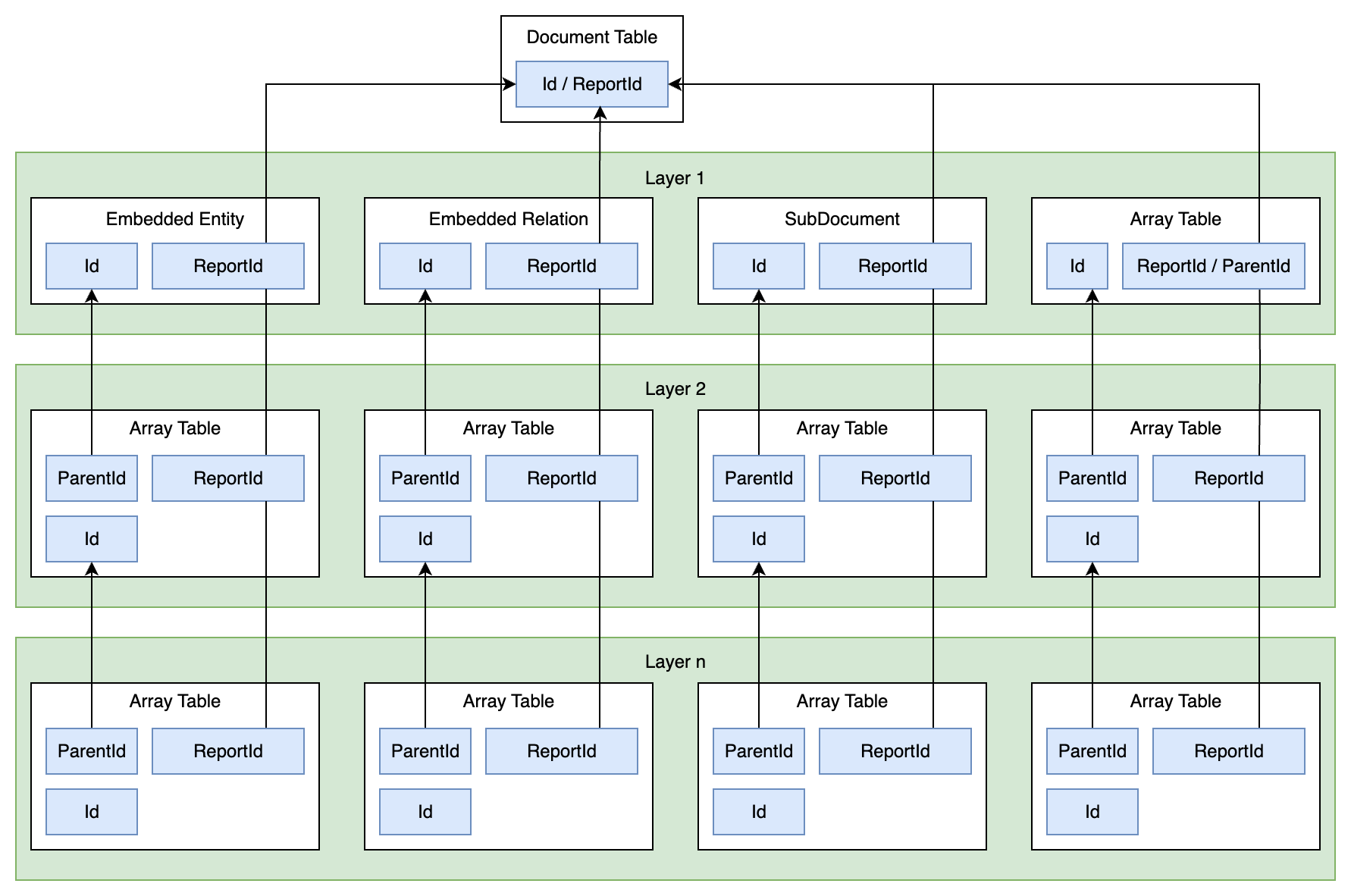
When working with report tables and their child structures in DataStore V2, it’s important to follow consistent join patterns to ensure data integrity and accurate results.
- Use
ReportIdto join across child tables of the same report. TheReportIdvalue is consistent across all embedded, sub-document, and array tables linked to a single report. Always useReportIdas the join key to connect related data.
Example
FROM IncidentReport r
LEFT JOIN IncidentReport_SubDomesticViolence dv
ON dv.ReportId = r.ReportId- For second-level (or deeper) child tables, use both
ParentIdandReportIdto join the child to its immediate parent and ensure the connection stays within the correct report.
Example
FROM standards.UseOfForce R
INNER JOIN standards.UseOfForce_AxonApplicationOfForce A
ON R.ReportId = A.ReportId
INNER JOIN standards.UseOfForce_AxonApplicationOfForce_Force F
ON R.ReportId = F.ReportId AND A.Id = F.ParentId- When joining between an entity array and an embedded entity, use both the entity’s
Idand the sharedReportIdto ensure the entity is correctly scoped to the report.
Example
FROM IncidentReport_AxonParties AP
JOIN IncidentReport_EntPerson EP
ON EP.Id = AP.IndividualPerson AND EP.ReportId = AP.ReportId- For embedded relation views, the first entity listed in the view name corresponds to
FromId, and the second corresponds toToId. These must be joined using both the entityIdandReportIdto ensure proper matching within the context of a report.
Example
IncidentReport_RelPersonToOffense.FromId = IncidentReport_EntPerson.Id
AND IncidentReport_RelPersonToOffense.ReportId = IncidentReport_EntPerson.ReportId
Joining master entity tables with their array tables
Similar to report tables, when joining master entity tables with their child tables, use the corresponding <Entity>Id (e.g., PersonId, IncidentId) consistently across all joins to ensure accuracy. For first-level child tables, joining on <Entity>Id is sufficient, as it is directly available in both the master entity and its immediate child.
However, when working with second-level child tables or deeper, you must also include the ParentId in the join condition. This ensures the nested data is correctly linked to its immediate parent within the entity hierarchy.
Example
FROM EntPerson p
JOIN EntPerson_AxonContactEmails e
ON e.PersonId = p.PersonId

FROM EntCallForService cfs
JOIN EntCallForService_AxonLocation l
ON l.CallForServiceId = cfs.CallForServiceId
JOIN EntCallForService_AxonLocation_Alias a
ON a.ParentId = l.Id AND a.CallForServiceId = l.CallForServiceId
Joining using master relation tables
Master relation tables in DataStore v2 define relationships between master entities and report tables. These tables are especially useful when linking reports to global entities that exist independently of a specific report context.
For example, to connect an Incident Report to its corresponding Incident entity (e.g., to retrieve the incident number, clearance details, etc.), you can use the master relation table RelIncidentDocument.
This table stores the association between the Incident entity and its related Incident Report(s):
- FromId: ID of the entity (e.g.,
EntIncident) - ToId: ID of the report (e.g.,
IncidentReport)
Example: Join incident report with the incident entity
The following query retrieves key report-level and entity-level details using the RelIncidentDocument master relation table:
SELECT ir.ReportFriendlyId, ir.AxonIncidentFromDate, ir.AxonIncidentToDate, inc.IncidentFriendlyId, inc.AxonClearedExceptionally, inc.AxonClearanceDate, inc.AxonUcrDisposition

FROM Records.IncidentReport ir
JOIN Records.RelIncidentDocument er ON er.ToId = ir.Id
JOIN Records.EntIncident inc ON inc.Id = er.FromId
Data dictionary
Before writing a SQL query, it’s important to have a clear understanding of the data you need and where it is likely to be stored within the DataStore V2 model.
For example, if you’re looking for a person’s age, it may be found in the EntPerson table—either as part of an embedded entity within a report table (e.g., IncidentReport_EntPerson) or in the master entity (MNI) table (e.g., EntPerson), depending on whether you need the historical snapshot or the latest record. (See Entity tables for more information.)
Some values, especially multi-select fields or repeatable data, may not be stored directly in the entity or report table. Instead, they may be normalized into an array table (e.g., EntPerson_AxonMarkings or IncidentReport_EntOffense_AxonBiasMotivationInvolved). Be sure to check for this structure if the column is not present in the base table.
If you’re unsure where a specific field is located, use the DataDictionary view, which provides a searchable reference for available tables and columns across DataStore V2. This is a valuable tool for identifying the correct data source. Below is the query to get data, and meaning of its returned columns.
SELECT *
FROM RECORDS.DataDictionary| Column name | Meaning |
|---|---|
Product
|
Indicates which Axon product (module) the view belongs to—either Standards or Records. (Note: “Product” would be more accurately named “Module”) |
SchemaName
|
The name of the schema where the view is located (e.g., RECORDS, STANDARDS, or PERSONNELS). |
ViewName
|
The name of the view. |
ColumnName
|
The name of the column within the view. |
DataType
|
The SQL data type of the column (e.g., nvarchar(max), decimal, datetime2). |
IsPrimaryKey
|
True if the column is a Primary Key, otherwise False. |
IsIndexed
|
True if the column is indexed, otherwise False. |
IsForeignKey
|
True if the column is a Foreign Key (i.e., part of a child table referencing a parent), otherwise False. |
ReferenceTable
|
If the column is a foreign key, this indicates the parent table it references. |
ReferenceColumn
|
The parent column in the referenced table (usually a primary key) that this foreign key points to. |
RootParentView
|
The name of the ultimate parent table (e.g., document, master entity, or master relation) that the current view is descended from. |
RootParentViewType
|
The type of the root parent table (e.g., Document, Entity, Relation). |
ViewType
|
The type of the current table (e.g., SubDocument, Array, Entity, Relation, etc.). |
Latest incident report
In Axon Records, once an incident report is finalized, it becomes read-only and cannot be edited. Any changes or corrections must be made by submitting a supplement report, which clones the existing report and creates a new version. Each new version receives a numeric suffix (e.g., -2, -3, etc.), forming a version history for the same incident.
In DataStore v2, the IncidentReport table—along with all of its child tables (e.g., IncidentReport_EntPerson, IncidentReport_EntOffense, etc.)—stores every version of an incident report. This includes all supplements, providing a complete version history.
In DataStore v1, incident reports were referred to as general offense reports.
For analytics and reporting purposes, users often only need the most recent version of a report. To support this, DataStore v2 has a dedicated set of views: LatestIncidentReport and its child views (e.g., LatestIncidentReport_EntPerson, etc.). These views provide a filtered 1:1 mapping with the IncidentReport tables, but only include the latest (most current) version of each incident report. This simplifies querying and ensures that analytics reflect the most up-to-date information.
Versioning support is exclusive to incident reports.
Other report types do not follow a versioning model and always appear as single-version entries in their respective tables.
Schema evolution
DataStore v2 supports automatic schema evolution to keep your data model in sync with form changes in Axon Records and/or Standards.
New report forms and new fields added to existing forms are automatically detected and updated in DataStore within 24 hours. This ensures that newly created forms and fields are queryable without requiring manual intervention.
However, new entities (i.e., new business objects not currently modeled in the schema) require engineering development and will be prioritized according to Axon's product roadmap.
Change log
All schema changes in DataStore v2 are tracked in the schema_change_log table. You can reference this table to audit when new tables or columns were added, providing transparency and traceability over time.
Schema changes are designed to be backward-compatible. Specifically:
- New tables and columns may be added as part of ongoing schema evolution.
- Existing tables or columns with data will not be modified or deleted, ensuring existing queries remain stable.
In the rare event of a breaking change, Axon will provide advance notice through release notes, with a minimum of 90 days before the change is applied.
Read-Only access and data replication
DataStore v2 provides read-only access to dbo tables and enables Change Data Capture (CDC) on all tables. This setup gives you the flexibility to replicate DataStore data into your own systems for downstream analytics, warehousing, or backup purposes.
You can choose from several data replication options depending on your infrastructure and technical preferences:
Option 1: Integration tools
Most off-the-shelf data integration tools support replication from SQL Server / Azure SQL using a combination of initial load + incremental CDC sync.
Replication specifications
The following are the key specifications for setting up data replication from DataStore v2 using integration tools:
- Initial Load: Replication can begin with a full snapshot of all
dbotables. This is performed using read-only access and provides a baseline for future incremental updates. - Incremental Sync: Integration tools can access Azure Change Data Capture (CDC) enabled on all tables to capture incremental changes, including inserts, updates, and deletes.
- Schema Evolution: Organizations are responsible for handling schema changes. Depending on the capabilities of the selected tool, this may require manual re-syncing of affected tables when changes are detected.
- Connectivity: Tools connect directly to the database using TLS/SSL-secured connections.
- Access: Read-only access is granted to
dboRecords,dboStandards, and other supporteddbotables required for replication.
Limitations
- Write access is not supported (read-only).
- Some tools require elevated privileges during setup (e.g., sysadmin for enabling CDC or Change Tracking).
- Initial full load may be time-consuming for very large datasets.
Vendor Examples (off-the-shelf tools)
| Vendor | Incremental Sync | Connectivity | Documentation |
|---|---|---|---|
| Stitch | Key-based incremental, CDC (log-based) | Direct SQL, SSL/TLS, optional SSH tunnel | Stitch Azure SQL docs |
| Airbyte | CDC (SQL Server CDC / binlog), Incremental append | Direct SQL, SSL/TLS, SSH tunnel | Airbyte MSSQL docs |
| Fivetran | Change Tracking (CT), CDC, Binary Log Reader, Teleport Incremental | Direct SQL, SSL/TLS, enterprise features (AlwaysOn, TDE) | Fivetran SQL Server docs |
This approach is suitable for most agencies because the setup is straightforward and maintenance is minimal. Once configured, the integration tool handles the ongoing replication reliably.
Option 2: Custom scripting
For advanced users or custom pipelines, you can implement your own script-based solution to handle CDC-based replication.
See Incremental pulling for more information.
Command Hierarchy
The Command Hierarchy in DataStore v2 models your organizational structure as a tree, where each node represents a team, group, or unit.
Each node in the tree has a unique HierarchyId, a path-like string that encodes its position in the structure. This format allows for intuitive querying of team relationships. For example, with the hierarchy structure below, the HierarchyId of Patrol Division is /1/1/.
/1/  Headquarters
├── /1/1/  Patrol Division
│   ├── /1/1/1/  North Precinct
│   │   ├── /1/1/1/1/  North Day Shift
│   │   └── /1/1/1/2/  North Night Shift
│   └── /1/1/2/  Bike Patrol Unit
├── /1/2/  Investigations Division
│   ├── /1/2/1/  Special Victims Unit
├── /1/3/  Special Operations
│   ├── /1/3/1/  SWAT
│   ├── /1/3/2/  K-9 Unit
To query the full command hierarchy, use the following query:
SELECT * FROM Records.CommandHierarchyExample 1: Get all teams under Special Operations
This query returns all teams under the Special Operations unit, such as SWAT, K-9 Unit.
SELECT ch.Id, ch.HierarchyID, ch.Name
FROM Records.CommandHierarchy ch
CROSS APPLY
( SELECT HierarchyID FROM Records.CommandHierarchy WHERE Name = 'Special Operations') AS h
WHERE ch.HierarchyID LIKE h.HierarchyID + '%'
Example 2: Get all officers under SWAT
This query retrieves all officers assigned to the SWAT team or any subteams beneath it.
SELECT ch.Name AS teamName, o.ExternalId AS OfficerId, o.BadgeNumber, o.FirstName, o.LastName, o.Username, o.District, o.DistrictDescription

FROM Records.CommandHierarchy ch
JOIN Records.TeamOfficerRelation team ON ch.Id = team.TeamId
JOIN Records.Officer o ON o.ExternalId = team.OfficerId
CROSS APPLY
(SELECT HierarchyID FROM Records.CommandHierarchy WHERE Name = 'SWAT') AS h
WHERE ch.HierarchyID LIKE h.HierarchyID + '%'
Example 3: Get chain of command for Bike Patrol
This query shows all parent teams above the Bike Patrol unit, forming its chain of command.
SELECT ch.Id, ch.HierarchyID, ch.Name
FROM Records.CommandHierarchy ch
CROSS APPLY
(SELECT HierarchyID FROM Records.CommandHierarchy WHERE Name = 'Bike Patrol Unit'
) AS h
WHERE h.HierarchyID LIKE ch.HierarchyID + '%'


