Quick reference
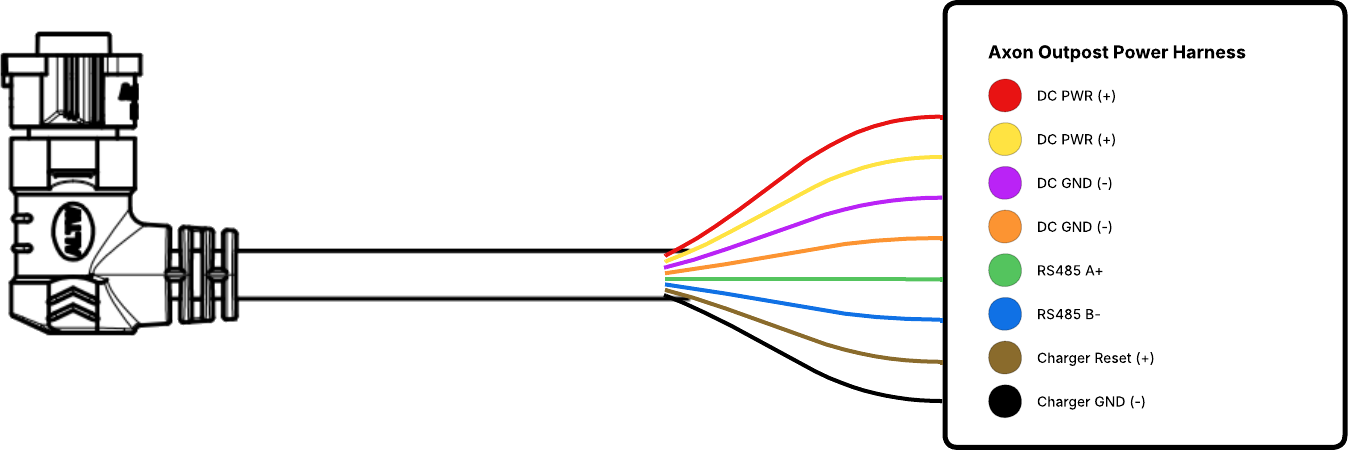
Power cable wiring diagram
LED ring behavior
The LED ring provides visual feedback about Axon Outpost's operational and diagnostic states. These indicators may appear during start-up, pairing, status checks, and other system events.
Indicators – normal operation and diagnostics
| Device State | LED Ring Behavior |
|---|---|
| Powering On |  Green pulsing in the corners Green pulsing in the corners |
| Boot Complete - Unregistered |  Bottom-left RED (unregistered) Bottom-left RED (unregistered) Bottom-right BLUE (pulsing) Bottom-right BLUE (pulsing)   Top = Battery Level (Red / Yellow / Green) Top = Battery Level (Red / Yellow / Green) |
| Boot Complete - Registered | Bottom-left GREEN (registered) Top = Battery Level (Red / Yellow / Green) Left vertical = GREEN (connected) or RED (not connected) Right vertical = YELLOW pulse on plate read Right vertical = YELLOW pulse on plate read |
| Battery Level (SoC) | Red <25% Yellow 25–90% Green >90%
|
| Pairing Mode (3s button press) |
Blue (pulsing) |
| Pairing Successful |  Blue (solid)
 |
| Diagnostics (short press) | Shows registration, battery level, connectivity, and ALPR indicators |
| Normal Operation | LED ring follows configured visibility settings |
| Powering Off |  Red (pulsing)
 |
These behaviors apply during normal operation when the device is not connected to the Axon Outpost Manager mobile app.
Indicators – mobile app only
These indicators appear only when Axon Outpost is paired with and actively communicating through the Axon Outpost Manager mobile app.
| Mobile App Event | LED Ring Behavior |
|---|---|
| Searching for device |
Blue |
| Carrier / network activity |  Magenta
 |
| Firmware update |  White
White |
| Registration success |  Rainbow sequence Rainbow sequence |
| App-initiated reboot |
Red |
| Plate read |
Yellow (brief pulse) |
During normal operation, the LED ring remains off unless the Community Visibility setting is enabled in Axon Evidence. Configure this setting at the organization level or apply to individual devices depending on administrative policy.
Button behavior
The Axon Outpost button supports multiple press durations, each mapped to a specific user-facing function. These functions ensure clear intentional actions and prevent accidental activation. The camera is on if it is receiving power.
| Press duration | Action | Notes |
|---|---|---|
| <500 ms | No action | Accidental activation while handling device |
| 500 ms | LED ring | Display device status via LED ring for 10 seconds |
| 3 seconds | Enable pairing mode | Hold to trigger pairing mode |
| 6 seconds | Power off | Power device off |
| 12 seconds | Hard reset | Force device reboot |


