Maintenance and FAQs
| Tip | This topic is intended for the armorer or administrator who will set up new sensors. For user guidance, see Operation. |
This topic discusses battery replacement, FAQs, and contact information for Axon Technical Support.
Extended exposure to concentrated sunscreen may cause cracks in the Axon Signal Sidearm housing. If cracks appear, contact Technical Support.
Battery replacement
Replace the battery when the LED blinks red in Mute mode or you receive a notification email from Axon Evidence. Required tools: Torx T6 screwdriver, small flat-head screwdriver, and a CR2430 battery.
| Warning | Ensure the firearm is unloaded during this process. |
- Place the sensor in Mute mode and remove the firearm.
-
Remove the center screws attaching the sensor to the bracket, then remove the four outer screws.
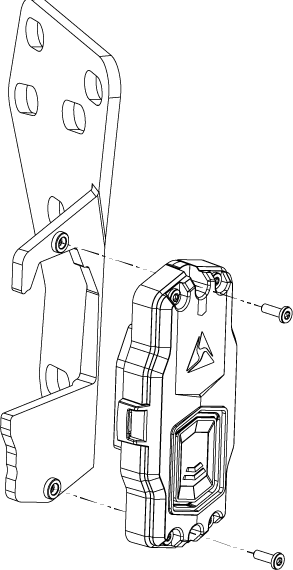
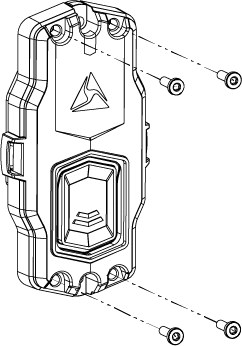
-
Pry open the case using a flat-head screwdriver.

-
Remove and replace the CR2430 battery.
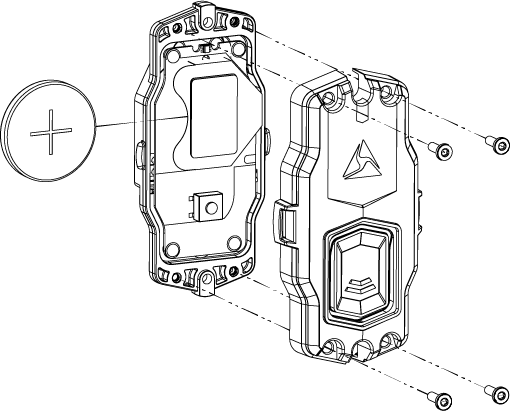
- Reassemble and reattach the sensor.
- Return the sensor to Mute mode.
- Use Axon Device Manager to check for updated firmware.
FAQs
If your issue is not listed here, see Technical support.
How do I find my SSA serial number?
The 9-digit serial number appears on the back of the sensor and begins with X.
Why does calibration fail?
Ensure proper sensor placement and follow the calibration steps carefully.
Why doesn't my Axon camera activate?
- Ensure the camera is powered on.
- Verify the sensor is in Field mode.
- Check battery status.
- Update firmware if needed.
Why is my LED dim or flickering?
- Battery may be low.
- Sensor may be cold.
- LED may be damaged.


