vRBT (Virtual Reality-Based) Live Action
Register your VR devices by November 10, 2026 to maintain online functionality. Unregistered devices will lose access to online features until registration is complete. For registration instructions, see Register and manage Axon VR devices.
Virtual Reality-Based Training (vRBT) Live Action is a content platform that combines 360⁰ video with Handgun and TASER VR Controllers for a highly immersive and realistic training experience. This innovative approach enhances rapid visual assessment, de-escalation techniques and hands-on technical proficiency with a handgun and TASER energy weapon. Primed with radio traffic from a dispatcher, trainees dive into high stress calls for service, demanding quick, critical decision-making ranging from issuing an audible alert to deploying their TASER energy weapon or firearm, effectively equipping them for complex real-world scenarios.
Requirements to use vRBT Live Action
| Device |
Version |
|---|---|
| Headset ROM | 5.1.999.930 or greater |
| TASER 10 VR Controller | 055.6014.1128 or greater |
| TASER 7 VR Controller | 055.6014.1128 or greater |
| Handgun VR Controller (VR19H) | 109.6016.1148 or greater |
| Handgun VR Controller (VR320H) | 109.6016.1148 or greater |
| Handgun VR Controller (VMRPH) | 109.6016.1148 or greater |
For information on how to update the headset firmware, see the FAQ How do I check or update the headset firmware? and for VR Controller firmware, see Update firmware for VR Controllers.
Scenario descriptions
The vRBT Live Action Facilitator's Guides and Sample Course Rosters are available for download on the Training Materials page on Axon Help.
Core scenarios
Active Shooter
Supported VR Controllers: TASER 7 VR, TASER 10 VR, and Handgun VR Controller
In this scenario, trainees are equipped with both a TASER energy weapon and a handgun as they rush to a business shortly after an active shooter has been reported. Trainees can refine their skills in precise aiming and strategic deployment of force when taking cover behind a wall. From this position, trainees aim to prevent any further harm to others as the shooter emerges from the building.
Armed Subject I
Supported VR Controller: TASER 10 VR
In this scenario, trainees are equipped with a TASER energy weapon as they encounter a shoplifter with multiple priors for weapons and assault. With the suspect partially obscured by a vehicle in an outdoor daytime setting, trainees must create their probe spread on the suspect in a high-intensity space and decide when to deploy based on the rapidly escalating scene.
Armed Subject II
Supported VR Controller: TASER 10 VR (with warning alert option)
In this scenario, trainees are equipped with a TASER energy weapon as they corner an assault suspect armed with a knife. Breathing heavily and winded from running, the suspect is unresponsive to commands as he takes cover behind a parked vehicle. Trainees may consider deploying a Warning Alert to de-escalate the suspect or deploy their TASER energy weapon to achieve NMI to resolve the conflict in this highly volatile scenario.
Assault Suspect: Attempt to Locate
Supported VR Controllers: TASER 7 VR (with re-energize option), TASER 10 VR (with re-energize option), and Handgun VR Controller
In this scenario, trainees are equipped with both a TASER energy weapon and a handgun as they and their partner have discovered a shooting suspect in a remote area off the road. Initially appearing unarmed, the suspect dismisses all commands as he advances toward the officers. Trainees must account for the constantly shifting distance between themselves and the subject while deciding whether to deploy their TASER energy weapon or fire their handgun, as well as factoring in the time it takes for the suspect to approach them. If trainees choose to deploy their TASER energy weapon, there is also an option to re-energize.
Bar Altercation
Supported VR Controllers: TASER 7 VR, TASER 10 VR, and Handgun VR Controller
In this scenario, trainees are equipped with both a TASER energy weapon and a handgun as they diffuse a confrontation between two males outside a bar. Despite repeated directives to disengage and cooperate with law enforcement, one subject persists in their non-compliant behavior. Trainees are compelled to make a critical decision regarding the optimal use of force, considering whether to deploy their TASER energy weapon or fire their handgun to ensure compliance from the subject.
Domestic Disturbance I
Supported VR Controllers: TASER 7 VR, TASER 10 VR, and Handgun VR Controller
In this scenario, trainees are equipped with both a TASER energy weapon and a handgun as they are confronted with a domestic dispute between a male and female in a parking lot, with both parties alleging abuse. While the trainee's partner endeavors to verbally de-escalate the situation and secure compliance, trainees must keenly evaluate the actions and accusations of the subjects, remaining ready to deploy use of force when necessary.
Domestic Disturbance II
Supported VR Controllers: TASER 7 VR, TASER 10 VR, and Handgun VR Controller
In this scenario, trainees are equipped with both a TASER energy weapon and a handgun as they respond to a domestic dispute at a residence where an individual is armed with a knife. While their partner engages in verbal de-escalation with the subject when the subject emerges from the residence, they are presented with the option to manage the situation swiftly. Trainees must make a rapid decision between deploying their TASER energy weapon or firing their handgun, as the subject persists in refusing to drop the weapon.
Neighbor Altercation
Supported VR Controllers: TASER 7 VR (with warning arc option), TASER 10 VR (with warning alert option), and Handgun VR Controller
In this scenario, trainees are equipped with both a TASER energy weapon and a handgun as they endeavor to apprehend an uncooperative and confrontational male at the front of his residence. Trainees must carefully assess their weapon selection as the subject moves erratically on the porch of the residence, and also consider the potential deployment of a TASER energy weapon Warning Alert/Arc to defuse the escalating tension in this highly volatile scenario.
Robbery
Supported VR Controller: TASER 10 VR
In this scenario, trainees are equipped with a TASER energy weapon as they and their partner have intercepted an armed robbery suspect in an alley during a foot pursuit. Trainees must decide to deploy their TASER energy weapon on an armed, highly agitated, jumpy individual frantically seeking an escape route.
Terry Stop
Supported VR Controllers: TASER 7 VR (with warning arc option), TASER 10 VR (with warning alert option), and Handgun VR Controller
In this scenario, trainees are equipped with both a TASER energy weapon and a handgun as they and their partner encounter a confrontational pedestrian displaying reluctance to adhere to commands. Faced with the subject's non-compliance, trainees must decide between using their TASER energy weapon or handgun. Alternatively, they may opt to use their TASER energy weapon to deploy a warning alert/arc as a strategic measure to de-escalate the situation and achieve a peaceful resolution to the conflict.
Traffic Stop I: Sovereign Citizen
Supported VR Controllers: TASER 7 VR, TASER 10 VR, and Handgun VR Controller
In this scenario, trainees are equipped with both a TASER energy weapon and a handgun as they confront a sovereign citizen during a routine traffic stop. Faced with the challenge of the driver refusing to provide essential legal documents due to beliefs in an unrecognized government, trainees are required to hone their skills in aiming and deploying their TASER energy weapon or firing their handgun while the subject seeks cover within their vehicle.
Traffic Stop II: Non-Compliant Passenger
Supported VR Controllers: TASER 7 VR, TASER 10 VR, and Handgun VR Controller
In this scenario, trainees are equipped with both a TASER energy weapon and a handgun as they find themselves in a pivotal role in this rapidly intensifying situation offering support to their partner during a routine traffic stop involving a confrontational passenger. Trainees must think on their feet to prevent harm to themselves or their partner upon discovering that the passenger possesses a handgun in their waistband. Trainees will focus on precise aiming and strategic deployment within the confines of a vehicle, aiming to thwart the subject's attempts to access and use their own weapon.
Workplace Disturbance
Supported VR Controllers: TASER 7 VR (with warning arc option), TASER 10 VR (with warning alert option), and Handgun VR Controller
In this scenario, trainees are equipped with both a TASER energy weapon and a handgun as they encounter a distressed female subject in a workplace public restroom. Faced with the added complication of the subject wielding a knife and issuing threats to others, herself, and law enforcement, trainees are confronted with the decision between selecting between using their TASER energy weapon or handgun. Alternatively, they may opt to use their TASER energy weapon to deploy a warning alert/arc as a strategic measure to de-escalate the situation and guide the subject back to a more rational state of mind.
Healthcare scenarios
Aggressive Patient
Supported VR Controllers: TASER 7 VR (with warning arc option) and TASER 10 VR (with warning alert option)
In this scenario, trainees are equipped with a TASER energy weapon as they respond to an aggressive patient in a hospital exam room who escalates from verbal threats to potential violence against staff. They practice assessing compliance, delivering clear commands, and applying the right level of deterrence to keep everyone safe—while strengthening both de-escalation skills and confident decision-making under pressure.
Disruptive Visitor
Supported VR Controllers: TASER 7 VR (with warning arc option) and TASER 10 VR (with warning alert option)
In this scenario, trainees are equipped with a TASER energy weapon as they confront a disruptive hospital visitor in the registration area who refuses to leave after being denied visitation rights. They use clear verbal commands and demonstrate presence to gain compliance, reinforcing de-escalation and deterrence while minimizing the need for unnecessary force in a sensitive healthcare environment.
Distressed Family Member
Supported VR Controllers: TASER 7 VR (with warning arc option) and TASER 10 VR (with warning alert option)
In this scenario, trainees are equipped with a TASER energy weapon as they engage with a distressed family member in an ER waiting room who is agitated over delays in care. They practice empathetic communication and de-escalation techniques, building confidence in resolving high-stress situations without resorting to force.
International
To download the Brazilian scenarios, change the headset language to Brazilian Portuguese. For more information, see Change language on VR headset.
Armed Subject on a Plane (Brazil)
Supported VR Controllers: TASER 7 VR and TASER 10 VR
In this scenario, trainees are equipped with a TASER energy weapon as they respond to an encounter with a paranoid and erratic male subject aboard a domestic aircraft. Trainees must operate within the aircraft’s narrow aisles and limited exits, applying precise and controlled tactics. They must determine how to establish an effective probe spread in this confined environment and identify the appropriate moment to deploy their TASER energy weapon should the situation escalate.
Domestic Dispute (Brazil)
Supported VR Controllers: TASER 7 VR, TASER 10 VR, and Handgun VR Controller
In this scenario, trainees are equipped with both a TASER energy weapon and a handgun as they respond to a volatile domestic violence situation with an emotionally unstable male and shouting while holding a kitchen knife. Trainees practice maintaining officer safety while using clear communication, empathy, and de-escalation strategies to stabilize the scene, support the victim, without escalating to higher levels of force.
Public Disturbance (Brazil)
Supported VR Controllers: TASER 7 VR, TASER 10 VR, and Handgun VR Controller
In this scenario, trainees are equipped with both a TASER energy weapon and a handgun as they respond to a disturbance involving an intoxicated man waving a metal pipe near vendor stands. Trainees must carefully evaluate the high-visibility environment while managing an unpredictable subject who is making threats. They practice maintaining officer safety through clear communication and de-escalation strategies to stabilize the scene.
Public Mental Health Crisis (Brazil)
Supported VR Controllers: TASER 7 VR, TASER 10 VR, and Handgun VR Controller
In this scenario, trainees are equipped with both a TASER energy weapon and a handgun as they respond to a public plaza where an emotionally disturbed man is yelling while holding a knife. Trainees must determine the appropriate action while maintaining safe distance, managing bystander safety, and using clear communication to guide the encounter to a safe and peaceful resolution.
Traffic Stop: Aggressive Passenger (Brazil)
Supported VR Controllers: TASER 7 VR, TASER 10 VR, and Handgun VR Controller
In this scenario, trainees are equipped with both a TASER energy weapon and a handgun during a tense roadside stop along a rural road while the passenger becomes increasingly aggressive. Trainees must quickly assess the evolving threat as the situation escalates, supporting the primary officer while maintaining strong situational awareness. They will practice clear communication, controlled presence, and decisive action as they prepare for the possibility of rapid changes in subject behavior, reinforcing their ability to manage high-risk encounters safely and effectively.
Manage scenarios
By default, three scenarios are installed with vRBT Live Action.
You can download or delete scenarios as needed. However, it's important to note that some scenarios only support certain VR Controllers. For more information on which VR Controllers are compatible with each scenario, see Scenario descriptions
Download scenarios
Make sure to stay in the vRBT Live Action app while scenarios download. Otherwise they may not finish downloading.
- Start vRBT Live Action.
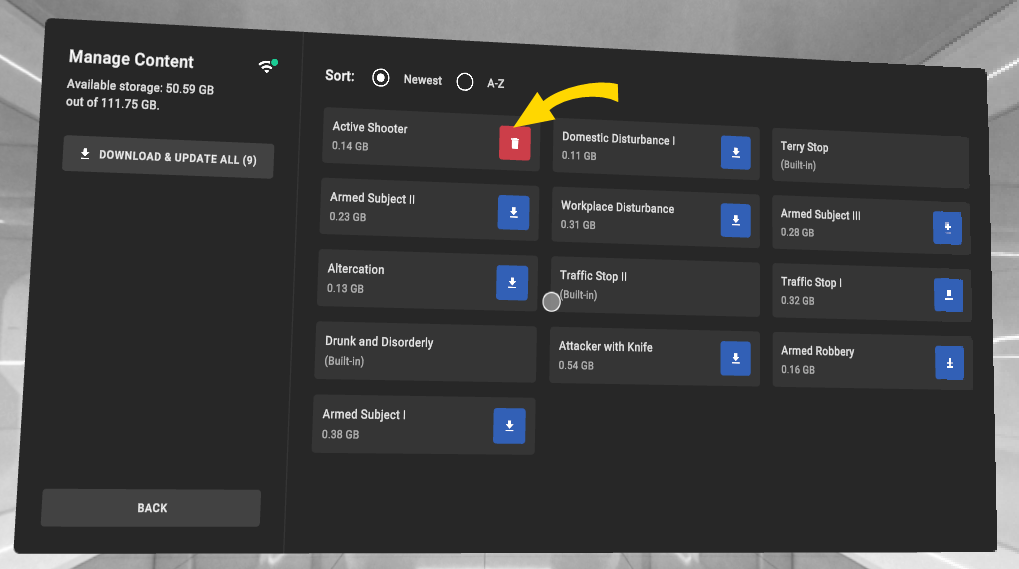
- Click Manage Content.
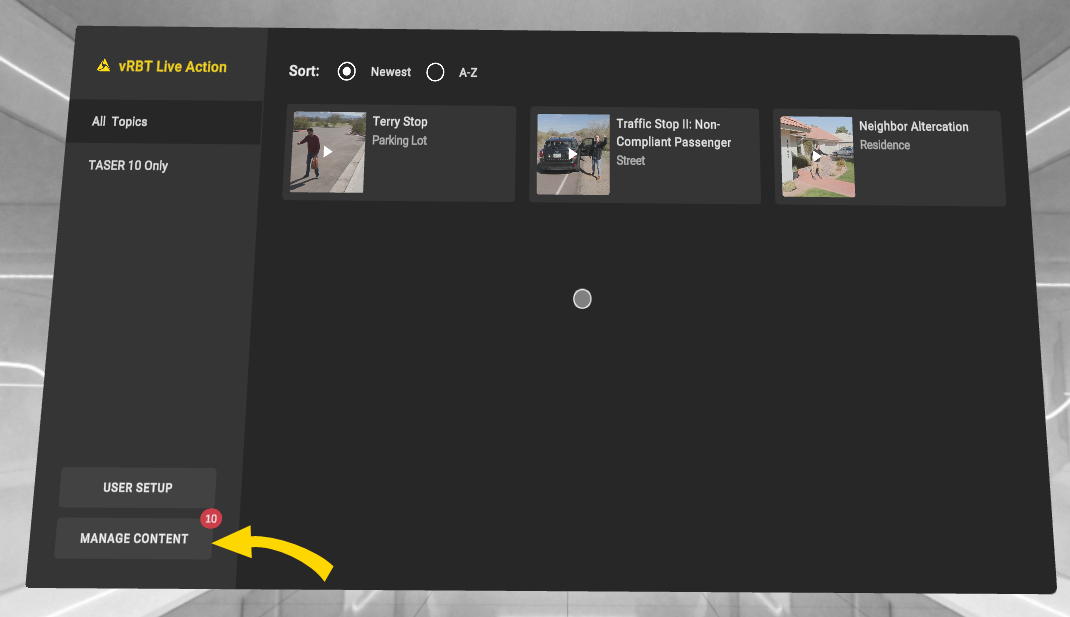
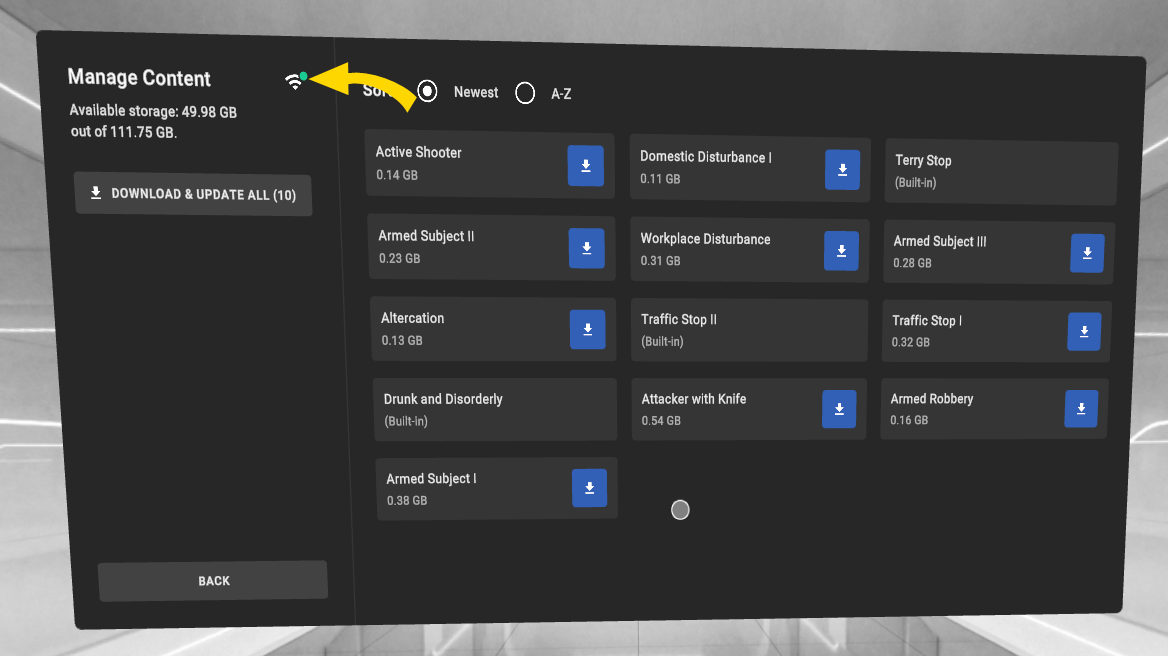
- Confirm that you're connected to Wi-Fi by checking the Wi-Fi status on the Manage Content page.
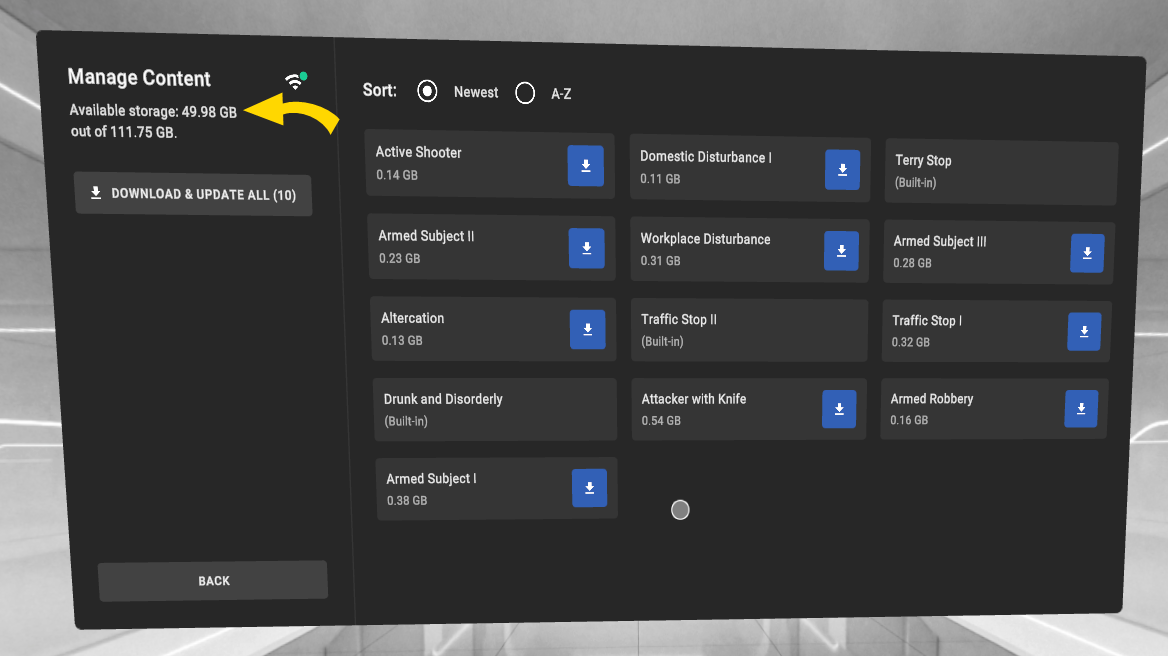
- Make sure the headset has enough storage space. You can view the storage space in the upper left of the Manage Content page.
- If you want to download all scenarios, click Download & Update All. Or, click the Download icon next to each scenario you want to download.
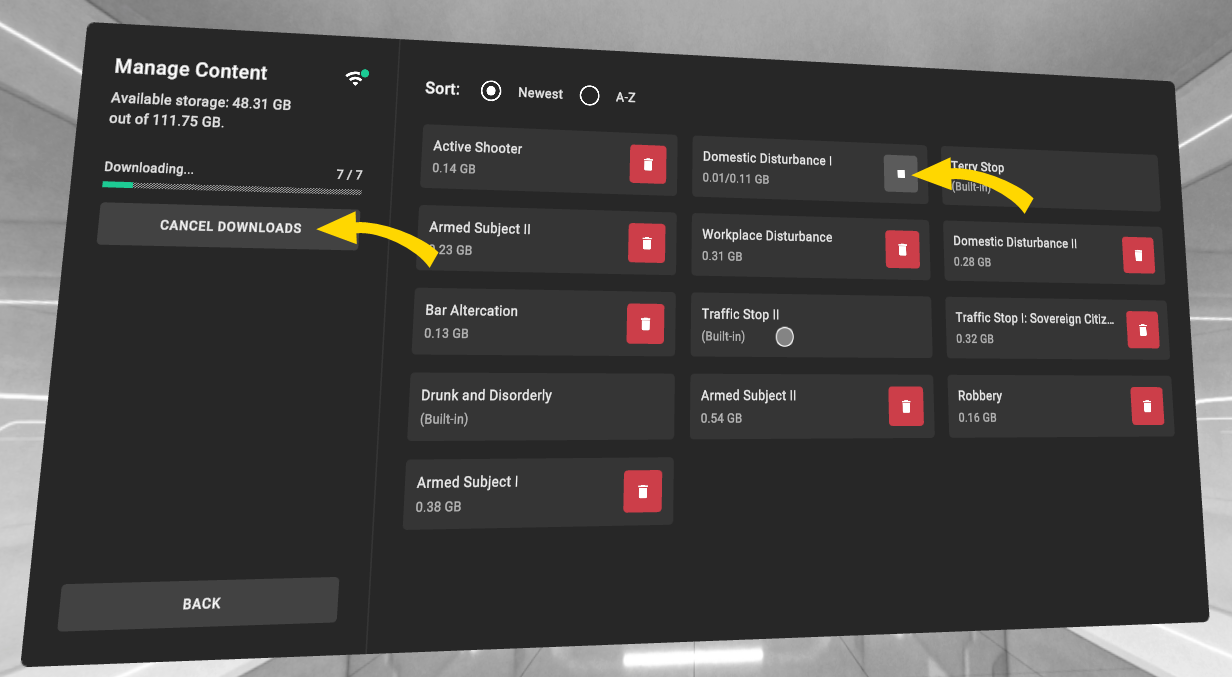
- The progress bar displays the status of the download.
- There are two options for canceling downloads:
- Click Cancel Downloads to cancel all downloads currently in progress.
- Click the gray cancel (square) icon next to the scenario you want to cancel.
- Select Back to return to the vRBT Live Action library.
Delete scenarios
Deleting a scenario can be helpful if your headset is running low on storage space, and you need more room.
To delete a scenario:
- Start vRBT Live Action.
- Click Manage Content.
- Click the red trash can icon next to the scenario you want to delete. (You cannot delete the scenarios that were pre-installed with vRBT Live Action.)
View TASER 10 scenarios
You can filter to see scenarios that are compatible with the TASER 10 VR Controller by selecting TASER 10 Only in the vRBT Live Action library.
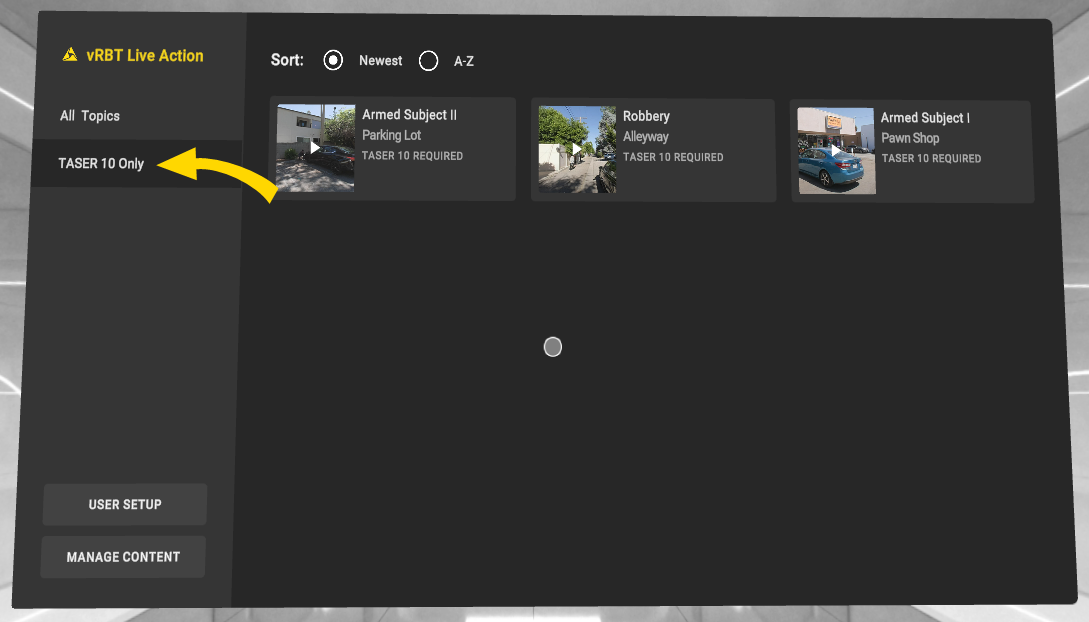
If you attempt to enter a TASER 10 Only scenario with a TASER 7 VR Controller, you will be prompted to pair a TASER 10 VR Controller.
Pair VR Controllers before entering vRBT Live Action
The TASER VR Controller will require a VR holster. However, you can use an existing field holster for a Handgun VR Controller.
Before you start vRBT Live Action, ensure you have a TASER VR Controller. It's optional to pair a Handgun VR Controller.
If you have a VR Controller paired, vRBT Live Action prompts you to select whether you'll use your left or right hand.
If you don't have a VR TASER controller paired, or you want to pair a Handgun VR Controller, select Exit App and then pair a controller accordingly. For more information on pairing, see Pair controller with headset.
Some scenarios only support certain VR Controllers. For more information on which VR Controllers are compatible with each scenario, see Scenario descriptions.
Start vRBT Live Action
To start vRBT Live Action:
- Turn on your headset by pressing the Power button for about five seconds.
- Put on the headset.
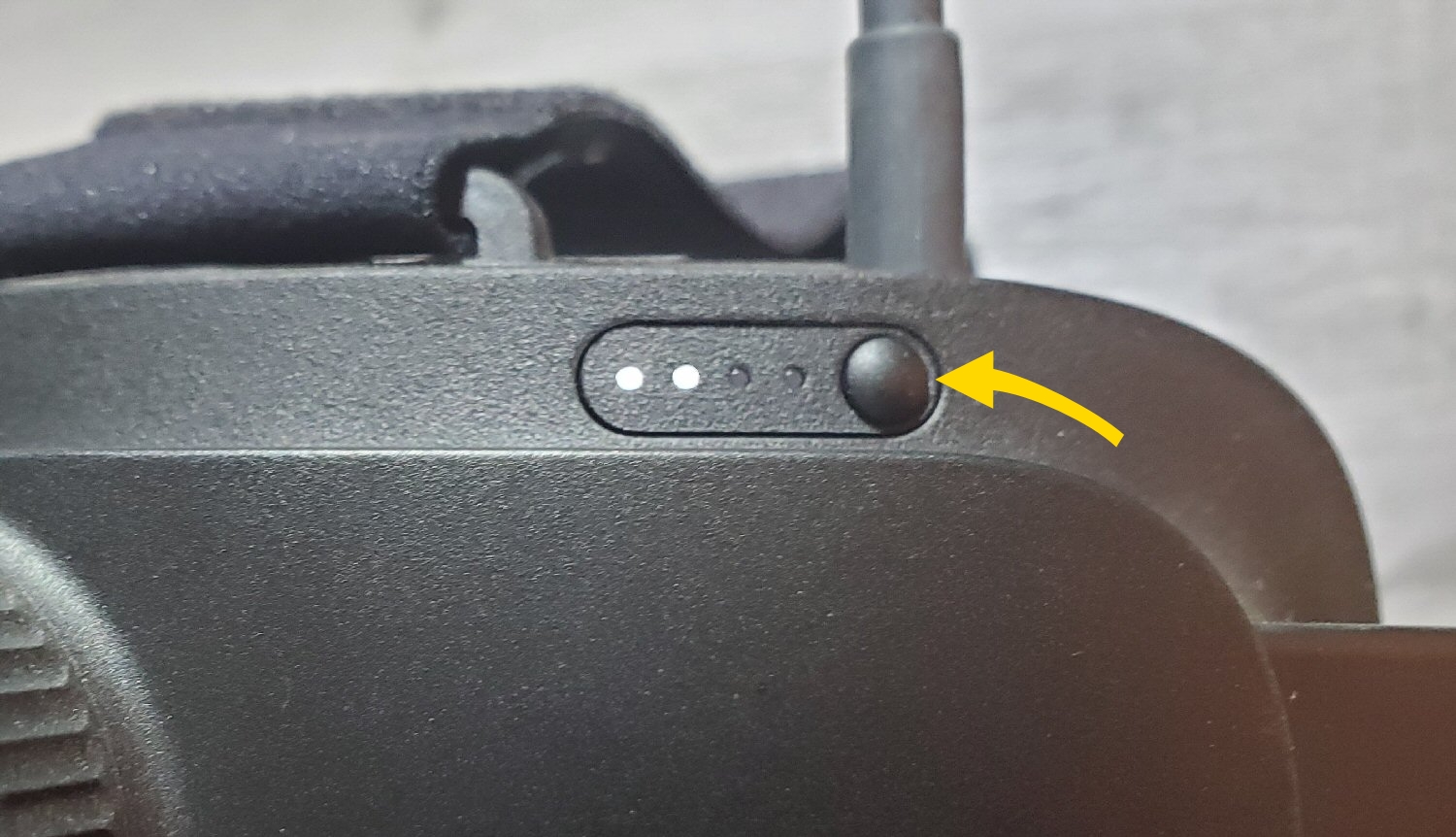
- Accept the boundary messages.
- Pair your VR Controllers. For more information on pairing, see Pair VR Controller with headset. This step is required before you can launch vRBT Live Action.
- In the library, pinch to select vRBT Live Action. You may need to scroll down to see it. If you don't see the Axon apps shown below, see the FAQ Why are the Axon VR apps not in my library?
- vRBT Live Action checks for a paired TASER VR Controller and Handgun VR Controller.
- If you don't have a Handgun VR Controller paired, you can continue by selecting Continue Without Handgun. If you continue without a Handgun VR Controller, you will only have access to a few scenarios. Otherwise, select Exit App to pair a Handgun VR Controller.
- By default, three scenarios are installed with vRBT Live Action. You can download more scenarios. See Manage and run vRBT Live Action scenarios.
- To exit vRBT Live Action, look straight down and gaze at the Quit icon.
Run scenarios
The vRBT Live Action scenarios are designed for you to engage naturally, just as you would in real-life situations. Unlike Community Engagement Training (CET), there will not be any on-screen prompts once you start the scenario. Paired with either a TASER VR Controller, a Handgun VR Controller, or both, you will need to make quick, critical decisions to deploy a TASER VR Controller, issue a warning arc, fire a Handgun VR Controller, or do nothing.
To run a scenario:
- Start vRBT Live Action.
- Select a scenario.
- A disclaimer appears. Read the disclaimer and continue by selecting I Understand.
- The scenario plays audio from a Dispatcher. Select Start Scenarioto proceed. To listen to the audio again, select Replay Audio.
- After you complete a scenario, the After Action Report displays. View this report to assess your performance.
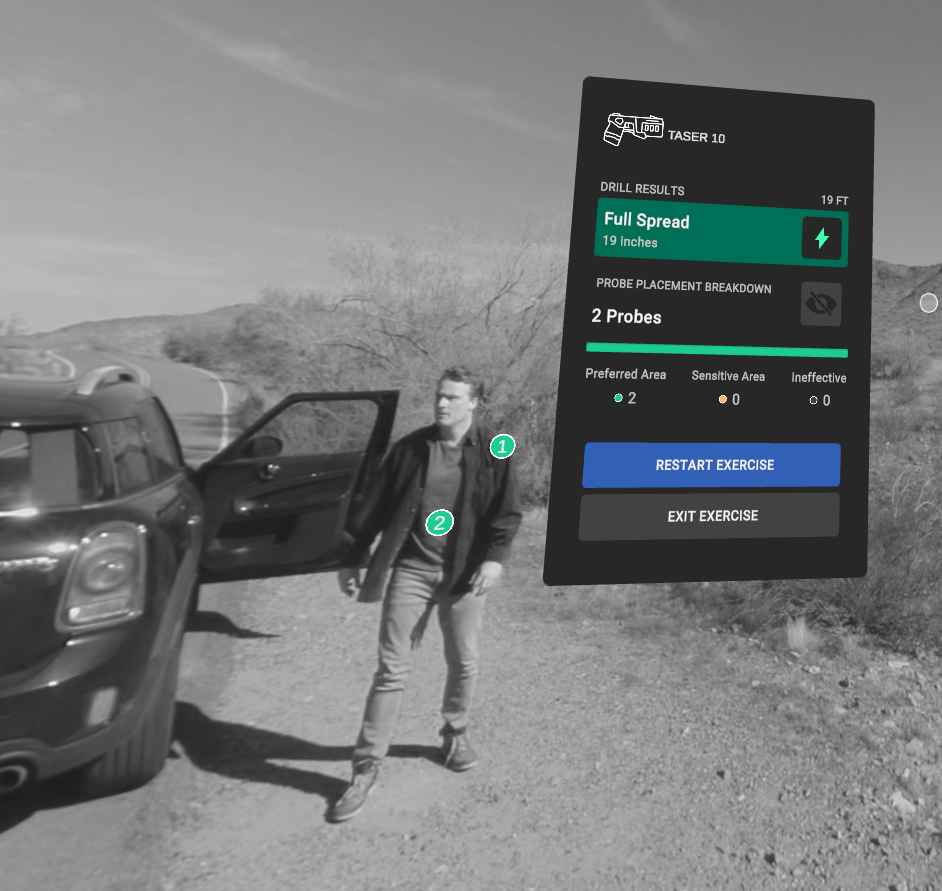
- To exit the scenario, look down and gaze at the Exit button.
Run in offline mode
If you launch vRBT Live Action and have an inactive internet connection, the app will open in offline mode.
In offline mode, you can run downloaded scenarios. However, you will not be able to:
- Download new scenarios
- Update downloaded scenarios
Troubleshooting
The app is unresponsive
If the app is unresponsive, try the following:
1. Exit the app: Depending on the app, either look down and select Exit, or use gaze selection to select Exit App.
2. In the library, use your hand to pinch and select the app tile to relaunch it.


