User privacy FAQ
This article applies to all Axon Body cameras, but Body 4 provides the largest number of features compatible with Axon Respond or Respond+. Prior body cameras will lack some of the features described below, such as the officer-initiated livestream request button and bi-directional communication.
What is Axon Respond?
Axon Respond is a web and mobile app that integrates location data and video feeds from connected Axon devices such as Axon Body, Axon Fleet 3 in-car cameras, and Axon Air drones to give you a complete picture of evolving situations. Live locations, alerts, and streams from the devices are visible on the Axon Respond map interface to help you make more informed decisions in real-time.
Who can view the Axon Respond map?
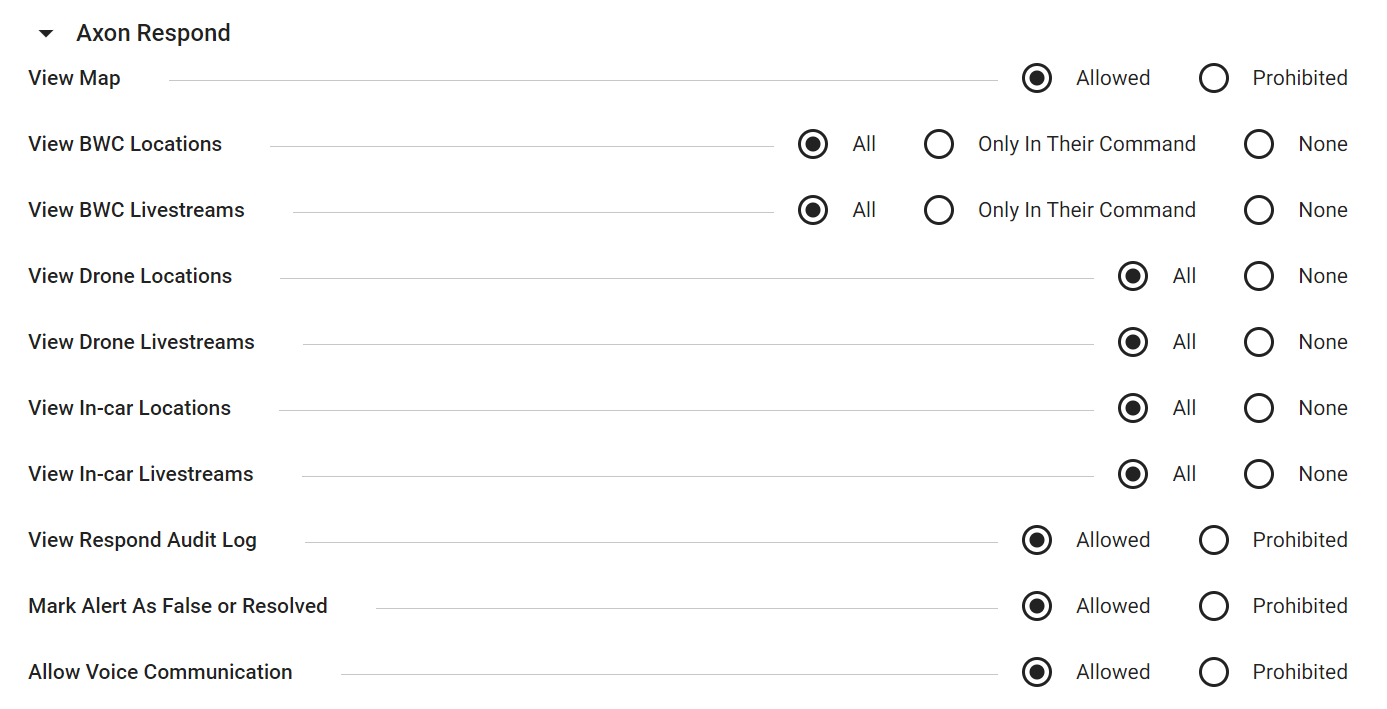
Only users with the required permissions can access the Axon Respond map on a web browser or mobile app. Permissions are set by the Axon Evidence administrator in Roles & Permissions (shown below). Users can be authorized to view body-worn camera, in-car camera, and drone camera locations on the Axon Respond map. Due to the individualized nature of body-worn camera locations and livestreams, additional privacy restrictions are available to ensure only supervisors can view them.
When can someone view a camera livestream?
Livestreaming is only possible when a camera is actively recording. If the user ends a recording, the livestream also ends. Users are in full control of when their body-worn cameras livestream because they control when their body-worn camera is recording.
Cameras may start recording automatically if activated by Axon Signal if enabled by agency policy, but the start of a recording always alerts the user with visual and haptic feedback (see next question).
A livestream is simply a live view of an in-progress recording that will later be uploaded to Axon Evidence. Watching a livestream in Axon Respond helps authorized viewers make well-informed, real-time decisions that boost user safety and contribute to a better outcome.
How does a user know their camera is recording?
When a user starts an Axon Body camera recording, the camera emits two short tones, the Operation LED on top blinks red  , and the camera vibrates and beeps every two minutes as a reminder. To learn more, see the Icons, LEDs, and sounds topic on your camera's product page.
How does a user know if someone is watching their livestream?
When the livestream starts during a recording, the camera emits three audible tones and one vibration. The Operation LED display blinks purple  and the display shows LIVE
  . At no time can a livestream be viewed without these notifications at the camera. When users end their recording, they also end the livestream.
How many people can watch a livestream at once?
There can be up to 25 concurrent viewers of a single livestream. Every viewer requires proper permissions. If viewers use bi-directional communication with the camera, the number of viewers appears at the bottom right of the screen. For example:  .
.
Can a camera user request a livestream?
Yes. Once recording, a Body 4 or Body Workforce user can trigger a "Watch Me" notification on their supervisor's Axon Respond desktop or mobile app. The supervisor can easily click into the livestream to help with the unfolding situation. For Body 4, this includes bi-directional communication, leaving the radio channel open for other needs.
Is there an audit trail for Axon Respond livestreaming actions?
Yes. Audit trail logging shows who accessed the live map or a livestream and when, providing complete transparency and accountability for all actions taken by Respond users. Everything done in Respond, whether web or mobile app, is logged so it can be audited for compliance with policy.
What other privacy measures does Axon Respond have?
Everything recorded by the camera is fully encrypted, including both the livestream footage and any bi-directional communications between camera user and supervisor, which includes both site audio and the bi-directional communication dialogue.
What use cases can Axon Respond help with?
See this use case article for examples of how using Axon Respond with Axon Body cameras boosts user safety and organizational efficiency in situations such as:
- Boosting officer safety with informed decision-making, as the person watching the livestream can see what's happening at the same time as the user, saving precious seconds
- Getting immediate help from a mental health expert, translator, or supervisor, who can watch situations unfolding in real-time to give informed guidance
- Responding to large events or quickly-developing scenes with effective resource planning
- Leveraging bi-directional communications for quick, efficient communications based on what is unfolding in the field
- Capturing live displays of individual or group behavior, allowing a supervisor to decide whether to send additional help or even instruct the user to temporarily back off


