Simulator Training: Range Skills
Simulator Training immerses trainees in an open-range environment to enhance TASER energy weapons proficiency. Through infinitely repeatable fundamentals and skill-based training, trainees refine techniques like target assessment, verbal commands, drawing, deploying at different distances, and adapting to various clothing types, body positions and movements. These exercises hone techniques such as target assessment, speed, accuracy, and precise probe placement for neuromuscular incapacitation (NMI) and address challenges such as missed probes, inadequate spread and insufficient deployment.
In all Axon VR apps, make selections by looking at an item ("gaze") until the circular crosshair fills in. When reading a page, ensure your gaze is on an inactive part of the screen.
Simulator Training: Configurable Range
Simulator Training: Configurable Range is a customization tool that enables trainers to build firearm and TASER energy weapon training exercises tailored to their agency’s needs. Trainers can configure drill sequences, target distances, target types, and other training parameters to replicate elements of agency qualification courses for practice, address individual performance gaps, or reinforce core skills through repeatable training.
Configurable Range also includes pre-configured Axon exercises for firearm and TASER energy weapon training.
For more information about creating and using configurations, see Simulator Training: Configurable Range.
Scenario descriptions
The Simulator Training: Range Skills Facilitator's Guides are available for download on the Training Materials page on Axon Help.
Alternate Positions
Supported VR Controllers: TASER 7 and TASER 10 VR Controllers
In this exercise, trainees hone their skills by deploying TASER energy weapons at targets positioned at different distances, simulating unique body positions like walking, fighting, sitting, kneeling, crouching, crawling and laying. This exercise focuses on identifying and addressing challenges presented by different body positions that may affect probe placement. Trainees enhance target assessment and accuracy of probe placement and spread to achieve neuromuscular incapacitation (NMI) and learn to overcome challenges such as missed probes, inadequate spread and insufficient deployment.
Broken Circuit
Supported VR Controllers: TASER 7 VR Controller and TASER 10 VR Controller
In this exercise, trainees elevate their skills by addressing TASER energy weapon deployments with broken circuits. Trainees practice quickly assessing and responding to scenarios where the electrical connection is interrupted, including disconnects or wire breakages. This exercise emphasizes rapid decision-making, accurate target reassessment, and precise redeployment techniques. Trainees also learn to identify causes of broken circuits and practice restoring successful electrical connections to help ensure optimal neuromuscular incapacitation (NMI).
Clothing
Supported VR Controllers: TASER 7 VR Controller and TASER 10 VR Controller
In this exercise, trainees elevate their skills by deploying TASER energy weapons at targets wearing various types of clothing. This exercise addresses the challenges of clothing types that may obstruct probe penetration. Trainees practice target assessment, precise probe placement and spread, and address challenges such as missed probes, inadequate spread and insufficient deployment.
Distance
Supported VR Controllers: TASER 7 VR Controller and TASER 10 VR Controller
In this exercise, trainees enhance their skills by deploying TASER energy weapons at different distances. This exercise focuses on improving accuracy and precise probe placement and spread to achieve neuromuscular incapacitation (NMI). Trainees also learn to overcome challenges such as missed probes, inadequate spread and insufficient deployment.
Draw Reps
Supported VR Controllers: TASER 7 VR Controller and TASER 10 VR Controller
In this exercise, trainees practice the "Ready. Arm. Aim. Threat. Make Safe and Recover" components of the Reality Based Training (RBT) Aim/Threat drill. This exercise enables trainees to practice using verbal commands effectively, precise probe placement and spread to achieve neuromuscular incapacitation (NMI), and refine their efficiency in drawing the energy weapon and the skill of recovering and re-holstering.
Handgun Targets
Supported VR Controllers: Handgun VR Controller and Rifle VR Controller
In this exercise, trainees enhance situational awareness and mental processing under cognitive load. Using a Handgun, they receive variable targeting instructions, requiring positive target identification and accurate engagement of targets with various shapes, colors and symbols positioned at different distances, heights and angles. The variety of combinations creates a wide array of shooting challenges, helping trainees develop proficiency with the fundamentals of marksmanship and strengthen operational confidence in real-world scenarios.
Move and Engage
Supported VR Controllers: TASER 7 VR Controller and TASER 10 VR Controller
In this exercise, trainees enhance TASER energy weapon proficiency by deploying while moving around obstacles to engage targets from more effective angles. The exercise reinforces controlled movement, effective positioning, target focus, weapon orientation, and situational awareness throughout the engagement. Trainees practice deployment accuracy and probe spread to achieve neuromuscular incapacitation (NMI).
Moving Targets
Supported VR Controllers: TASER 7 VR Controller and TASER 10 VR Controller
In this exercise, trainees elevate their skills by deploying TASER energy weapons at moving targets with varying speeds, directions, body positions and distances. This exercise enhances target engagement skills by enabling trainees to anticipate dynamic targets' speed, direction and body movements to achieve precise probe placement and spread to achieve neuromuscular incapacitation (NMI) while overcoming challenges such as missed probes, inadequate spread and insufficient deployment.
Re-Energize
Supported VR Controllers: TASER 7 VR Controller and TASER 10 VR Controller
In this exercise, trainees enhance their skills by re-energizing TASER energy weapons after initial deployment. Trainees evaluate target behavior following neuromuscular incapacitation (NMI) effects and, if necessary, re-energize probes to initiate another electrical discharge cycle. This exercise focuses on improving target assessment, decision-making, and maintaining control in dynamic situations. Trainees also learn to overcome challenges such as continued resistance after deployment while refining probe placement and spread techniques to help ensure optimal NMI effectiveness.
Rifle Targets
Supported VR Controllers: Rifle VR Controllers and Handgun VR Controllers
In this exercise, trainees build precision and accountability with focused engagements that reinforce rifle fundamentals. Using the Rifle VR Controller, they engage clustered targets at varying ranges, elevations, and angles to simulate realistic conditions. The drill emphasizes consistent sight picture, trigger control, follow‑through, and delivering multiple accurate shots on a single target while practicing positive target identification. Repetition builds confidence, accuracy, and composure under pressure.
Rifle Transitions
Supported VR Controllers: Rifle VR Controllers and Handgun VR Controllers
Rifle Transitions develops a trainee’s ability to perform smooth, confident changes between the Rifle and Handgun VR Controllers. Trainees practice deliberate, controlled exchanges that reinforce proper handling, precision, and situational awareness. Each transition is paired with target engagements that challenge accuracy, timing, and control. Through consistent repetition, trainees build coordination and reliability between both weapons—enhancing confidence, adaptability, and overall readiness for dynamic engagement scenarios.
Timed Deployment
Supported VR Controllers: TASER 7 VR Controller and TASER 10 VR Controller
In this timed exercise, trainees refine their skills by deploying TASER energy weapons at different distances. This exercise focuses on enhancing deployment efficiency, drawing speed, and the skill of recovering and re-holstering while operating under time constraints. It also highlights the effective use of verbal commands and precise probe placement and spread to achieve neuromuscular incapacitation (NMI) while overcoming challenges such as missed probes, inadequate spread and insufficient deployment.
Weapon Transitions
Supported VR Controllers: TASER 7 VR Controller, TASER 10 VR Controller, and Handgun VR Controller
In this exercise, trainees enhance their proficiency in transitioning between a TASER energy weapon and a handgun. In response to variable commands, they practice quick and efficient weapon transitions to improve response times in dynamic situations. Through repeated and deliberate practice, trainees develop muscle memory and understand safety protocols to reduce the risk of accidental discharges or weapon confusion.
Pair VR Controllers
Simulator Training: Range Skills checks to see if you already have a TASER VR Controller or Handgun VR Controller paired.
If you have a VR Controller paired, Simulator Training prompts you to select whether you'll use your left or right hand.
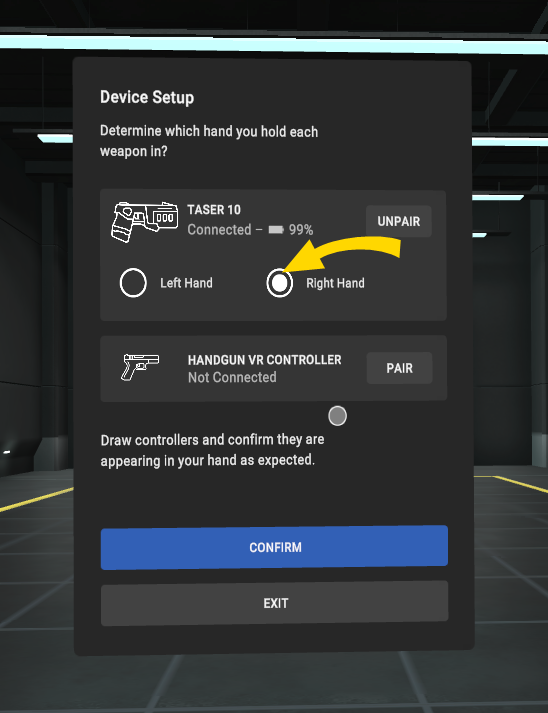
If you don't have a VR Controller already paired, you can pair one in Simulator Training. To do this:
- Turn on your headset by pressing the Power button for five to seven seconds.
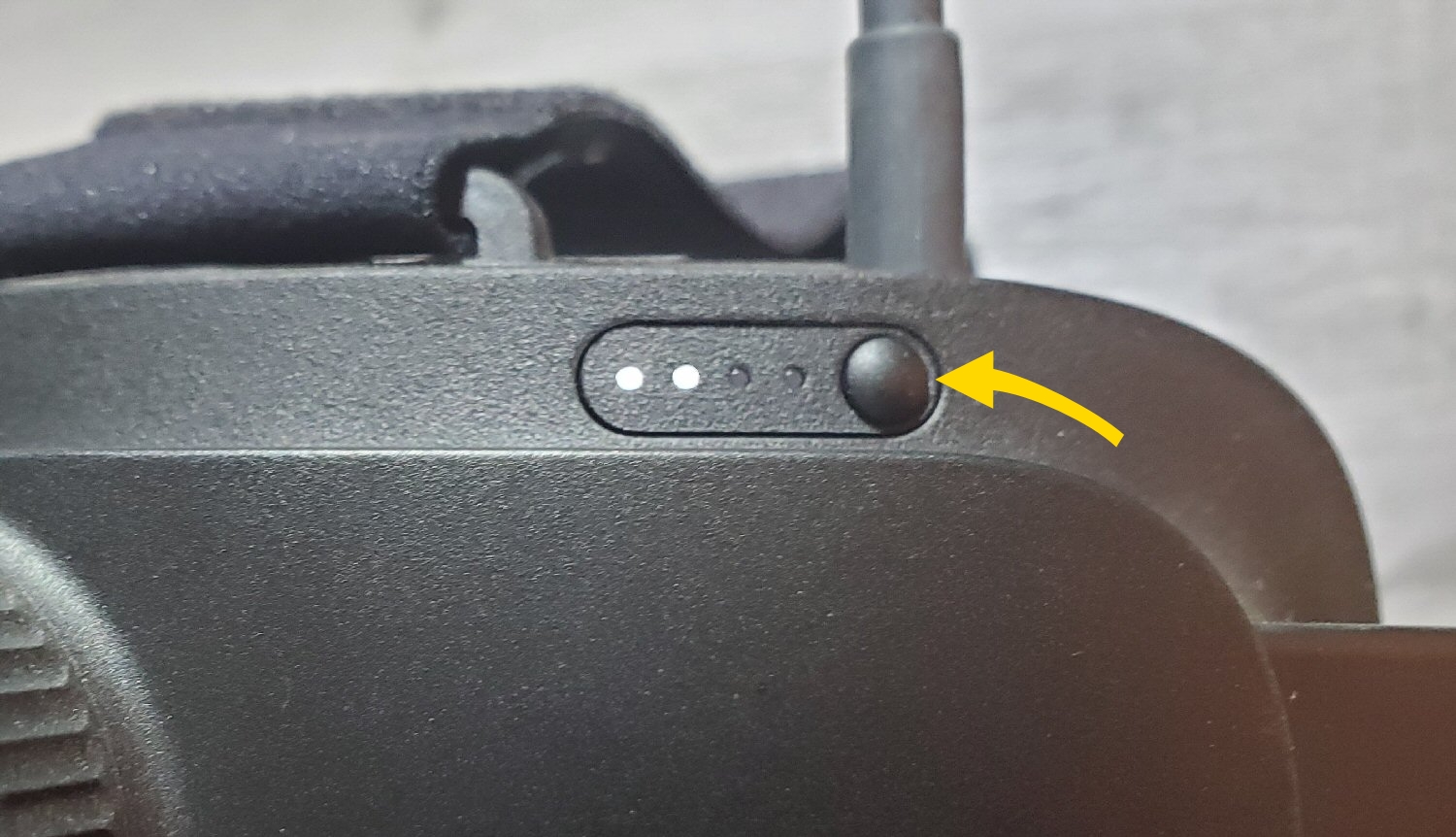
- Put on the headset.
- Accept the boundary messages.
- In the library, pinch to select Simulator Training. If you don't see the Axon apps shown below, see the FAQ Why are the Axon VR apps not in my library?
- Gaze to select Pair next to the type of VR Controller you want to pair.
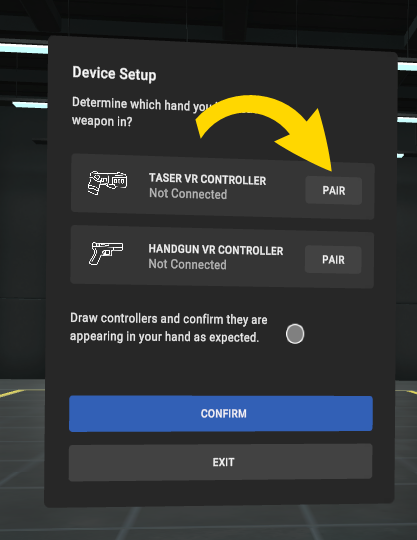
- The headset will automatically activate passthrough mode, allowing you to see your real surroundings.
- Turn on your VR Controller.
- Press the button on the top until the pairing LED blinks blue
 .
. - After pairing completes, the pairing LED will turn solid green
 and a message confirms the pairing was successful:
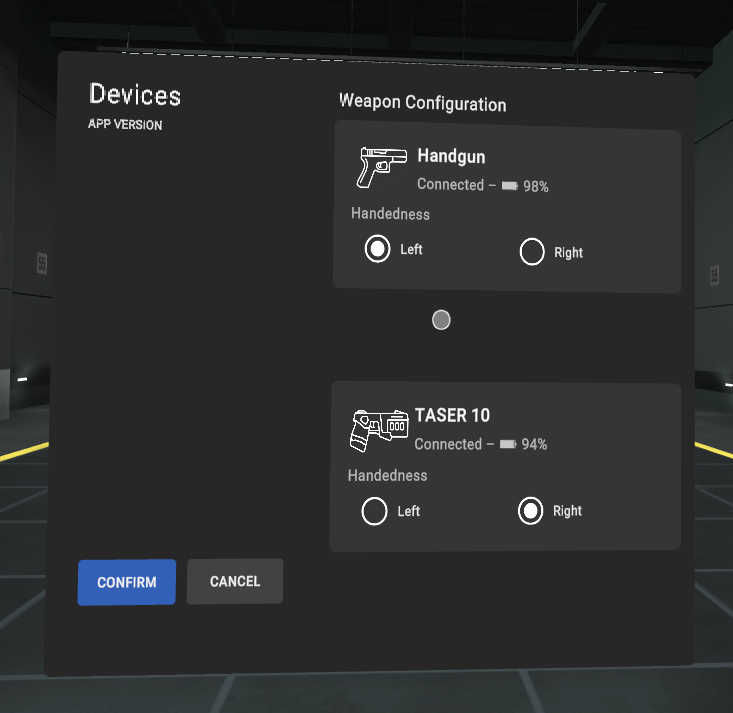
 - After the message closes, the Device Setup screen now shows the paired VR Controller. Select whether you'll use your left or right hand.
- You can pair another VR Controller by performing the steps above starting at Step 5.
- Select Confirm when you're done pairing VR Controllers.
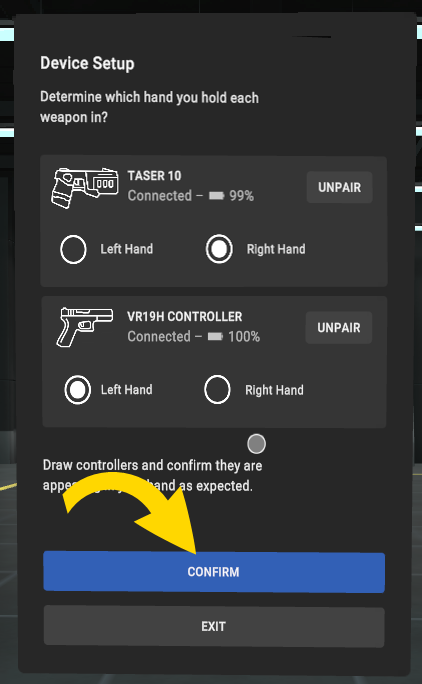
Manage Devices
You can change the hand you use for your VR Controller in Manage Devices. To do this:
- Start Simulator Training.
- Use gaze to select Manage Devices.
- Select Left or Right accordingly.
- Select Confirm.
Start Simulator Training
Before you launch Simulator Training, make sure you have a VR Controller paired. For more information, see Pair VR Controller in Simulator Training.
To launch Simulator Training:
- Turn on your headset by pressing the Power button for five to seven seconds.
- Put on the headset.
- Accept the boundary messages.
- In the library, pinch to select Simulator Training. If you don't see the Axon apps shown below, see the FAQ Why are the Axon VR apps not in my library?
- Simulator Training checks for a paired VR Controller.
- If a VR Controller is paired, the app prompts you to select whether you'll use your left or right hand.
- If a VR Controller isn't paired, you can pair one in Simulator Training. See Simulator Training: Range Skills above.
Simulator Training settings
Before you start a training, you can adjust its settings. Any changes you make to these settings will be saved and applied to all future trainings.
These are the settings:
-
Visual Probe Feedback: Displays visual indicators to depict where the probes landed and the distance between each probe. If this setting is turned off, you can view the After-Action Report to assess your performance.
-
Holstered Weapon: Enforces you to holster your weapon (VR Controller) between each target. Draw Reps and Timed Deployment already include the use of VR Controllers being holstered; a holster is required for these exercises, and you can't turn off this setting.
-
Show Feedback After Each Target: Displays a summary after a failed component of any drill.
-
Measurement System: Select your preferred system of measurement: Imperial (feet) or Metric (meters).
Review the After-Action Report
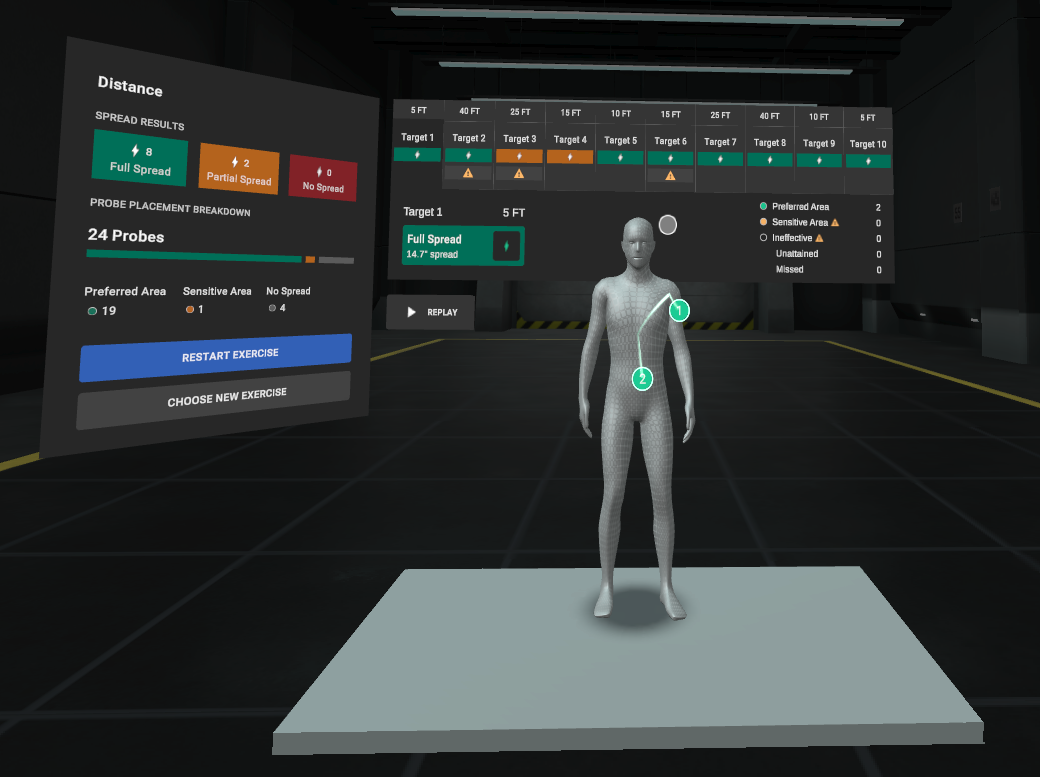
After you've completed a Simulator Training exercise, an After-Action Report displays. View this report to assess your performance.
Exit Simulator Training
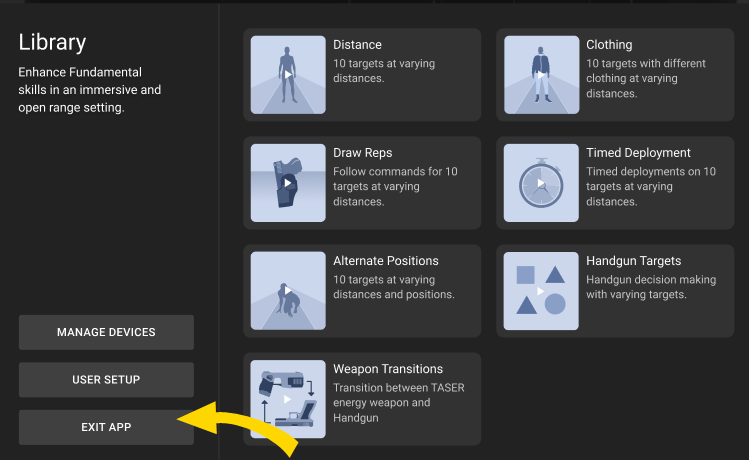
To exit to the main lobby from the library, click Exit App.
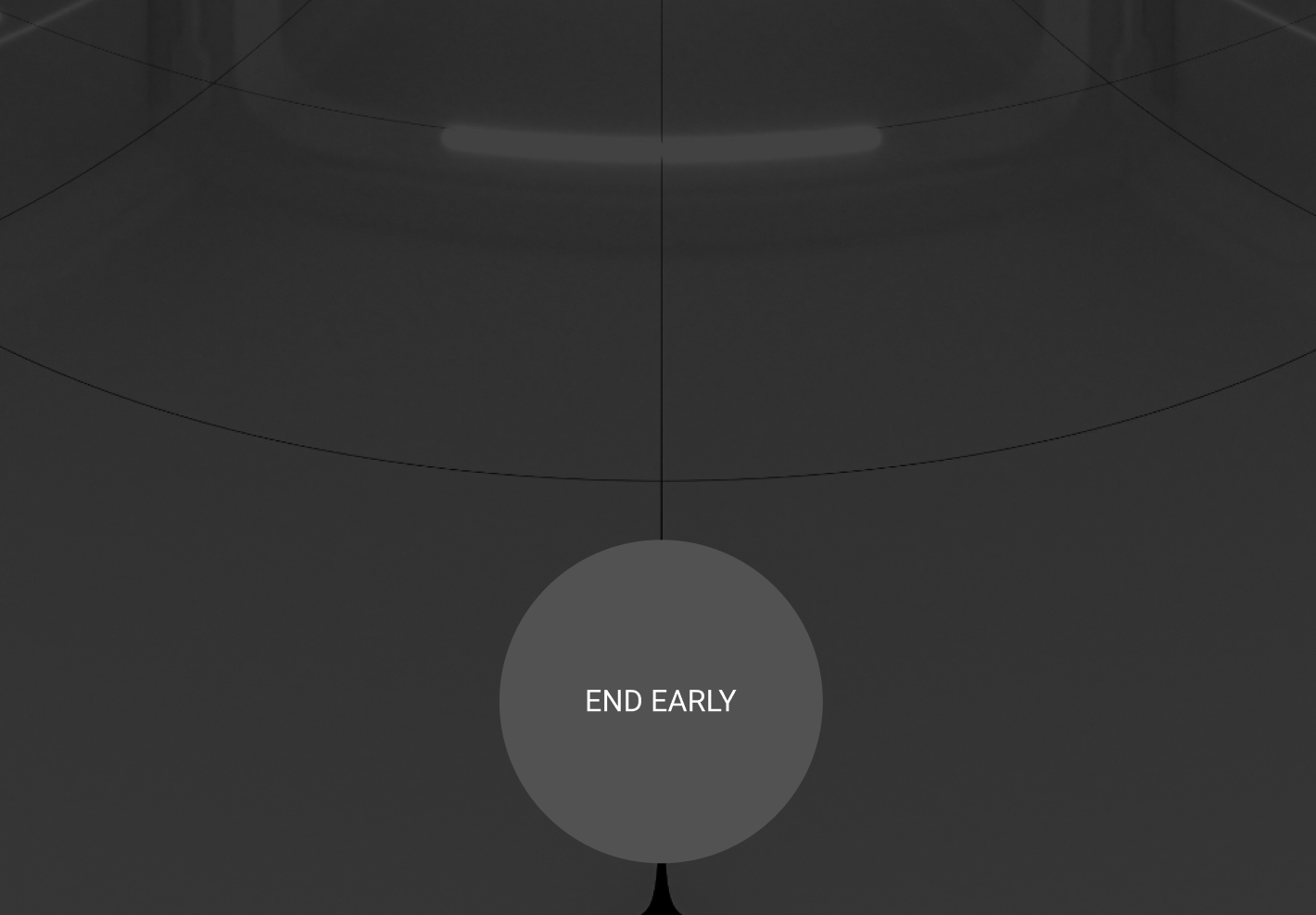
To exit a Simulator Training exercise, look straight down and gaze at the End Early icon.
FAQ
Why am I being asked to update my headset or controller firmware before training?
Starting April 14, 2026, Simulator Training and vRBT Live Action require all VR headsets and controllers to be on the latest firmware versions. These updates are required to support new platform features and ensure compatibility with supported hardware. Once the updates are complete, you can relaunch the application and continue training as normal. For more information how to update firmware, see Update firmware for VR Controllers and the FAQ How do I check or update the headset firmware?.
Will I lose any content or scenarios after updating?
No. All existing scenarios and training content remain available after completing the required firmware updates.
Why do I only see Simulator Training: Range Skills?
If you only see Simulator Training: Range Skills, your agency's VR subscription may only include this app. VR is sold under different subscriptions; each subscription provides access to different apps. Contact your Axon representative to confirm which VR subscription your agency has today. If you require a different subscription tier, they can help review options to upgrade.
Troubleshooting
The app is unresponsive
If the app is unresponsive, try the following:
1. Exit the app: Depending on the app, either look down and select Exit, or use gaze selection to select Exit App.
2. In the library, use your hand to pinch and select the app tile to relaunch it.
Available firmware update for paired VR Controller detected
If you see a firmware update available after pairing your controller, see Update controller firmware.
Available firmware update for headset detected
If you see a firmware update available for your headset, see the FAQ How do I check or update the headset firmware?.


