Bookings
The following privileges related to the Bookings module appear in the Bookings privilege category.
Within this category, there are "static" privileges, as well as workflow privileges. Generally, the static privileges determine which buttons and options appear to users when they open a booking or booking profile. The workflow privileges determine which actions a user can take on booking reports, depending on the report's current state (Draft, Finalized, etc.).
Name |
Description |
Additional required privileges |
|---|---|---|
|
Access the Bookings module |
Lets users see the Bookings icon in the left navigation menu. |
View tasks (workflow privileges) |
|
Create |
||
|
Create booking reports |
Lets users create a booking. |
Create tasks (workflow privilege) |
|
Take photos when creating a booking report |
Lets users take mugshot photos when creating a booking. |
|
|
Upload photos when creating a booking report |
Lets users upload mugshot photos when creating a booking. |
|
|
Update |
||
|
Edit booking and release reports after inmate release |
Lets users update a booking after the inmate is released from custody. |
|
|
Send booking details to Livescan or jail management system |
Lets users select Send Booking on the booking profile. |
|
|
Start an innate release |
Lets users release an inmate. |
|
|
Update a warrant status from a booking report |
Lets users update a warrant status to Served from a booking report
|
|
Workflows
Once created, a booking report (and the inmate associated with it) moves through a workflow, for example, Draft → Finalized. Each state is associated with multiple privileges, which give you granular control over which users can take actions on a report, based on its current state.
Booking Document
Bookings reports, including the adult/juvenile intake report and the release report move through this workflow, which is made up of two states: Draft → Finalized.
Booking Inmate Status
When you add a person to a booking report, they also move through a workflow as an inmate: Intake → Holding → Released .
Depending on the type of booking report that is created, juvenile inmates can follow the regular workflow move straight from Intake to Release.
These workflows interact with one another. Changes in the state of a report moving through the Booking Document workflow affect the state of an inmate who is moving through the Booking Inmate Status workflow: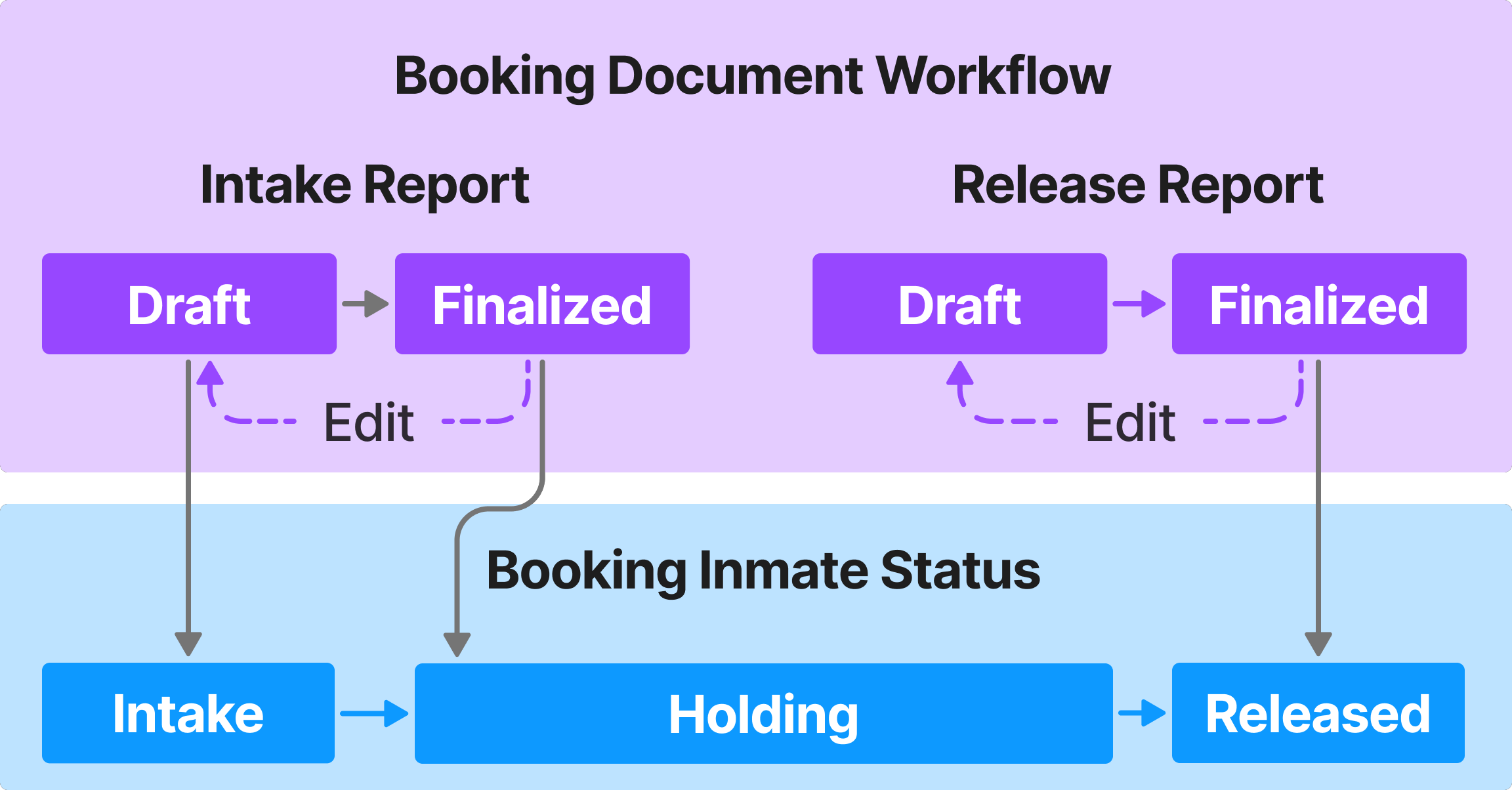
The privileges for workflows appear at the end of the Bookings category. Each workflow has its own subcategory, and within that subcategory, privileges are sorted by state. The states are listed alphabetically, not by the order in which they appear in the workflow. For example, Holding, which is the second state, appears before Intake.
The hover tooltip for the first state in the workflow provides additional details about the workflow as a whole and not just that workflow state.
The table below explains how each workflow privilege works. Generally, if you give a user a privilege in one workflow, you should also give them the corresponding privilege in the other workflow.
Name |
Description |
Additional required privileges |
|---|---|---|
|
Add comments States: Draft, Intake, Holding |
Lets users add comments in the report sidebar. |
|
|
Assign tasks to others States: Draft, Intake, Holding |
Lets users take over booking reports from other users by opening the report and selecting Take over booking. |
Assign tasks to themselves (workflow privilege) |
| Assign tasks to themselves
States: Draft, Intake, Holding |
Lets users take over booking reports from other users by opening the report and selecting Take over booking. |
Assign tasks to others (workflow privilege) |
|
Create tasks States: Draft, Intake |
Lets users create booking reports. |
Create booking reports (static privilege) |
|
Revert finalized reports States: Finalized |
Lets users update bookings for inmates in the Holding status. |
|
|
Submit tasks from the {State name} state States: Draft, Intake, Holding |
The Draft state version of this privilege lets users submit a booking report. When the booking is submitted, the inmate moves from Intake to Holding status. The Holding state version of this privilege lets users perform an inmate release. During a release, the inmate moves from Holding to Released status. |
To release inmates, users must also have the Start an inmate release privilege (static privilege). |
|
View tasks States: Draft, Finalized, Intake, Holding, Released |
Lets users view booking reports and booking profiles. |


