Permits
The following privileges related to permits appear in the Permits privilege category.
Within this category, there are "static" privileges, as well as workflow privileges. Generally, the static privileges determine which buttons and options appear to users when they open a permit. The workflow privileges determine which actions a user can take on permits, depending on the permit's current state (Draft, Finalized, etc.).
Name |
Description |
Additional required privileges |
|---|---|---|
|
Create and update permit statuses |
Lets users update the status of a permit. |
|
|
Print permit cards and letters |
Lets users print permit photo cards. |
|
|
Print permit forms, activity logs, and files |
Lets users print permit applications, activity logs, and any files that were added to the permit. |
|
|
Search for and view permits (no edit access) |
Lets users search for and view permits, but not edit them. Additionally, if users do not have this privilege, they will NOT see links to permit forms on person search results. |
View tasks workflow privileges |
Workflows
Once created, a permit moves through a workflow. Each state is associated with multiple privileges, which give you granular control over which users can take actions on a permit, based on its current state.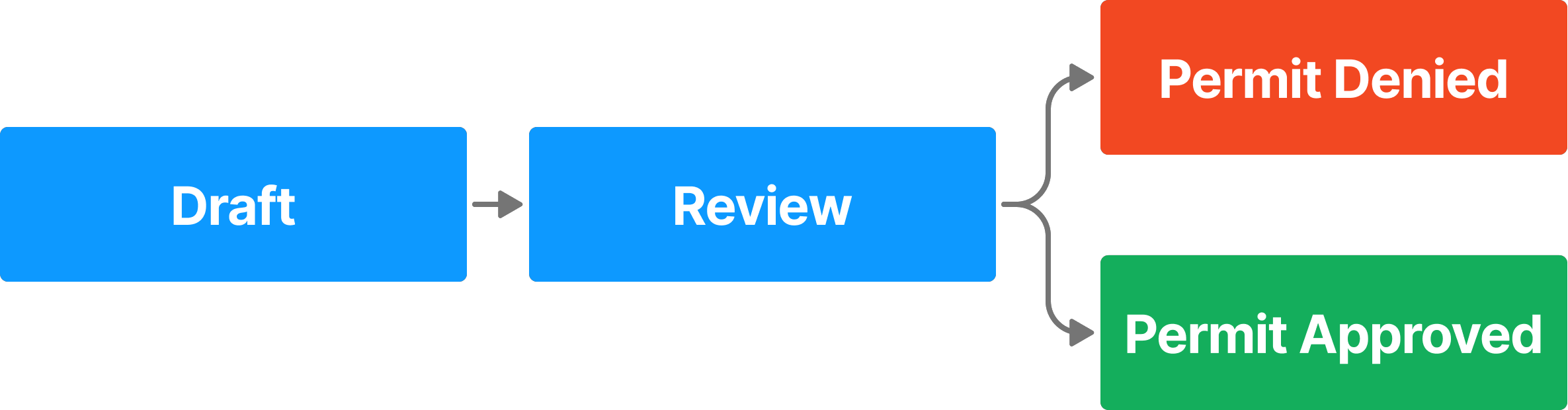
The Permit workflow privileges appear at the end of the category. Each workflow has its own subcategory, and within that subcategory, privileges are sorted by state. The states are listed alphabetically, not by the order in which they appear in the workflow. For example, Permit Approved, which is a final state, appears before Review).
The hover tooltip for the first state in the workflow provides additional details about the workflow as a whole and not just that workflow state.
The table below explains how each workflow privilege works.
Name |
Description |
|---|---|
|
Add comments States: Draft, Review, Permit Approved, Permit Denied |
Lets users add comments in the permit sidebar. |
|
Assign tasks to others States: Draft, Review |
Lets users reassign permit tasks (currently assigned to themselves or to other users) to other users. |
|
Assign tasks to themselves States: Draft, Review |
Lets users reassign permit tasks currently assigned to themselves to other users. |
|
Create tasks
States: Draft |
Lets users create permit applications. |
|
Revert finalized reports back to the Draft state States: Permit Approved, Permit Denied |
Lets users return a finalized permit application to the Draft state so it can be edited. |
|
Submit tasks from the {State name} state States: Draft, Review |
Lets users approve and reject tasks in the indicated state. When a task is approved, it moves to the next state in the workflow. When a task is rejected, it moves to the Draft state. The Draft state version of this privilege lets users submit permit applications for review (i.e., reveals the Submit button in Report Writer). |
|
View tasks States: Draft, Review, Permit Approved, Permit Denied |
Lets users view permit applications. |


