Maintenance
This topic discusses maintenance, battery replacement, FAQs, and contact information for Axon technical support.
Find the battery level of a Signal Sensor device in Axon Evidence under Inventory > Signal > your device. This requires an Axon Body camera to be assigned to you, b/c the sensor reports battery life through the camera.
Extended exposure to concentrated amounts of sunscreen can cause cracks in the Signal Sensor device plastic housing. If you notice cracks in your device, please contact Technical Support.
Battery replacement
Replace the battery if you receive a notification on your Axon body camera or email from Axon Evidence. You'll need a large flat head screwdriver or coin and a CR2032 battery.
Changing the battery does not require recalibration.
Ensure the firearm is unloaded during this process. This sensor is for professional use; keep new and used batteries away from children.
- To keep the sensor from activating cameras, place it in Mute mode, remove the firearm, and set it safely aside.
- Unscrew the battery cap on the front. Some holsters may need to be removed from the belt clip to allow removal of the battery cap.
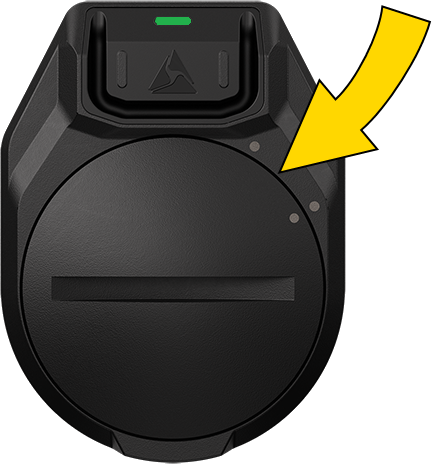
- Replace the old battery with a new one, ensuring you install it in the same direction (positive side up).
- Replace the battery cover. The cover will properly center the battery in the sensor.
FAQs
If your issue is not listed here, see Technical information.
How do I download changes in Axon Evidence to my sensor?
Ensure your Axon Body camera and Signal Sensor are assigned to the same user. Dock the camera for at least four hours (after downloading any evidence) so it can receive updates from Axon Evidence. The next time you use your camera, changes pertinent to your sensor will download from the camera automatically within two hours.
How do I find my sensor serial number?
The 9-digit serial number starts with the letter D and is visible:
- In ADM; see step 5 of Setup
- In your Axon Evidence inventory
- In the menu of a body camera assigned to the same user
- On the back of the sensor, which may require removal from the holster
Why doesn't my Axon camera activate when I draw my firearm, baton, or other device?
- Both your sensor and your body camera must be assigned to you. Side note: if the Assigned Officer Activation setting in Axon Evidence is on, your sensor will only activate your camera; if off, it will activate all Axon cameras with a 30-ft (10-m) radius.
- Make sure the camera is powered on and has sufficient battery power. If you received a body camera or email notification that your Signal Sensor is low on battery, check battery status in Axon Evidence Inventory or in your Axon body camera menu (see Signal Sensor and your body camera).
- If any of the screws holding the sensor to the bracket or the bracket to the holster have come loose, it may not be able to consistently determine the state of your firearm. Ensure the sensor is as close to the holster body as possible and tighten all screws.
- The sensor was installed on a non-approved holster or with an incorrect bracket. Obtain the correct bracket for your holster from Axon and reinstall.
- The sensor was subjected to a major impact, was submerged, or was otherwise damaged to the point where it can no longer function properly. Check battery status in Axon Evidence > Inventory or ADM. Or, restart sensor setup.
- If the sensor was used outside the operating temperature range, you may experience unexpected behavior. Allow the sensor to return to the storage and operating temperature range of -4–122 °F (-20–50 °C).
- Update the firmware.
- There may be an issue with your camera. Consult your camera's user guide.
- An aftermarket modification to your firearm or holster is interfering with the sensor. Signal Sensor only works with approved unmodified holsters and firearms. Modifications such as using an aftermarket slide or painting the holster may cause a malfunction.
- You may already be in Mute mode (LED blinking green
 or red
  ). To exit, wait 30–90 seconds for the sensor to return to Live mode (LED off).
 - If you have just added or assigned a sensor to your agency for the first time, dock BWCs for up to four hours to let them download the latest data and recognize that the sensor has been added to your agency.
Why can't I enter Mute mode?
- You may already be in Mute mode (LED blinking green or red ). To exit, wait 30–90 seconds for the sensor to return to Live mode (LED off).
- The button may be damaged and unable to receive input.
- Update the firmware.
Why does my camera activate but I haven’t drawn my firearm?
- Your camera may have activated because another Axon Sensor device was used in range of your camera. This is intended behavior if set to do so in Axon Evidence.
- Your Signal Sensor sensor may have registered a false positive. Inspect the sensor and holster mount to see whether either is loose or damaged. If you get repeated false positives, your sensor may be malfunctioning.
- Inspect the equipment in its holster and/or pouch to confirm nd verify that it is not secure.
Why won't the sensor install properly on a holster?
Sometimes a forced installation can cause the retrofit bracket to bend, causing an unacceptable gap between the sensor and the holster body.
- Ensure your bracket is correct for your holster and your holster is a supported model. If you do not have the correct bracket, request one from Axon.
- Ask your armorer to disassemble the holster, belt clip, and bracket and reassemble carefully (see Installation).
- Verify the bracket is mounted closest to the holster. Install all other mounting equipment and accessories after the bracket.
Why does my battery last much less than the published battery life?
The battery life estimate is based on typical sensor use. If you use Mute mode or draw your firearm much more frequently than the typical use case, battery life can be reduced. Axon does not recommend adjusting the use of your firearm and holster to improve battery life.
If this problem continues, there may be a hardware problem with your sensor.
Why is my Signal Sensor so sensitive?
Signal Sensor was designed with the input of law enforcement officers to provide an optimal balance of sensitivity for registering true firearm (or other device) draws and rejecting normal daily interactions. Each holster and firearm combination has slightly different distances the firearm can be withdrawn before the sensor registers the absence of the firearm. In general, once the end of the firearm’s slide passes the center of the sensor, the sensor detects that the firearm is no longer present within 1–2 seconds.
Why is the LED dim, flickering, or not turning on as expected?
- The battery in your sensor may be very low and/or the sensor may be very cold. Replace the battery and/or allow the sensor to warm up.
- The LED may be damaged. Restart sensor setup. If the LED still performs poorly, it is likely damaged. Your sensor will continue functioning without a working LED, but it will be impossible to know when it's in Mute mode.


