Reports - Standards
The privileges related to report writing appear in the Reports and Axon Standards and Reports - Standards categories as shown in the tables below.
Within these categories, there are "static" privileges, as well as workflow privileges. Generally, the static privileges determine which buttons and options appear to users when they open an inbox or report. The workflow privileges determine which actions a user can take on a report, depending on its current state (Draft, Review, etc.).
In addition to these Reports privileges, users must also have Task Inboxes privileges to access reports from task inboxes.
Reports - Records and Standards
|
Name |
Description |
Additional required privileges |
|---|---|---|
|
Create reports |
Lets users create any type of report in Axon Records and Axon Standards. Users must have this privilege in addition to all other privileges to create specific kinds of reports. |
Users must also have the following privileges in the report's workflow:
Additionally, users must have Create privileges for the reports the user must be able to create. |
|
Edit |
||
|
Review and edit in-progress reports
|
Reveals a Review and edit action in the More actions [...] menu in Report Writer. With this privilege, users can edit an in-progress report while it is in any Review state except for the Finalized state. (Users must be assigned to the report to Review and Edit it.) This privilege applies to all Records reports, including contributions. |
Users must also have the following privileges in the report's workflow:
|
|
Configure print options and settings |
Lets users adjust the printing options and settings when they are printing reports. Without this privilege, users can still print but not adjust any print settings. |
|
|
Print reports |
Lets users print reports. |
|
|
Self-finalize |
||
|
Self-finalize supplement reports |
Lets users finalize supplements they have created. |
|
|
Write |
||
|
Generate draft narratives using the AI-powered Draft One |
Lets users use Draft One to generate draft narratives for reports. |
|
Reports - Standards
|
Name |
Description |
Additional required privileges |
|---|---|---|
| Create | ||
|
Create Standards reports |
This privilege must be enabled to let users create any reports in Axon Standards. |
Users must also have the following privileges in the report's workflow:
|
|
Custom Names |
||
|
Edit the custom names of Standards reports, case documents, and case tasks |
Lets users edit report and document names even if they don't have the Create tasks workflow privilege that would allow them to create that type of report. Some report names can't be edited, including: incident reports, bookings, property reports, permits, and warrants. |
|
| Delete | ||
|
Delete author-owned fields |
Author-owned fields are fields a report author adds to a report that only they can edit or remove. This privilege lets users delete author-owned fields other uses have created. |
|
|
Delete in-progress Standards reports |
Lets users delete reports that are in any state (Draft, Supervisor Review, etc.) except the Finalized state. |
Users must also have the Finalized State - View tasks privilege in the report's workflow. |
| Finalize | ||
|
Finalize Standards reports |
Lets users select Finalize report on the routing screen when submitting a report. When this option is selected, the report is immediately moved to the Finalized state without further review. When this privilege is enabled, the Finalize report option appears for all report types. |
|
|
Revert finalized Standards reports |
Lets users revert finalized reports. The report is moved back to the Review state. |
|
|
Change the author of in-progress Standards reports |
Lets users change the author of an in-progress report while it is in the Draft status. |
|
|
Reassign Standards reports |
Lets users change the author of a report while it is in a Review status. |
|
| Share | ||
| Share reports | Let users share reports by sending a message to users, teams, and Command Hierarchy groups. | |
|
View all Standards reports |
This master switch allows users to view all reports in any state. |
To allow users to only view reports based on their state, use the View tasksworkflow privileges in the states the user should be able to view. |
|
View finalized Standards reports |
Lets users view all finalized reports, regardless of the workflow they belong to. |
To allow users to only view reports based on their workflow, use the Finalized State - View tasksworkflow privileges. |
Workflows
Once created, a report moves through a workflow, for example, Draft → Review → Finalized. Each state is associated with multiple privileges, which give you granular control over which users can take actions on a report, based on its current state.
Workflows in Axon Standards generally include the following states:
- Draft (In Progress)
- Review
- IA Investigation
- IA Review
- Finalized
Standards workflows are flexible; reports do not move in one direction through the workflow (i.e., In Progress → Review → IA Investigation → Finalized.). Instead, reports can move between any of the states. For example, a report can move through the workflow as follows: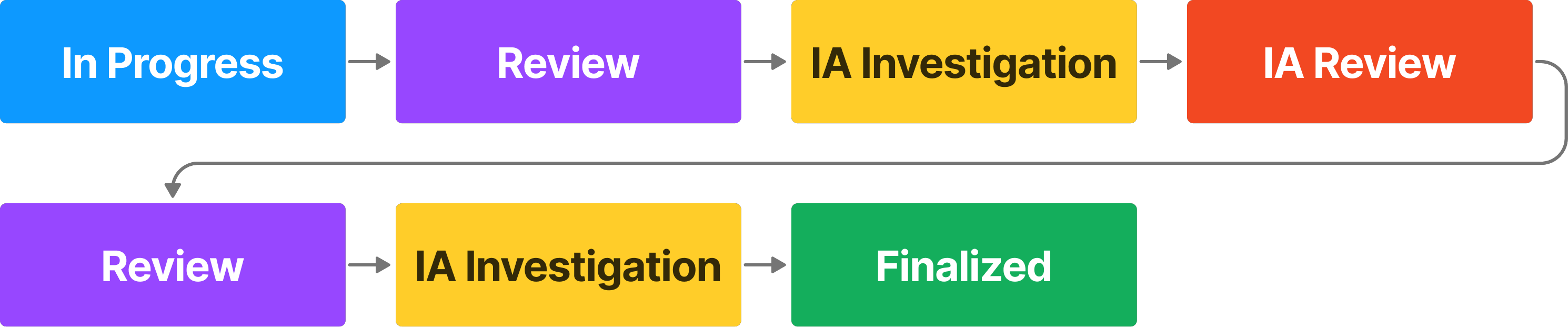
If a report is rejected at any point, it is returned to the original author who can revise and resubmit it for review.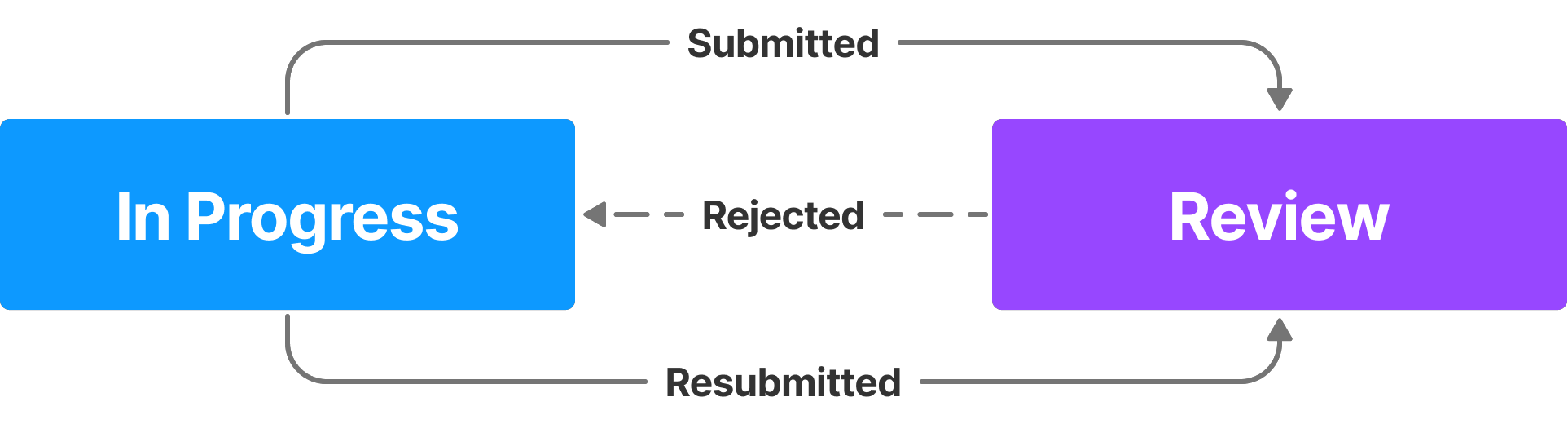
For more information, see Create Axon Standards Workflows.
The privileges for workflows appear at the end of the Reports - Standards category. Each workflow has its own subcategory, and within that subcategory, privileges are sorted by state. The states are listed alphabetically, not by the order in which they appear in the workflow. For example, Finalized, which is the final state, appears before Review.
The hover tooltip for the first state in the workflow provides additional details about the workflow as a whole and not just that workflow state.
The table below explains how each workflow privilege works. Keep the following in mind when reviewing this table:
- This table is an exhaustive list of all possible workflow privileges.
- Not every workflow contains the states listed in the table.
- Some workflows may have a state but not all privileges associated with the state as shown in the table.
- For consolidation purposes, a single Review state is listed, although some workflows may have multiple Review states.
|
Name |
Description |
Additional required privileges |
|---|---|---|
|
Add comments States: Draft, Review |
Lets users add comments in the report sidebar. |
|
|
Assign tasks to others States: Draft, Review |
Lets users reassign reports (currently assigned to themselves or to other users) to other users. |
To change the author of reports currently in the Draft state, users must also have Reassign privileges. |
|
Assign tasks to themselves
States: Draft, Review |
Lets users reassign reports to themselves. |
To change the author of reports currently in the Draft state, users must also have Reassign privileges. |
|
Create tasks States: Draft |
Lets users create reports |
Users must also have the following privileges:
|
|
States: Draft |
Lets users delete reports that are in any state (Draft, Supervisor Review, etc.) except the Finalized state. |
Users must also have Delete privileges |
|
Revert finalized reports States: Finalized |
Lets users revert finalized reports. The report is moved back to the Review state. |
|
|
Submit tasks from the {State name} state States: Draft, Review |
Lets users approve and reject tasks in the indicated state. When a task is approved, it moves to the next state in the workflow. When a task is rejected, it moves to the Draft state. The Draft state version of this privilege lets users submit reports for review. (i.e., reveals the Submit button in Report Writer.) |
|
|
View tasks States: Draft, Review, Self-Finalized, Finalized |
Lets users view reports |
Users must also have Task inbox privileges for the task inboxes that contain the reports. Additionally, users must also have View privileges. |


