Investigations
Investigations capture proactive or intelligence-driven work that is not yet tied to a formal event report. Organizations typically use investigations for:
- Gathering intelligence
- Tracking tips and leads
- Documenting ongoing surveillance
- Performing proactive investigative work
If an investigation is later tied to a specific event, a case can created to track the formal investigative work for that event.
Cases and investigations
Cases and investigations have different features, which help determine when you should use a case or an investigation to manage your work. The table below outlines these features:
| Feature | Case | Investigation |
|---|---|---|
| Requires an incident report | Yes | No |
| Has a NIBRS disposition | Yes | No |
| Has an internal disposition | Yes | Yes |
| Can be automatically created from an incident | Yes | No |
| Has evidence integration (i.e., uploaded evidence is also uploaded to Axon Evidence, where it can be managed and shared) | Yes | Yes |
Create investigations
To create an investigation:
- Open the Case Management module and select Create investigation.

- Give the investigation a name.
- Assign the case to a primary unit and a lead detective within that unit.
- The "Lead Detective" label is customizable and may appear differently across organizations.
- Optionally set a due date.
- Select Create.
- Once the investigation is created, the profile opens where you can begin adding information.
Investigation profiles
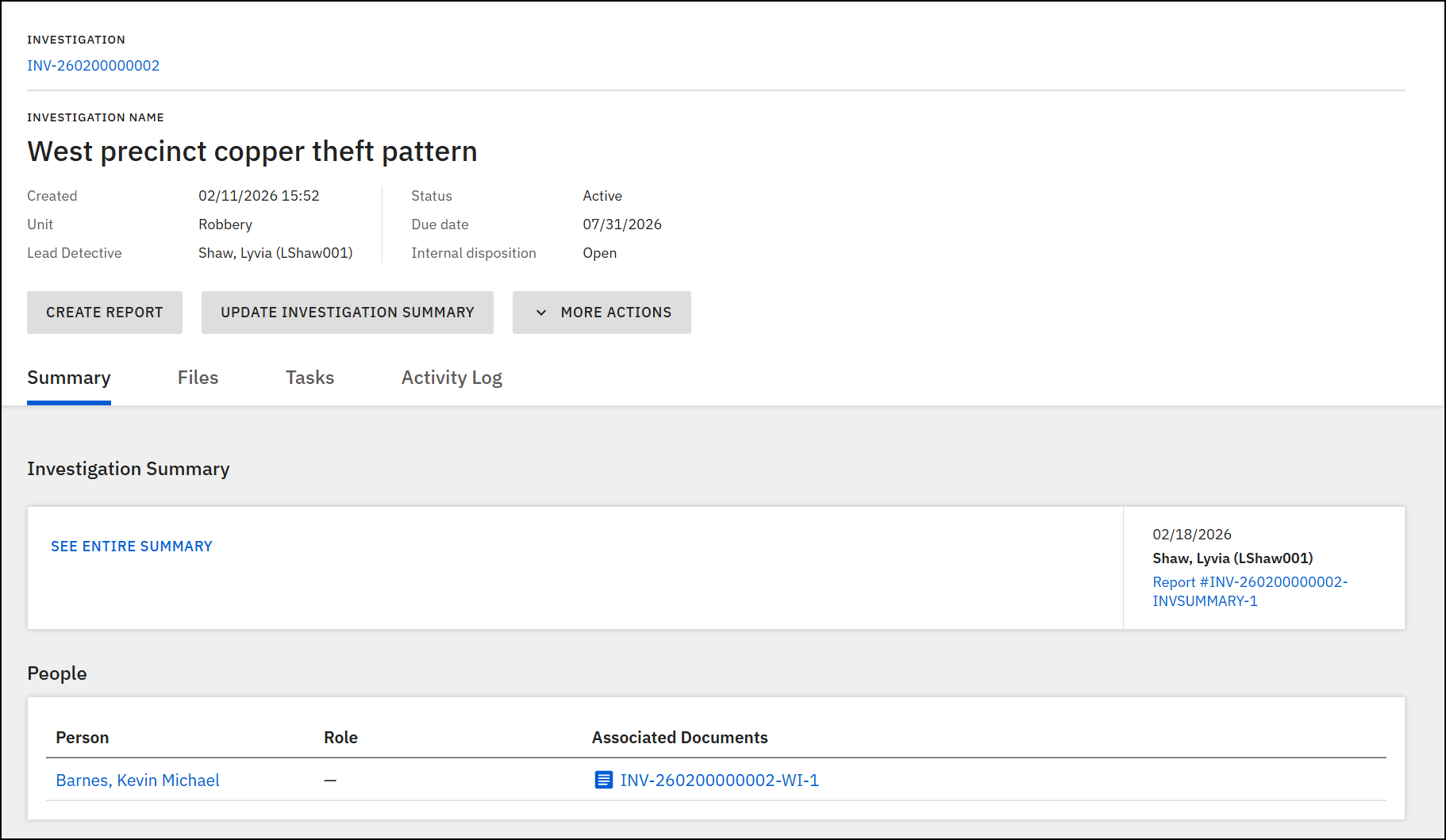
When an investigation is created, an investigation profile is generated. From this top section of the profile, you can take the following actions:
- View investigation details, including:
- Creation date
- Unit the investigation is assigned to
- Lead detective(s) the investigation is assigned to
- Investigation status
- Internal disposition
- Use the buttons to:
- Create or update the investigation summary
- Create case documents
- Take additional actions from the More actions menu:
- Investigation management
- Rename investigation
- Reassign investigation
- Transfer unit
- Update disposition
- Update due date
- Evidence management
- Sharing and print
- Investigation management
Below the top heading section, you can switch among the tabs to view information and take various additional actions:
- Summary: View offenses, people, organizations, narratives, vehicles, property, and reports that have been added to the investigation.
- Files: Mange all files that have been added to the investigation, either to the reports and investigation documents or directly to the investigation.
- Tasks: Manage the tasks that have been created for the investigation.
- Activity log: Manage the log of all actions taken on the investigation.
Reassign investigations
To manage an investigation's lead detective, a user must have the Triage privileges for the unit currently assigned to the investigation. To update an investigation's lead detective:
- Open the investigation profile.
- Select More actions > Reassign investigation.
- Select the X icon beside the lead detective's name and enter a new name.
- Add a routing note, update the due date, and mark the investigation as urgent (as applicable).
- Select Assign investigation.
Transfer unit
To transfer an investigation to a new unit, a user must have the Triage privileges for all affected units (the unit the investigation is currently assigned to, as well as the unit the investigation will be assigned to).
To transfer an investigation to a new unit:
- Open the investigation profile.
- Select More actions > Transfer unit.
- Search for a new unit and lead detective.
- Optionally, set a due date, mark the case as urgent, and select the comment icon to add routing notes.
- Select Transfer.
Update investigation due dates
To manage investigation due dates:
- Open the investigation profile.
- Select More actions > Update due date.
- Adjust the due date as required and provide a change reason.
- Select Save to apply your changes.
Caseload visualization
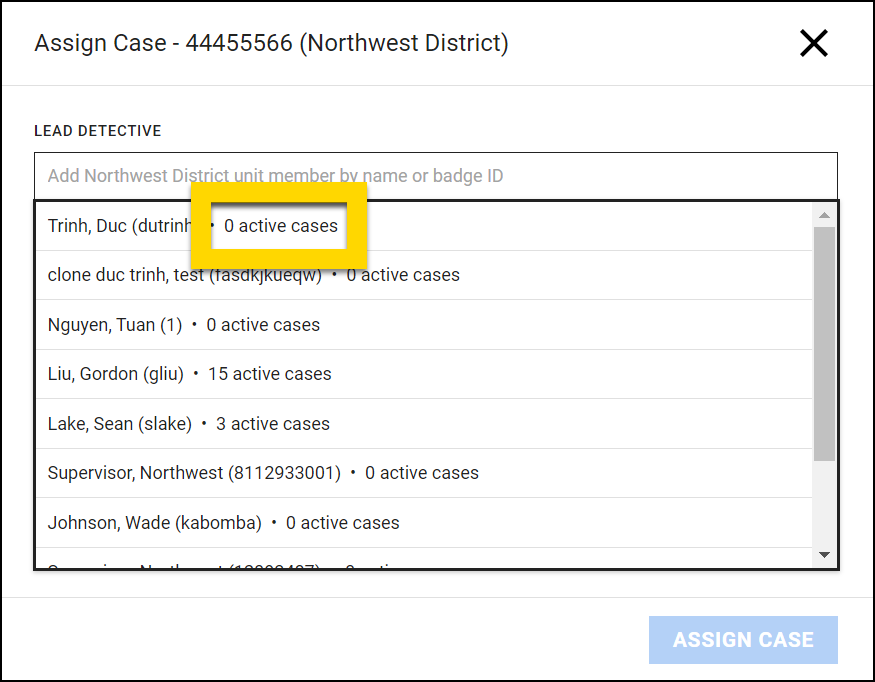
Caseload visualization gives a supervisor information to balance work more effectively when assigning investigations. When you assign a new investigation or transfer an existing investigation, the options in the Lead detective field display the number of active cases and investigations currently assigned to each detective in that unit.